Does Turning the Cube Cost a Move in 2048? Free Turns
Does turning the cube cost a move in 2048? In Evolved 2048, no. A whole-cube turn adds no points, counts no move and adds no tile, so you can look around the cube as much as you like. This post explains how free turns work and when to use them.
Evolved 2048 is the 2048 puzzle on a cube you turn like a Rubik's cube, and it is free to play in your browser on a computer or a phone, so you can check every claim below yourself. (It was called 3D 2048 until 11 October 2026.)
Does turning the cube cost a move in 2048?
The top bar shows Score, Best and Moves. Moves is the number to watch.
Here is a short test, played signed out with the keyboard. After two slides (Left, then Up), the bar read Score 4 and Moves 2, with a 4 tile made from two 2s. Then Shift and Left turned the whole cube to a face with no tiles. Moves still read 2, and no new tile appeared on the front.
The game's own How to play box says it in three words: "Turning is free." Slides and twists are different. Each counts one move.
How free turns work in Evolved 2048
You can turn the cube two ways:
- Drag the empty space around the cube.
- Press Shift and an arrow key. Shift with W, A, S or D also works.
Each Shift and arrow press turns the cube a quarter. These are the directions I saw on a set-up cube with a different tile on each face's centre:
- Shift and Left brings the right face to the front. The front goes to the left, the left to the back, and the back to the right. Top and bottom stay put.
- Shift and Right does the opposite.
- Shift and Up brings the bottom face to the front. The front goes to the top, the top to the back, and the back to the bottom.
- Shift and Down does the opposite.
Moves and Score stayed at 0 after every one of these turns. Four Shift and Left presses in a row brought the cube back to where it started. I did not test a turn about the front face itself, so I will not say what it does.
Turning the cube vs swiping: what actually spawns a new tile
The reason a turn is free is simple. The game only adds a tile when you slide or twist. Here is the full picture:
- Slide: one move. Points for every tile its merges make. One new tile.
- Twist: one move. No points by itself. One new tile.
- Turn: no move, no points, no tile.
A new tile is a 2 or a 4. It goes on a randomly picked empty square of the front face, or on any empty square when the front face is full. The game picks a 2 when a random number is under 0.9, and a 4 otherwise. I ran the game's own random number code on its own: of 10,000 new tiles in a row, 1,001 were 4s.
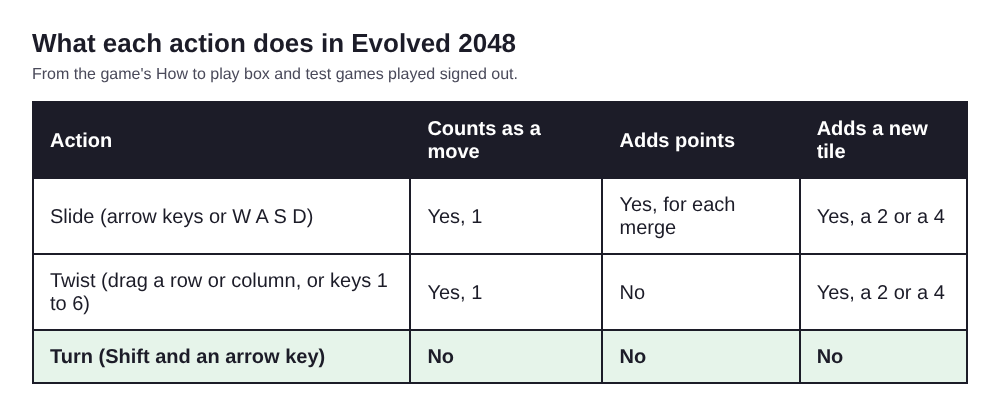
A turn is the only action that costs nothing.
That has a practical meaning. Every slide and every twist puts one more tile on a cube that has only 54 squares. A turn never does. When space is your problem, a turn is the one action that costs you none.
One more rule matters here. A twist needs one empty square for its new tile. When the cube is totally full, the game says: "The cube is full. Merge two tiles on a face to make room before you twist." If you are in that spot, read what a full cube means and what to merge.
When a free turn beats a swipe
A swipe is the right call when it merges something. A swipe that only shuffles tiles still spends a move and adds a tile. A turn is better in three cases.
You are not sure what is on the other faces
Turn first, decide second. Looking costs nothing. A blind swipe costs a move and fills a square.
The cube is nearly full
Each slide and twist adds a tile, so a crowded cube gets more crowded. Before you make a move that adds one, turn and check whether another face has a better merge waiting.
The front is stuck but the game is not over
Here is a real case from a test game with slides and twists. All 54 squares were full at move 165, with a score of 1160 after 39 twists. The front face had no slide, but other faces still had equal tiles side by side, so the game was not over. The way out is a free turn: bring the face with the equal pair to the front, then slide to merge it. That merge makes room, and you are playing again.
A turn does not fix a stuck front by itself, though. In one slides-only test game the front face was full at move 46, with the other five faces empty. Turning to an empty face and sliding moved nothing. Slides work on whichever face is in front, and an empty face has no tiles to slide. A turn shows you the cube, and your next slide or twist does the work.
Using turns to see hidden faces and plan merges
You only see part of the cube at once. You drag a row on the right face or a column on the top face to twist it, so a tile on the left face is out of reach for a drag until you turn it round.
Here is a worked example. You want to use the left face's tiles in a twist.
- Press Shift and Left. The left face goes to the back.
- Press Shift and Left again. The back face goes to the right, so the old left face is now the right face.
- Drag one of its rows sideways to twist it. The twist carries those tiles onto the next face, so bring a tile from the side next to its match on the front.
The two turns cost nothing. The twist costs one move and adds one tile. For a dragged twist that moved a right-face tile to the front, I saw this on a set-up board: dragging the right face's top row to the left carried a 16 onto the front's top left square. One slide down then merged it with the 16 below into a 32. That took two moves.
To plan well, take a quick lap. Turn through the faces, note where equal tiles sit, then turn back. If you also want a clear picture of which side is which, the post on which face is the front and which twist covers the layout.
Common mistakes when rotating the cube
- Pressing an arrow key without Shift. An arrow key slides the front face. It adds one move and one new tile. Shift with the arrow is the turn.
- Dragging on a tile instead of empty space. A drag on the right face's row or the top face's column twists that layer. To turn the cube, drag the space around it.
- Expecting a turn to fix a stuck front. It only changes which face you slide. If the new front has no moves either, the game says: "Nothing moves that way. Try another way, or twist a row."
- Sliding before checking the new front. After a turn, a slide acts on the face now in front. Look at it first.
- Trying to undo with a twist. I saw no undo in the game. A twist can be twisted back with Shift and its key, but that counts as a second move and adds a second tile. In one test, key 4 then Shift and 4 gave Moves 2, and the tile count went from 4 to 6. A turn, by contrast, can be turned back for free.
- Turning forever. A turn scores nothing. The score only grows when a slide merges tiles. Look, decide, then move.
Frequently asked questions
Does turning the cube add a new tile?
No. Only a slide or a twist adds a 2 or a 4. A whole-cube turn adds no tile, no points and no move.
How do I turn the cube?
Drag the empty space around the cube, or press Shift and an arrow key. Shift and Left brings the right face to the front, and Shift and Right does the opposite.
Can I turn the cube when the front face is full?
Yes, a turn works whenever you like. If another face has two equal tiles side by side, turn it to the front and slide to merge them. A twist needs one empty square, so merge first when the cube is full.
Is there an undo in Evolved 2048?
I saw none. You can turn the cube back for free, but a twist you want to reverse costs a second move and adds a second tile.
Get started with Evolved 2048
Open the game, pick a mode, and slide a couple of times. Then press Shift and Left a few times and watch the Moves counter stay where it is. After that, look for an equal pair on a face you cannot see, and turn it to the front.
Play Evolved 2048: it is free and plays in your browser on a computer or a phone.
The 2048 puzzle on a Rubik's cube, and past 2048.
Visit evolved2048.vlvd.net↗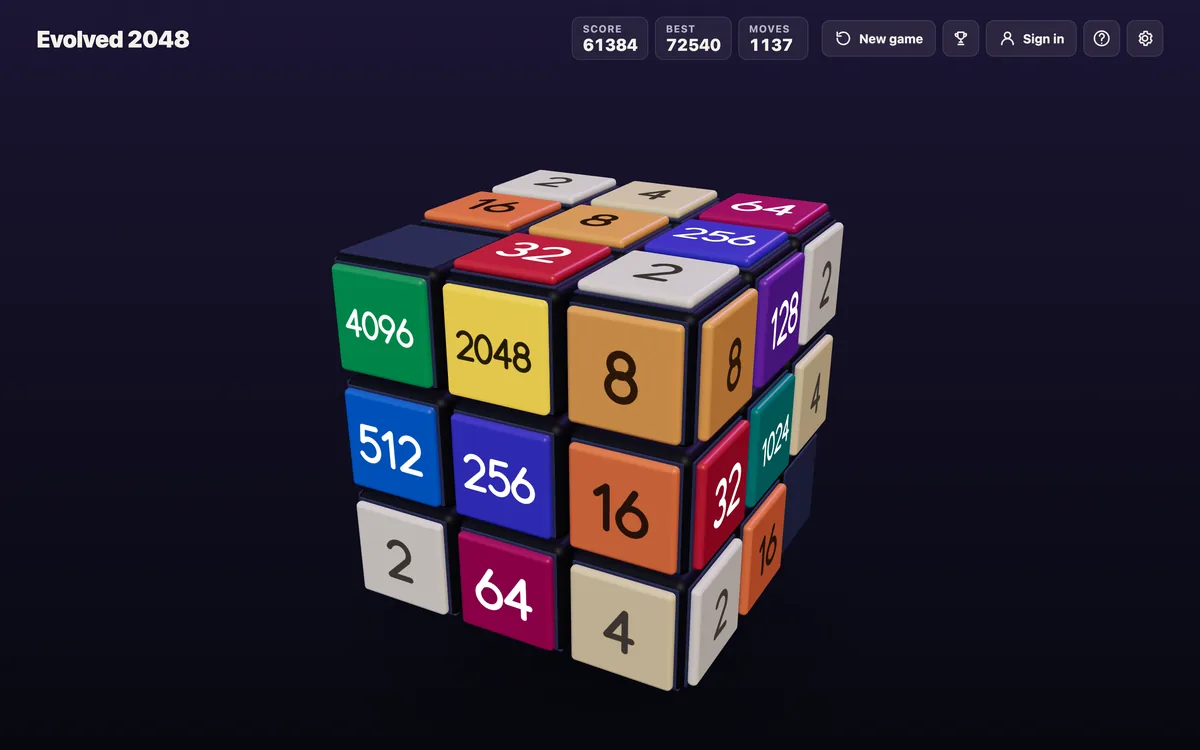
Comments
No comments yet.