2048 Cube Faces: Which Face Is the Front, and Which Twist
The 2048 cube has six faces, and you slide tiles on only one of them. For the 2048 cube faces, the short answer is this: the front is the face pointing at you, you drag rows on the right face and columns on the top face to twist, and the left, back and bottom faces come into play when a twist or a turn carries tiles to them.
Evolved 2048 is the 2048 puzzle on a cube you turn like a Rubik's cube, and it is free in your browser on a computer or a phone. This guide uses it to show what each face does.
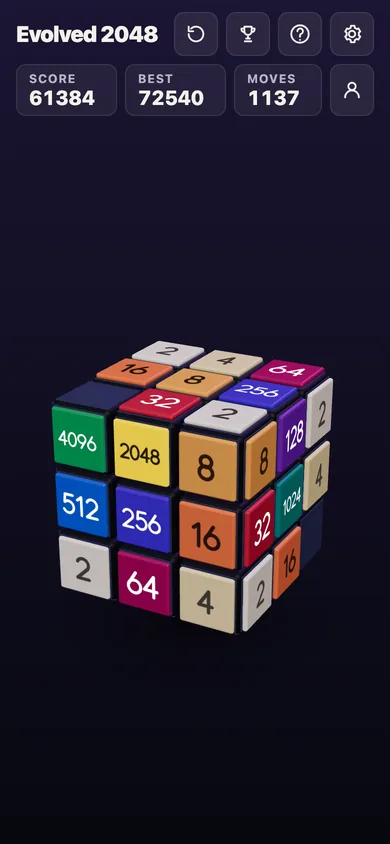
The six 2048 cube faces and their names
The cube has six faces of nine squares each, 54 squares in all. The game names them Front, Right, Back, Left, Top and Bottom. Its saved game numbers the squares in that order: the front is squares 0 to 8, the right 9 to 17, the back 18 to 26, the left 27 to 35, the top 36 to 44 and the bottom 45 to 53. You never need the numbers to play, but they make the names concrete.
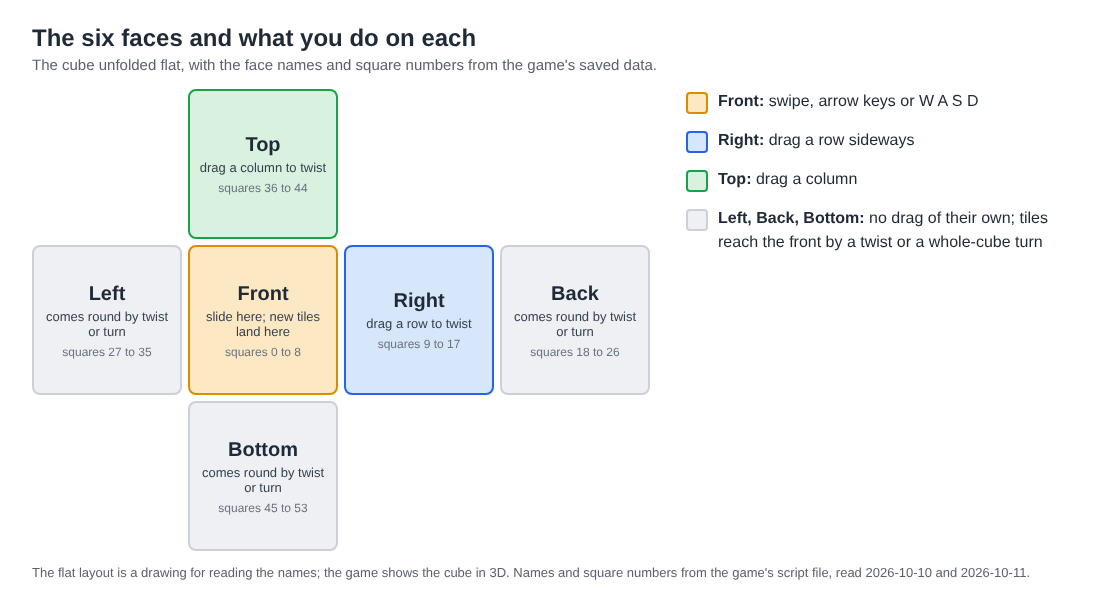
The six faces, and the three you act on directly.
Each face has a role. The front is the face you slide. The right face is where you drag rows to twist, and the top face is where you drag columns. The back, left and bottom faces have no drag of their own: tiles reach them when a twist carries a layer round, and you bring them to the front by turning the whole cube.
Which face is the front
The front is whichever face points at you right now. It is not a fixed face of the cube. When you turn the whole cube, a different face becomes the front, and everything you do is measured from there.
Sliding with a swipe, the arrow keys or W A S D moves tiles on the front. Two equal tiles that meet merge into their sum. In Evolved mode a slide works on the front face. In Edge mode a slide towards an edge also merges the tile at that edge with an equal tile just over it, on the next face. In Fun mode a slide runs each row or column all the way round the cube, so other faces take part.
New tiles follow the front too. Every slide or twist adds a 2 or a 4 on the front when it has room, and on any empty square when the front is full. So a full front is not the end of the game: the next tile may just appear somewhere you are not looking. To plan where your biggest tile lives, read where to keep your biggest tile in 2048 on a cube.
Which faces you twist
With a mouse or a finger you twist from two places: drag a row on the right face sideways, or a column on the top face. That layer turns a quarter and carries its tiles to the next face.
The keyboard reaches every layer:
1,2,3twist the top, middle and bottom row to the right.4,5,6twist the left, middle and right column up.- Hold Shift with any of them to twist the other way.
The middle row and middle column twist like any other layer. In one test on a desktop browser, dragging the right face's middle row to the left carried it onto the front's middle row, and the front's middle row went to the left face. Dragging the top face's middle column straight up or down did nothing in that test, while a drag down and to the left worked. If a column drag does not register, try a slightly diagonal path. The full key list is in 2048 keyboard controls.
A worked twist from face to face
A twist moves a whole ring of squares. The front's own squares in that row leave too: they do not stay behind. This example is from a test board.
A 16 sits on the front's middle-left square. A second 16 sits on the right face's top-left square, just over the front's top right edge. Press Shift and 1, which twists the top row to the left:
- The right face's 16 comes onto the front's top-left square, directly above the other 16.
- A new 2 appears on the front. Moves reads 1 and Score stays 0, because a twist adds no points.
- Press Up. The two 16s merge into a 32 in the top-left corner. Score is 32 and Moves is 2.
Now take the same start and press 1 alone, which twists the top row to the right. The right face's 16 goes on round to the back face and the front's empty top row goes to the right face. Nothing merges. The same tile and the same key give the opposite result, so check which way the tile you want will travel before you press.
Columns work the same way. In another test a 16 sat on the front's middle-left square and 2, 4, 8 ran down the bottom face's left column. Key 4 twisted the left column up: the 2, 4, 8 came onto the front's left column from top to bottom and the 16 went up to the top face. Shift and 4 then twisted it back down, and Moves read 2. A twist needs one empty square for its new tile; if one seems dead, why a twist needs one empty square covers it.
Which face comes to the front when you turn
Turning the whole cube is a different action from twisting. Drag the space around the cube, or press Shift and an arrow key. Turning is free: it adds no points, counts no move and adds no tile.
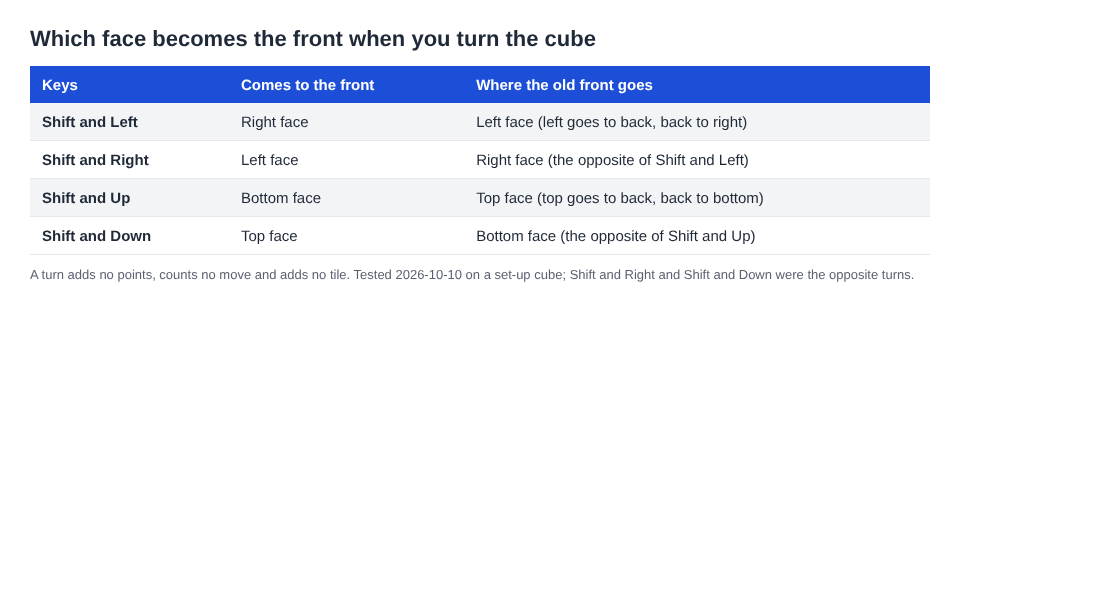
Which face comes to the front for each turn key.
Shift and Left brings the right face to the front: the front goes to the left, the left to the back and the back to the right, and the top and bottom stay. Shift and Up brings the bottom face to the front: the front goes to the top, the top to the back and the back to the bottom. Shift and Right and Shift and Down are the opposite turns. Four Shift and Left turns bring the cube back to where it started. The post on turning the whole cube goes through them with boards.
A useful habit: before you turn, note which face holds your big tile, and find it again after the turn. Since a turn costs nothing, you can turn back freely. Slides and twists are what spend moves.
Common face mix-ups
Sliding on a face that is not the front
After a turn you may swipe and find nothing moves. In one test, turning to an empty face and sliding moved nothing. Bring the face with your tiles back to the front, then slide.
Expecting the front to stay still in a twist
The front's squares in the twisted row travel with the layer. If you were building a row on the front, a twist through it carries that row away. Twist a layer that does not hold your best tiles, or twist knowing where they will land.
Expecting a free undo
No undo was seen in the game. You can twist a layer back with Shift and its key, but that counts as a second move and adds another new tile. Think before you twist.
A key that does nothing
Key 1 changed nothing when the top row's ring held no tile, and Moves stayed at 0. The game words a refusal of an empty layer as "That row has no tiles to carry." It is not broken: the layer was just empty. If the front is stuck in a direction you see "Nothing moves that way. Try another way, or twist a row." That is your cue to twist, not to keep sliding.
Frequently asked questions
Which face is the front in 2048 on a cube?
The front is the face pointing at you right now. It changes when you turn the whole cube. You slide tiles on it with swipes, the arrow keys or W A S D.
Which faces can I twist?
With a mouse or a finger, drag a row on the right face sideways or a column on the top face. On a keyboard, keys 1 to 3 twist the rows and keys 4 to 6 twist the columns, and Shift reverses the direction.
Does turning the cube cost a move?
No. Turning is free: it adds no points, counts no move and adds no tile. Slides and twists do count as moves.
Why did my twist add a tile?
Every slide or twist adds a 2 or a 4, on the front when it has room. That is why a twist needs at least one empty square.
Get started
Open a game, pick a mode and try one twist on purpose. Put two equal tiles on different faces, twist so one lands next to the other on the front, then slide to merge them. Do it once and the face names will make sense.
Play Evolved 2048: it is free and plays in your browser on a computer or a phone.
The 2048 puzzle on a Rubik's cube, and past 2048.
Visit evolved2048.vlvd.net↗
Comments
No comments yet.
Sign in or make an account to comment.