The Cube Is Full in 2048: What It Means and What to Merge
When the cube is full in 2048, the game has refused a twist because all 54 squares hold a tile. The full message is "The cube is full. Merge two tiles on a face to make room before you twist." It does not mean you lost. It means the next useful move is a merge, not a twist.
Evolved 2048 lets you turn the whole cube for free, so you can look at every face for a pair before you decide the game is over. It is free to play in your browser on a computer or a phone.
The cube is full in 2048: what the message means
The cube has six faces of nine squares, 54 in all. Every slide or twist adds a new 2 or 4. A slide puts the new tile on the front face when it has room. A twist needs one empty square somewhere to put its new tile. If every square holds a tile, there is nowhere to put it, so the game refuses the twist and shows the message.
Two details matter here:
- The message is about the whole cube, not the front face. A full front face with empty faces elsewhere is a different problem, and a twist still works there.
- The fix it names is a merge. Two equal tiles side by side on a face combine into their sum, and that removes one tile from the board.
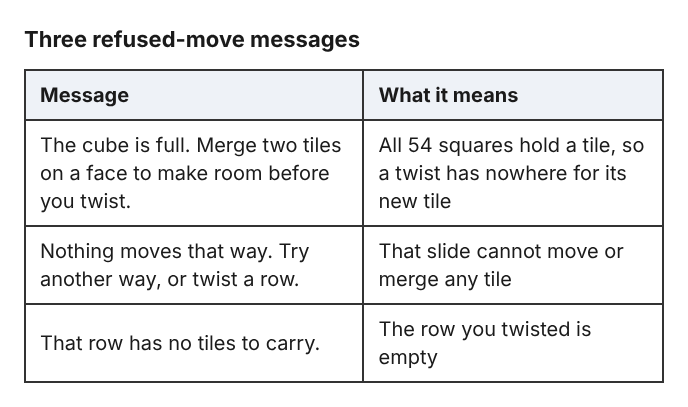
The three messages the game shows when it refuses a move.
Full cube vs game over: are they the same?
No. The game ends only when all 54 squares are full and no face has two equal tiles side by side. In Edge mode the rule also counts pairs across an edge: no two equal tiles sit side by side, on a face or across an edge.
So a full cube is a warning, and a full cube with no pairs is the end. The difference is whether a pair exists somewhere on the cube, including on a face you cannot see.
One test game shows how easy it is to miss. It filled all 54 squares at move 165 with a score of 1160, after 39 twists. The front face had no slide, yet other faces still had equal tiles side by side, so the game was not over. The pair was on another face, out of sight from the front.
Check for hidden merges before you give up
Turning the cube costs nothing. A whole-cube turn adds no points, adds no tile and does not count as a move. Use that to inspect every face.
- Press Shift and Left. The right face comes to the front. Look for equal tiles side by side in any row or column.
- Press Shift and Left again to see the back, and again for the left face. Four turns bring you back to where you started.
- Shift with Up or Down turns the cube the other way, so the top and bottom faces can come to the front too.
- When you find a pair, leave that face in front and slide along the pair's line with the arrow keys or W A S D.
On a phone, drag the space around the cube to turn it. If you are not sure which face is which, the post on cube faces, the front and which way a twist goes lays it out.
Slides only merge tiles on the face in front, so a pair on another face does nothing until you turn it to the front. In Edge mode, also check the tiles along the edge of the front face. A slide towards an edge merges the edge tile with an equal tile just over the edge, on the next face. In the tests the match had to sit in the same row or column. An 8 on the front's top middle and an 8 on the top face's bottom middle made a 16, but an 8 in the neighbouring column did not. Evolved mode does not do this: an 8 beside an 8 across the edge did not merge there.
What to merge first when the cube is full
A slide adds a new tile as well as merging. So one merge in a full cube takes a tile away and puts a tile back, and the cube can be just as full afterward. You want a slide that merges two or more pairs, because that leaves at least one square empty after the new tile arrives.
Pick your merge in this order:
- A slide that merges two or more pairs at once. Two pairs in two different rows, both running the same way, give you net room.
- A merge that sets up a chain. In one test, the front face had 64 32 16 on the top row and 4 8 16 on the middle row. Up merged the two 16s into a 32. Left made the two 32s a 64. Left again made two 64s a 128 in the top left corner, and two 2s a 4 on the bottom row. Three moves, 228 points, and several tiles gone.
- The smallest tiles. Small tiles are the ones that clog a face. Clearing them gives a twist somewhere to put its new tile.
Remember that a tile made in a merge does not merge again in the same slide. A row of 2 2 4 becomes 4 4, not 8. Plan for two slides, not one.
If you are chasing a big tile, keep it out of your way while you do this. The post on where to keep your biggest tile covers it.
Use cube twists to open new merge lines
Once you have one empty square, a twist is the way to bring a far tile next to its match. Drag a row on the right face sideways, or a column on the top face. That layer turns a quarter and carries its tiles to the next face. On a keyboard, 1 2 3 twist the top, middle and bottom row right, and 4 5 6 twist the left, middle and right column up. Holding Shift twists the other way.
Here is a worked example from the test games. A 16 sat on the front's middle left square, and another 16 sat on the right face, just over the front's top right edge. Shift and 1 twisted the top row to the left. That put the right face's 16 on the front's top left square, directly above the other 16. A new 2 appeared on the front. Then Up merged the two 16s into a 32 in the top left corner. Two moves, 32 points.
A twist costs a move and adds a tile, so use it with a target in mind. If you twist and regret it, Shift with the same key twists it back. That counts as a second move and adds a second new tile, which uses up the very room you were trying to make. There is no undo in the game.
How to stop the cube from filling up
The game gives one piece of advice itself, in the No moves left box: keep room on one face so a twist can still bring tiles round to their match.
The slide-only test games show the opposite problem. In one, the front face was full at move 46 with a score of 332, and the other five faces were empty. Turning to an empty face and sliding moved nothing, because slides only work on the front's tiles. Every corner test ended the same way: front full, other five faces empty. The cube was not full, but the game was stuck until a twist was used.
To avoid both traps:
- Twist before the front is jammed, not after. A twist moves tiles onto other faces and spreads the load.
- Do not let small tiles scatter across all six faces. Scattered 2s and 4s are hard to line up.
- Work towards one corner of the front face and keep a clear row for sliding.
The week of short games is a good way to practise this one habit at a time.
Common mistakes that fill the cube fast
- Twisting back and forth. Each twist adds a tile. Two twists add two.
- Forgetting to turn. A pair on the back face cannot merge until you bring it to the front.
- Treating a full front as a full cube. "Nothing moves that way. Try another way, or twist a row." means the slide is stuck, not that the cube is full.
- Looking for undo. Control+Z, Command+Z, Backspace and more were tried, and the board did not change.
- Ignoring edge pairs in Edge mode. They count for both merging and the end rule.
Frequently asked questions
Why does the game say the cube is full?
All 54 squares hold a tile, and a twist needs one empty square for its new tile. The game refuses the twist and tells you to merge two tiles on a face first.
Is a full cube game over?
Not by itself. The game ends only when the cube is full and no face has two equal tiles side by side. In Edge mode, pairs across an edge count too.
Does turning the cube use a move?
No. Turning is free. It adds no points, no tile and no move, so check every face before you decide you are stuck.
Can I undo a twist that filled the cube?
There is no undo. You can twist a layer back with Shift and its key, but that counts as a second move and adds a second new tile.
Get started
Next time the message appears, turn the cube with Shift and an arrow key, find a face with two equal tiles side by side, and slide along that line.
Play Evolved 2048: it is free and plays in your browser on a computer or a phone.
The 2048 puzzle on a Rubik's cube, and past 2048.
Visit evolved2048.vlvd.net↗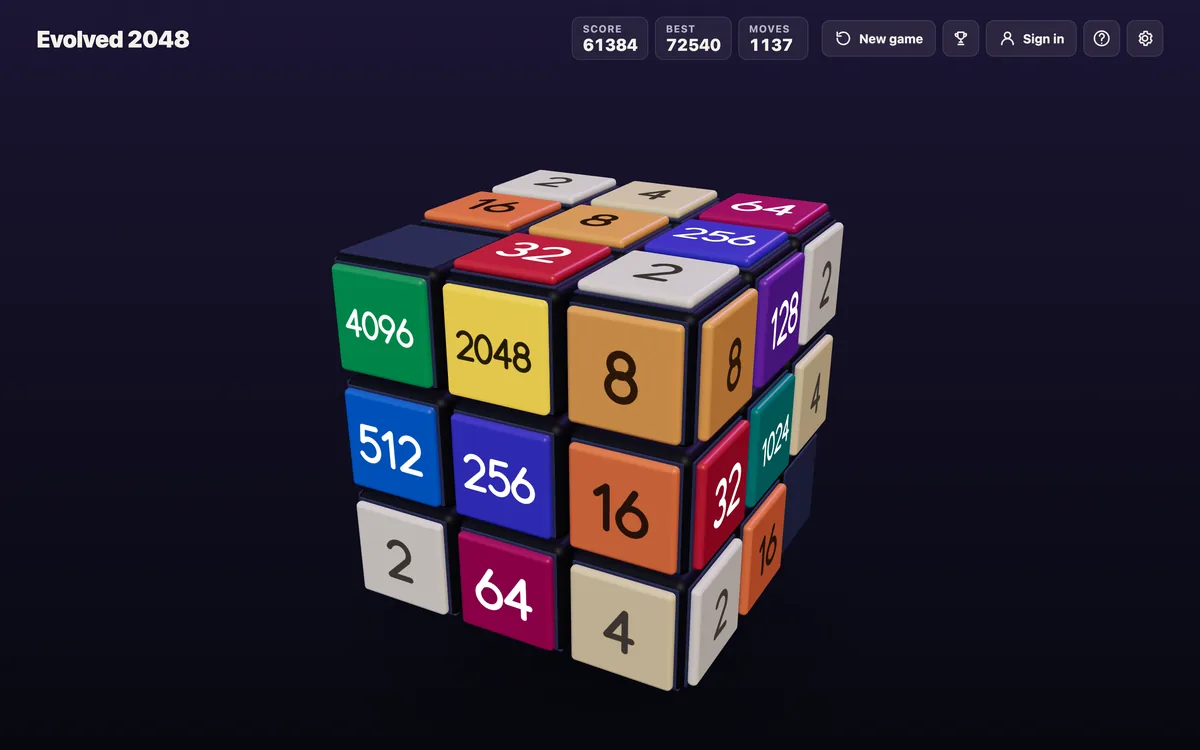
Comments
No comments yet.
Sign in or make an account to comment.