How to Document Family Recipes Before They Are Lost
If you are working out how to document family recipes, the method that works is simple: record the cook making the dish, measure every pinch and handful as it happens, then turn the recording into a written recipe that keeps their stories attached. For the camera side of this, our post on recording a recipe demo on webcam with the steps as a transcript walks through a camera-only setup in Chrome, keeping your voice clear over kitchen noise, and using the timed transcript as the first draft of the written recipe. It is written for people cooking on camera themselves. The main lesson to take from it is that the transcript is a draft, not a finished recipe. This post covers what that one leaves out: who to interview, how to pin down vague amounts, and how to build a collection the whole family can use.
Cheap Recorder runs in Google Chrome and records your webcam and voice into one MP4 on your own computer, with a timed transcript of what the cook says. That means the "add it until it looks right" moments get written down while you watch.
How to document family recipes: why they get lost (and why a card is not enough)
Family recipes rarely live on paper. They live in someone's hands. The card in the drawer says "flour, sugar, butter, bake." It leaves out the right size of bowl, how long the dough should rest, and the trick of lowering the heat when the onions start to smell sweet.
The cook doesn't think about those details, because they are habits. Asking them to write the recipe down gets you the card again. Watching them cook gets you everything else.
Who to ask, and what to ask them before you cook together
Start with the person whose dish everyone asks for at gatherings. Then ask the people who learned from them, because they often remember versions the cook has quietly changed.
Before you cook together, have a short conversation. Five questions cover most of it:
- Where did you learn this dish, and from whom?
- What do you always buy, and what do you swap when you can't find it?
- Which step do people usually get wrong?
- How do you know when it is done?
- When does the family eat it?
Tell them you want to record the session and why. Some people freeze up when a camera appears, so ask early and give them a reason they care about, like their grandchildren cooking the dish someday. Our post on how to ask to record and what to say is written for meetings, but the same wording and timing work at a kitchen table.
Watch, do not just write: record the cook making the dish
Here is a setup that works in Chrome:
- Under What to capture, choose Webcam only, so no screen goes into the file.
- Type a name in Name this recording, for example
Lola's pancit. The recording's folder takes that name plus the date and time, so each recipe gets a clear folder of its own. - Press Choose folder... and pick where the files go. The recorder doesn't remember this between visits, so you pick it each time.
- Under Options, keep Live transcript ticked and choose the language the cook will mostly speak. There are 25 languages, and Chrome listens for one language per recording. The menu goes back to its default every time the page opens, so check it before every take.
- Record a 30 second test and play it back. This catches a wrong microphone before you lose a real take.
Sound matters more than picture here. The transcript is made from what Chrome hears on the microphone. A headset or a desk microphone near the cook will beat a laptop's built-in microphone next to a sizzling pan. Avoid a Bluetooth headset as the microphone, because it drops to a low-quality mode when used that way; a wired or USB microphone works best.
Measure the pinches and handfuls as they happen
This is the step that makes the recording useful. A "handful" is only a measurement if someone weighs it.
Put a kitchen scale and a set of small bowls next to the cook. Before each ingredient goes into the pot, ask them to put their usual amount in a bowl first. Weigh it, then say the result out loud: "That handful of brown sugar is 45 grams." Because you said it, the number lands in the transcript with a time next to it.
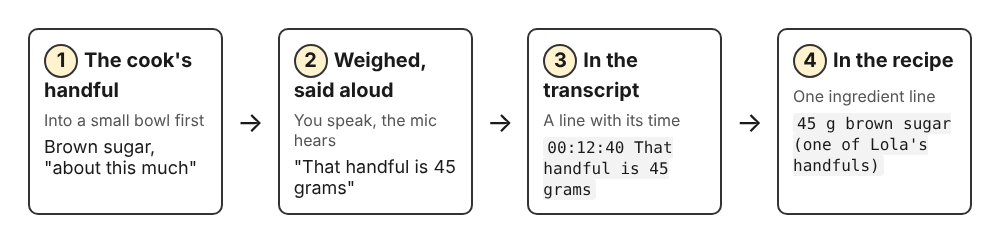
Say every measurement out loud so the transcript holds it.
Do the same for things that aren't amounts:
- Heat: "Your dial is on 6 out of 10."
- Time: "The onions have been in for about eight minutes."
- Looks and smells: ask the cook to describe what "done" looks like, in their own words.
You can press M or Add marker to mark a moment, and a short note confirms the time. In a normal single-file recording, those marker notes show while you record but are not saved. Keep a notepad nearby and write down the timer reading for the moments you want to find again.
Turn what they said into a written recipe with steps and amounts
Press Stop and finish, not Chrome's own Stop sharing bar. The recording is already saved in your folder. If the transcript caught speech, the folder also holds a plain text transcript next to the MP4, with the time of each line. It opens in any text editor.
Work through it in two passes:
- Ingredients: search the transcript for every number you said out loud. A line like "that handful of brown sugar is 45 grams" becomes
45 g brown sugar (one of Lola's handfuls). - Steps: go through in time order and write one action per step. When a line is unclear, use its time to jump to that moment in the video and watch what the cook's hands are actually doing.
Keep the cook's phrases where they help. "Stir until it coats the back of the spoon" is a better instruction than a number of minutes. The live transcript and captions guide explains what affects transcript quality. One thing to know before you start: if the transcript is off during a recording, you cannot add one to that recording afterwards.
Keep the stories with the recipe, not just the ingredients
The stories are why the recipe matters to the family. Don't trim them out of the transcript. Copy the best ones into a short "About this dish" note at the top of the written recipe, and include who taught it and when the family eats it.
The best stories often come after the cooking, over the meal. For those, you don't need the camera. If you switch off Record my webcam and don't pick a screen, the recorder saves an M4A audio file instead of an MP4. If you would rather capture stories as quick voice notes, our post on turning a voice memo into text in Chrome covers that.
Store and share the recipe collection so the family can find it
Each recording already has its own folder, named with the recipe and the date and time it began. Put the written recipe in that same folder, so the video, the transcript and the finished recipe stay together.
These are ordinary files. The MP4 plays almost anywhere, and you can move or rename the files once you have finished any downloads from the recording card. Recordings are saved to your own folder, and Cheap Recorder keeps no copy, with one exception: Download MP3 and Convert send the file to the Cheap Recorder server to be converted. It is deleted there as soon as that finishes, and the original in your folder is never changed. Separately, while the live transcript is on, Chrome sends the microphone audio to Google to turn it into text. The guide to where recordings are saved lists exactly what lands in each folder.
To share, copy the recipe folders to whatever drive or archive your family already uses. Add a single index document listing each dish, who it came from, and the folder name.
Frequently asked questions
Should I record on video or just take notes?
Record on video if you can. Notes miss the hand movements, textures and offhand tips that make a family recipe work, and a recording with a transcript gives you both the footage and the words.
How do I convert 'a little of this' into real measurements?
Have the cook put each amount into a bowl before it goes in, weigh or measure it, and say the number out loud so it ends up in the transcript. Do the same for heat settings and cooking times.
What if the cook lives far away?
Cook together over a video call in a Chrome tab. Press Pick the call tab... in the Call audio tile and tick Share tab audio so their voice is recorded with yours. The Google Meet recording guide has the details. Always tell them you are recording.
How do I organize a family recipe book from recordings?
Keep one folder per dish holding the video, the transcript and the written recipe, then keep one index document that lists every dish and its source. When the collection feels complete, the written recipes are ready to collect into a printed book.
Get started: record your first family recipe with a transcript in Chrome
Pick one dish and one cook this week. Set up a scale and some bowls, do a 30 second test, then record the whole cook from start to finish. For more on filming the kitchen itself, see the post on recording a recipe demo on webcam with a timed transcript. The Free plan includes recording, the live transcript and 12 hours of recording a month, which is plenty for several family recipes.
The Free plan needs no card. Create a free Cheap Recorder account in Chrome, and your recordings stay on your own disk.
Screen recording that is cheap and easy.
Visit cheaprecorder.com↗
Comments
No comments yet.