How to make a practice test from a worksheet
A finished worksheet is one of the best study tools you own. It shows exactly what your class covered, in the words your teacher used, and it usually ends up in a folder and is never looked at again. If you want to know how to make a practice test from a worksheet, the short answer is this: do not just redo the same questions. Ask new questions about the same page. This guide shows why, what the research says about it, and two ways to do it, by hand and with a photo.
Why redoing the same worksheet is not enough
Doing a worksheet a second time feels like practice. But after the first time, you often remember the answers rather than the ideas. Question 4 was "evaporation", so you write "evaporation". You have practised remembering a list, not understanding the page.
Your test will not copy the worksheet. It will ask about the same ideas in different words, in a different order, and often in a different format. A worksheet with blanks to fill in may turn into a test with multiple-choice questions, short answers, or a question that asks you to explain what happens next.
So the goal of a practice test is to meet the same content in new questions. That checks whether you really know it, while there is still time to fix what you do not.
What the research says about new questions on old material
A large review by Dunlosky and colleagues (2013) rated ten study techniques and gave practice testing one of its two highest ratings. Rereading was rated low, and the authors suggest practice testing in its place.
The harder question is whether practice on some questions helps with different questions. A review of 40 years of studies by Pan and Rickard (2018) looked at exactly this, across more than 10,000 people. They found that testing can help with new questions too, compared with simply seeing the material again. The help was largest when the final test used a different format, and for questions that ask you to apply an idea or draw an inference.
The same review found two weak spots that matter for worksheets:
- Material you saw but were never asked about. Transfer was weakest to parts of the page you read while studying but were never tested on. Most worksheets ask about only some of the page.
- Worked problems. Transfer was also weak to problems involving worked examples, the kind you solve step by step in maths or chemistry.
The authors are also cautious. After correcting for studies that may never have been published, the benefit often disappeared when none of the helpful conditions were present. So new questions are not magic. They work best when they cover the whole page and ask you to use ideas, not only recall words.
One classroom finding helps here. McDermott and colleagues (2014) ran quizzes in seventh-grade science and high school history classes. Information that had been quizzed did better on the unit exams and the end-of-semester exam, and the quiz format did not need to match the exam format. Multiple-choice quizzes helped just as much as short-answer ones, and quizzing with feedback beat studying the same facts again.
How to make a practice test from a worksheet, step by step
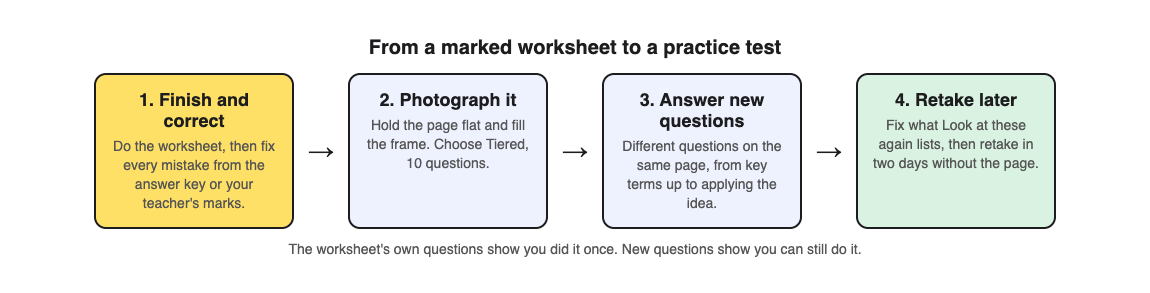
The method works the same whether you write the questions yourself or use an app:
- Finish and correct the worksheet first. Use the answer key or your teacher's marks to fix every mistake. A practice test built on a wrong answer teaches the wrong answer.
- Cover the whole page. Write at least one new question for each part of the worksheet, including the text and diagrams between the blanks. That is the material the Pan and Rickard review found transfers least.
- Change the format. Turn a fill-in-the-blank into a multiple-choice question, a definition into "which of these is an example of", a label into "what would happen if this part stopped working".
- Add harder questions. At least a few should ask you to explain, compare or apply an idea, not just name it.
- Wait, then answer without the worksheet. Leave it a day or two, answer from memory, and check every answer.
Writing good questions by hand takes time, and it is hard to write a question you do not already know the answer to. That is where a photo can help.
Worked example: a water cycle worksheet
Say your science class did a worksheet on the water cycle: a diagram with arrows to label, and blanks for evaporation, condensation, precipitation and collection. You have corrected it, and the test is next week. Here is how to turn it into a practice test with Study Shot, which takes a photo of a page from your textbook, notes or worksheet and writes multiple-choice questions about it, from the basics to advanced, explaining every answer.
- Photograph the corrected worksheet. Choose Take photo, or Choose photo if you already have one. Hold the page flat and fill the frame. The questions can only come from what is on the page, so a filled-in, corrected worksheet gives it more to work with than a blank one.
- Pick Tiered and 10 questions. Tiered is a ladder: Basic questions on key terms come first, then Intermediate questions that ask you to explain and connect ideas, then Advanced questions that apply the idea to a new situation. That gives you the change of format and the harder questions from steps 3 and 4 above.
- Answer without looking. A question like "What happens to water vapour as it rises and cools?" tests the same idea as your "condensation" blank, but you have to understand it to pick the right choice. Press Check answer after each one to see whether you were right, the correct answer and a short explanation.
- Read your results. You get a score for each level. Look at these again lists every question you missed, with your answer and the right one. Go back to the worksheet for those parts only.
- Retake in two days. The quiz is saved in your library with the page photo and your best score. Press Retake quiz before you look at the worksheet again.
Studying with friends? Share this quiz makes a link, and each person who opens it gets their own copy to take (they need a Study Shot account). See how to quiz each other in a study group for a way to use it.
What a quiz from a worksheet cannot do
Be honest about the limits so you fill the gaps another way:
- It cannot check your working. A multiple-choice question can test whether you understand an idea, but it cannot mark the steps of a maths or chemistry problem. If your worksheet is mostly calculations, keep solving problems on paper. The Pan and Rickard review found transfer to worked problems was weak, so practise those problems directly. Our post on studying for a math test shows how to split the two.
- Some pages do not work. If Study Shot cannot write questions for a photo, it says "We couldn't write questions for this photo. Try a different page." Try the textbook page the worksheet came from instead.
- Questions can contain mistakes. They are written by an AI model. If one looks wrong, check it against your corrected worksheet, and use Report a problem under the question.
Frequently asked questions
Should I photograph a blank or a completed worksheet?
Use the completed and corrected one. The questions come from what is on the page, so the right answers need to be on it.
How many questions should my practice test have?
Ten is a good start for one worksheet page. Study Shot offers 5, 10, 15 or 20; use 20 for a dense page and 5 for a quick check the night before.
When should I take the practice test?
A day or two after you finish the worksheet, then again a couple of days later. Spreading your practice out is the other technique the Dunlosky review rated highly; our spaced repetition schedule shows one way.
Does a multiple-choice practice test help with a short-answer exam?
In one classroom study, multiple-choice quizzes helped on later exams just as much as short-answer quizzes, and the formats did not need to match. Practise writing short answers too if your exam asks for them.
Get started
Try Study Shot: it is free to start and works on your phone and computer. Pull out the last worksheet you finished, photograph it, and take 10 Tiered questions on it. The ones you miss are your study list for this week.
Comments
No comments yet.
Sign in or make an account to comment.