How to photograph a black cat without losing the detail
If you have tried to take a picture of a black cat, you know the problem. The phone shows two eyes floating in a dark shape, and the fur has no detail at all. This guide covers how to photograph a black cat so it looks like a cat: where the light should go, what to put behind it, where to focus, and how to brighten the shot without a flash. Every tip comes from cat charities' own photo guides and a phone maker's camera guide.
Why black cats are so hard to photograph
Most of the trouble comes from two things: light and contrast.
Black fur reflects very little light, so in a shadow its texture vanishes. Your phone also sets the brightness on its own: Apple's camera guide says the camera sets the focus and exposure automatically. It does not know that the dark shape is the part you care about.
Then there is the background. Cats Protection, the UK cat charity, says in its video tips that filming a black cat against a black background is going to be tricky. The same is true of a photo. A dark cat on a dark step has no edge, so the eye cannot find the outline.
The good news: both problems have simple fixes, and none need a special camera.
How to photograph a black cat: get the light on your side
Light is the first fix and the biggest one. The charity PDSA puts it plainly in its pet photo tips: your source of light should be on your side of the camera, not behind your pet. Shoot a pet in front of a window with light coming from behind, and it can end up very dark and almost silhouetted.
Cats Protection's photo guide says the same thing: a backlit subject will look dark, like a silhouette. Make sure soft light is behind you or pointed at the cat.
What counts as good light for dark fur?
- Window light. Natural light through a window can give sharp photos with lots of detail and highlights, says a Cats Protection volunteer in 9 tips for better cat photos. Stand between the window and the cat.
- The golden hour. The same volunteer calls it the best light: shortly after sunrise or before sunset, when light is softer and redder.
- A desk lamp. Indoors, a cat in the pool of light from a desk lamp can make a strong picture.
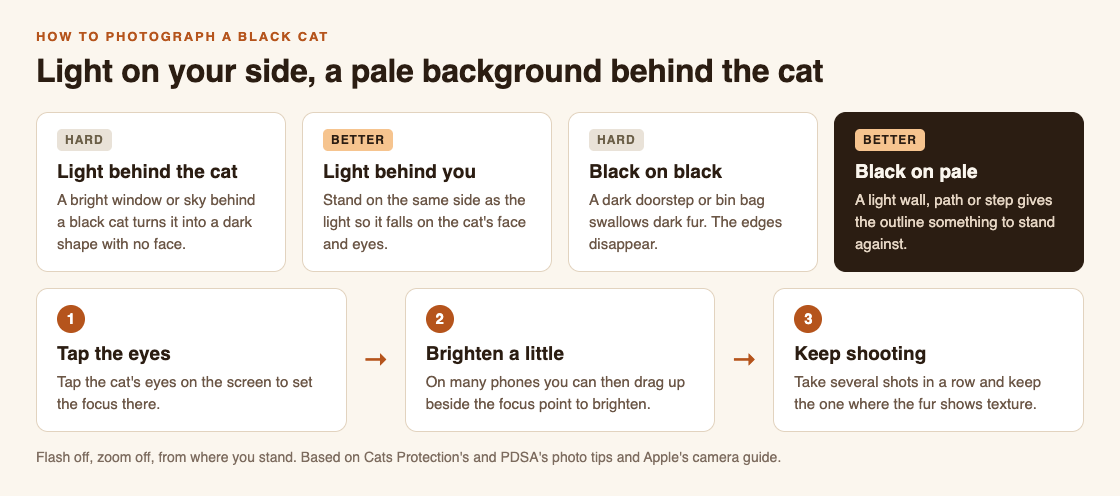
Two choices do most of the work: where the light is, and what is behind the cat.
Pick a background that is lighter than the cat
The Cats Protection volunteer's rule is simple: a white cat looks magnificent against a dark background, and a dark cat against a light background creates contrast. Their photo guide adds a second idea: pick a backdrop that contrasts with the fur, or one that sets off the eye color, such as gold or green.
Outside, light backgrounds are everywhere once you look: a pale wall, a sunlit path, a light-colored step, a patch of dry grass. Dark ones to avoid are just as common: black bins, dark doors, shaded hedges, wet tarmac.
You usually cannot move a cat. But you can move yourself. Take one step to the side, or crouch lower, and the background behind the cat changes. Getting down to the cat's level helps anyway: both PDSA and Cats Protection recommend shooting from the animal's eye level.
Focus on the eyes, then brighten a little
On a black cat, the eyes are often the only bright point. Use them.
Cats Protection's guide says to tap the screen just before you take the shot to focus, and that the best point to focus on is the cat's eyes. On many phones, that tap does a second job. Apple's iPhone camera guide says that after you tap where you want the focus, you can drag up or down next to the focus area to adjust the exposure, which is how bright the picture comes out. Touch and hold instead, and you lock focus and exposure for the next shots.
For a black cat, drag up a little. Stop when you can see texture in the fur but the bright parts of the scene are not washed out. Go too far and the picture looks washed out.
If the shot still comes out dark, the guide suggests brightening it in an editing app afterwards. That is often easier than fighting the camera in the moment.
What not to do: flash, zoom and long sessions
- No flash. Cats Protection says a flash could startle a cat. PDSA adds that it can hurt an animal's eyes and spook it into running off. Use more light from your side instead.
- No zoom. On a phone, Cats Protection says the zoom feature will degrade the photo, and it is better to crop afterwards. Dark fur loses detail first.
- No long sessions. PDSA says to keep sessions short and stop if an animal loses interest or looks uncomfortable. The Cats Protection volunteer says never do anything that makes a cat uncomfortable, and when it has had enough, let it be.
One more help: take lots of shots. Both charities suggest burst mode or simply snapping several in a row, then keeping the best one.
A worked example: a black cat on a dark doorstep
It is late afternoon. On your walk you see a black cat sitting on a dark gray doorstep, with the low sun behind you. Here is how it goes.
- Stay where you are. Do not walk up. The sun is already behind you, so the light is on your side. Good.
- Fix the background. Dark cat, dark step: no edge. Take a step to your left so a pale wall is behind the cat instead, and crouch to its eye level.
- Frame wide. Leave the zoom alone. You can crop later.
- Tap the eyes. Then drag up slightly beside the focus point until the fur shows texture.
- Shoot a few in a row. Keep the one where the eyes are sharp.
- Leave it there. If the cat looks away, gets up or walks off, that is the end of the session.
Done this way, the photo takes under a minute, and the cat may not even notice. For more on reading a cat's mood before you raise the phone, see What does a cat's tail position mean? and How to approach a cat you don't know. For phone tips that apply to cats of every color, see How to photograph a cat with your phone.
Turn your black cat photos into catches with Cat Go
A good black cat photo is worth keeping. Cat Go is a game that plays in your web browser. In the site's own words: "Walk anywhere, photograph a real cat, lure it with food and catch it. Every catch keeps its breed and where you found it."
The photo is the catch. The site says: "You catch a cat by taking its photo." The camera screen asks you to "Fit the whole cat in the frame", which matches the advice above: step back instead of zooming. If the game finds no cat in the shot, it says "No catch this time", and no in-game food is used, so you can try another angle.
Then the game asks "Which breed is it?" and you pick. For most black cats on the street, "Mixed breed is always a safe pick." A caught cat is "Saved to your Catdex with its breed and the place you found it."
The food and the catch stay inside the game. The real cat only gets its picture taken, from where you stand. Cat Go needs the camera and location allowed in your browser.
Frequently asked questions
How do you photograph a black cat with a phone?
Put the light on your side, choose a background lighter than the cat, tap the eyes to focus, and drag the brightness up a little. Leave the flash and the zoom off.
Should I use flash to photograph a black cat?
No. Cats Protection and PDSA both say a flash can startle a cat, and PDSA says it can hurt its eyes. Use window light or soft daylight instead.
What background is best for a black cat?
A light one. A Cats Protection volunteer says a dark cat against a light background creates contrast, so look for a pale wall, path or step.
What time of day is best for black cat photos?
The golden hour, shortly after sunrise or before sunset, gives soft light that shows fur texture.
Get started
Next time you meet a black cat, check where the light is and what is behind it before you raise your phone. Then play Cat Go in your browser: walk anywhere, photograph a real cat, lure it with food and catch it, and keep its breed and the place you found it in your Catdex.
Comments
No comments yet.
Sign in or make an account to comment.