How to stop solving the same problem twice
You have fixed this before. You know you have. But you cannot remember how, so you spend the same half hour working it out again. If you want to stop solving the same problem twice, a good memory will not save you. A short routine will: check before you start, write down the fix with everything it needs, make it the normal way, find out why it came back, and copy it to every place it could happen next. This guide walks through each step with one worked example.
Why the same problems keep coming back
Most repeat work has one of three causes.
- The fix was never written down. It lived in one person's head, and that person forgot, left, or was not in the room.
- The fix was written down without what it needs. "Use the adapter" helps nobody if the adapter is not where it should be.
- The cause was never touched. The fix cleared the symptom, so the problem came back the next week, and the week after.
Each step below closes one of these gaps. You do not need all five for every small problem. Use them for anything that has happened twice.
How to stop solving the same problem twice: five steps
Step 1: look before you solve
The cheapest fix is the one you already found. Before you start on any problem, spend one minute asking: have I seen this before? Search your notes, your journal or your map for one or two words from the problem.
This only works if past problems are written in plain words you will search for later. "Laptop will not show on the meeting room screen" can be found. "Tech issue Tuesday" cannot. If you keep a problem solving journal, write each problem as what happens, in one line.
Step 2: write down the fix and everything it needs
When something works, write it down while you still remember the details. Three parts matter:
- The fix, in steps someone else could follow. Not "fiddled with it", but what you did, in order.
- The outcome. Worked, partly or failed, and how you know.
- What it needs. A tool, a password, a part, a person, ten minutes. This is the part people leave out, and it is the part that makes a fix repeatable.
Keep the fixes that failed too. They stop the next person from trying them first. Our guide on keeping track of the solutions you tried covers this record in more detail.
Step 3: make the fix the normal way
A fix that works but stays a clever trick will be forgotten. Turn it into how things are done. The Lean Enterprise Institute describes the last stage of the plan, do, check, act cycle as "Act": to "standardize and stabilize the change or begin the cycle again, depending on the results" (Lean Enterprise Institute, PDCA).
For everyday problems, that can be as small as a note taped where the problem happens, a line in a checklist, or a habit you agree on. The test is simple: could someone who was not there last time get it right the first time?
Step 4: ask why it came back
If a problem returns even after a good fix, the fix is treating a symptom. Ask why it keeps happening, and keep asking until you reach something you can change. Our 5 whys example shows how. Write the cause down as its own problem and link it to the first one, so the two stay together.
Step 5: copy the fix to similar places
Lean teams have a word for this: yokoten, which the Lean Enterprise Institute defines as deploying ideas "horizontally" across a company. Its example is a defective valve found on one machine, which leads to every similar valve being checked for the same defect (Lean Enterprise Institute, Yokoten).
You can do the same at home or at work. When you fix something, ask: where else could this happen? The second bathroom, the other car, the other office, the next project. Check those places before the problem shows up there.
A worked example: the meeting room screen
Here is a made-up example that runs through all five steps.
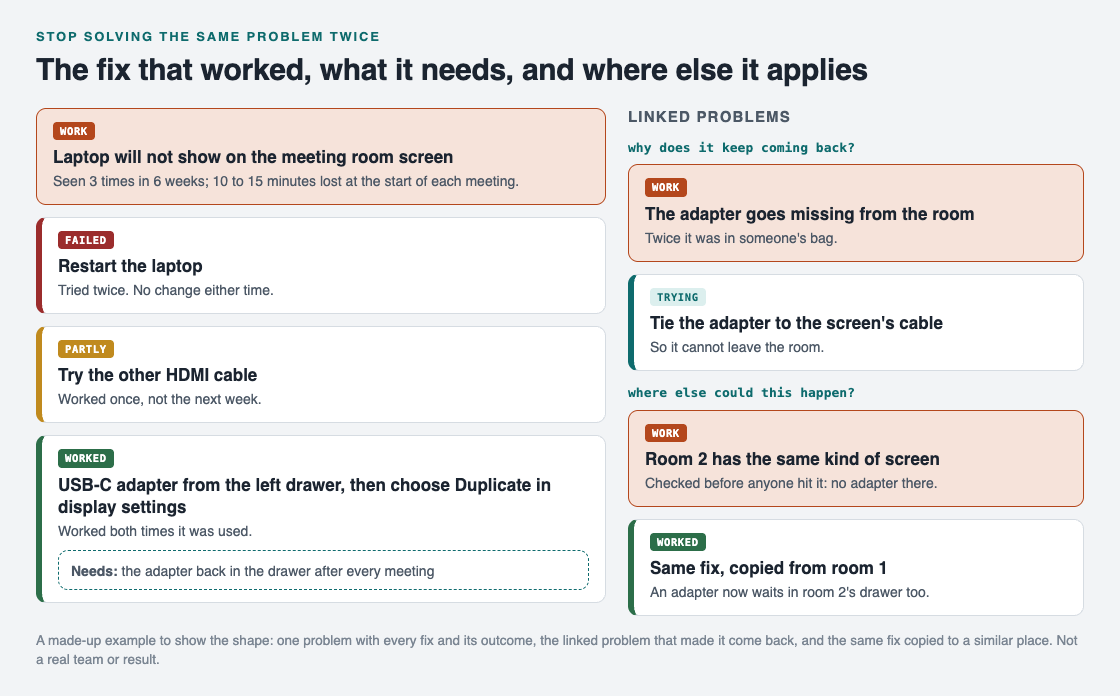
One problem, every fix with its outcome, the cause behind it, and the same fix copied to a second room.
- The problem. "Laptop will not show on the meeting room screen." It happened three times in six weeks, and each time the meeting started 10 to 15 minutes late.
- Look before you solve. The third time, someone searched the team's notes for "meeting room screen" and found the fix from last time in under a minute.
- The fix and what it needs. Restarting the laptop failed twice. The other cable worked once, then not the next week: partly. What worked both times was the USB-C adapter from the left drawer, then choosing Duplicate in the display settings. Its requirement: the adapter must be back in the drawer after every meeting.
- Make it normal. A card on the table now says, in two lines, what to plug in and which setting to choose.
- Why it came back. Twice, the adapter was in someone's bag. That became its own problem, "The adapter goes missing from the room", linked to the first. The fix being tried: tie the adapter to the screen's cable.
- Copy it. Room 2 has the same kind of screen. Someone checked it before anyone hit the problem there: no adapter. One is now in that drawer too.
The failed restart stays on the record. As Problem Graph's home page puts it, a solution that failed "stays on the map as a failed solution, and that is exactly what the next person needs to know."
Keep your fixes on one map with Problem Graph
The routine above works in any notebook. Problem Graph was built around the same record, and it draws it as a map:
- You write the problem in one line and put it in a lane: personal, work, expert or scientific.
- You add each fix as a solution, mark the one you are trying, and record the outcome: worked, partly or failed. A solution can have requirements, which is where "the adapter back in the drawer" goes.
- You link the cause to the problem it keeps bringing back, and link similar problems to each other.
- For a team, you mark the problem as a main node and share it into a private network with an invite code. Its solutions, their outcomes and the requirements they need go along, and only members see it.
- When others share problems, Problem Graph shows you similar ones and which of their solutions worked. You can borrow one into your own graph with one tap, and it keeps a link back to where it came from.
Holding a short look back after a problem is fixed helps too. The Lean Enterprise Institute describes hansei meetings that identify problems, develop countermeasures and share the improvements "so mistakes aren't repeated" (Lean Enterprise Institute, Hansei).
Frequently asked questions
How do I stop solving the same problem twice?
Search your notes before you start, write down each fix with what it needs, and make the fix that worked the normal way. If the problem still returns, find out why and fix that cause as its own problem.
What should I write down after fixing a problem?
The problem in one line, the fix as steps someone else could follow, the outcome, and what the fix needs to work. Keep the fixes that failed as well.
What is yokoten?
It is a lean term for spreading a fix or an idea sideways to every similar place. After fixing one problem, you check where else the same thing could happen.
Is this only for work problems?
No. The same routine works for a leaking tap, a car that will not start on cold days or a recipe that keeps going wrong. Anything that has happened twice is worth one line.
Get started
Think of one problem you have solved at least twice this year. Write it in one line, then write the fix that worked and what it needed, while you still remember.
Try Problem Graph: it is free, and you can look around the public network without an account. Write one problem down in a line and attach the first thing you will try.
Comments
No comments yet.
Sign in or make an account to comment.