How to track work problems without a ticket system
If you need to track work problems without a ticket system, you are probably keeping them in your inbox, a chat thread and your head. That works until a problem you thought was fixed comes back and nobody remembers what was tried. You do not need a help desk tool to fix that. You need a few habits and one place to write things down.
What a ticket system gives you that you still need
Strip away the features and a ticket system does four useful things:
- One record per problem. Not a thread, not a meeting note. One place.
- A history of what was done. Every attempt, so nobody repeats the one that failed.
- A status. Open or closed, so you know where things stand.
- A view of everything open. So nothing sits forgotten.
If you work alone or in a small team, those four are the part worth copying. The rest, assigning work to people, due dates, automatic alerts, matters when many people hand work to each other. More on that near the end.
How to track work problems with four habits
Here is the whole method. Each habit replaces one of the four things above.
- Write each problem in one line, with a number. "The printer is a pain" is a mood. "The second floor printer jams most days" is a problem you can check. Add a count where you have one: "jammed on 4 of 5 days this week". Our guide on how to write a problem statement in one line goes deeper.
- Record every attempt with its outcome. Worked, partly or failed. Keep the failures. A failed fix is the most useful line in the record, because it stops the next person from trying it again.
- Set one rule for open and closed. A simple one: a problem is open until one of its solutions has worked. Partly does not close it.
- Link problems that share a cause. When two problems turn out to come from the same place, connect them, and fix the cause once.
Make the status visible at a glance
A list of problems only helps if you can see where each one stands without reading every entry. Lean practice has a name for this. The Lean Enterprise Institute defines visual management as putting work and its indicators "in plain view" so the status "can be understood at a glance by everyone involved" (Lean Enterprise Institute, Visual Management).
A factory example is the andon, which the Institute describes as a tool that "highlights the status of operations in an area at a single glance and that signals whenever an abnormality occurs" (Lean Enterprise Institute, Andon). The word is Japanese for lamp. You do not need lights over your desk. You need a record where a failed fix, a partial fix and a working fix look different, so open problems stand out.
A worked example: an office manager's work problems
Here is a made-up office, tracked in Problem Graph, a problem and solution journal drawn as a map. Every problem goes in the work lane.
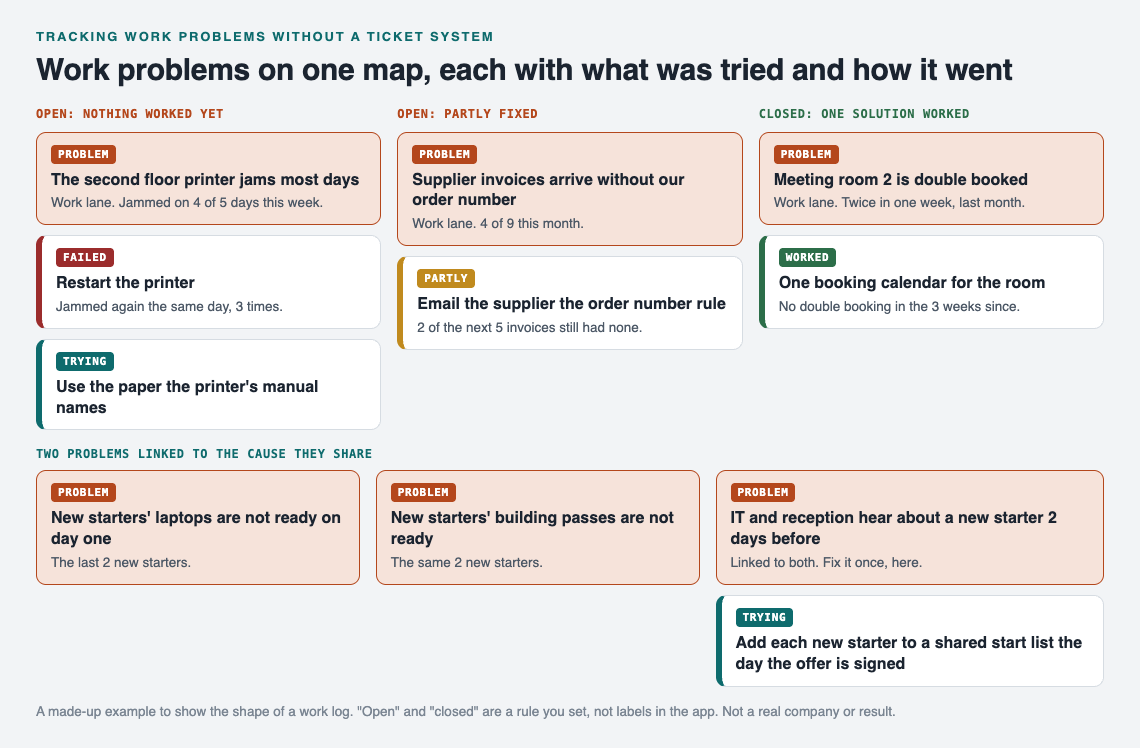
Failed, partly and worked look different, so the open problems stand out.
The printer. "The second floor printer jams most days", 4 of 5 days this week. Restarting it failed: it jammed again the same day, 3 times. The next attempt, using the paper the printer's manual names, is marked as trying. Open.
The invoices. "Supplier invoices arrive without our order number", 4 of 9 this month. An email to the supplier explaining the rule was partly a fix: 2 of the next 5 invoices still had none. Open, because partly does not close it.
The meeting room. "Meeting room 2 is double booked", twice in one week last month. One booking calendar for the room worked: no double booking in the 3 weeks since. Closed.
The new starters. Two problems came up for the last 2 new starters: their laptops were not ready on day one, and neither were their building passes. Written side by side, the shared cause is plain: IT and reception hear about a new starter only 2 days before the start date. That cause goes on the map as its own problem, linked to both. The fix, adding each new starter to a shared start list the day the offer is signed, is marked as trying on the cause, not on each symptom.
This is where a map beats a list. In an inbox, the laptop and the pass are two unrelated complaints from two different people. On the map they point at the same cause, because patterns show up on a map that never show up in a list.

The three steps on Problem Graph's home page: write, attach, link.
In the app, each problem is one line and lands on the graph when you press Enter. You add solutions as ideas, mark the ones you are trying, and record the outcome. The app also has a list view beside the map and a filter for the work lane, so your work problems stay apart from anything personal. Problems are private by default and follow you to any phone or computer you log in on.
A 15 minute weekly review
The record only stays useful if you look at it. Once a week, go through it in this order:
- Anything marked trying for more than two weeks. Decide: worked, partly or failed. A fix left on trying for a month tells you nothing, so give it an outcome.
- Every open problem. Is the number in its line still true? Update it.
- New problems from the week. Write each in one line. Check if it belongs with something already there, and link it.
- One problem to work on next. Pick it, and add the first thing you will try.
For more on recording each attempt honestly, see how to keep track of the solutions you tried.
When you do need a ticket system
Be honest about the limits. If many people hand work to each other, need to be told when something is theirs, or work to due dates, a ticket system is built for that. Problem Graph's pages describe writing problems down, recording outcomes, linking and sharing. They do not describe assigning work, due dates or notifications.
For one person, or a small team where one person keeps the record, the four habits above are usually enough. If you want your team to see a problem and its fixes, you can mark it as a main node and share it into a private network by invite code. Our post on a shared problem log for a small business shows how one keeper runs that.
Frequently asked questions
Can I track work problems in a spreadsheet?
Yes, if it has one row per problem, a column for each attempt and its outcome, and a status. What a spreadsheet does not show well is which problems share a cause.
When is a work problem closed?
Set the rule yourself and keep it. A clear one is that a problem stays open until one of its solutions has worked, not partly worked.
Should I delete fixes that failed?
No. Keep them with their outcome, so nobody tries the same fix again.
Can my team see my work problems in Problem Graph?
Only if you share them. Problems are private by default; a main node you share into a private network is seen by its members.
Get started
Write down the three work problems on your mind today, one line each, with a number. Add the first thing you will try for one of them.
Try Problem Graph: it is free, and you can look around the public network without an account. Write one problem down in a line and attach the first thing you will try.
Comments
No comments yet.
Sign in or make an account to comment.