Shared problem log for a small business
In a small business, problems rarely stay solved. The morning shift finds out that the dishwasher only needs its filter cleaned, and the evening shift spends twenty minutes on the same fault two days later. A shared problem log stops that. It is one place where every problem the business keeps hitting is written down, with every fix tried and what happened, so anyone on any shift can see what to do. This guide shows what to write, who keeps it, and how to review it in fifteen minutes a week.
What a shared problem log is
A shared problem log is a running list of the problems your business has right now and has had before. Each entry holds the problem, the fixes tried, how each one turned out, and what the working fix needs. It is shared because the people who hit the problem are rarely the people who fixed it last time.
It is different from a to-do list, which tracks tasks, and from a lessons learned log, which is usually written at the end of a project. Our guide to the lessons learned log covers that. A problem log is about the problems that come back day after day: equipment, stock, suppliers, customers, the till.
What to write for each problem
Keep every entry to five things. Anything more and people stop writing.
- The problem in one line. What happens, when, and how often, next to what should happen. "The dishwasher stops mid-cycle on 2 of the last 7 evenings; it should finish every cycle."
- Each fix tried. In words someone on another shift could follow.
- The outcome of each fix. Worked, partly or failed. Keep the failures; they save the next person from trying them.
- What the working fix needs. A tool, a part, a step on a checklist, a person. This is the line people forget, and the one that makes a fix repeatable.
- The status. Open, trying a fix, or worked.
Our guide on keeping track of the solutions you tried goes deeper on recording attempts.
Who keeps the shared problem log
Everyone reports. One person keeps the log. That split matters in a small business, where everyone is busy and nobody wants to write in a shared document mid-shift.
- Reporting is easy. Staff tell the keeper in whatever way is quickest: a note by the till, a message, a word at handover. They do not need to word it well.
- The keeper writes it properly. The owner, a manager or a shift lead turns each report into the five parts above, and checks whether the problem is already in the log.
- Everyone can read it. The point of sharing is that the evening shift can look up what the morning shift found without asking.
Why readable by everyone, all the time? The Lean Enterprise Institute describes visual management as placing work and its indicators "in plain view" so that "the status of the system can be understood at a glance by everyone involved" (Lean Enterprise Institute, Visual Management). A log that only the owner can open does not do that.
The 15-minute weekly review
A log nobody reads turns into a graveyard. Pick one fixed slot a week, ideally when both shifts overlap, and go through it together:
- Read each open problem aloud.
- Record what happened to each fix since last week: worked, partly or failed.
- Decide the next fix for anything still open, and who will try it.
- Move anything that worked onto a checklist, so it becomes the normal way.
Step 4 is the "act" stage of plan, do, check, act, which the Lean Enterprise Institute describes as to "standardize and stabilize the change or begin the cycle again, depending on the results" (Lean Enterprise Institute, PDCA).
Worked example: a small cafe's log
Here is a made-up cafe with two shifts and one keeper, the manager. After a month, the log holds three problems.
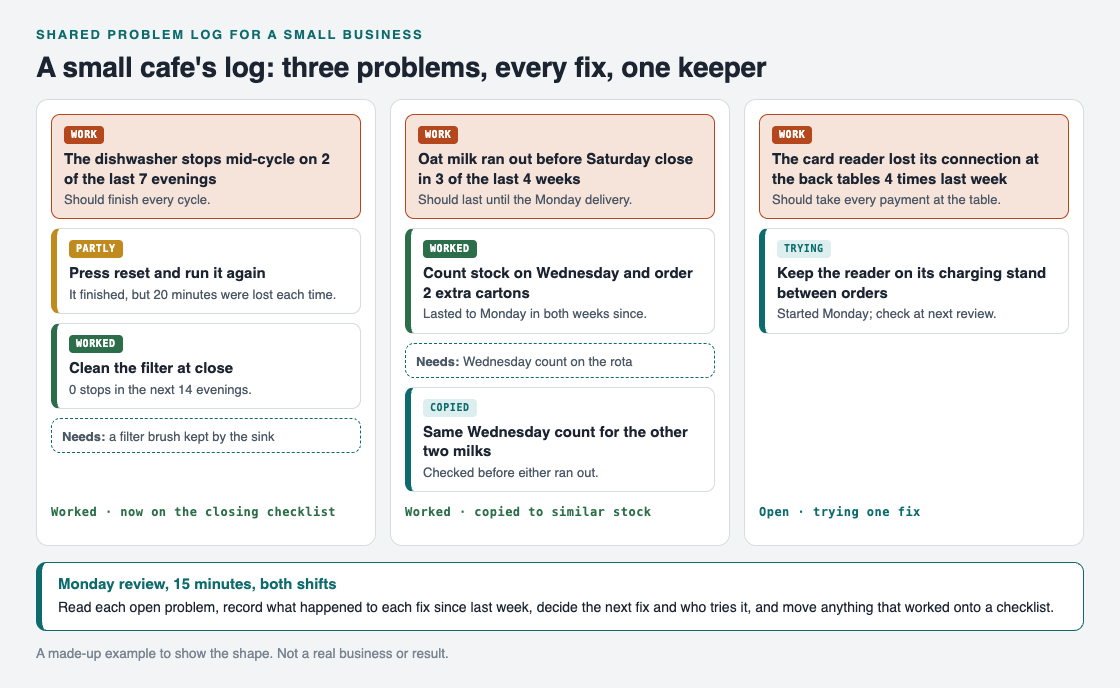
Three problems, every fix with its outcome, and what each working fix needs.
- The dishwasher. It stopped mid-cycle on 2 of the last 7 evenings. Pressing reset and running it again was only a partial fix: the load finished, but twenty minutes were lost each time. Cleaning the filter at close worked, with no stops in the next 14 evenings. It needs a filter brush kept by the sink, and it is now on the closing checklist.
- Oat milk. It ran out before Saturday close in 3 of the last 4 weeks, though it should last until the Monday delivery. Counting stock on Wednesday and ordering 2 extra cartons worked: the milk lasted to Monday in both weeks since. It needs the Wednesday count on the rota.
- The card reader. It lost its connection at the back tables 4 times last week. The fix being tried is keeping the reader on its charging stand between orders. It is still open, and the next review will check it.
Spread a fix to every shift and every similar place
A fix in the log is only half the value. The other half is asking where else the same problem could happen. Lean teams call this yokoten, deploying ideas "horizontally" across a company. The Lean Enterprise Institute's example is a defective valve found on one machine, after which all similar valves are examined for the same defect (Lean Enterprise Institute, Yokoten).
In the cafe, the oat milk fix was copied straight away: the same Wednesday count now covers the other two milks, checked before either ran out. If you have a second site, a second van or a second till, the same question applies. Our guide on how to stop solving the same problem twice covers this habit in more detail.
Keep a shared problem log in Problem Graph
A notebook or a shared document can hold the five parts. Problem Graph is a problem and solution journal drawn as a map, and it already has a place for each one:
- The keeper writes each problem in one line, in the work lane.
- Each fix is a solution: added as an idea, marked when someone is trying it, and given an outcome of worked, partly or failed.
- What a fix needs, such as the filter brush, goes on as a requirement.
- Problems that belong together are linked, even across lanes, so a problem and the one causing it stay side by side.
- The app has a List view beside the map, and filters for your own problems and the ones shared in a network.

The three ways to share, from Problem Graph's home page.
To share the log with staff, the keeper creates a private network and gives the team the invite code. For each problem the whole team should see, the keeper marks it as a main node and shares it into the network. Its solutions, their outcomes and the requirements they need go along. Members see it; nobody else does. Anyone with the invite code can join, so give it only to your team. Problems the keeper does not share stay private. For more on how this works, see our guide to sharing problems and solutions with your team.
Frequently asked questions
What should a problem log include?
The problem in one line, each fix tried, how each fix turned out, what the working fix needs, and the status. Keep the failed fixes too.
Who should keep a shared problem log?
One keeper, such as the owner or a shift lead, with everyone else reporting problems to them. One keeper keeps the entries consistent and avoids duplicates.
How often should we review the log?
Once a week is enough for most small businesses. Fifteen minutes when shifts overlap covers what happened to each fix and what to try next.
Is a problem log the same as a lessons learned log?
They overlap. A lessons learned log is usually written at the end of a project, while a problem log is kept every week for problems that keep coming back.
Get started
Write down the three problems your business hit most this month, each in one line. Then add the fix you tried last and what happened.
Try Problem Graph: it is free, and you can look around the public network without an account. Write one problem down in a line and attach the first thing you will try.
Comments
No comments yet.
Sign in or make an account to comment.