How to write a cheat sheet for a topic you are learning
To write a cheat sheet for a topic you are learning, pick one goal, pull the key terms and rules from your sources, cut everything you can already recall, and arrange what is left so you can scan it in seconds. Deciding what makes the cut means you have to understand the topic, and the finished page is something you can test yourself against.
If you want somewhere to keep the result, Electrified lets you make an account and post notes and articles on your own page, with up to 5 topics on each post. A short cheat sheet fits well in a note, and a longer one fits in an article with sections.
What a cheat sheet is and why writing one can help you learn
A cheat sheet is a short page of the things you need to recall fast: terms, rules, formulas, commands, a few examples. It is not a summary of a book. It is the part you keep forgetting.
Writing one can help for three reasons:
- You have to decide what matters, and that needs understanding.
- You have to put each idea in your own words, so gaps show up.
- You end up with a page you can quiz yourself from.
A cheat sheet differs from a concept note. A concept note explains one idea in full. A cheat sheet holds many small ideas in compressed form, so you can find the one you need.
Decide the goal and the reader before you start
Write one sentence before you collect anything: "This sheet helps me ___ when I ___." For example: "This sheet helps me pick the right HTTP status code when I design an API." That sentence decides what goes in and what stays out.
Then decide who reads it. Usually it is you in two weeks, tired, with ten minutes to spare. Sometimes it is a classmate or a teammate. If it is someone else, assume less background and spell out the terms you would only abbreviate for yourself.
Pick a size limit now. One screen or one printed page works well. A limit makes the cutting step easier, because you cannot keep everything.
Collect the key terms, rules, and examples from your sources
Gather your raw material first. Use the course notes, the textbook chapter, the documentation, your own mistakes. Do not trim yet. Just pull out three kinds of items:
- Terms. Words the topic uses that you must recognize.
- Rules. Things that are always true, or conditions that decide a choice.
- Examples. One small, concrete case for each rule that confuses you.
Write each item in your own words, not copied text. If you cannot, you don't understand it yet, and that is worth knowing. Go back to the source and read that part again.
Keep a separate list titled "Mistakes to avoid." Errors from practice problems are the best cheat sheet material, because they point at exactly what you tend to forget.
Cut it down to what you actually need to recall
Now take your pile and cut. Go through each item and ask three questions:
- Do I already know this without looking? If yes, cut it.
- Can I work this out in ten seconds from something else on the page? If yes, cut it.
- Does it serve the goal sentence? If no, cut it.
What survives is the stuff you forget, mix up, or cannot derive. Definitions you keep confusing stay. Obvious ones go.
Cut sentences into fragments. "A 404 means the server could not find the thing you asked for" becomes "404: nothing at this address." Keep the fragment only if you still understand it a week later.
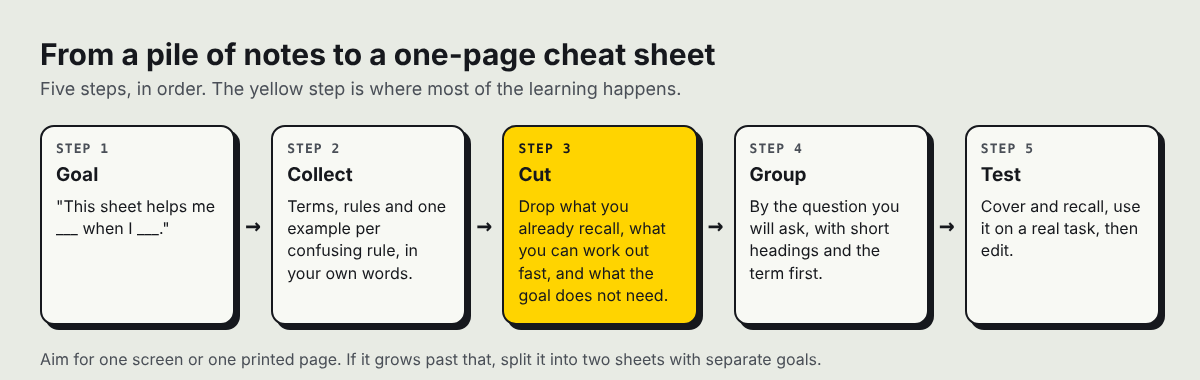
The five steps in order. Cutting is where most of the learning happens.
Structure the cheat sheet so it is easy to scan
Structure decides whether you use the sheet or abandon it. A few habits help:
- Group by the question you will ask, not by the order of your textbook. "Which code do I return?" is a better group than "Chapter 4."
- Use short headings. You should find a group by glancing.
- Put the term first, then the meaning. Bold the term so your eye lands on it.
- Use lists, not paragraphs. One idea per line.
- Show commands, names and values in code style, so they stand apart from the explanation.
- Add one example per tricky rule, and no more.
This is the same discipline as writing a step-by-step list: one action or idea per line, in an order that helps the person using it.
How to write a cheat sheet for a topic you are learning: a worked example
Say a made-up learner, Dana, is studying HTTP status codes, and her goal sentence is: "This sheet helps me pick the right status code when I build an API." Here is her finished sheet, built from the steps above. The codes match the MDN list of status codes.
HTTP status codes: which one do I return?
Success
200: the request worked and here is the result.201: something new was created.
Moved
301: moved for good. Use the new address from now on.302: moved for now. Keep using the old address.
The caller made a mistake
400: the request is malformed or missing something.401: the caller has not proved who they are.403: the caller is known but not allowed.404: nothing at this address.
The server failed
500: something broke on our side.503: the service is not available right now.
Mistakes to avoid (from Dana's practice questions)
- Returning
401when403was meant. Check: do I know who they are? If yes, it is403. - Using
200for an error with the message in the body. Use a real error code.
Look at what Dana did. The sheet is grouped by the question ("who made the mistake?"), not by the numeric order a reference page would use. The obvious items are gone. The "Mistakes to avoid" block carries the parts that actually cost time. You can read the whole thing in under a minute.
Test your cheat sheet and keep improving it
A cheat sheet you never test is just notes. Test it three ways:
- Cover and recall. Hide the right side of each line and say the meaning from the term alone. Mark the lines you miss.
- Use it on a real problem. Do a practice question or a small task with only the sheet for help. Note what you had to look up elsewhere.
- Hand it to someone. If it is meant for a classmate, ask them where they got stuck.
Then edit. Add what you had to look up. Remove what you never glanced at. After a few rounds the sheet becomes shorter and sharper, and by then you may need it less, which is the point.
If you keep sheets for several topics, publishing them as a run of short pieces is one way to build knowledge around a topic over time. Each one stays small and easy to scan, which fits the advice in how to write a short article people finish reading.
Frequently asked questions
How long should a cheat sheet be?
One screen or one printed page is a good limit. If it grows past that, split it into two sheets with separate goals.
Should I copy text from my textbook?
No. Put each item in your own words. If you cannot, you have found something you don't understand yet.
When should I make the cheat sheet: before or after studying?
Start a rough version while you study, then cut it down once you have seen the whole topic. Collecting as you go is easy, and the cutting step is where most of the learning happens.
Can I post a cheat sheet on Electrified?
Yes. A note holds up to 500 characters with no title, and an article has a title and as many sections as it needs. The editor reads ## headings, - lists, numbered lists, bold, inline code and > quotes.
Can I keep a cheat sheet private while I work on it?
Yes. After the first save it is a draft that only you can see until you publish it, and a draft is never shown to search engines.
Get started
Pick a topic you are learning right now and write the goal sentence. Then collect, cut, group, and test. When the sheet is ready, you can keep it on your own page: make an account on Electrified, write it as a note or an article, save it as a draft while you refine it, and publish when you are happy with it.
Comments
No comments yet.
Sign in or make an account to comment.