How to Write a Concept Note: One Idea per Article
A concept note explains one idea and stops. How to write a concept note: one idea per article is the whole rule, and the rest of this post shows how to keep to it. You pick an idea, define it in a sentence, show it once with an example, and point to related ideas instead of explaining them all in the same place.
If you want somewhere to publish these, Electrified gives you your own page where your articles live, with topic pages that group posts and a feed for each writer.
How to write a concept note: one idea per article, and why it works
A concept note is a short article about a single idea: a term, a method, a rule of thumb, a mental model. It answers one question, such as "What is a retry budget?" or "What does a cache key do?" A reader should be able to finish it and say the idea back in their own words.
One idea per article works for three reasons.
- The title can be exact. A title that names one idea tells the reader what they will get before they open the post.
- The note stays short. There is nothing to pad. If you want more on the style of length, see how to write a short article people finish reading.
- You can reuse it. A note on one idea can be linked from any later article that needs that idea, so you never explain it twice.
A concept note is different from a guide. A guide walks someone through a task. A concept note explains a thing. If you are writing steps, you want a step-by-step list instead, and the concept note can sit next to it as the place where the term is defined.
Pick the single idea your note will explain
Start with a noun phrase, not a topic. "Caching" is a topic. "Cache invalidation" is closer. "Time-based expiry" is an idea you can finish in one sitting.
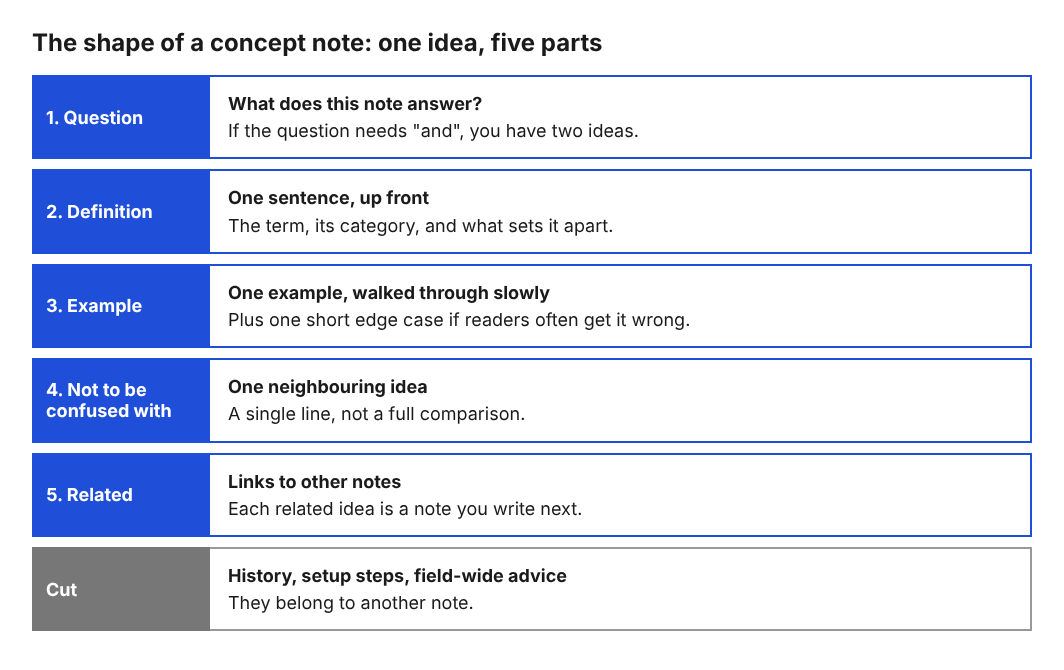
Use this test. Write the question your note answers. If you need the word "and" in the question, you have two ideas.
- Too wide: "What are retries and timeouts and backoff?"
- One idea: "What is exponential backoff?"
Then write down who is asking. A concept note for someone who has never seen the term reads differently from one for a colleague who wants a precise definition. Pick one reader and keep to them. If you are not sure which idea to start with, take the one you have explained out loud most often. You already know where people get stuck on it.
Write a one-sentence definition up front
Put the definition in the first paragraph. Do not build up to it. A reader who only reads the opening should still leave with the idea.
A good definition has three parts:
- The term.
- The category it belongs to ("a technique", "a rule", "a measure").
- What makes it different from its neighbors.
Here is a weak one and a strong one.
- Weak: "Idempotency is an important concept in software that many developers find useful."
- Strong: "An idempotent operation gives the same result whether you run it once or ten times."
The strong version has no filler and no praise for the idea. It says what the thing is. Check yours by reading it with the title hidden. If a stranger can tell what the term means, it works.
Explain the idea with a plain example
After the definition, give one example. Not three. One example that you walk through slowly teaches more than a list of cases the reader has to sort out alone.
Pick an example with these qualities:
- It uses things the reader already knows, like a light switch, a payment form or a shopping cart.
- It shows the idea working, then shows what happens without it.
- It has numbers or names, so it is concrete. "A customer clicks Pay twice" beats "a user repeats an action".
If the idea has an edge case that readers often get wrong, add it as a second short paragraph after the main example. Say it is an edge case and keep it to a few sentences. That is still one idea, seen from a second angle.
Cut everything that belongs to a different idea
This is the step that most writers skip. Once the draft exists, read it and mark every paragraph that would still make sense in a different note. Those paragraphs belong to another idea.
Common things to cut:
- History. Who invented the term is its own note, if it matters at all.
- Setup instructions. If the reader needs to install something, that is a task. Link to a guide, such as a getting started guide, and keep the concept note clean.
- Comparisons with a neighboring idea. A short "not to be confused with" line is fine. A full side-by-side belongs elsewhere.
- Advice that applies to the whole field. If it is true of every idea in the area, it is not about this one.
Do not delete what you cut. Paste it into a scratch file. Each piece is often the seed of your next note, which is the point of working one idea at a time.
Link related notes instead of merging them
When your note touches a second idea, link to it. If the note does not exist yet, that is your to-do list. A reader who already knows the second idea skips the link. A reader who does not can follow it.
On Electrified, the editor reads Markdown-style links, written as [link text](https://...), so a link to your earlier note is a single line. Each post can also carry up to 5 topics that you choose, separated by commas. Each topic links to a page listing every post under it, so use the same topic names across your concept notes. Over time those topic pages become an index of your ideas. Two existing ones are knowledge building and writing guides.
A run of linked concept notes is a way to build up knowledge around a topic. Each note is small. Together they cover the ground. Do not expect any link to help your search ranking, though. Links on the site may carry rel="nofollow ugc", so write the links for the reader, not for a crawler.
A concept note example you can copy
Here is a complete concept note, short enough to read in a minute. Copy the shape, not the topic.
Title: What Is an Idempotency Key? An idempotency key is a unique value a client sends with a request so the server can recognize a repeat and not do the work twice. Example. A customer clicks Pay, the network drops, and the page does not respond. They click Pay again. Without a key, the server sees two requests and may charge the card twice. With a key, the client sends the same value, say
order-4821-attempt, on both requests. The server sees that it already handled that key and returns the first result. Edge case. If the second request arrives while the first is still running, the server should wait or reject it, not start a second run. Not to be confused with a retry policy, which decides when to try again. The key makes trying again safe. Related: exponential backoff, request timeouts.
Look at what it does. It opens with the definition. It has one example, one edge case and one "not to be confused with" line. It ends with two related ideas, which are the next two notes to write. It never explains backoff or timeouts here.
To publish something like this on Electrified, open the editor at /write while signed in and choose Article. Type the title (up to 140 characters) and start each section with ## and a heading. Use the Preview tab to see it as it will look when published. Add your topics, then press Save draft. It saves as a draft that only you can see until you press Publish. A published post keeps its address, so links to it keep working.
If you only want to capture the definition for now, a note works too. A note is a short post of up to 500 characters with no title, which is enough for one sentence and one example. You can expand it into a full article later.
Frequently asked questions
How long should a concept note be?
Long enough to define the idea, show one example and name related ideas, and no longer. For most ideas that is a few hundred words. If it grows past that, check whether a second idea has slipped in.
Can I write a concept note as a short note instead of an article?
Yes, if the idea fits. A note on Electrified is up to 500 characters and has no title, so it suits a definition and one line of example. Use an article when you need a title and sections.
What if two ideas depend on each other?
Write two notes and link each to the other. Give each its own definition, so a reader can start from either one.
How do I know when I have more than one idea?
Write the question the note answers. If it needs an "and", or if a paragraph would still make sense in a different note, split it.
Should I add pictures?
Only if the idea needs one. The Electrified editor has no picture button. Pictures are uploaded through the site's images API with a personal token, so most concept notes are simpler as plain text with a clear example.
Get started
Pick one idea you have explained out loud more than once. Write its question, its one-sentence definition and one example. Cut anything that belongs somewhere else, and list the related ideas as your next notes.
Make an account on Electrified: write about your product, topic or idea on your own page, one article at a time, and let readers follow along.
Comments
No comments yet.
Sign in or make an account to comment.