How to write a start here post for your page
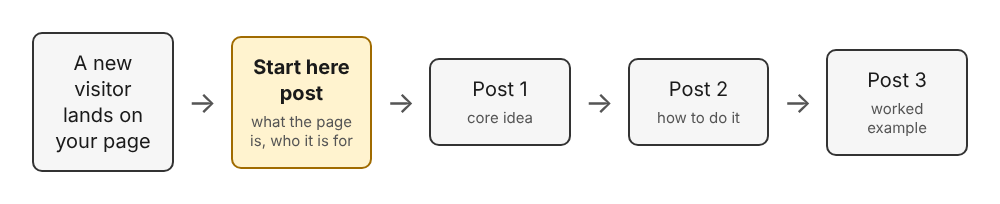
To write a start here post, publish one short article that says what your page is about, who it is for, and which three to six of your own posts to read first, in that order. It is a map, not a biography, and you can edit it as your page grows.
Electrified gives you your own page at /@handle where your notes and articles live, and a published post keeps its address, so a start here post can point to your other posts and stay valid.
What a start here post is
A start here post is an article for a person who has just landed on your page and does not know where to begin. It answers three questions: what is this page about, is it for me, and what should I read first.
Without one, a visitor sees a list of posts. A profile page shows your name, handle, bio, website and up to 100 published posts. That list helps once someone knows what they want. It does not tell a newcomer which post to open first or which ones belong together.
The need grows with every post you add. Five posts are easy to scan, and thirty are not. If you are writing a run of articles around one product, topic or idea, a start here post turns that run into a path.
Who a start here post is for
Write it for one person: someone who knows nothing about you and a little about your subject. Not an expert, and not your best friend.
Be specific about that person. "Anyone interested in home networks" is vague. "Someone who just bought a router and wants to stop guessing at settings" is a reader you can write for.
It also helps to say who the page is not for. One sentence such as "This page assumes you already know what an IP address is" tells the wrong reader to look elsewhere and the right reader that they are in the right place.
What to put in it
Include five things and little else.
- One sentence on what your page is about. Say it the way you would to a colleague.
- Who it is for. The reader from the section above, in a sentence or two.
- A short reading path. Three to six links, each with a line on what the reader gets from it.
- How to follow along. Your page has a Follow button, and every person has an Atom feed at
/@handle/feed.xml. For example, Miguel's feed is at/@miguel/feed.xml. Give your own address so feed reader users have it. - A line on who you are. One or two sentences, only what helps the reader trust the page. Your short bio, up to 280 characters, lives in Settings.
Leave out your life story, a list of every post you have written, and any promise about how often you will post.
How to write a start here post, step by step
- Wait until you have a few posts. A path needs something to walk through. Three published posts are enough to start.
- Write the answer sentence first. Fill in this blank: "This page is for people who want to ___, and it covers ___." If you cannot finish it, your page is not focused yet, and that is worth knowing.
- Sort your posts into an order. Put the post that needs the least background first and the most specific one last.
- Open the editor at
/writeand choose Article. A note is limited to 500 characters and has no title, so it is too small for this job. An article has a title of up to 140 characters and as many sections as it needs. - Write a title that says what the post is. "Start here: a practical path through home networking" works. A clever title does not.
- Add sections with
##headings. Give each part a short heading: what this page is, who it is for, the reading path, how to follow. - Add your links with
[text](https://...). Use the full address of each of your own posts, copied from the post itself. - Check the Preview tab. It looks like the published page, so you can see whether the path reads clearly.
- Save a draft, then publish. After the first save the editor tells you the post is saved as a draft that only you can see until you publish it. Publish when every link works.
- Post a short note that points to it. The "Post a note" box on the home page posts straight away, and a note of up to 500 characters is enough to say the start here post exists and link to it.
How to choose which posts to link
Choosing is the hardest part. Do not link your newest posts or your favourites. Link the posts that take a newcomer from knowing nothing to knowing something.
Use this test for each candidate: could a stranger read this post cold and get value from it? If it depends on three earlier posts, it is not a starting point.
A good reading path often mixes kinds of post:
- One post that explains the core idea. A concept note with one idea per article is a good shape for it.
- One post that shows how to do the main task, if your page is about a product or a skill. See how to write a getting started guide for your product.
- One post with a worked example.
- One quick reference for people who come back to it.
Stop at six links. If you have more good posts than that, your page may cover two subjects, and each could have its own topics and its own short path.
A start here template you can copy
Paste this into the editor and replace what is in brackets. The example after it is for a made-up page about home networking.
Title: Start here: a practical path through [your subject] ## What this page is. This page is for people who want to [goal]. It covers [two or three things], in plain language, with examples. ## Who it is for. You have [starting point] and want to [outcome]. You do not need [thing you do not assume]. ## Read these in order. 1. Post one title: [what the reader gets, in one line]. 2. Post two title: [one line]. 3. Post three title: [one line]. ## Keep reading. Follow my page, or add my feed at [your feed address] to a feed reader. ## About me. I am [name]. I write about [subject] because [one honest reason].
Filled in for the made-up home networking page, the reading path might say: "1. What your router actually does: the jobs it handles at once. 2. Three settings to change first: a short checklist. 3. Why your Wi-Fi drops at night: a worked example of finding the cause." Each line tells the reader what they get, not just the title. Those post titles are invented for this example.
Mistakes to avoid
- Making it long. If it is longer than the posts it links to, you have written the wrong thing. The advice in how to write a short article people finish reading applies here.
- Linking everything. A list of thirty links is an archive, not a path. Your page already lists your posts.
- Writing it once and never touching it again. When you publish a stronger post, edit the start here post and choose Save changes. The address stays the same, so links to it keep working.
- Using only titles as link text. Add a line after each link saying what the reader will learn.
- Selling instead of guiding. If you write about a product, explain it honestly and show how it works. A start here post is a guide, not an ad.
- Forgetting the topics. Give the post up to 5 topics, each under 40 characters. Each topic links to a page of every post about it, so a reader who finishes your path can find more on the same subject.
Frequently asked questions
How long should a start here post be?
Short enough that the reader reaches the links without effort. It only needs to say what your page covers, who it is for and which three to six posts to read first.
Should a start here post be a note or an article?
Write it as an article. A note is limited to 500 characters and has no title, while an article has a title and sections, which a reading path needs. A short note is useful afterwards, to point people to the article.
Can I change my start here post later?
Yes. Open the published post, edit it and choose Save changes. A published post keeps its address, so links to it still work.
Do I need one if I only have a few posts?
Not at first. With only a post or two, your page already works as the list. Write it when you notice you would struggle to say which post a newcomer should read first.
Where should I link to my start here post?
Mention it in a note, link it from your other articles, and consider putting its address in the Website field in Settings. Your bio is limited to 280 characters, so use it to say what you write about.
Get started
Write three posts on one subject, then write the post that ties them together. If you do not have a page yet, you need a name, a handle, an email and a password of at least 8 characters, and you get your own page at /@handle. Browse the writing guides to see how other pieces on this site are shaped.
Make an account on Electrified: write about your product, topic or idea on your own page, one article at a time, and let readers follow along.
Comments
No comments yet.
Sign in or make an account to comment.