Why AI Agents Fail: Loops, Tools and the Guardrails That Help
Why AI agents fail comes down to one fact: an agent is a language model running in a loop, so every small error gets a chance to repeat. It picks a step, calls a tool, reads the result and picks the next step, with nobody checking in between. A chatbot that slips gives you one bad paragraph. An agent that slips can retry the same wrong call all night, or send the wrong email.
The Agents and Automation course on Age of AI Entrepreneur has a lesson called "Tools, Loops and Why Agents Fail", and a reader signs in with an email and an emailed code to open it; this post goes through the same ground with a worked example you can copy.
An agent is a loop, and that is the first risk
The course's first lesson, "Workflows Versus Agents", draws the line. A workflow is a fixed sequence you wrote: step one, step two, step three. The model does language work inside each step, but your code decides the order. An agent decides the order itself, using tools, until it thinks the job is done.
That freedom is the reason agents are useful, and also the reason they fail in ways a workflow cannot. A workflow with a bad step fails at the same place every time, so you find it fast. An agent can fail in a different place on each run. If you are not sure whether your product needs the loop at all, the post on the AI tech stack for startups shows where a model call fits among the other parts.
Why AI agents fail: four patterns that repeat
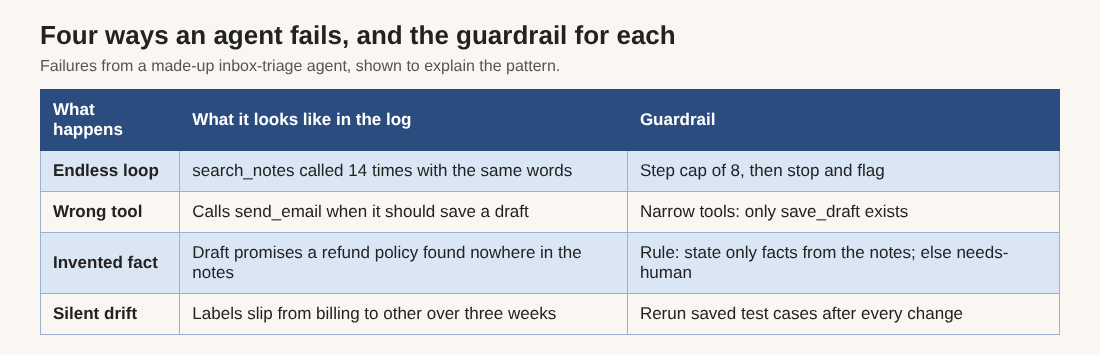
Most failures fall into four patterns. Learn to spot them in a log and you can fix most agents you meet.
- The endless loop. A tool returns something the model does not like, so it calls the same tool again with nearly the same input. Nothing changes, so it tries again. Without a limit, this runs until your budget does.
- The wrong tool. The model reads each tool's name and description and picks one. If "send email" and "save draft" sound alike, it will sometimes pick the wrong one.
- The invented fact. Language models can state wrong things with full confidence. The post on AI hallucination examples shows real cases. In an agent, an invented fact does not stay in a paragraph. It ends up in an action.
- The silent drift. The agent works on day one. Three weeks later a prompt change, a new kind of input or a model update makes it a little worse, and nobody notices because nothing crashes.
How tools turn small errors into real actions
A model on its own only produces text. A tool is a function it is allowed to call: search the web, read a file, draft a reply, call an API. Each tool is a small contract with a name, a description and the inputs it takes. The model reads those descriptions and chooses. So your tool descriptions are part of your prompt, and vague ones produce wrong calls.
Three habits cut the risk from the start:
- Give the fewest tools that do the job. Every extra tool is another wrong choice the model can make.
- Make each tool narrow. "Save a draft reply" is safer than "send email", because the worst case is a bad draft a person deletes.
- Start read-only. Let the agent look before you let it change anything.
Guardrails that catch each failure
Each pattern has a plain countermeasure. None of them needs a framework.
- A step cap. Stop the loop after a set number of steps, say eight, and flag the run for a person. This ends the endless loop.
- A spending cap. Every model call costs tokens. Set a ceiling per run so one confused run cannot cost a week of budget.
- Output checks in code. Before any action, check the result: is the address valid, is the reply under a length limit, does it avoid banned phrases?
- A rule for not knowing. Write into the agent's standing instructions that "I don't know, ask a person" is an acceptable answer. A model told this is more likely to use it than one that is never offered the choice.
- A log of every call. Record each tool call and result. When something breaks, the log is how you find out why.
- Human approval. Anything that sends, pays, deletes or publishes waits for a yes from a person. Loosen this only for low-risk actions, and only after your logs show many clean runs.
A worked example: an inbox agent and its failure log
Take a small agent that reads new customer emails, labels each one and writes a draft reply for you to approve. The numbers below are made up to show the method. Here is how you build it so the four failures show up early and cheaply.
- Write it as a workflow first. Fetch new emails, ask the model to label each as question, bug report, billing or other, then draft a reply. No loop yet. Run it on twenty old emails and read every result.
- Add one tool at a time. First
read_inbox, which is read-only. Thensearch_notes, which looks through a file of your product facts and policies. Lastsave_draft, which stores a reply but cannot send it. Because no tool sends, the wrong-tool failure cannot hurt anyone. - Write the standing instructions. Include the tone, the rule "only state facts found in the notes", and the fallback "if the notes do not answer it, label the email needs-human and draft nothing". That is your answer to the invented fact.
- Add the loop and the caps. Let the model decide whether to search the notes before drafting. Cap the run at eight steps and log every call.
- Read the log after a week. Say you find that 6 of 120 runs hit the cap. Reading them shows the model searching for a refund policy your notes never mention. The fix is not a bigger cap. It is a line in the notes saying what you do about refunds, or a rule to stop and flag when a search returns nothing twice.
- Turn each failure into a test. Save every bad run as a test case. Before you change the instructions, rerun all the cases and check that the score did not drop. This is your defence against silent drift. The Evals: Shipping AI That Works course teaches this habit in depth, and the post on using an LLM as a judge shows how to grade outputs at scale.
The arithmetic that matters: 6 capped runs out of 120 is 5 percent. A 5 percent failure rate is invisible in a demo and very visible to the customers it touches, which is why you read logs instead of trusting the first good run.
When a plain workflow beats an agent
Not every job needs a loop. If you can write the steps in advance, write them. A workflow is easier to test, cheaper to run and easier to explain when it breaks. Reach for an agent when the path truly changes from one input to the next, for example when the next step depends on what a search turns up.
Picking the first job matters as much as the design. A good first task is boring and repeated, takes text as input, costs little when wrong and has a clear picture of "done". The lesson "Project 3: Automate One Boring Workflow" in the Your First Builds course is a gentler step before the agent level.
Frequently asked questions
Why do AI agents fail more often than chatbots?
An agent runs many steps with no person in between, so one wrong choice can feed the next. A chatbot gives one answer, and a person reads it before anything else happens.
How do I stop an AI agent from looping forever?
Set a hard cap on steps and a spending cap per run, and make the agent stop and flag the run for a person when it hits either. Log every tool call so you can see what it kept retrying.
Should an agent be allowed to send emails or make payments?
Not at first. Give it read-only tools and tools that save drafts, and keep a person approving anything that sends, pays, deletes or publishes. Loosen that only after your logs show clean runs.
How do I know if my agent is getting worse over time?
Save every bad run as a test case and rerun the whole set after each change to the instructions or the model. A score that drops tells you about drift before a customer does.
Get started
Pick one narrow job, write it as a plain workflow, and read every result before you give a model a loop. Then add tools, caps and a human check one at a time, and read the log after the first week.
To work through it with short lessons, sign in to Age of AI Entrepreneur with your email and an emailed code, then open the Agents and Automation course. It has three lessons: Workflows Versus Agents, Tools, Loops and Why Agents Fail, and Project: An Agent That Does a Real Job.
Building a business in the age of AI, from a first project to a company.
Visit aientrepreneur.vlvd.net↗
Comments
No comments yet.
Sign in or make an account to comment.