Jazzy piano tracks for a cooking tutorial video: what to pick
If you want jazzy piano tracks for a cooking tutorial video, choose by feel, not by genre label. You want soft chords, a relaxed swing and a tempo that lets your voice sit on top. Wavecrate has no Jazz genre, so this guide shows where the same feel hides in the genres it does have.
Wavecrate lets you filter music by mood, tempo, key and energy, so you can shortlist piano tracks by the numbers and then confirm by ear. Items marked Free download now with a free account; paid licenses are not on sale yet.
Why jazzy piano tracks for a cooking tutorial video work
A cooking video has a rhythm of its own: chop, stir, wait, taste. Piano chords with a loose feel follow that rhythm without pushing it. Piano also leaves gaps. A single sustained chord under a close-up of simmering sauce feels calm, while a busy brass section over the same shot feels like a lounge ad.
For a tutorial, calm wins, because viewers are following instructions and need to hear them. The same logic runs through our guide to soft jazz tracks for a cafe menu video. A cooking tutorial asks for the same softness, with more room left for speech.
What Wavecrate has instead of a jazz genre
The genre list on the browse page reads Lo-fi, House, Cinematic, Hip-hop, Ambient, Corporate, Rock, Chiptune, Acoustic and Synthwave. A search for "jazz" returns 0 results. A search for "piano" returns 7 tracks, all in Lo-fi or Hip-hop.
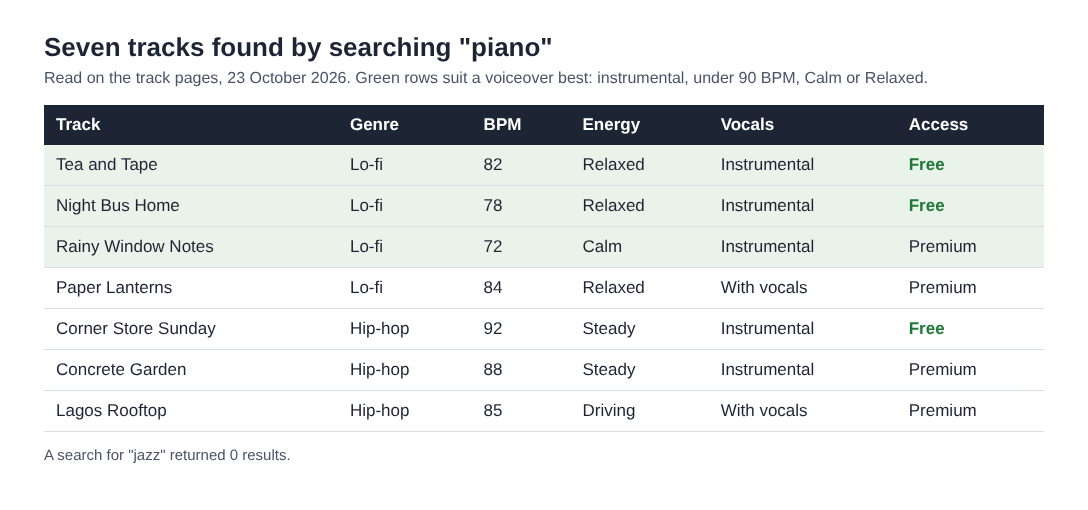
None of these is labeled jazz, and this post will not call them jazz. What they share is what you are after: piano at the center, a relaxed groove and a friendly mood. Four of the Lo-fi tracks describe "soft electric piano chords" under "dusty swung drums". That is a mellow electric tone, not a grand piano.
Three tracks to start with
- Tea and Tape (Lo-fi, Free, instrumental, 82 BPM, Relaxed). The page says "Calm and Happy, good for study and cooking", so it is the closest match to your topic.
- Night Bus Home (Lo-fi, Free, instrumental, 78 BPM, Relaxed). Same instrumentation, with a Calm and Nostalgic mood. Try it for slow dishes such as soups and braises.
- Corner Store Sunday (Hip-hop, Free, instrumental, 92 BPM, Steady). "Boom-bap drums, deep sub bass and a looping piano phrase", Happy and Playful. The drums are more present, so it suits a lively recipe or a plating shot.
If you can wait for paid licenses, Rainy Window Notes (Lo-fi, Premium, 72 BPM, Calm) is the slowest of the seven. Paper Lanterns and Lagos Rooftop have vocals, which fight with a voiceover, so skip them for a tutorial.
Tempo, energy and mood: what to filter for
The music browse page has three tempo bands: Slow (under 90 BPM), Mid (90 to 120) and Fast (over 120), plus a custom range. For a cooking tutorial, start at Slow and widen to Mid only if the video needs more lift. A fast beat pulls attention away from your words.
The energy filter runs Calm, Relaxed, Steady, Driving and Intense. As a rule of thumb, Relaxed suits slow instructions and Steady suits a brisk walkthrough. Driving is rarely right under a recipe. For mood, pick calm, happy or playful. There is no "chill" mood in the filter, so use calm.
Set the Vocals filter to Instrumental. A vocal line under a spoken line is a fight you will lose.
Keep the piano from fighting your voiceover
Piano sits in the same frequency range as a human voice, which is the main reason it can clash with narration. A few habits keep it out of the way:
- Set your voice level first. Bring the music up until you just notice it, then pull it down a little more.
- Dip it under key instructions. When you say a temperature or a timing, lower the music for those few seconds.
- Prefer sparse arrangements. Soft chords with light drums leave more room than a looping phrase over deep sub bass.
- Use bolder music only when there is no talking. If your video uses on-screen text instead of a voiceover, a track like Corner Store Sunday can come up louder.
A similar balance appears in piano music for a language lesson video, where the spoken word is the point and the music has to stay behind it.
A worked example: a six minute pasta video
Each track page offers three versions: the full track, a 30 second edit and an 8 bar loop. For Tea and Tape these run 1:10, 0:29 and 0:23, and Corner Store Sunday's 30 second edit is 0:31. A recipe video gives music three different jobs.
- Intro, first 30 seconds. Use the 30 second edit of Tea and Tape while you say what you are making and why. Fade it as the method starts.
- Steps, the middle. Run the full track very low under the cooking. At 1:10 it repeats several times in six minutes, so keep it quiet. For a long silent stretch such as a simmer, use the loop and then fade it out. Swap to Night Bus Home halfway if the repeat starts to show.
- Plating, the last minute. Cut to the 30 second edit of Corner Store Sunday. Firmer drums tell the viewer the work is done and it is time to eat.
While you audition, Space plays or pauses, Left and Right skip 5 seconds, M mutes and / jumps to search. Skipping around lets you test the intro and plating moments fast. The Study and focus collection holds Tea and Tape, Night Bus Home and Rainy Window Notes together, and describes itself as "low-key beats and pads that stay out of the way of your thinking", which is close to what a voiceover needs.
Licensing piano tracks for a cooking channel
Items marked Free carry a Free license. It covers YouTube, TikTok, Instagram, Twitch and podcasts, including monetized channels, and asks for credit text in your video description. A free account gets 3 free downloads a month. Tea and Tape, Night Bus Home and Corner Store Sunday were all marked Free on 23 October 2026; read the page on the day you download, because items can change.
The Free license does not list your own business and brand videos. If your channel promotes a shop, a cookbook or a course, that is business content, and the Standard license ($15 listed on the track pages) lists it. If a brand pays you to make a recipe video, that is client work, and the Extended license ($49 listed) names client work, paid ads and apps. Paid licenses are not on sale yet, because purchases open soon, so treat those prices as the listed prices for when sales open, not something you can pay today.
Every license comes with a certificate and a code. Paste the code in your video description, and anyone can check it on the verify page with no account. Wavecrate keeps the copyright; you get a license, not the music. The pricing page has the full table.
Frequently asked questions
Does Wavecrate have a jazz genre?
No. The genres are Lo-fi, House, Cinematic, Hip-hop, Ambient, Corporate, Rock, Chiptune, Acoustic and Synthwave, and a search for jazz returns nothing. A search for piano finds seven tracks in Lo-fi and Hip-hop.
Which tempo works best for a cooking tutorial?
Start in the Slow band, under 90 BPM, and move to Mid (90 to 120) only if you need more energy. Tea and Tape at 82 BPM is a good reference for a calm video.
Can I use a Free track on a monetized YouTube cooking channel?
Yes. The Free license covers monetized channels on YouTube, TikTok, Instagram, Twitch and podcasts, with credit text in your description. It does not list your own business and brand videos, so a channel that sells something needs Standard.
Can I buy a license today?
No. Paid licenses are not on sale yet and purchases open soon. Items marked Free can already be downloaded with a free account.
How do I show someone my license is real?
Paste the license code in your video description. Anyone can enter it on the verify page and check it with no account.
Get started with Wavecrate
Search "piano" on the music page, set Vocals to Instrumental and Tempo to Slow, then play Tea and Tape under a clip of your own cooking. Try Corner Store Sunday on your plating shot.
Browse Wavecrate: you can join free and download items marked Free now, paid licenses are not on sale yet (purchases open soon), and every download comes with a license certificate and a code anyone can check on its verify page.
Music, sound, photos and video with a license you can prove.
Visit wavecrate.vlvd.net↗


Comments
No comments yet.
Sign in or make an account to comment.