Laravel Security: What to Check Before You Launch
Laravel security starts with a short list of settings and habits. The framework is meant to be secure by default, and the OWASP Laravel Cheat Sheet says the risk comes from the flexibility around those defaults: a developer who does not know how a feature works inside can use it in an insecure way. This post turns that sheet into a review you can run on your own app before you launch.
Building something that has to be safe? Book a meeting with whitehatstoic: it builds web and mobile apps, tests web apps and AI systems for weak spots, and gives independent advice.
Where Laravel security goes wrong
Laravel protects against many common attacks out of the box. You lose that protection in small steps: you turn debug on and forget it, unguard a model to save time, write one raw query, or print a value without escaping it. None of these is a clever attack waiting for you. They are your own shortcuts.
So the first job is a reading job. Open your config files, your models and your controllers, and compare them with the sections below. Most fixes are one line.
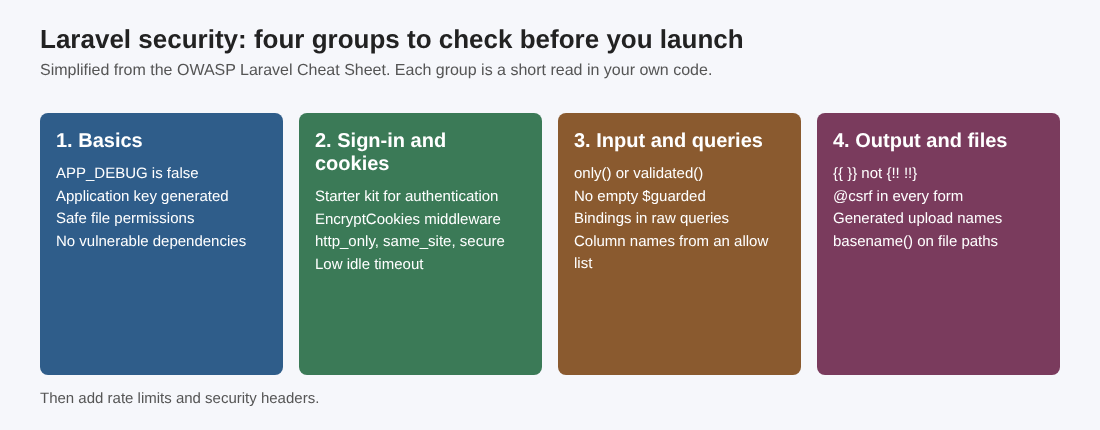
Four groups of checks, each one a short read in your own code.
The basics: debug, app key, permissions, dependencies
OWASP starts with four checks.
- Debug off. Set
APP_DEBUG=falsein production. - App key generated. Laravel uses the key for symmetric encryption and SHA256 hashes, such as cookie encryption, signed URLs, password reset tokens and session data encryption. Run
php artisan key:generateif you have not. - Safe file permissions. The sheet says directories should have a maximum permission level of 775, non-executable files 664, and executable files such as Artisan or deployment scripts 775.
- No vulnerable dependencies. Check the packages your app uses and update the ones with known problems.
The sheet also points to its PHP Configuration Cheat Sheet for secure PHP settings. Read both: Laravel runs on whatever PHP configuration the server gives it.
Cookies, sessions and sign-in
By default Laravel is set up in a secure way. The checks matter if you changed your cookie or session settings. OWASP lists these:
- Enable the
EncryptCookiesmiddleware in thewebmiddleware group if you use the cookie session store or keep any data in cookies that clients should not read or change. - In
config/session.php, set'http_only' => trueso JavaScript cannot read the session cookie. - Set
'domain' => nullunless the cookie must be shared with subdomains. - Set
'same_site'to'lax'or'strict'. - If the app is HTTPS only, set
'secure' => true. If it mixes HTTP and HTTPS, set it tonullso the attribute is added when a request arrives over HTTPS. - Keep the idle timeout low. OWASP recommends 2 to 5 minutes for high value applications and 15 to 30 minutes for low risk ones, set with
'lifetime'.
For sign-in, the sheet recommends one of Laravel's first-party starter kits. Breeze is a minimal version of login, registration, password reset, email verification and password confirmation. Fortify is a headless backend that adds two-factor authentication. Jetstream puts a UI on top of Fortify. For API authentication, Passport is an OAuth2 provider and Sanctum issues API tokens. Writing your own login is where teams usually go wrong; for the wider picture see the same review for a Django project.
Mass assignment and SQL injection
Mass assignment lets a user change a column you never meant to expose. OWASP's example is a profile route that calls forceFill($request->all())->save(). If the users table has an is_admin column, any logged-in user can send it and promote themselves. Three rules from the sheet:
- Name the fields you allow with
$request->onlyor$request->validated, never$request->all. - Do not unguard models or set
$guardedto an empty array. That switches off Laravel's own protection. - Avoid
forceFillandforceCreate, which bypass it. Use them only with a validated array.
For SQL injection, Eloquent parameterizes queries and uses bindings, so User::where('email', $email)->get() is safe even if $email is untrusted. The danger sits in three places.
Raw queries. whereRaw('email = "'.$request->input('email').'"') joins user input into the SQL. Use bindings: whereRaw('email = ?', [$request->input('email')]). Named bindings such as :email work too.
Column names. Never let user input choose a column, as in orderBy($request->input('sortBy')). Databases cannot bind column names, so Laravel's wrapping may not be enough on some engines and versions. Validate against a list: $request->validate(['sortBy' => 'in:price,updated_at']).
Validation rules. Rules such as Rule::unique('users')->ignore($id, $request->input('colname')) build a query from a column name. If the name comes from the request, it is the same flaw.
Cross-site scripting, CSRF and other injections
Blade's {{ }} escapes ordinary string values with htmlspecialchars. That is right for HTML text and quoted ordinary attributes, but it does not check URL schemes or encode JavaScript or CSS contexts. The unescaped syntax {!! !!} must never touch untrusted data. For data placed in JavaScript, OWASP points to Laravel's Js::from guidance, and to its Cross Site Scripting Prevention Cheat Sheet for URLs and CSS.
For CSRF, keep the VerifyCsrfToken middleware in the web group, put @csrf in every POST form, and send the X-CSRF-Token header on AJAX requests. You can exclude routes with $except, but OWASP says to exclude only stateless routes such as APIs or webhooks. Any other excluded route can be forged.
The sheet adds a few more habits:
- Command injection. Avoid shell commands when a PHP library can do the job. If you must run a process, keep the executable fixed and pass arguments separately with Symfony Process. Do not use
escapeshellcmd()as a substitute, since it still permits extra arguments. - Dangerous functions. Do not pass untrusted input to
unserialize,evalorextract. - Open redirects.
redirect($request->input('url'))sends users to any address an attacker picks, which helps phishing. Do not redirect to a URL taken straight from input.
File uploads and file paths
OWASP treats uploads as one of the riskier areas. Validate the type and set a maximum size, for example 'photo' => 'file|max:100|mimes:jpg,bmp,png'. Then remember what that does not do. The mimes rule infers the type from the content. It does not validate the extension the user supplied, and it does not make the file safe to run.
So also generate the stored filename yourself, keep uploads outside the web root or on a separate host, and make sure the server cannot execute uploaded files. Bound the total storage and the upload frequency too, not only one file's size.
The same sheet warns about paths built from input. A route that calls storeAs(auth()->id(), $request->input('filename')) lets a name such as ../2/filename.pdf write into another user's folder. A download route using storage_path('content/').$request->input('filename') could be asked for ../../.env. Wrap the name in PHP's basename() to strip directory information. Avoid processing ZIP or XML files if you can: XML brings XXE and billion laughs attacks, and ZIP brings zip bombs.
Rate limits, headers and a one-afternoon review
Laravel has two ways to limit requests. The throttle middleware works per route (throttle:10,1 means 10 requests per minute) or per route group. RateLimiter::for() defines a custom limiter, for example Limit::perMinute(5)->by($request->user()?->id ?: $request->ip()). You can also set limits on the whole api or web group, and the api group is rate limited by default. For headers, OWASP says to consider X-Frame-Options, X-Content-Type-Options, Strict-Transport-Security (HTTPS only apps) and Content-Security-Policy.
Here is a worked example for one afternoon on a small app:
- Open
.envandconfig/session.php. ConfirmAPP_DEBUG=falseand the cookie settings above. - Search the code for
whereRaw,DB::raw,orderBy(andforceFill. For each hit, ask: does input reach it? - Search your models for an empty
$guardedand your controllers for$request->all(). - Search the Blade files for
{!!and check each use. - Read the upload and download routes and the CSRF
$exceptlist. - Add
throttleto login and password reset routes, then write down what you changed.
If you also want to see how the same habits look for other stacks, the FastAPI review covers the API side.
Frequently asked questions
Is Laravel secure by default?
OWASP calls it meant to be secure by default, with built-in protections for SQL injection, XSS and CSRF. It also says its flexibility lets developers who do not know the internals use features in ways that are not secure.
What is the first setting to check?
Set APP_DEBUG=false in production and make sure the application key is generated. These are the first two items on the OWASP list.
Does Blade escape everything?
Only {{ }} on ordinary string values, and only for HTML text and quoted attributes. Anything printed with {!! !!} is not escaped, and URLs, JavaScript and CSS need their own handling.
Does a checklist prove my app is secure?
No. It catches common mistakes. Flaws in your own logic need a review or test by someone who did not build the app.
Get started
Work through the list and fix what you find. whitehatstoic builds web and mobile apps and tests web apps and APIs for weak spots, with a written report and a retest after fixes. Book a meeting with whitehatstoic and tell us about your app, your deadline and your biggest worry; work is scoped after a short call.
Comments
No comments yet.
Sign in or make an account to comment.