FastAPI security: what to check before you ship an API
FastAPI security is mostly about what you add around the framework: who may call each route, what a request may contain and what a response gives away. This guide follows the OWASP FastAPI Security Cheat Sheet and is written for a founder or engineer who is about to put a FastAPI service in front of real users.
If you want a second pair of eyes on your API before launch, whitehatstoic tests web apps and AI systems for weak spots, with a written report and fixes.
FastAPI is a Python web framework built on ASGI, the Asynchronous Server Gateway Interface. The sheet covers three things: authentication dependencies, input and output models, and deployment controls. It says its code snippets show single controls, not whole applications, so adapt and test them for your app.
For general API controls see REST API security.
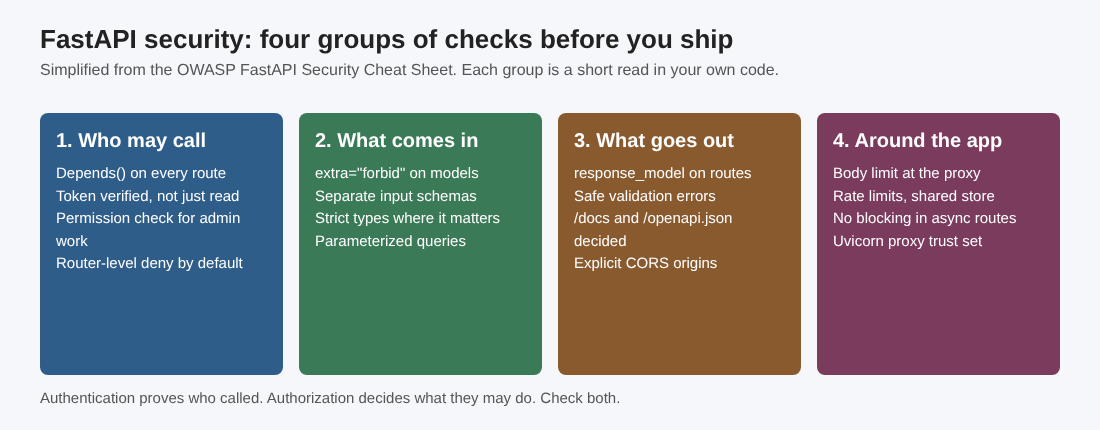
FastAPI security starts with who may call each route
FastAPI enforces access through dependency injection, using Depends(). A route with no dependency is open to everyone, so the first review is a walk through every route asking which dependency guards it.
- Verify the token yourself. The helper
OAuth2PasswordBeareronly checks the authorization scheme and pulls out the bearer token. It does not validate the token or its signature. Your authentication dependency must do that and reject bad credentials before it returns a user. - Authenticate, then authorize. Knowing who called is not permission to act. The sheet's example is a
get_admin_userdependency that wrapsget_current_userand answers 403 when the user is not an admin. - Deny by default at the router. Put the authentication dependency on the whole
APIRouter, so a new route added later inherits the check. That covers only that router, and sensitive actions still need permission checks.
Broken access control is the usual failure here. The post on broken access control gives a test plan you can run against these routes.
Verify tokens the way the sheet asks
If you use JSON Web Tokens, you own the verification and the key handling. The sheet names PyJWT and says to let the library verify tokens rather than write your own parsing or cryptography. Then it adds four rules:
- Require the key claims. Verify the signature and require
exp,issandaud, with the expected issuer and audience supplied. Requiring a claim only checks that it is present, so keep the matching verification on. Checknbfwhen it is present. - Name the algorithm. Set the accepted algorithm in your decode call. Never take it from the token's own header.
- Plan for theft. Expiry limits a token's life and a blocklist rejects revoked tokens, but a stolen token that is still valid can be reused.
- Handle cookies with care. If you keep a refresh token in a cookie, set
HttpOnly,SecureandSameSiteto Lax or Strict where your flow allows.HttpOnlystops scripts reading the cookie but not injected scripts making requests as the user. Cookies are sent automatically, so protect refresh routes against CSRF too, and treatSameSiteas a second layer.
For the wider list of token tests, see JWT security.
Keep the signing key out of the code. The sheet says never to hardcode a signing secret or ship a default development key. Supply it from deployment-managed storage, preferably a mounted secret file or a secret manager, and use environment variables only when nothing safer is available. Keep local .env files with secrets out of source control.
Harden what comes in with Pydantic
Pydantic models check the shape of the data, but the sheet is plain that they do not replace authorization or stop injection. Four habits help:
- Reject unknown fields. By default Pydantic ignores fields you did not declare. Set
extra="forbid"in the model config if the API should refuse such requests. - Use separate input schemas. Keep one for create and one for update, and leave out server-controlled fields such as
is_adminorid. Save only the validated fields, not the raw request dictionary. Note thatextra="forbid"does not stop a client setting a sensitive field you declared in the input schema. See mass assignment. - Use strict types where the exact type matters. Pydantic will turn the string "123" into the number 123 unless you use
StrictIntorStrictBool. - Keep queries parameterized. Validation does not prevent SQL injection. Use parameterized queries, including through an ORM that binds parameters, and never build SQL with string formatting on user input. See SQL injection testing.
Control what goes out
Three places leak data on the way out.
Response models. Set response_model on each route so FastAPI filters the database object down to the fields you list. That keeps a field like password_hash out of the reply even if the query returned it.
Validation errors. A request validation error can echo the values a client submitted, including passwords or tokens. In your RequestValidationError handler, return only safe field locations and error descriptions, or a generic message. Do not return str(exc) or the whole request body, and keep those values out of your logs too. More on this in error handling.
The docs routes. FastAPI serves interactive documentation at /docs and /redoc, and the schema at /openapi.json. Decide whether that should be public. If not, restrict those routes or turn them off with FastAPI(openapi_url=None). Hiding the documentation does not protect the API, so every operation still needs its own authorization.
CORS origins. Wrong CORS settings can let an untrusted website read private API answers in a visitor's browser. CORS does not replace endpoint authorization or restrict non-browser clients. Two rules:
- When
allow_credentials=True, list the trusted origins inallow_origins. Never pair credentials withallow_origins=["*"]. - Limit
allow_methodsandallow_headersto what your client really uses.
The post on CORS misconfiguration shows how to check yours.
Protect the event loop, uploads, limits and proxy settings
Do not block the event loop. A worker whose loop is blocked cannot serve other requests, which is a denial of service risk. Use asynchronous database and network clients inside async def routes. For a synchronous library, use a plain def route or dependency, which FastAPI runs in a thread pool. BackgroundTasks still runs inside your app process, so send heavy or long jobs to a separate worker system such as Celery.
Limit uploads before they are parsed. FastAPI parses the multipart form before it runs your dependencies, so a size check on UploadFile.size comes too late to save the resources already spent. Set a body limit at the reverse proxy or gateway, for example Nginx's client_max_body_size,. Treat UploadFile.filename as untrusted: never use it as a storage path, and do not accept content_type as proof of what the file is. The file upload checklist covers the rest.
Rate limit sensitive routes. The sheet gives three options: a library such as slowapi for per-route limits, a shared counter store such as Redis when you run several workers or replicas so the limit holds across all of them, or limits at the proxy or gateway.
Uvicorn proxy options. If your app sits behind a reverse proxy, tell the ASGI server which proxies to trust so clients cannot fake their address or scheme with forwarding headers. Set --forwarded-allow-ips to your trusted proxies and have those proxies overwrite untrusted forwarding headers. Avoid --forwarded-allow-ips="*", which trusts every client that connects. The --no-server-header option hides Uvicorn's default Server header, which removes one clue but does not stop other fingerprinting.
A worked example: one afternoon before launch
Take a small FastAPI service with sign-in, a user profile, file uploads and an admin page.
- List every route and write the dependency that guards it. Any blank is a finding.
- Move the sign-in check to the router for the profile and admin routers, then add a permission dependency on the admin routes.
- Read the token decode call. Confirm it names the algorithm and requires
exp,issandaud. - Split the profile model into an input schema without
is_adminand a response model without the password hash. - Fix CORS to the real front-end origin and decide what to do with
/docs. - Set the body limit at the proxy and a rate limit on sign-in and upload.
Frequently asked questions
Does FastAPI check my tokens for me?
No. OAuth2PasswordBearer only pulls the bearer token from the header. Your dependency must verify the signature and claims and reject invalid tokens.
Is a Pydantic model enough to stop bad input?
No. It checks shape and type, but OWASP says it does not replace authorization checks or prevent injection. Add parameterized queries and permission checks.
Should I turn off /docs in production?
Decide on purpose. If the documentation is private, restrict the pages and schema or set openapi_url=None. It protects nothing by itself, so every route still needs authorization.
Why can I not check upload size in my endpoint?
FastAPI parses the form before it runs dependencies, so the resources are already used. Set a body limit at the reverse proxy or gateway instead.
Get started
An API is where sign-in, data and payments meet, so it is worth a check before launch. whitehatstoic runs security tests on web apps and AI systems, with a written report and fixes, covering web app and API review and a retest after fixes. No test finds every weakness, but a focused look at your routes, tokens and limits is a sound place to start.
Building something that has to be safe? Book a meeting with whitehatstoic: tell us the product, the deadline and your biggest worry, and we reply with a plan.
Comments
No comments yet.
Sign in or make an account to comment.