Django Security: Settings to Check Before You Deploy
Django security starts in one file, settings.py. The framework ships with protections that aim to be secure by default, and the OWASP Django Security Cheat Sheet says plainly where a team can switch them off or set them up wrong without noticing. This post turns that sheet into a review you can run on your own project before a deploy, in the order the settings matter.
Building something that has to be safe? Book a meeting with whitehatstoic: it builds web and mobile apps, tests web apps and AI systems for weak spots, and gives independent advice.
Why Django security is mostly about settings
Django's built-in features are flexible, so you can reuse them for complex cases. OWASP points out the other side of that: developers who do not know how a component works inside can configure it in an insecure way. The sheet exists to list such cases, with short explanations and Django-specific code.
That makes the first job a reading job. Open settings.py and compare it with the sections below. Most fixes are a line you add, a line you remove, or a value you move out of the code.
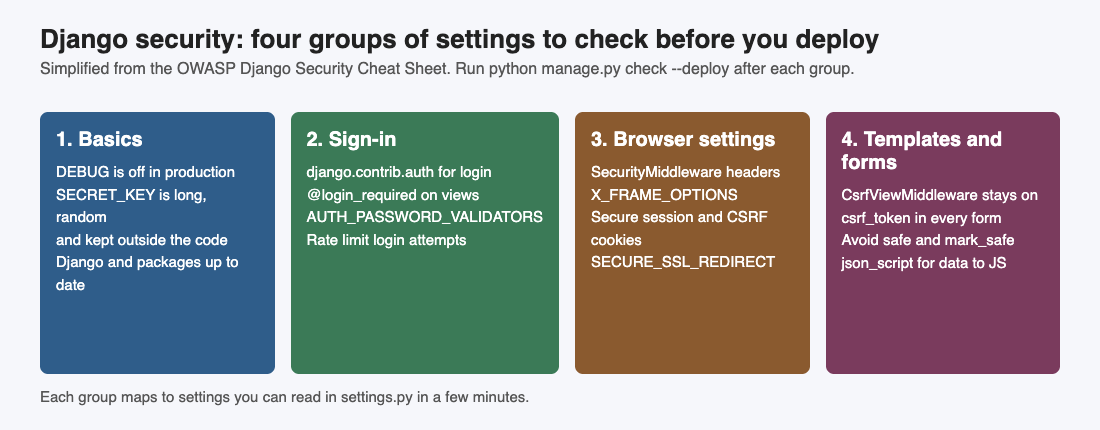
Four groups of settings, each one a short read in settings.py.
Turn off debug and keep the secret key private
Start with the two lines that cause the most trouble. The sheet says the app must never run in DEBUG mode in production, and puts it in capitals: never run DEBUG = True there. Debug pages show a lot about your code to anyone who triggers an error.
Next, SECRET_KEY. Django uses it for cryptographic signing, so it must stay confidential. OWASP's advice, in short:
- Make it long and random. Use at least 50 characters with a mix of letters, digits and symbols, made by a strong random generator. Django has
get_random_secret_key()for this. - Keep it out of the code. Do not hard code it in
settings.pyor anywhere else. Read it from an environment variable, such asos.environ.get('DJANGO_SECRET_KEY'), or from a secrets manager. The post on keeping keys out of code and logs covers the habit in general. - Rotate it. Change it on a regular schedule, and at once if it is ever exposed. The sheet warns that rotating can invalidate sessions and password reset tokens, so plan for people to sign in again.
Also keep Django and your dependencies up to date. The sheet puts this first in its general list.
Sign-in: use the built-in auth and add password checks
For login, logout and password change, OWASP says to use the django.contrib.auth app for views and forms. List it in INSTALLED_APPS with the two apps it depends on, django.contrib.contenttypes and django.contrib.sessions.
Then protect each view that needs a signed-in user. The @login_required decorator sends anyone who is not signed in to the login page, or to a page of your choice with the login_url option.
For password rules, set AUTH_PASSWORD_VALIDATORS. The sheet lists four built-in validators: one that compares the password with user attributes such as username and email, a minimum length check (its example uses 8), a common password list check, and a check that the password is not entirely numeric. Store passwords with make_password and compare with check_password, never with your own code.
The sheet also tells you to slow down brute-force attacks with packages like django_ratelimit or django-axes. See the login rate limiting checklist.
Security headers, cookies and HTTPS
Add django.middleware.security.SecurityMiddleware to MIDDLEWARE. It sets the security-related headers in the sheet:
SECURE_CONTENT_TYPE_NOSNIFF = TrueaddsX-Content-Type-Options: nosniff, which stops browsers from guessing a file's type.- A positive
SECURE_HSTS_SECONDSadds HTTP Strict Transport Security, so supporting browsers keep using HTTPS for that period. The sheet is careful about its limits: it does not reject plain HTTP requests on the server, and it does not protect a browser's very first connection. Preloading closes that gap. - Add
XFrameOptionsMiddlewareafter the security middleware, because order matters, and setX_FRAME_OPTIONStoDENYorSAMEORIGINto protect against clickjacking.
A Content Security Policy is the next layer (our security headers post covers the wider set). Django 6.0 and later have built-in support: enable ContentSecurityPolicyMiddleware, then set SECURE_CSP to enforce a policy or SECURE_CSP_REPORT_ONLY to watch for violations without blocking anything. Earlier versions need a library like django-csp.
Cookies come next. Set SESSION_COOKIE_SECURE and CSRF_COOKIE_SECURE to True so those cookies travel only over HTTPS. When a view sets its own cookie with HttpResponse.set_cookie(), pass secure=True there too.
For HTTPS itself, set SECURE_SSL_REDIRECT = True. It redirects HTTP requests to HTTPS with a 301, a permanent redirect that the browser remembers. Be careful with SECURE_PROXY_SSL_HEADER. Set it only behind a trusted proxy that strips any copy of that header sent by a client and sets it only for requests that really arrived over HTTPS. If you cannot be sure of that, leave it at None.
Keep the CSRF and XSS protections switched on
Two protections work for you by default, and the review is mostly about not breaking them.
For cross-site request forgery, keep django.middleware.csrf.CsrfViewMiddleware in MIDDLEWARE and put {% csrf_token %} inside every form that posts. For AJAX calls, the sheet notes that you must extract the token before you use it in the call. Our CSRF protection post shows how to test for the gaps.
For cross-site scripting, render pages with Django's template system, which escapes HTML for you. Two escape hatches are the thing to hunt for: the safe filter and the mark_safe function. Both turn escaping off. OWASP says to avoid them, and if you must use one, make sure the input comes from a trusted source, with extra caution for anything a user can control. To hand data to JavaScript in a template, use the json_script filter. The XSS prevention post explains why output must be encoded for the place it lands.
The admin URL and the check --deploy command
The sheet suggests changing the default admin address, example.com/admin/. In the top-level urls.py, change the path that leads to admin.site.urls to something other than admin/. OWASP says this only slightly increases the difficulty for automated attacks, so treat it as a small extra.
Then let Django check your work. It has a built-in command: ./manage.py check --deploy. The sheet's example output lists the kind of warnings it gives:
- No value for
SECURE_HSTS_SECONDS. SECURE_SSL_REDIRECTnot set toTrue.- A
SECRET_KEYunder 50 characters, with fewer than 5 unique characters, or starting withdjango-insecure-. SESSION_COOKIE_SECUREandCSRF_COOKIE_SECUREnot set toTrue.DEBUGset toTrue, and an emptyALLOWED_HOSTS.
OWASP's own line is that you can harden the project by addressing the warnings. Note the limit: the command checks settings, and it does not read your views for a missing @login_required or a stray mark_safe. You still need the manual review below.
A one-afternoon review you can run
Here is a worked example. Block out an afternoon and use a staging copy of the project with production settings.
- Run the command first. Run
./manage.py check --deployand copy every warning into a list. This is your starting score. - Fix the basics. Confirm
DEBUGis off,ALLOWED_HOSTSis filled in, andSECRET_KEYcomes from the environment. If the key was ever in a repository, rotate it. - Read the middleware list. Check that the security, clickjacking and CSRF middleware are there, clickjacking after security.
- Set the cookie and HTTPS values. Turn on the two secure-cookie settings and the SSL redirect.
- Walk the views. List every view that shows private data and check it has
@login_requiredor its own check. - Search the templates. Search for
|safe,mark_safeand forms with no{% csrf_token %}. For each hit, decide whether the input is trusted. - Check the sign-in, then run the command again. Confirm the password validators are set. Each warning should be gone or have a written reason to stay.
Keep the list in the repository. A review like this lowers the chance of the common mistakes. It cannot show that a project has no weaknesses.
Frequently asked questions
What does Django security cover out of the box?
Django ships with protections that aim to be secure by default, such as template escaping and CSRF checks. OWASP's point is that they can be configured in an insecure way, so settings still need a review.
What does check --deploy do?
It is a built-in Django command that runs security checks on your settings and prints warnings, such as a missing HSTS value, a short secret key, or debug left on. It checks settings only, not your own view code.
Is changing the admin URL enough to protect it?
No. The sheet says it only slightly increases the difficulty for automated attacks. Keep strong sign-in and rate limiting in place as well.
Should I rotate the SECRET_KEY?
OWASP says to rotate it regularly and at once if it is exposed. Rotating can invalidate sessions and password reset tokens, so plan for that.
Get started
Start today with one command: run ./manage.py check --deploy on a staging copy and fix the first warning. Then move your secret key out of the code and check that debug is off.
If you want a second pair of eyes, whitehatstoic runs security tests on web apps and APIs, with a written report and fixes. You can book a security testing call, and the work is scoped after a short call. No test can promise to find every weakness, so treat a report as a clear list to work from.
Building something that has to be safe? Book a meeting with whitehatstoic: tell us the product, the deadline and your biggest worry, and we reply with a plan.
Comments
No comments yet.
Sign in or make an account to comment.