Learn AI by Building Projects: 3 First Builds That Work
The fastest way to learn AI by building projects is to ship three small things in a row: a landing page that tests one idea, a micro tool powered by one prompt, and an automation that removes one boring task. Each one teaches a different part of working with AI, and each fits in an afternoon or two. The Your First Builds course follows this same three-project shape. Sign in to open it and you find one lesson per project.
If you are new to this, Age of AI Entrepreneur gives you short hands-on lessons on how modern AI works and how to turn it into a business, so you build with some understanding of why things work or break. This post walks through the three builds with worked examples you can copy.
Why to learn AI by building projects instead of watching
Watching a video about AI feels like progress. You nod, you understand, and a week later you cannot reproduce any of it. Building forces you to make decisions, and decisions are where the learning sits.
When you build, you hit the real problems early. The model gives an answer that sounds right and is wrong. Your prompt works on three examples and fails on the fourth. A user does something you never planned for. You cannot learn these things from a summary.
Building also gives you something to show, and small builds shrink the cost of being wrong. If a project takes one afternoon, a bad idea costs you an afternoon, not a quarter.
What makes a good first AI project
A good first project has four traits.
- It is small. You can finish it in one sitting or two. If you cannot describe it in one sentence, cut it down.
- It has a real user. That user can be you, a friend or a small group you can name. "Everyone" is not a user.
- It has a visible result. Someone can look at it and say whether it worked.
- It teaches one new thing. A landing page teaches you to test demand. A prompt tool teaches you to control a model's output. An automation teaches you to connect steps.
If you still need an idea, the post on no-code AI tool ideas you can launch in one afternoon lists starting points. The Finding AI Opportunities course covers where good ideas come from and how to talk to customers without fooling yourself.
Build 1: A landing page that tests one idea
Start here because it needs the least technical skill and teaches the most important business habit: check whether anyone cares before you build the product.
Pick one idea. Say you think freelancers would pay for a tool that turns messy meeting notes into a clean list of action items. Your landing page needs only four parts:
- A headline that names the result: "Turn meeting notes into action items in one click."
- Two or three lines on who it is for and what changes for them.
- One call to action: "Join the waitlist."
- An email field, nothing else.
Use an AI assistant to draft the copy. Give it the audience, the problem and the result, and ask for five headline options. Pick one and rewrite it in your own voice; the model writes smooth but generic lines, and your edit makes the page specific.
Then send the page to ten people who match your target user. Count how many sign up. The number matters less than what you learn: which headline got attention, which people replied, what they asked. In the course this is Project 1, A Landing Page and a Waitlist. The blog also has longer reads on testing demand this way, which you can find on the Age of AI Entrepreneur blog.
Build 2: A micro tool powered by one prompt
Now build the thing the landing page promised, in the smallest form possible. A micro tool is one input, one prompt and one output. No accounts, no database, no dashboard.
Continuing the example, the tool takes pasted meeting notes and returns action items. The prompt does all the work, so write it carefully. Here is a starting version:
You are an assistant that extracts action items from meeting notes. Read the notes below. Return a list where each line has: the task, the person responsible (or "Unassigned" if the notes do not say), and the deadline (or "No deadline stated"). Do not invent names or dates. If the notes contain no action items, reply "No action items found."
Notice the last two instructions. They tell the model what to do when the input is thin, which is where models tend to make things up. Test the prompt on at least five real examples, including a bad one: notes with no tasks, notes with two people sharing a name, notes with a vague date like "soon". Read each output against the original.
This is where you meet one of the central facts about modern AI: it predicts plausible text, and plausible is not the same as correct. The post on AI hallucination examples and what they teach shows how this goes wrong in real cases. Your fix is usually a clearer prompt, a narrower task, or a line telling the model to say when it does not know.
This is Project 2 in the course, A Prompt-Powered Micro Tool. If you want the background on why models behave this way, the How Modern AI Actually Works course covers next-token prediction and what AI gets wrong.
Build 3: A workflow that saves you real time
The third build moves from a tool you run to a process that runs itself. Pick a boring task you do repeatedly and automate one piece of it.
A concrete example: every time someone joins your waitlist, you want to know who they are and what they need. Design the workflow in plain steps before touching any tool:
- Trigger: a new signup arrives.
- AI step: a prompt reads the signup's short "what do you want to use this for?" answer and labels it with a category and a one-line summary.
- Output: the result is added as a new row in a spreadsheet.
- Review: you glance at the sheet once a week.
Keep a human in the loop at the start. The automation does the sorting, and you check the results. After a few weeks of correct labels, you can trust it more.
The lesson here is that a workflow is a fixed path with a model inside it. You decide the steps, and the model handles one fuzzy step that normal code cannot. Later, the Agents and Automation course contrasts workflows with agents, where the model chooses the steps. Start with the workflow. It is easier to debug.
In the course this is Project 3, Automate One Boring Workflow.
How to pick the order and keep each build small
Do them in the order above. The landing page tells you whether the idea is worth a tool. The tool gives you something real to put in front of people. The automation then removes the repeated work of running it.
You can also do the three projects on three different ideas. The skills carry over, and you avoid getting stuck on one weak idea.
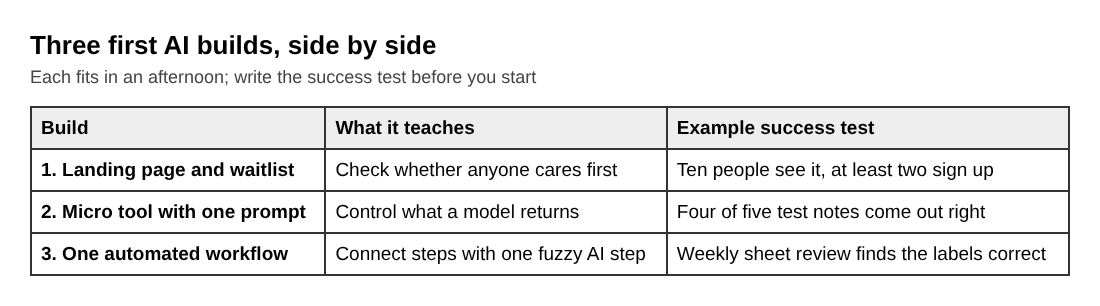
To keep each build small, use these rules:
- Set a time box. Give each project one afternoon. When time runs out, ship what you have.
- Cut one feature. After you list what the project needs, remove the last item.
- Write the success test first. For example: "Ten people see the page and at least two sign up," or "The tool gets four of five test notes right."
- Do not polish. Fix what breaks. Leave what only looks plain.
What to do after your first three builds
Look back at what you learned and choose a direction. If the landing page drew real interest, make the micro tool better and put it in front of those people. If nobody cared, you found out cheaply. Change the audience or the promise and test again.
Then fill the gaps. You will likely want to understand what a request to a model costs, how to feed a model your own data, and how to know your outputs are good over time. The AI Product Stack course and the Evals course cover those. For a bigger map of the whole journey, see the 12 course path from zero to launch.
Frequently asked questions
Do I need to know how to code to learn AI by building?
No. All three builds here can be done with a page builder, an AI chat assistant and a no-code automation tool. Coding helps later, but it is not the starting point.
How long does each first project take?
Plan on one afternoon each. If a project runs past a day, it is too big, so cut a feature and finish it. In the course, each lesson takes about 9 minutes, and you do the building on your own time.
Which AI tools should a beginner start with?
Start with a general chat assistant for drafting copy and testing prompts, and a no-code automation tool for the workflow build. Add a model API only when you need your own tool to call a model directly. Tool names matter less than learning to write clear instructions and check outputs.
How do I know if a project is good enough to share?
Write a success test before you start, then check it. If the page, tool or workflow does its one job for a real person, share it. Perfect is not the bar; working for one named user is.
Get started
Pick one idea and give yourself an afternoon for the landing page. Then move on to the prompt tool and the workflow. If you want guided lessons for all three, sign in to Age of AI Entrepreneur with your email and an emailed code, then open the Your First Builds course. The terms page says every lesson is free to anyone with an account.
Building a business in the age of AI, from a first project to a company.
Visit aientrepreneur.vlvd.net↗
Comments
No comments yet.
Sign in or make an account to comment.