LLM Observability: What Small AI Teams Should Log and Track
LLM observability is the practice of recording enough about every model call that you can explain, after the fact, why your product gave a certain answer, how long it took and what it cost. If you can't replay a bad output, you can't fix it. This post covers what a small team should log, trace and score, and it builds on the site's own post on how to monitor an AI product in production, which looks at what to track, bad outputs, costs and alerts.
Age of AI Entrepreneur teaches how to build, launch and grow a business with AI in short hands-on lessons. Its Evals course has a lesson called Running AI in Production, which goes well with this post. You sign in with your email and an emailed code to open it.
What LLM observability means, and why AI products need it
Classic monitoring answers one question: is the system up? You watch error rates, memory and response times. When something breaks, a graph turns red and someone gets paged.
LLM observability answers a harder question: was the answer any good, and why? A model call can return HTTP 200 in 900 milliseconds and still tell a customer something false. Nothing in classic monitoring catches that, because nothing technically failed. So it adds three things on top of normal monitoring:
- Content records. The actual input and output of each call, not only its status.
- Traces. The chain of steps that led to an answer: retrieval, tool calls, retries.
- Quality signals. Scores, user reactions and reviewed samples that tell you whether outputs are acceptable.
Ordinary software gives the same output for the same input. Language models don't, at least not reliably, so a test that passed yesterday tells you little about what a user sees today. That leads to silent failures:
- The model invents a fact and states it with confidence (see these AI hallucination examples).
- Retrieval returns the wrong document, so the answer is fluent but off-topic.
- A provider updates a model and your prompt behaves differently.
- An agent loops on a tool call and burns tokens without finishing.
None of these throw an error. Your first sign is usually a user complaint or a surprising invoice. Logs give you the evidence to find the cause.
What to log on every LLM call
Start with one record per model call. Keep it boring and consistent. A useful minimum:
request_idandtimestamp, so you can find and order records.user_id(an internal id, not an email) andfeature, such as "support_reply" or "summary".modeland its settings, such as temperature and max output length.prompt_version, a label you bump every time you change the prompt.- The full
inputas sent, and the fulloutputas returned. input_tokensandoutput_tokens.latency_ms, and if you stream, time to first token.status, including provider errors, timeouts and retries.
The prompt version is the field people skip and regret. Without it you can't tell whether quality dropped because you changed the prompt or because the world changed. The tokens field matters too: a request's cost comes from tokens, which the Model APIs, Tokens and What a Request Costs lesson in the AI Product Stack course explains.
Tracing multi-step chains, retrieval and tool calls
Many products make more than one call per user action. One request might retrieve documents, build a prompt, call a model, call a tool, then call the model again. If you log only the final call, you see the answer but not the path.
The fix is a trace. Give each user action a single trace_id, and give each step its own record that points back to it, with its own timing and status. Then you can read a whole request top to bottom.
Here is a made-up example. A user asks your support assistant, "Can I get a refund after 30 days?" The assistant answers "Yes, within 60 days," but your policy document says 14 days. The trace shows the real cause: retrieval ran, and the passage with the correct policy was ranked fifth, so it never made it into the prompt.
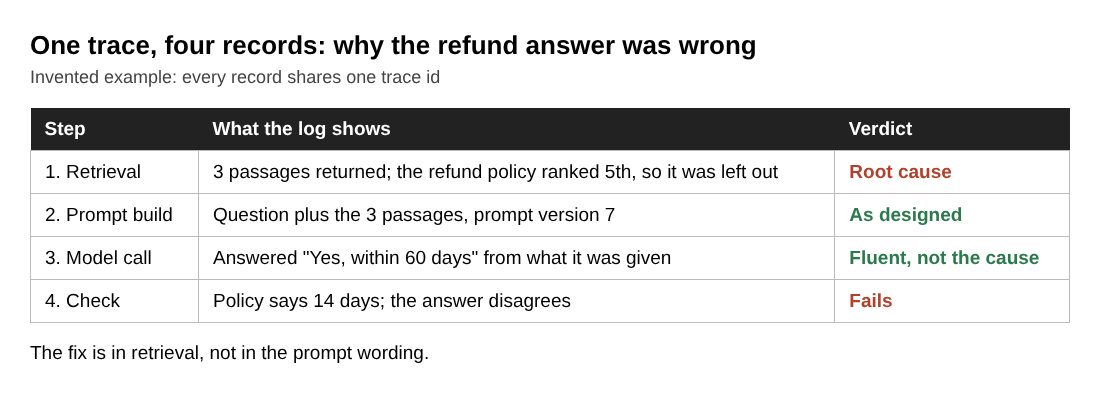
That is a retrieval fix, not a prompt fix. Without the trace you might spend a day rewriting instructions. The lesson on giving models your data in the AI Product Stack course covers retrieval, and the Agents and Automation course has a lesson on tools, loops and why agents fail.
Turning logs into quality signals
Logs alone are a pile of text. You turn them into signals in three ways, and a small team can use all three cheaply.
User feedback
Add a thumbs up and thumbs down next to outputs, and store the vote against the request_id. Also watch implicit signals: the user regenerated the answer, copied it, edited it heavily or abandoned the page.
Automated checks
Write simple checks that run on every output or on a sample. Does the JSON parse? Is the answer under the length limit? Does it contain a banned phrase or a link that isn't in your sources? You can also use a second model call to judge outputs against a rubric. Treat that judge as a tool that needs its own checking, not as ground truth. The Building an Eval Set and Judging Outputs lesson in the Evals course goes into this, and the post on how to test LLM prompts before release shows a short version.
Sampled human review
Once a week, read 20 or 30 real traces yourself. Pick some at random and some from the lowest-rated. This is the cheapest quality system there is, and it tells you what your automated checks are missing. When you find a failure, add it to your eval set so it can't return unnoticed.
Cost and latency tracking per user, feature and prompt version
Averages hide problems. A flat "average cost per request" can look fine while one feature or one heavy user eats most of the spend. Because you logged user_id, feature and prompt_version, you can slice the same data three ways:
- Per user: who costs the most, and does their usage fit what they pay you?
- Per feature: which part of the product is expensive to run?
- Per prompt version: did the new, longer prompt raise cost or slow responses?
Compute cost from tokens and the provider's current price per token, and store the result as a field. For latency, look at the slow end, not the middle: the slowest 5 percent of requests are the ones users remember. Then set alerts on a few numbers: daily spend, error rate, slow-request rate and your quality score.
Build or buy: a lightweight stack for a tiny team
You have two reasonable paths, and you can start with the first and move later.
Build it small. Wrap your model call in one function. Every call writes a row to a database table with the fields above. Add a trace_id when you have multi-step flows.
Use a dedicated platform. A hosted or self-hosted tool saves you from building trace viewers, prompt comparison and review queues. It is worth it when several people review outputs, you have many chains, or you have no time to maintain your own dashboards.
Whichever you pick, put the logging behind one function in your code. Then switching later means changing one place, not every call site. The AI product launch checklist is a good place to confirm this is in place before you go live.
Privacy and data handling for stored prompts and outputs
Full prompts and outputs are the most useful thing you can log and also the riskiest. Users paste private things into AI products. Treat your logs as user data.
- Log less where you can. Store ids instead of names and emails. Mask obvious personal data, such as emails, phone numbers and card numbers, before writing the record.
- Limit access. Only the people who debug the product should read raw logs.
- Set a retention period. Keep raw text for a short, fixed time. Keep scores, token counts and cost fields longer, since they hold no private text.
- Honor deletion. If a user asks you to delete their account, make sure their log records go too.
Rules differ by country and by the kind of data, so check the ones that apply to you before you store anything sensitive.
Frequently asked questions
Is LLM observability the same as LLM monitoring?
Not quite. Monitoring tells you whether the system is up and fast. Observability also lets you inspect the content and the path of each request, so you can explain why an answer was good or bad.
What is the minimum I should log to get started?
Log the request id, timestamp, user id, feature, model, prompt version, full input, full output, token counts, latency and status. That single record per call already answers most debugging and cost questions.
Do I need a dedicated observability platform?
Not at the start. A database table written from one wrapper function is enough for a tiny team. Move to a dedicated platform when several people need to review traces or your chains get hard to read in raw rows.
How long should I keep prompt and response logs?
Keep raw text only as long as you need it to debug and review, and make that period short and fixed. Keep derived data such as scores, token counts and cost for longer, since it holds no private content.
Get started
Do three things this week. Wrap your model call in one function that writes a full record. Add a prompt_version field and bump it on every change. Then read 20 real traces and write down what surprised you. For the wider picture of alerts and cost control, read how to monitor an AI product in production.
If you want the reasoning behind evals and production quality in short lessons, Age of AI Entrepreneur has them, and every lesson lists its sources. You sign in with your email and an emailed code.
Building a business in the age of AI, from a first project to a company.
Visit aientrepreneur.vlvd.net↗
Comments
No comments yet.
Sign in or make an account to comment.