OWASP ASVS: turn the verification standard into a test plan
OWASP ASVS, the Application Security Verification Standard, is a list of about 350 security requirements for web applications and services, each written so a tester can mark it pass or fail. That makes it a ready-made test plan: pick a level, cut the list to what your app actually does, and decide how each requirement will be checked. This post shows you how to do that in a week, with a worked example for a small web app.
If you would rather have someone build and run that plan with you, whitehatstoic tests web apps and AI systems for weak spots and hands you a written report with fixes, scoped after a short call.
OWASP ASVS in plain terms
The OWASP ASVS project page describes the standard as a basis for testing the technical security controls of a web application, and as a list of requirements for developers building one. The current stable release is ASVS 5.0.0, published on 30 May 2025, and you can download it as a PDF, a Word document or a CSV file of the requirements.
Three ideas from the standard matter most when you plan tests:
- Every requirement is verifiable. The standard says each one must lead to a "pass" or "fail" decision. There are no "should" recommendations as the main condition, only requirements.
- Requirements have stable addresses. Each one has an identifier in the form chapter.section.requirement. The project page gives
1.2.5as an example, which in version 5.0.0 asks you to verify that the app protects against OS command injection. Because numbers can change between versions, OWASP suggests writing the version in front:v5.0.0-1.2.5. - Some requirements are about decisions, not code. Documentation requirements sit in the first section of a chapter and ask you to write down choices such as which file types may be uploaded. A later requirement then checks that the code matches the document. Checking the document and checking the code are two separate tests.
Pick the level your app needs
ASVS 5.0 has three levels, and each one adds to the one before. You choose the level from your own risk: what data you hold and what your users expect.
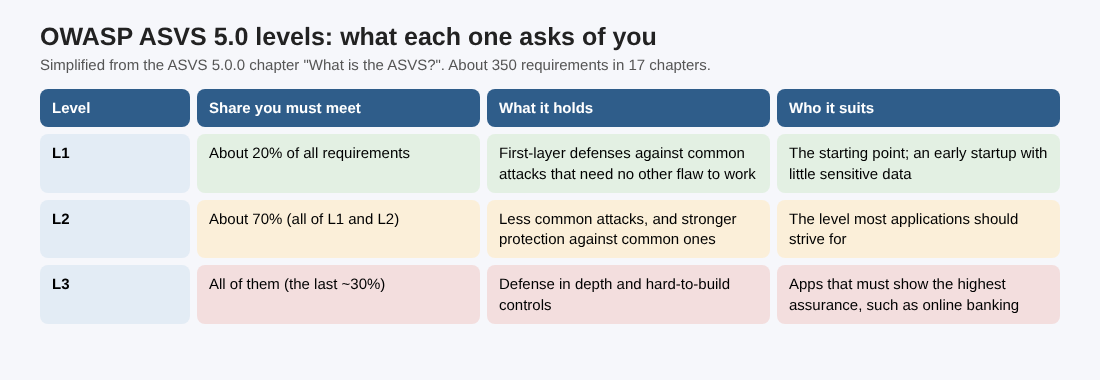
Simplified from the ASVS 5.0.0 chapter "What is the ASVS?".
- Level 1 holds about 20% of the requirements: first-layer defenses against common attacks that need no other weakness to work. It is the starting point.
- Level 2 adds about 50% more, so meeting it means meeting about 70% of the standard. The standard says most applications should strive for it.
- Level 3 adds the last 30% or so: defense in depth and controls that are hard to build.
The standard's own example: an early-stage startup that collects little sensitive data may start at Level 1, while a bank would struggle to justify less than Level 3 for online banking. If you are unsure, start at Level 1 for the whole app and raise the level for the parts that handle money, health data or admin power.
Cut the standard to your app's scope
You will not test 350 requirements, and you should not try. The chapters are there so you can filter. The standard notes that a machine-to-machine API can skip the chapter on web frontends, and an app that does not use OAuth or WebRTC can skip those chapters too. It goes further and encourages each organization to keep its own fork of the standard, dropping what does not apply, as long as each requirement number still means the same thing.
A quick way to scope:
- Download the CSV of requirements and open it in a spreadsheet.
- Delete every row above your chosen level.
- Go chapter by chapter and mark each one "in scope" or "not applicable", with one line saying why and the change that would bring it back, such as "reopen if we add file attachments".
- Keep the "not applicable" rows. The final report has to list them, so you want the reason written while it is fresh.
Remember that attackers have no scope. ASVS covers the application itself, not your build pipeline, hosting or DNS, so pair it with checks for those. Our post on CI/CD security covers the pipeline side.
Turn each requirement into a test case
A requirement says what must be true. A test case says how you will find out. For every row left in your spreadsheet, add four columns:
- Method: automated test, manual test, code review, configuration review or document review.
- Evidence: what you will keep to prove the result, such as a test log, a screenshot or a link to the code.
- Owner: one named person.
- Result: pass, fail or not applicable, with the date.
Write the test in the language of your app, not the standard. "Verify that the application protects against OS command injection" becomes "send shell metacharacters to the export filename field and the image resize endpoint, and confirm neither reaches a shell". If you have never written tests from an attacker's view, our guide to abuse case testing shows the habit.
Decide what to automate and what to test by hand
The ASVS chapter on assessment is blunt about tools. Scanners in the build pipeline can catch some basic issues, such as missing output encoding, but they cannot fully verify the more complicated requirements, especially business logic and access control. Its summary: being testable by automation is not the same as running an off-the-shelf tool.
The standard suggests writing your own unit and integration tests for the requirements that code can check. Its example is a test suite for a login controller that tries common default usernames, account enumeration, brute forcing, LDAP and SQL injection, and cross-site scripting on the username field. Once written, those tests run on every build, so a requirement that passed in March cannot quietly fail in May.
For the rest, the standard encourages testing with the code and documentation open, rather than a "black box" test from outside, because it finds more in less time. Access control is the classic case: you need to know every role to test every role. Our post on authorization testing automation shows how to turn that into tests.
Worked example: a one-week Level 1 plan
Say you run a small web app with email sign-in, a billing page and a file upload. You have one developer free for a week.
- Day 1, scope. Download the ASVS 5.0.0 CSV, keep only Level 1 rows, and mark chapters that do not apply. No OAuth and no WebRTC? Those rows become "not applicable" with that reason.
- Day 2, decisions. Answer the documentation requirements left in scope: which file types and sizes the upload accepts, and who may see which billing data. One short page is enough.
- Day 3, automate. Pick the requirements that code can check, starting with sign-in and injection, and write integration tests for them, referenced by version and number, for example
v5.0.0-1.2.5in the test name. - Day 4, manual tests. Work through the rest with the code open: upload checks against the page you wrote on day 2, billing access as each role, session behavior after sign-out.
- Day 5, report and fix list. Fill in every result, open a ticket for each fail, and agree a date to retest.
At the end you have a plan you can rerun after each release, and a clear list of what passed, what failed and what does not apply. Be honest about what it proves: a column of passes means your tests passed, not that the app has no weak spots. The plan is only as good as the tests behind each row.
Report pass, fail and not applicable
Most penetration test reports list only what failed. The ASVS says a verification report should include the scope, a summary of every requirement checked, the ones where exceptions were found, and guidance on fixing them. Requirements that do not apply, such as session management in a stateless API, must be noted too. It also asks the tester to say which level the app aims for and to give an opinion on why excluded requirements were left out.
One caution: OWASP does not endorse any vendor, tester or software, so treat a third party's claim of official ASVS compliance with care. What you can do is show your own report, built from the standard, with your scope and method in plain view.
Frequently asked questions
What is OWASP ASVS used for?
It is used as a test plan for web app security, as a list of requirements for developers, and as a yardstick in contracts when you buy software or development work. The buyer can ask for a given level and ask the seller to show it is met.
Which ASVS level should a startup aim for?
The standard suggests an early-stage startup holding little sensitive data may start at Level 1. Most applications should work toward Level 2, which covers about 70% of the requirements.
Can a scanner check my app against ASVS?
Only in part. The standard says tools can catch some basic issues but cannot fully verify business logic and access control, so you need your own tests and a manual review with the code open.
How do I cite an ASVS requirement in a ticket?
Use the version and the number, such as v5.0.0-1.2.5. Numbers can change between major versions, so the version keeps the reference clear.
Get started
An ASVS test plan works best when the people testing can read the code. whitehatstoic tests web apps and AI systems, covers web app and API review, writes up what it finds with fixes, and retests after you fix them. Every engagement is scoped and priced after a short call.
Building something that has to be safe? Book a meeting with whitehatstoic: tell us the product, the deadline and your biggest worry, and we reply with a plan and a price.
Build it right. Test it thoroughly. Keep it safe.
Visit whitehatstoic.com↗
Comments
No comments yet.