OWASP Proactive Controls: the security every developer builds first
The OWASP Proactive Controls are a short list of security techniques that every developer should build into an app from the start, rather than patching in after a bug report. This post walks through the 2024 list, groups the ten controls by where they live in your code, and shows how to review a new feature against all ten before it ships.
When you want a second pair of eyes on that work, whitehatstoic builds web and mobile apps and tests them for weak spots, so the controls are both built in and checked.
What the OWASP Proactive Controls are
The OWASP Top 10 Proactive Controls is an OWASP project written mainly for developers, though managers, product owners and testers can use it too. The current list is the 2024 edition, published at top10proactive.owasp.org.
Its idea is simple. The OWASP Top Ten lists the security problems teams keep shipping. The proactive controls list the positive patterns that prevent them, so you avoid the scramble of analyzing, fixing and re-releasing after a vulnerability is found in the wild.
The project is clear about two limits. First, following the controls lowers the chance of a vulnerability but does not make code bug free. Second, the list is a starting point for developer training, not a full method. For complete requirements it points to OWASP ASVS, and for a whole development program to maturity models such as OWASP SAMM.
Every control has the same sections: a description, the threats it counters, how to implement it, the vulnerabilities it prevents, references and tools. That makes each one easy to turn into a checklist.
The ten controls at a glance
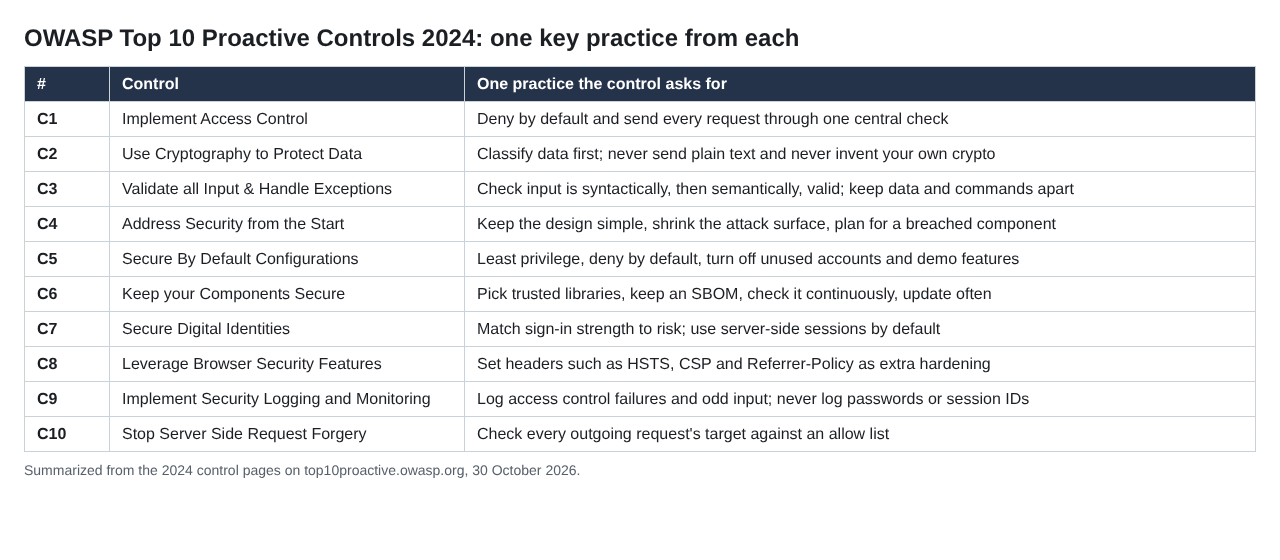
The 2024 list, summarized from top10proactive.owasp.org.
The order runs from access control (C1) to server-side request forgery (C10). In practice they fall into four groups: who can do what, what data goes in and out, how the app is put together, and what the browser and logs do for you.
Who can do what: access control and identity
C1, Implement Access Control. The control asks you to design access control up front, because changing the pattern later is slow and hard, especially for multi-tenant apps. Its rules:
- Force every request, from the website and the API alike, through an access control check, and use one central routine for it.
- Deny by default. If the check throws an error, deny. New accounts and new features start with no access until someone grants it.
- Give least privilege, and avoid a fully privileged admin account for daily work.
- Do not hard-code roles such as
user.hasRole("ADMIN")across the code. Those checks are fragile, hard to audit and do not fit multi-tenancy.
C7, Secure Digital Identities. Match sign-in strength to the risk: a password may do for low-risk apps with no private data, multi-factor sign-in for apps holding personal data, and cryptographic proof of a key where a breach could cause serious harm. Biometrics alone do not count as a secret. For sessions, the control's default is server-side sessions, because they keep data off the client and let a user log out every session at once.
What goes in and out: input, cryptography and SSRF
C3, Validate all Input and Handle Exceptions. Check that input is syntactically valid (the expected form, such as exactly four digits) and then semantically valid (it makes sense, such as a start date before an end date). Prefer allow lists. Validate on the server even if the client also checks. Watch for mass assignment, where a request sets fields the user should not touch. And remember the limit: validation alone does not stop injection, so keep data and commands apart, for example with parameterized queries.
C2, Use Cryptography to Protect Data. Start by classifying your data, so each type gets its own protection rule and you can avoid storing sensitive data at all. Then never send plain text, never create your own cryptographic protocols, store passwords safely, manage keys through their whole life cycle, and plan for algorithms to change over time.
C10, Stop Server Side Request Forgery. SSRF tricks your server into making a request for the attacker, using the server's own identity, often to reach internal services on localhost that have no sign-in. Validate input, check every outgoing request's target against an allow list, configure XML parsers safely, and beware of Unicode and other character changes during validation. Our SSRF testing guide shows how to check it.
How the app is put together: architecture, defaults and dependencies
C4, Address Security from the Start. The guiding line is that complexity is the enemy of security. Keep the design simple, make the secure path the easy one, never rely on obscurity, state what is trusted to do what, shrink the attack surface, and plan for what happens if one component is breached.
C5, Secure By Default Configurations. Software should start in a secure state. When you write infrastructure as code, apply least privilege, deny by default, keep cloud storage private, use scanned container images, encrypt traffic by default and switch off accounts, software and demo features you do not need.
C6, Keep your Components Secure. Choose libraries by source, popularity, activity, maturity, complexity and security. Then keep an inventory: build an SBOM in your pipeline, check it continuously for known vulnerabilities, and update components as a recurring task. Our post on SBOM security covers that inventory.
What the browser and logs do for you
C8, Leverage Browser Security Features. Headers such as HSTS, Content Security Policy, Referrer-Policy and X-Content-Type-Options, plus secure cookie flags, harden the app in the browser. The control calls them opportunistic: the app cannot verify that the browser obeys, so treat them as extra protection, never the only one.
C9, Implement Security Logging and Monitoring. Log signs of an attack, such as values outside the expected range, changes to fields that should not change, and requests that fail access control. Never log passwords, session IDs or card numbers. Encode log input to prevent log injection, protect logs from tampering, and send them to a central service.
A worked example: review one feature against all ten
Say your team is adding "import a file from a URL" to a document app. The user pastes a link, the server fetches the file and attaches it to a project. Before it ships, walk the OWASP Proactive Controls one by one:
- C1: the import endpoint uses the central access check, confirms the user can write to that project, and is denied by default.
- C2: the fetched file is classified like any other upload and stored with the same protection.
- C3: the URL is checked for form, the file for type and size, and errors fail closed.
- C4: the fetcher is a small separate component, so a flaw in it has a smaller blast radius.
- C5: the fetcher runs with only the network and storage access it needs.
- C6: any library that parses the file is chosen with care and lands in the SBOM.
- C7: the request needs a valid server-side session, and the import cannot be triggered without one.
- C8: the imported file is served with a content type and CSP that stop it running as script.
- C9: blocked targets and failed access checks are logged, without the session ID.
- C10: the target host is checked against an allow list, so the server cannot be pointed at internal addresses.
Ten questions, one per control, take a short meeting and leave a written record of what was decided.
Frequently asked questions
Are the OWASP Proactive Controls the same as the OWASP Top 10?
No. The OWASP Top 10 lists common security risks. The proactive controls list the techniques developers build in to prevent them.
Which version should I use?
Use the 2024 edition, the current list on the project's site. Earlier editions from 2018, 2016 and 2014 are kept in its archive.
Is following the ten controls enough?
No. The project calls the list a starting point, and points to OWASP ASVS for full requirements and to SAMM for the wider development program.
Get started
The OWASP Proactive Controls help your developers build security in from the first commit. whitehatstoic builds web and mobile apps with Next.js, Node and Postgres or Expo and React Native, and tests web apps, APIs and AI systems with a written report and fixes. Every engagement is scoped after a short call.
Building something that has to be safe? Book a meeting with whitehatstoic: tell us the product, the deadline and your biggest worry, and we reply with a plan.
Build it right. Test it thoroughly. Keep it safe.
Visit whitehatstoic.com↗


Comments
No comments yet.