SBOM security: build and use a software bill of materials
SBOM security comes down to one question: when a new advisory lands, can you trust your software bill of materials to tell you which releases and servers are affected? An SBOM lists the components in your software, and a dependency graph records how they connect. The OWASP Dependency Graph and SBOM Best Practices Cheat Sheet says to use both to find vulnerable components in your releases and deployments. This guide follows the sheet from generation to response, and ends with a one-hour review of one release.
Want an independent look at how your team builds, ships and patches? Book a meeting with whitehatstoic: it tests web apps and APIs for weak spots with a written report and fixes, and gives independent codebase and vendor reviews.
What an SBOM is for, and what it cannot prove
Most teams first meet SBOMs as a box to tick for a customer. The real use is speed. When a library you depend on turns out to be vulnerable, a good SBOM and dependency graph tell you which products include it, which version, and which of your direct dependencies pulled it in. Without them, you are grepping lockfiles across repositories under pressure.
The sheet is just as clear about the limits, and they shape everything below. A component missing from an SBOM is not evidence that it is absent from the software. Passing a schema check does not make an inventory complete. A valid signature does not make an SBOM accurate. Keep those three in mind and you will not over-trust a document that only describes what its generator could see.
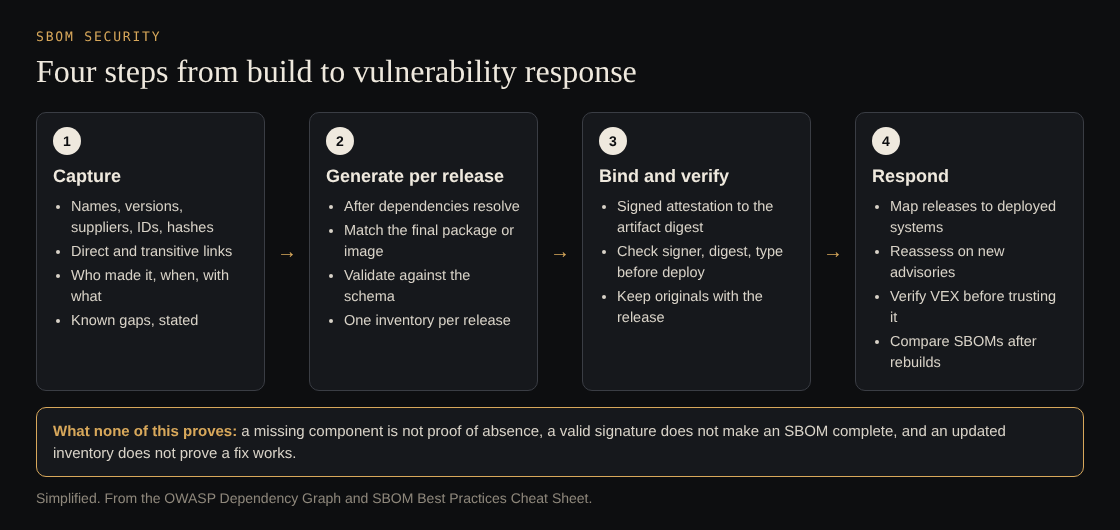
Simplified from the OWASP Dependency Graph and SBOM Best Practices Cheat Sheet.
Capture components and how they connect
Use a standard machine-readable format. The sheet names CycloneDX as an example. Whatever you pick, capture three kinds of data:
- Components: names, versions, suppliers, package identifiers, and hashes where available.
- Relationships: both direct dependencies and transitive ones, the components your dependencies bring in.
- Metadata: the product described, who wrote the SBOM, when it was generated, and which generator and version made it.
Then write down what you do not know. If the generator cannot see a vendored library or a binary blob, record that coverage as incomplete or unknown. A stated gap is useful; a silent one gives a false "not affected" later.
Generate a new SBOM for each release
An SBOM made from the source repository on someone's laptop describes what might ship, not what did. The sheet's advice:
- Automate generation after dependency resolution, inside the build.
- Reconcile the inventory with the final package or container image. Include bundled libraries and operating system packages where they apply, because manifests alone can misrepresent what ships.
- Record the scope of generation and any known gaps.
- Validate the document against its format's schema before you publish or import it, and check the metadata and relationships separately.
- Keep each release's inventory distinct, so you can always answer "what was in version 2.3?"
Because generation runs in your pipeline, the pipeline itself needs protecting; our post on CI/CD security covers that side.
Bind the SBOM to the artifact and verify before deploy
An SBOM sitting next to a container image proves nothing about that image. The sheet says to bind the SBOM to the final artifact's cryptographic digest with a signed attestation, a signed statement naming the artifact and its SBOM. Signing the artifact and the SBOM separately does not tie them together.
Keep two kinds of evidence apart. An SBOM attestation describes what is inside. Build provenance records how the artifact was produced. Before installing or deploying, the sheet suggests using SLSA's provenance verification checks as a model:
- Validate the signatures and that the signer is one you allow.
- Check the artifact digest and the expected attestation type.
- For build provenance, also check the builder identity, source repository, build type and parameters.
- Reject missing, invalid or unexpected evidence where your trust policy requires it.
Signatures authenticate claims and protect their integrity. They do not prove the software is safe or that a trusted builder was not compromised. Keep the original SBOMs and signed evidence with each release, even if you import the data elsewhere, restrict who can write to them, and limit sharing of sensitive metadata. For the wider set of controls, see our post on software supply chain attacks.
Use the SBOM when an advisory lands
This is where SBOM security pays off. The sheet's steps for vulnerability response:
- Map each release's SBOM to the systems where it is deployed, so a component points to real servers.
- Reassess components when new advisories arrive.
- Prioritise by exploitability, exposure and impact. How deep a dependency sits does not decide its risk by itself.
- Use the graph to find which parent dependency brings in the affected component, since that is usually what you upgrade.
Suppliers may send VEX (Vulnerability Exploitability eXchange) documents saying whether a vulnerability affects their product. Before you accept a "not affected" claim, authenticate who issued it, verify the document's integrity, and check its reasoning against the exact product version and how you deploy it.
After you rebuild with a fix, compare the new SBOM with the previous release and update your deployment mappings. An updated inventory does not prove the vulnerability is fixed or that a mitigation works, so test that separately. Our post on dependency updates covers choosing and rolling out the fix.
A one-hour SBOM security review
Pick your most recent production release and work through it:
- Find it (10 minutes). Can you locate the SBOM for that exact release, not the latest build? If not, that is the first ticket.
- Read the metadata (10 minutes). Does it name the product, author, time and generator? Does it state any gaps?
- Check coverage (15 minutes). Compare it with the shipped image or package. Are operating system packages and bundled libraries in it?
- Check the binding (10 minutes). Is there a signed attestation tying the SBOM to the artifact digest, and does your deploy step verify it?
- Run a drill (15 minutes). Pick one transitive dependency. Using only the SBOM and graph, find which releases include it, which parent brings it in, and where those releases run.
If the drill took longer than the rest of the review, your SBOM is a document, not a tool yet.
Frequently asked questions
What should an SBOM include?
Component names, versions, suppliers, package identifiers and hashes, the direct and transitive relationships, and who generated it, when and with what. It should also state any gaps in coverage.
Is signing the SBOM enough?
No. OWASP says to bind the SBOM to the artifact's digest with a signed attestation; signing each separately does not link them, and a signature never proves completeness.
What is a VEX document?
A statement of whether a vulnerability affects a particular product. Verify who issued it and check its reasoning against your exact version and deployment before you rely on it.
How often should I generate an SBOM?
For every release, automatically, after dependencies are resolved, and reconciled with the final package or image.
Get started
Run the one-hour review on your latest release this week. whitehatstoic tests web apps and APIs for weak spots, with a written report and a retest after fixes, and gives independent codebase and vendor reviews. Book a meeting with whitehatstoic and tell us about your product, your deadline and your biggest worry; work is scoped after a short call.
Build it right. Test it thoroughly. Keep it safe.
Visit whitehatstoic.com↗

Comments
No comments yet.