Personal kanban for problems: limit what you work on at once
Personal kanban for problems means putting every problem you carry on a board and capping how many you actively try to fix at once. You see all of them, but you push on only a few. The cap is called a work-in-progress limit, or WIP limit, and it is the part that makes the board useful.
Problem Graph is a journal drawn as a map: you write each problem in one line, attach the solutions you try and record whether each one worked, partly worked or failed. It has no kanban columns, so you apply the limit yourself. This post shows how.
What personal kanban for problems means
A kanban, in the Lean Enterprise Institute's words, is a signaling device that authorizes production or withdrawal in a pull system, and the word is Japanese for "sign" or "signboard". The personal version here is an adaptation of the same idea, not that factory system: a few columns on a board, and a signal for what you may start next.
A task is something you finish. A problem is something you are trying to fix, and it often takes several attempts. So the columns for problems might be:
- Backlog: problems you have noticed but are not working on.
- Trying: problems where you are testing a fix right now.
- Waiting: problems you cannot move until something else happens.
- Solved: problems that stopped bothering you, with a note on what did it.
The Trying column gets a hard cap. The others can grow as far as they need to.
Why trying too many fixes at once muddies the result
When you have ten problems and you poke at all of them, each one gets a thin slice of your attention. A fix gets started, the next annoyance pulls you away, and a week later you may not remember what you did.
- You cannot tell what worked. If you change your sleep schedule, your workload and your diet in the same week, you will not know which change helped.
- Switching has a cost. Each time you drop one problem for another, you have to remember where you were.
- A long flat list gives no order. Everything looks equally urgent, so it is hard to see what to do first.
A limit forces a choice. If you can only try two things, you have to decide which two, and that decision is most of the value. For help making it, see how to choose which problem to solve first.
Two working rules for the board
- Make every problem visible. If a problem lives only in your head, it still costs you attention and you cannot count it against your limit.
- Limit what is in progress. Pick a number for the Trying column and do not go over it. To start something new, finish something or move it out first.
The second rule feels wrong at first, as if you were letting problems sit. In practice you are choosing where your effort goes, and the backlog is no worse off than before. Those problems were not getting attention anyway. Now the choice is on purpose.
Build a personal kanban board for problems in 10 minutes
- Dump every problem. Set a timer for five minutes and write one line per problem. Do not sort yet.
- Add the columns. Backlog, Trying, Waiting, Solved.
- Pick your first limit. Start with two.
- Move your top problems into Trying. Stop at the limit. The rest stay in the backlog.
- Write one attempt on each card in Trying. Not a plan, a single fix you will test first.
The last step matters. A problem with no attempt attached is a worry with a column. The attempt is what makes it "in progress".
Choose your WIP limit and adjust it
Start low: one to three problems in Trying. If you are juggling a job, a family and a few side projects, two is a reasonable first try. Then adjust with two checks:
- If problems sit in Trying for weeks with no movement, your limit may be too high or the attempts too big. Lower the number or shrink the next step.
- If you finish things quickly and feel idle, raise the limit by one.
These are starting points to test on yourself, not rules with a proven number behind them.
A made-up board with a limit of two
Say you keep four problems. "Weekly report takes four hours" is in the work lane. "I never practise Spanish", "Old photos are scattered across three drives" and "Hallway light is still broken" are in the personal lane. Your limit is two.
- Trying: the report, with the attempt "use a fixed template", and Spanish, with the attempt "ten minutes after breakfast".
- Waiting: the hallway light, because the landlord has to act. Note what you wait for and check again on Friday.
- Backlog: the photos. The limit is reached, so they stay put.
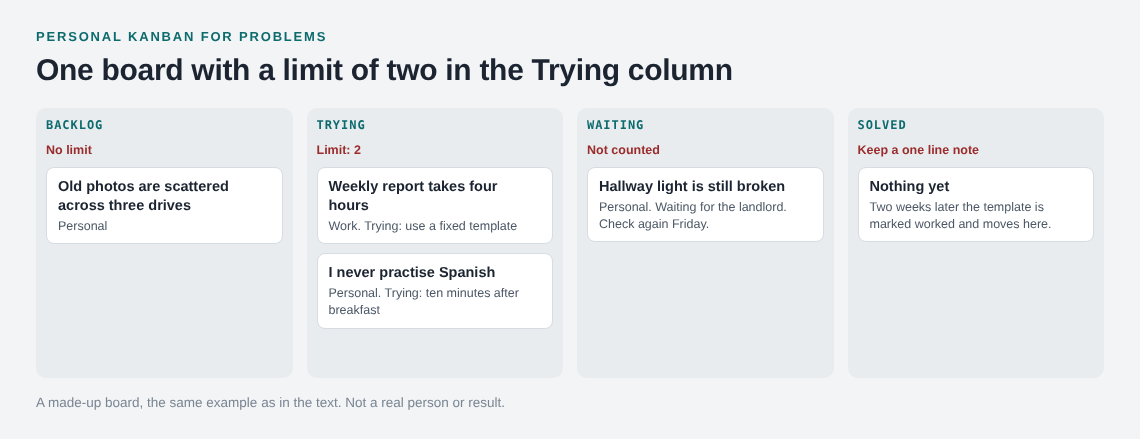
Two weeks later you mark the template as worked. The report problem moves to Solved with a one line note, a slot opens and the photos move up to Trying with a first attempt, such as sorting one drive per weekend.
What to do with blocked or stuck problems
Some problems cannot move because you are waiting on a reply, a budget or another person. If they stay in Trying, they use up your limit and give nothing back. Move them to Waiting and write what you are waiting for and the date you will check. Waiting problems do not count against the limit. For a fuller template, see the waiting on someone log.
Other problems are stuck because the attempt failed. Note what you tried and that it did not work, then pick a different attempt or send the problem back to the backlog. A recorded failure keeps you from repeating the same fix in three months.
A weekly review to keep the board honest
A board you never look at turns into a list you ignore. Set fifteen minutes once a week, same day, same time.
- Check Trying. Did each attempt happen? What was the result: worked, partly or failed?
- Check Waiting. Has the thing you were waiting for arrived? If yes, move the problem back.
- Clear Solved. Move finished problems out of sight and keep a one line note on what worked.
- Count. Are you at or under the limit? If not, move something out.
- Pull from the backlog. If a slot is free, pick the next problem and write its first attempt.
- Add new problems. Anything that popped up this week goes in the backlog, not straight into Trying.
The last step gives a new problem a week to show whether it still matters.
Track the board in Problem Graph
Problem Graph does not have kanban columns and does not enforce a limit. It gives you one place for the whole picture and the history of what you tried.
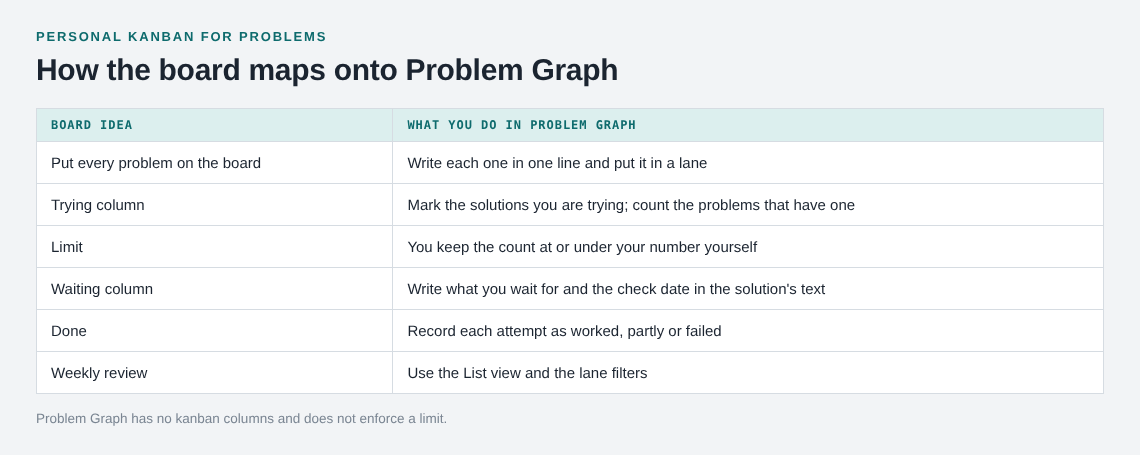
- Visualize: write each problem in one line and put it in a lane: personal, work, expert or scientific. It lands on the graph when you press Enter. The app also has a List view beside the map, which helps when you want to count.
- Trying: attach solutions to a problem as ideas and mark the ones you are trying. The number of problems with a solution marked as trying is your work in progress.
- Outcomes: record each attempt as worked, partly or failed. A failed solution stays on the map as a failed solution.
- Related problems: link problems that belong together, even across lanes.
- Review: filter by lane to go through one area of life at a time.
Your problems are private by default and nobody else sees them. If you want, mark one as a main node and share it with a private network or put it out for everyone; its solutions, outcomes and requirements go with it. The app can also show similar problems other people have shared and which of their solutions worked, so you can borrow one with a link back to where it came from. You can also ask for suggestions. They are proposals, so treat them as ideas to test.
Frequently asked questions
What is a WIP limit in personal kanban?
It is a cap on how many items you work on at the same time. For problems, it is the number you allow in your Trying column. When you reach it, you finish or move something before you start another.
What WIP limit should I start with?
Try two. Go to one if you feel scattered, or three if you finish things quickly and have spare energy. Review the number every few weeks.
Does Problem Graph enforce a work-in-progress limit?
No. It is a journal drawn as a knowledge graph, not a kanban board. You mark the solutions you are trying and keep the count under your limit yourself.
Where do blocked problems go?
Into a Waiting column, with a note on what you need and when you will check again. They do not count toward your limit.
Can I use this for work and personal problems together?
Yes. One shared limit across both stops work from filling every slot. Problem Graph keeps them in separate lanes and lets you link problems across lanes.
Get started
Pick the two problems you will try to fix first, write each as one line and attach the first thing you will try.
Try Problem Graph: it is free, and you can look around without an account. Then decide your limit and keep to it for a week.
Every problem you carry, on one map. Solved together.
Visit problemgraph.vlvd.net↗


Comments
No comments yet.
Sign in or make an account to comment.