Waiting on someone log: track fixes that depend on others
A waiting on someone log is a short record of every fix you cannot finish alone: what you need, who has it, when you asked, and what you will do if nothing comes back. It keeps a blocked fix from going quiet. This post shows what to write in each entry, a template you can copy, and how to follow up without nagging.
Problem Graph is a journal drawn as a map, so you can write the blocked problem in one line, attach the thing you are waiting for as a solution you are trying, and link it to the problem that is holding it up.
What a waiting on someone log is
Most problem logs track what you did. A waiting on someone log tracks what you handed away. The fix is not in your hands. A colleague has to approve it, a vendor has to reply, a landlord has to send someone, a family member has to decide.
Once you have asked, the item can look finished, because your part is done. The log gives each handoff a name, an owner and a next check, so it stays on your list until it is closed. If you already keep records of your own attempts, such as a gym plateau log or a writing block log, this is the same habit pointed at other people.
Common reasons a dependent fix stalls
These are the ways a request can stall that are easy to fix in the way you write it down. Check which ones fit your own blocked items.
- The ask was vague. "Can you look at this?" gives the other person no clear thing to do.
- Nobody owns it. You asked a group, so each person may have assumed someone else would answer.
- You did not write down that you asked. Without a date, there is no moment to check.
- The reason it matters was missing. The other person cannot rank your request without knowing what it unblocks.
- There is no plan B. Without a fallback, waiting is the only move.
Each one maps to a field in the log: a sharper ask, a named person, a date, a reason, and a fallback.
What to record in each waiting entry
Keep entries small. If one takes more than a minute to write, it is easy to stop writing them.
The blocked problem and what you need
Write the problem in one line, in plain words. "Customer export fails on large files" is better than "export issue". Then name the thing you need, not the person's effort. "A raised upload limit on the storage service" is a thing. "Help from the platform team" is not.
Who has it
One name. If a team owns it, still write the person you asked.
When you asked and when you will check
Write both dates in the text yourself. The pages describe no reminders, so the next check date is a line you write and a habit you keep, such as opening your map at the start of each week.
The fallback
What you will do if the answer is no or never. Even a rough one helps. It turns waiting into a bet with a limit. The post on a contingency plan goes deeper on writing one.
A simple waiting on someone log template
You can use this in any notes app. Each entry has seven fields: the blocked fix, what you are waiting for, who has it, when you asked, when you will check again, what you will do if there is no answer, and the outcome (still waiting, got it, partly, or no).
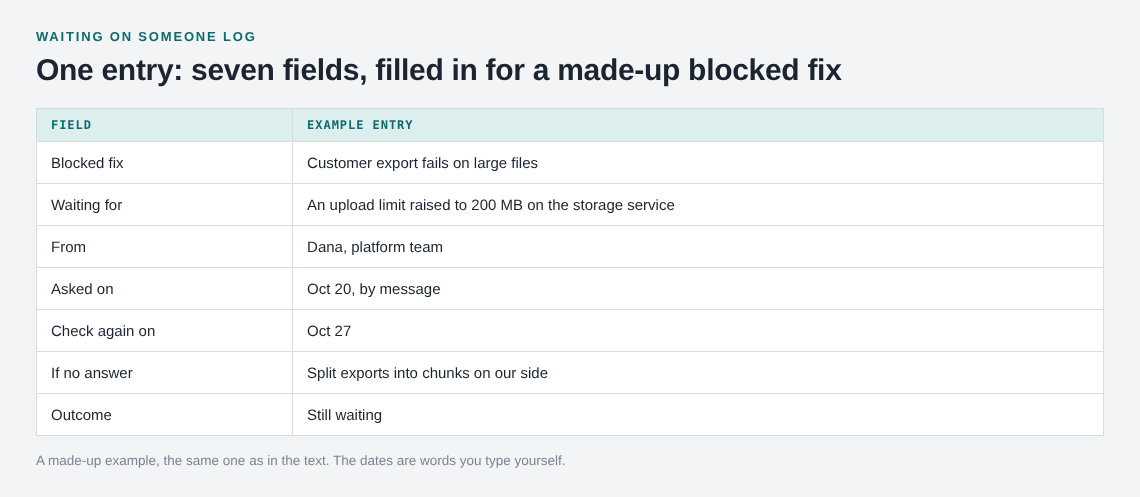
In a flat list, this works until you have fifteen entries and cannot see which ones are connected. Three blocked fixes might all depend on the same person or the same decision. Problem Graph's home page says "Patterns show up on the map that never show up in a list", and a shared blocker is the kind of thing that shows up when blocked problems link to it.
Example: a fix blocked by another team
This example is made up. You run a small product and a customer reports that exports fail on large files. You find the cause: uploads over a size limit are rejected by a service another team owns. Here is how you would set it up in Problem Graph.
- Write the problem. Type "Customer export fails on large files" and put it in the work lane. It lands on the graph when you press Enter.
- Attach the dependent fix as a solution. Add "Ask Dana on the platform team to raise the upload limit to 200 MB. Asked Oct 20, check Oct 27." and mark it as one you are trying. The dates are words you typed, and they travel with the idea.
- Attach the fallback. Add a second idea, "Split exports into chunks on our side". Leave it as an idea until you need it.
- Link the blocker. If the limit is itself a problem, write it as its own problem, "Upload limit set too low for exports", and link the two. Other fixes that hit the same limit can link there as well.
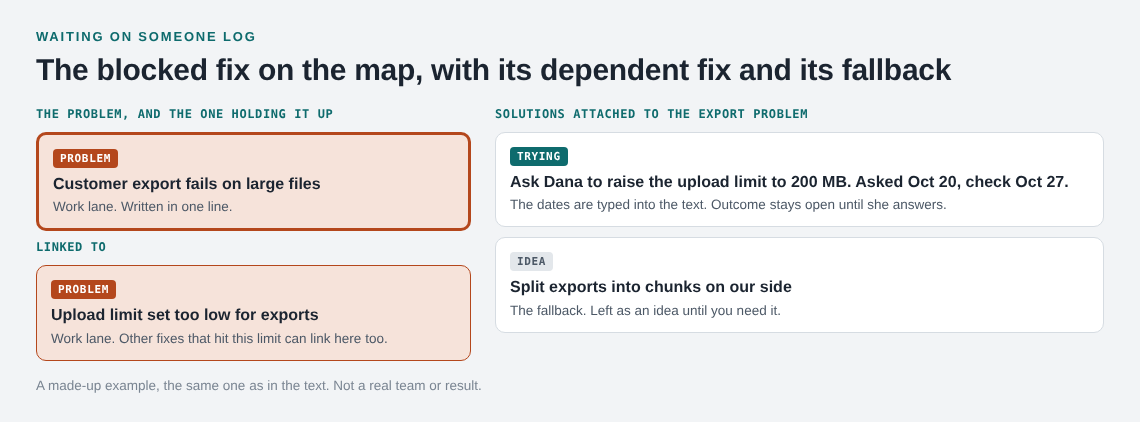
On Oct 27 you open the map. The limit request is still marked as trying, and nobody has answered. You follow up, as in the next section. If the answer is yes, record the outcome as worked. If it is no, record it as failed and the chunking idea becomes the one you try.
A failed entry is useful, not embarrassing. The home page puts it this way: "The graph is honest. A solution that failed three times stays on the map as a failed solution, and that is exactly what the next person needs to know."
How to follow up without nagging
Nagging is repeating the same message with more pressure. Following up is giving the person a better way to answer. Your log makes that easy, because everything you need is already written down.
- Restate the ask in one sentence. "Still hoping to get the upload limit raised to 200 MB."
- Say what it unblocks. "Three customers are hitting this."
- Make a yes cheap. Link the exact setting or ticket, and offer to make the change if they approve.
- Offer a no. "If this is not possible, a quick no helps me plan around it."
- Name the next date. "I will check back Thursday."
Then update the entry with the new date. One follow-up on the date you chose is a reasonable start, and a second a few days later is fair.
When to escalate, reroute or drop a blocker
After two follow-ups with no answer, your log gives you the evidence to choose.
- Escalate. Go to someone who can set priorities for both of you, when the fix matters and the other person has not said no. Bring the log: what you asked, when, how many times, and what it is costing.
- Reroute. Find another person or path to the same result. Add it as a fresh solution, and mark the old one as failed or partly if it gave you something.
- Drop the dependency. Use your fallback. If you wrote one on day one, this is a quick call. Record the dependent idea as failed and move on, so you do not keep checking it.
If the blocker involves several people, put the problem on a map they can see. Mark it as a main node and share it into a private network: create a network, give the invite code to the people involved, and members see the node with its solutions and outcomes. Nobody outside the network sees it, and anyone with the invite code can join, so give it only to people you trust. Sharing is not messaging, so you still send the follow-up yourself. The posts on naming a problem owner and handover notes cover the people side.
Frequently asked questions
What is a waiting on someone log?
It is a list of fixes that depend on other people, with the specific thing you need, who has it, when you asked, when you will check, and your fallback. Its job is to stop blocked work from going quiet.
How often should I check my waiting entries?
Check each entry on the date you set when you wrote it. Reviewing the whole log once a week is a reasonable default for blockers at work or at home.
Does Problem Graph remind me when someone has not replied?
The pages describe writing problems, attaching solutions and outcomes, linking and sharing, and no reminders. Write the check date in the text and look at your map yourself.
Can I share a blocked fix with the person I am waiting on?
You can share a main node into a private network, and the people you give the invite code to can see it with its solutions and outcomes. Only a main node can be shared; a problem you only link to it stays private.
What if the fix fails because they said no?
Record the outcome as failed and keep it on the map. Then try your fallback. The failed entry stops you or a teammate from asking the same question again.
Get started
Pick one fix you are waiting on right now. Write the problem in one line, attach the ask as a solution you are trying, add your fallback as a second idea, and put the check date in the text. When you are ready, open the app and add your first blocked fix.
Try Problem Graph: it is free, and you can look around the public network without an account. Write one problem down in a line and attach the first thing you will try.
Every problem you carry, on one map. Solved together.
Visit problemgraph.vlvd.net↗


Comments
No comments yet.
Sign in or make an account to comment.