Questions to ask a mentor, and how to keep the answers
The most useful questions to ask a mentor are specific, tied to a real decision, and end with a request for one next step. Bring five or six, ask the hardest one first, and keep the answers, because advice you half remember is advice you did not really get. Cheap Recorder's blog post on how to record a mentoring call on Google Meet and keep the advice covers the capture side: record the call in Chrome as sound only, mark each piece of advice as you hear it, and end with a short advice file. This post covers the other half, which is what to ask.
If you want the answers kept word for word, Cheap Recorder records a Google Meet call in Chrome, your voice and your mentor's in one file in a folder on your own computer, with a live transcript that has a time on every line.
Why the questions you ask a mentor shape the advice you get
A vague question gets a vague answer. "I have two offers, one pays more and one teaches more, which would you take at my stage?" gets a real answer with reasons.
Your mentor gives you an hour. You make that hour count by doing the thinking first. Arrive with context: what you tried, what happened, and what you are deciding this month.
A simple rule: every question should name a situation, a choice, or a piece of work. If you cannot name one, the question is not ready yet.
Questions to ask a mentor about your career path and next move
These work best when you have a decision coming in the next few months.
- "If you were in my role right now, what would you be trying to learn in the next six months?"
- "Looking back, what did people at my stage do that held them back?"
- "I am choosing between X and Y. What would you want to know before you decided?"
- "Which skill got you your last two promotions, and was it the one you expected?"
- "What is a move you made too late, and how would you have known sooner?"
- "Who in our field does the kind of work I want to do, and how did they get there?"
Notice the third question. You are not asking your mentor to decide for you. You are asking how they would think it through, and that answer still helps next year, when the choice is different.
Questions to ask a mentor about skills, habits and blind spots
This is where a mentor sees what you cannot. Ask directly and give them permission to be blunt.
- "What is one thing I do that you think is slowing me down?"
- "When I explain my work, what do I leave out that you wish I would say?"
- "Which habit of yours took the longest to build and paid off the most?"
- "What do you think I am overrating, and what am I underrating?"
- "Where is the line between doing more than is asked and taking on work nobody will notice?"
The last one matters early in a career. Extra effort can build trust, or it can quietly eat your evenings. Someone who has seen both on your kind of team can tell you which kind of extra gets noticed there.
Questions to ask a mentor for honest feedback on your work
Feedback works best on something concrete. Send a short piece of work a day or two before the call: a draft, a plan, a deck, a pull request. Then ask:
- "If you had five minutes to improve this, what would you change first?"
- "Where did you stop reading closely?"
- "What would a skeptical reader push back on?"
- "Is this the right problem to be working on at all?"
- "What would make this good enough to share more widely?"
Do not argue with feedback during the call. Ask one follow-up to check you understood, then note the time. You can decide later whether you agree.
Questions to ask a mentor at the end of every call
Keep these three for the last five minutes, every time.
- "If you were me, what is the one thing you would do before we next talk?"
- "Is there anyone you think I should talk to about this?"
- "What should I bring to our next call?"
Then play back what you heard: "So the main points were A, B and C. Did I get that right?" This catches anything you misheard while your mentor is still there to correct it, and it puts a clean summary into your own words.
How to keep the answers: record the call and mark each piece of advice
First, ask. Tell your mentor you would like to record so you can listen properly instead of scribbling, and that the file stays on your own computer. The law on recording calls differs from place to place, so always ask and always say when you are recording. Our post on how to ask to record a meeting has wording you can borrow.
Here is the workflow for a Google Meet call, in short. The Google Meet guide has each step with pictures.
- Open the Meet call in a Chrome tab and put on headphones, so your mentor's voice does not come out of your speakers and back into your microphone.
- In the recorder, press Choose folder... and pick a folder for your mentoring calls. The recorder does not remember it between visits, so you pick it each time.
- Type a name in Name this recording, such as
Mentor call 04. The name is used for the file and its folder, and the number keeps your calls in order. - In the Call audio tile, press Pick the call tab..., choose the Meet tab, tick Share tab audio and press Share. Your microphone and the call are mixed into one recording.
- Switch your webcam off and do not pick a screen. The recording is then an M4A audio file instead of an MP4, which is all a mentoring call needs.
- Leave Record the microphone untouched unticked, so Chrome's echo and noise clean-up stays on, and check the transcript language beside Live transcript.
- Press Start recording. When a piece of advice lands, press
Mor Add marker, and jot the time on paper next to a word or two. - Finish with Stop and finish, not Chrome's own Stop sharing bar.
Why paper? Markers are written to files only when Also save every source separately is ticked. With the default single file, the marker note shows the time while you record but is not kept. Your scrap of paper becomes the index to the transcript.
If the recorder shows Meeting audio sharing stopped., the tab share has ended. Your voice carries on, but your mentor is silent from then on, and picking the tab again does not add them back. Stop and finish, then start a new recording.
Turn the advice into a short file you will reread
A 45-minute recording is not something you will listen to again. A half page of notes is. The transcript is saved beside the recording as plain text with a time on each line, and it opens in any text editor.
Chrome makes the transcript from what it hears on your microphone, which is one more reason to play each piece of advice back in your own words before the call ends. On plans that include speaker detection, lines from the Meet tab are labelled Meeting; type your mentor's name in that Speaker box and press Save captions. The transcript guide explains the labels. Chrome gives a time for each line, not each word, so look a few lines either side of each time you jotted.
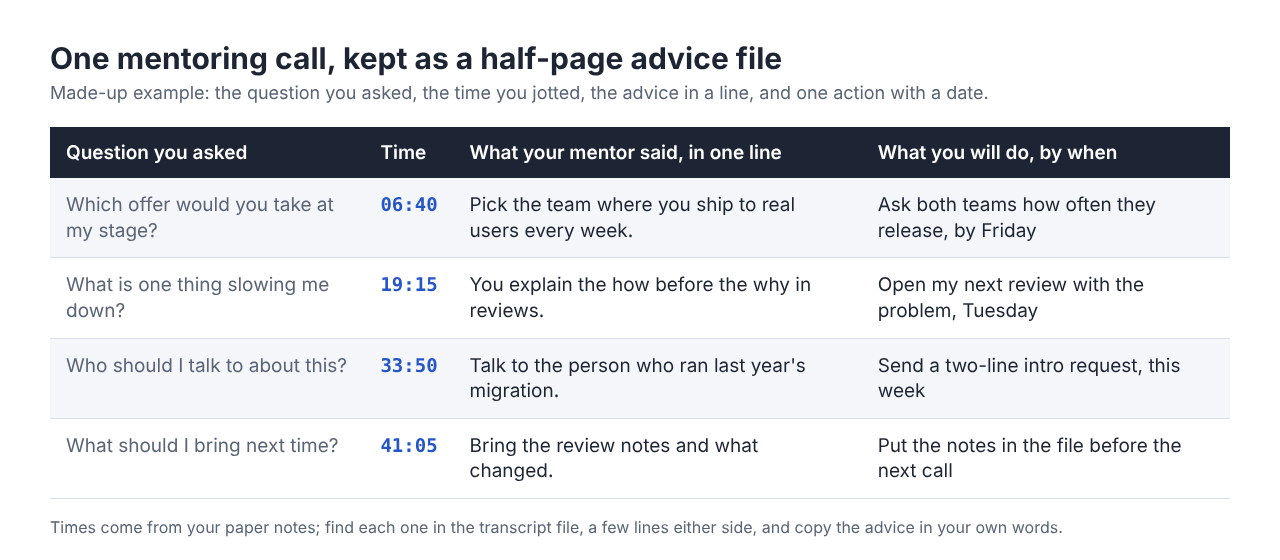
Give the file four columns, as in the table above: the question you asked, the time from your paper notes, what your mentor said in one line of your own words, and one action with a date.
Then reread it. Before your next call, read the whole file and open with "Last time you told me X. Here is what happened." That turns one good call into a series that builds. For a longer way to work through a call's transcript, see meeting notes from a call transcript.
If a call must not leave your computer in any form, untick Live transcript before you start: while it is on, Chrome sends your microphone audio to Google to turn it into text. You then rely on your paper times and the recording itself.
Frequently asked questions
How many questions should I bring to a mentoring call?
Bring five or six, ranked, and expect to get through three or four properly. Always keep time for the three end-of-call questions about your next step, who to talk to, and what to bring next time.
Is it okay to ask a mentor if I can record our call?
Yes, as long as you ask first and accept a no. Explain that it lets you listen instead of taking notes, and say when the recording starts. Some people speak more freely with no recording, and the relationship matters more than the file.
What should I avoid asking a mentor?
Avoid questions a quick search would answer, and "any advice?" with no context. Tie each question to a decision or a piece of work you can name.
How often should I meet with a mentor?
Agree on it together. Leave a gap long enough to act on the last round of advice, so you come back with results rather than the same questions.
Get started
Write your questions tonight, send your mentor any work you want feedback on, and ask whether you may record. For the full recording walkthrough, read how to record a mentoring call on Google Meet and keep the advice. The Free plan includes recording, the live transcript and captions, and 12 hours of recording a month on one device.
The free plan needs no card. Try Cheap Recorder in Chrome, and your recordings stay on your own disk.
Screen recording that is cheap and easy.
Visit cheaprecorder.com↗
Comments
No comments yet.