Small team knowledge base for problems and fixes
A small team knowledge base usually starts as a folder of how-to documents. It describes how things should work, and nobody opens it when something breaks. This guide shows a different shape: a knowledge base built around the problems your team keeps meeting and the fixes it has tried, failures included, so the answer is there the moment someone needs it.
Why build it around problems, not documents
Think about when someone on a small team goes looking for help. It is rarely to read how a process works on a good day. It is because something just went wrong: the drive is full, the Wi-Fi dropped, a client sent the wrong file. The question in their head is "has this happened before, and what fixed it?"
A folder of documents cannot answer that quickly. A list of problems, each with the fixes tried and how they went, can. It also keeps something documents usually lose: the fixes that did not work. Those are worth keeping, because they stop people retrying the same dead end.
What goes in a small team knowledge base
Keep each entry to four parts:
- The problem, in one line, with a number. "The shared drive is full by the end of the month, 2 of the last 3 months."
- Every fix tried, with its outcome. Worked, partly or failed. Keep the failed ones.
- What the working fix needs. A fix often holds only while one thing stays true. Write that down, or the fix quietly stops working when someone changes it.
- Links to related problems. So the next person sees that two problems share a cause.
Lean practice has a useful model for why this matters. The Lean Enterprise Institute lists the benefits of standardized work as including "documentation of the current process for all shifts", "easier training of new operators" and "a baseline for improvement activities". It adds that the charts are "continuously reviewed and updated" as conditions change (Lean Enterprise Institute, Standardized Work). A team knowledge base earns the same benefits only if it is kept current in the same way.
Spread a fix to similar problems
When a fix works, ask one more question: where else could the same problem be happening? Lean calls this yokoten. The Lean Enterprise Institute defines it as deploying ideas "horizontally across the company", and gives an example: when a defective valve is found on one machine, all similar valves are examined for the same defect (Lean Enterprise Institute, Yokoten).
On a small team it is the same move at a smaller scale. A file guide that fixed one kind of wrong file may fix another. A setting that fixed one laptop may be wrong on the others. Write the similar problem down as its own entry, and try the fix there too.
A worked example: a small studio's knowledge base
Here is a made-up studio of five people, using Problem Graph, a problem and solution journal drawn as a map. One person, the studio manager, is the keeper.
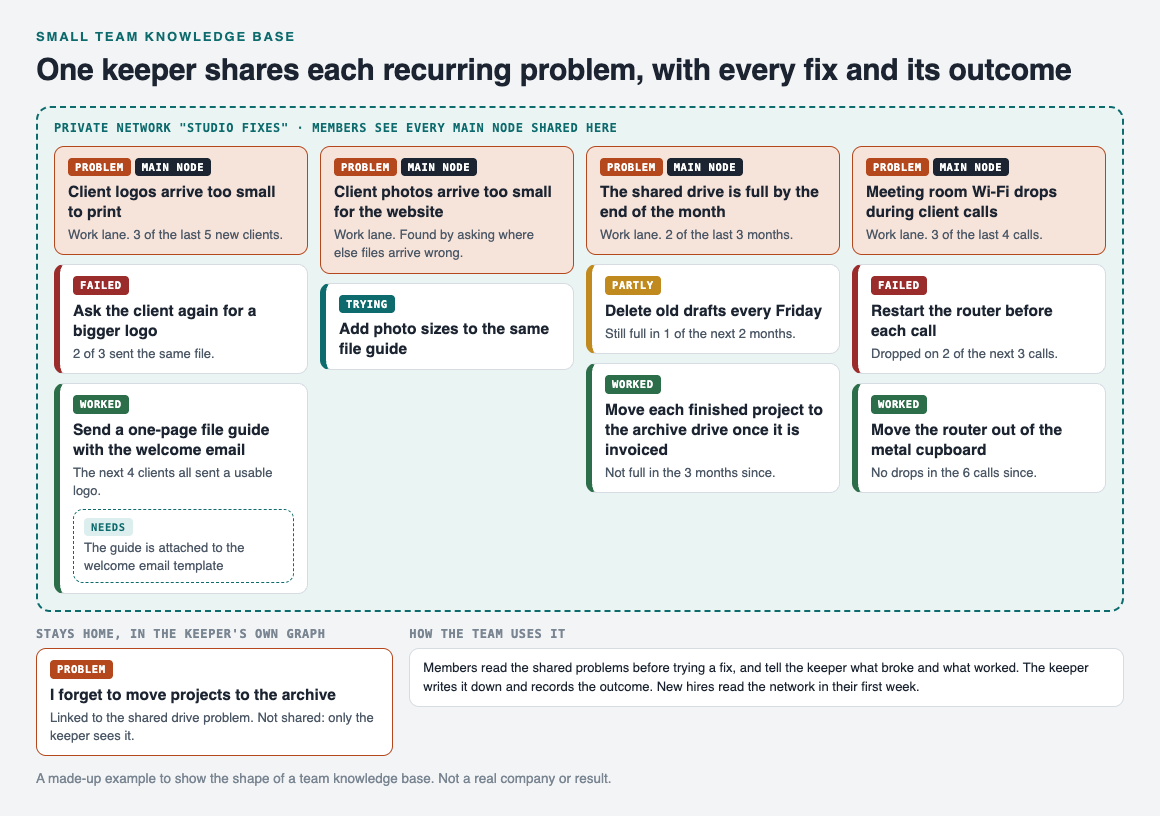
Each recurring problem is a main node shared into the network, with every fix and its outcome.
Client logos. "Client logos arrive too small to print", 3 of the last 5 new clients. Asking the client again failed: 2 of 3 sent the same file. Sending a one-page file guide with the welcome email worked: the next 4 clients all sent a usable logo. It needs one thing to keep working, the guide attached to the welcome email template, so that goes on as a requirement.
Client photos, found by spreading the fix. Once the guide worked, the keeper asked where else files arrive wrong, and wrote "Client photos arrive too small for the website" as its own problem. Adding photo sizes to the same guide is marked as trying.
The shared drive. "The shared drive is full by the end of the month", 2 of the last 3 months. Deleting old drafts every Friday was partly a fix: still full in 1 of the next 2 months. Moving each finished project to the archive drive once it is invoiced worked: not full in the 3 months since.
The meeting room Wi-Fi. "Meeting room Wi-Fi drops during client calls", 3 of the last 4 calls. Restarting the router before each call failed: it dropped on 2 of the next 3 calls. Moving the router out of the metal cupboard worked: no drops in the 6 calls since.
How sharing works for a team
In Problem Graph, a problem is private by default. To share one, the keeper marks it as a main node. Only a main node can be shared, and when it is, its solutions, their outcomes and the requirements they need go along with it.

The three ways to share, from Problem Graph's home page.
The keeper creates a private network, here called "Studio fixes", gives the team the invite code, and shares each of the four main nodes into it. Members see them; nobody else does. Anyone with the invite code can join, so treat the code like a key and give it only to the team.
The keeper's own notes stay home. In the example, the keeper links a personal reminder, "I forget to move projects to the archive", to the shared drive problem. A problem only linked to a main node is not shared, so the team sees the drive problem and its fixes, and the keeper's note stays private. Our post on how to share problems and solutions with your team covers sharing in more depth.
Run it with one keeper
Give the knowledge base one owner. A single keeper keeps the entries in one voice and one place:
- Before trying a fix, read the network. Everyone checks whether the problem is already there and what failed.
- Tell the keeper what broke and what worked. In the team chat or at the weekly meeting, whichever you already use.
- The keeper writes it down. A new problem in one line, a new fix as a solution, and an outcome once it is known.
- Once a month, the keeper reviews it. Fixes still marked as trying get an outcome, numbers get updated, and each working fix gets the yokoten question.
- New hires read it in their first week. It shows them what goes wrong on this team and what was done about it.
If your team already holds retrospectives, the lessons that come out of them belong here too. See how to keep the lessons after a team retrospective, and our guide to a lessons learned log.
Frequently asked questions
What should a small team knowledge base include?
One entry per recurring problem, every fix tried with its outcome, what the working fix needs, and links to related problems. Keep the fixes that failed.
Who should keep the knowledge base up to date?
One keeper works best for a small team. Everyone else reads it and reports to the keeper what broke and what worked.
Can team members add to a shared problem in Problem Graph?
The pages say members of a private network see a main node shared into it. In the setup here, the keeper writes the entries and members read them.
Is a team knowledge base in Problem Graph private?
Problems are private by default. A main node shared into a private network is seen by its members and nobody else, and anyone with the invite code can join.
Get started
List the three problems your team has fixed more than once. Write each in one line, add every fix you remember with its outcome, and share them with your team.
Try Problem Graph: it is free, and you can look around the public network without an account. Write one problem down in a line and attach the first thing you will try.
Comments
No comments yet.
Sign in or make an account to comment.