Start recording greyed out? Read the note beside the button
You are ready to record, and the Start recording button is greyed out. It is not broken. In Cheap Recorder, Start recording greyed out always comes with a short note beside the button, and that note names the one thing in the way. This guide lists every note the recorder can show, in the order it checks them, with the fix for each. It ends with a fresh recorder page taken from greyed out to ready in under a minute.
Start recording greyed out: read the note first
Look just beside the Start recording button at the bottom of the recorder page. When the button can start, the note reads ready to record. When it cannot, the note gives the reason instead.
Two things are worth knowing before you start fixing:
- It shows one reason at a time. The recorder checks a short list in a fixed order and shows the first problem it finds.
- Fixing one can bring up the next. If you fix the first reason and the button stays grey, read the note again. It may now name a second thing.
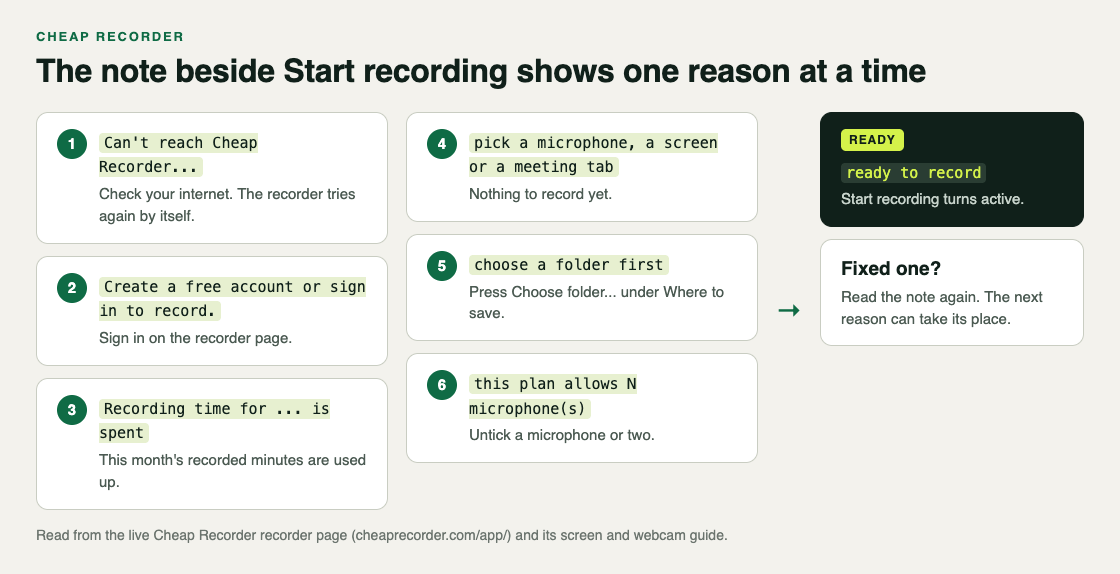
The six notes, in the order they appear
Here is the full list, word for word, so you can match what you see. The first three are about your account and your connection. The last three are about your setup on the page.
- Can't reach Cheap Recorder. Check your internet connection. The recorder tries again by itself.
- Create a free account or sign in to record.
- Recording time for this month is spent, with the hours your plan allows in brackets.
- pick a microphone, a screen or a meeting tab
- choose a folder first
- this plan allows a number of microphone(s)
Notes about your account and connection
Can't reach Cheap Recorder. Your plan comes from Cheap Recorder's server, so the recorder does not start without an answer from it. There is no offline recording. Check your internet connection. You do not need to reload: the recorder checks in again about every 15 seconds, and the button comes back once the server answers.
Create a free account or sign in to record. Recording needs an account so your minutes and plan follow you. Sign in on the recorder page, or create a free account. The free plan needs no card.
Recording time is spent. Each plan has a number of recorded hours a month: 12 on Free, 80 on Creator and 250 on Business. When the month's minutes are used up, the button stays grey until the next month or a plan with more hours. Open your name in the top right of the recorder to see how many minutes are left. Checking this before a long session also stops a recording from ending partway, which the post on a recording that stopped by itself explains.
Notes about your setup
pick a microphone, a screen or a meeting tab. The recorder has nothing to record yet. That means no microphone is ticked, no screen, window or tab is picked, no call tab is picked, and the webcam is off. Any one of these is enough. Most often you unticked your only microphone, so open Change or add microphones and tick the one you speak into. If you just plugged it in, press Rescan.
choose a folder first. Every recording is saved straight into a folder you pick, so the recorder needs one before it starts. Under Where to save, press Choose folder..., pick a folder, and allow Chrome to edit files there when it asks. The recorder does not remember the folder between visits, so this note is normal every time you open the page. The post on where recordings are saved covers folder names and what lands inside.
this plan allows a number of microphone(s). Some plans limit how many microphones you can record at once, and you have ticked more than yours allows. The note says how many. Open Change or add microphones and untick the extra ones, keeping the one closest to your mouth. The post on picking the right microphone helps you choose which to keep.
When Choose folder is greyed out too
Sometimes the folder button is the greyed out one. Then step 1 says This browser cannot write to disk; the file downloads at the end. Use Google Chrome for long recordings.
That happens in a browser that does not let web pages write into a folder. You will not see choose a folder first there, because there is no folder to choose. You can still record. The recording is kept in the browser's memory and downloaded to your usual downloads folder when you press Stop and finish. For anything long, open the recorder in Google Chrome instead, where it is written to your folder as you go.
A worked example: a fresh recorder page on a new laptop
Say you set up a new laptop and open the recorder for the first time to record a short walkthrough. Start recording is greyed out.
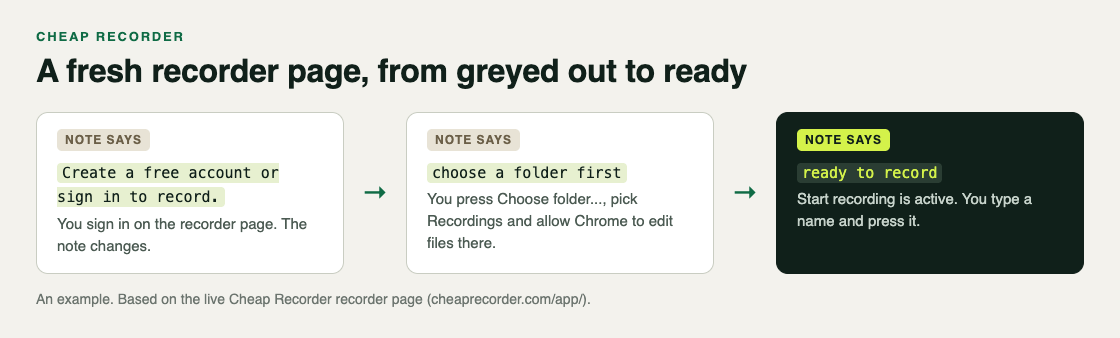
- Read the note. It says Create a free account or sign in to record. You sign in with your existing account.
- Read it again. The button is still grey, and the note now says choose a folder first. You press Choose folder..., make a folder called Recordings, and allow Chrome to edit files there.
- Read it a third time. The note says ready to record, and the button is active.
- Pick what to film. Under What to capture you choose A window, pick your browser window in Chrome's sharing box, and press Share.
- Test. You type Test in Name this recording, record 30 seconds, stop and play it back. The picture and your voice are both there.
- Record. You name the real take and press Start recording.
Had you also plugged in a USB microphone and ticked both it and the laptop's, a plan with a lower microphone limit would have shown the microphone note as a fourth step. Unticking one clears it.
The screen and webcam guide has the full setup, step by step.
Frequently asked questions
Why is the Start recording button greyed out?
Something the recorder needs is missing, and the note beside the button names it. The most common note on a fresh page is choose a folder first.
I fixed the problem but the button is still grey. Why?
The note shows one reason at a time. Read it again; it probably names the next thing to fix.
Can I record offline?
No. Your plan comes from Cheap Recorder's server, so the recorder needs a connection to start. It tries again by itself about every 15 seconds.
Do I have to choose the folder every time?
Yes. The recorder does not remember the folder between visits, but Chrome's picker normally reopens where you were last time.
Get started
The free plan needs no card and gives you 12 hours of recording a month. Try Cheap Recorder in Chrome, and your recordings stay on your own disk.
Comments
No comments yet.
Sign in or make an account to comment.