Swim lane diagram: see where a shared task gets dropped
A swim lane diagram is a flowchart split into lanes, one lane per person or team, so you can see who does each step and where the work passes from one person to the next. This guide shows one use of a swim lane diagram: finding the exact handoff where a shared task gets dropped, naming that gap in one sentence, and keeping track of each fix until one holds.
Once you have found the gap, Problem Graph gives you one place to write it down as a one-line problem, attach each fix you try with its outcome, and share it only with the people in your lanes.
What a swim lane diagram is
According to the Wikipedia article on swimlanes, parallel lines divide the chart into lanes, with one lane for each person, group or sub process, and each lane carries a label. Boxes are steps. Arrows between the lanes show how information or material passes from one lane to another.
A plain flowchart tells you what happens. A swim lane diagram also tells you who does it. The same article says that, for a process that runs across more than one department, swimlanes can clarify the steps, who is responsible for each one, and where delays or mistakes are most likely to happen. The name comes from Geary Rummler and Alan Brache, who called them swim lane diagrams in their 1990 book Improving Performance, which is why you will also see them called Rummler-Brache diagrams.
Why handoffs between lanes are worth circling
Every arrow that crosses a lane line is a handoff. At that moment one person stops holding the task and another starts. If the switch is not clear, the task belongs to nobody for a while, even though each person can see their own part moving.
Here are four ways a handoff can fail. Use them as questions to ask at each crossing, not as a complete list:
- No trigger. The next person does not know the task is ready for them.
- Wrong channel. The message goes to an inbox nobody checks, or to someone who is away.
- Missing input. The task arrives without what the next person needs to start.
- Assumed ownership. Each lane believes the other one is handling it.
A to-do list hides all four. A swim lane diagram shows each one as an arrow crossing a line, which is the reason to draw it.
How to draw a swim lane diagram in five steps
A pen and a large sheet of paper or a whiteboard is enough. Keep it rough: you want to see the handoffs, not make a poster.
- Pick one task with a clear start and end. "Onboard a new starter" is too big. "New starter has a working laptop on day one" is a good size.
- Draw one lane for each role. Write the role at the left edge of each row, so the flow reads left to right. Use roles, not names, unless one person really is the whole role.
- Write each step as a box in the lane of whoever does it. Start with a verb: "send start date", "order laptop", "set up accounts".
- Draw the arrows in order, and circle every arrow that crosses into a new lane. Those circles are your handoffs.
- Walk it with someone from each lane. Ask each person: "How do you know it is your turn?" Mark every handoff where the answer is vague.
If you start with a pile of complaints and do not know which task to draw first, sort them into groups before you pick one. An affinity diagram is one way to do that sorting.
Swim lane diagram example: a laptop that is never ready
Here is a made-up example. A small company keeps having new starters arrive to no working laptop. There are four lanes: hiring manager, HR, IT and new starter.
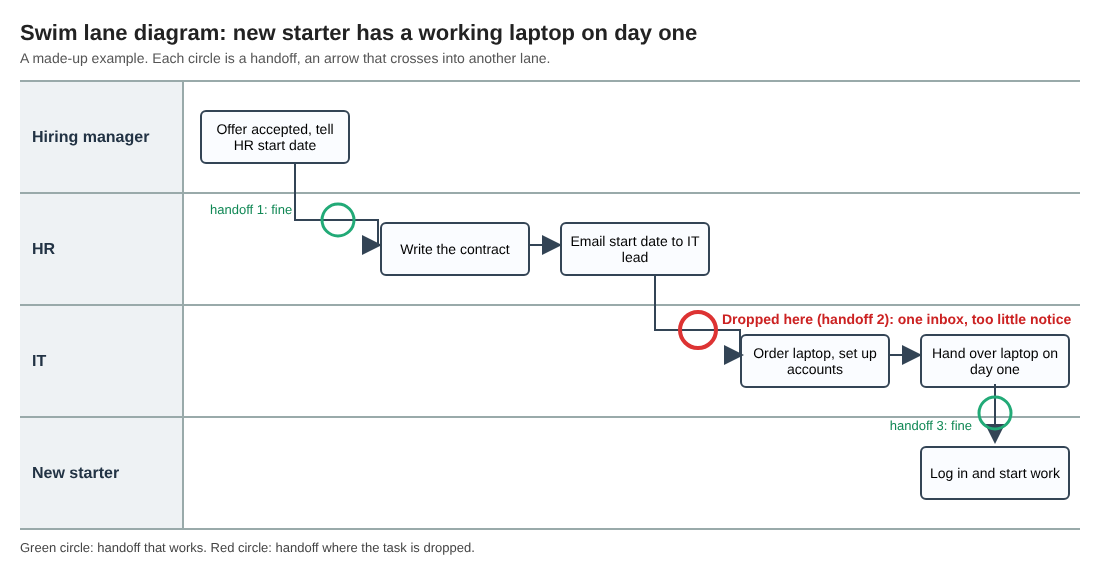
The made-up laptop example: three handoffs, one of them where the task is dropped.
Trace the task from left to right:
- Hiring manager: the offer is accepted, and the manager tells HR the start date.
- HR: writes the contract, then emails the start date to the IT lead.
- IT: orders a laptop and sets up the accounts.
- IT: hands the laptop over on day one.
- New starter: logs in and starts work.
Circle each arrow that crosses a lane. There are three: manager to HR, HR to IT, and IT to the new starter.
Now ask each person how they know it is their turn. Manager to HR is fine: HR needs the date to write the contract, so they chase it. IT to the new starter is fine: the new starter turns up. But HR to IT depends on one email to one person. In this example, when the IT lead is away the email sits unread. IT also says it needs ten working days to get a laptop ready, and HR has sometimes sent the date with five days to go.
So the task is dropped in one place, for two reasons: the wrong channel and a missing input (enough notice). Nobody in either lane did anything wrong from where they stood. The gap lives on the line between them.
Reading the diagram: signs of a dropped handoff
With your own diagram on paper, look for these marks:
- An arrow that points at a person, not a place. "Email the IT lead" depends on one inbox. "Post in the IT request queue" does not.
- A box with no arrow coming into it. Someone is guessing when to start.
- A lane that is empty for many steps, then urgent. That lane may be told late.
- The same step written in two lanes. Two people may each think they own it, or each think the other does.
- An arrow that loops back. "IT asks HR for the date again" is a handoff that has already failed once.
Write each sign next to its arrow. Then turn the worst one into a single sentence you can act on.
From a dropped handoff to a problem everyone can see
The diagram shows where the task falls. It does not remember what you tried to fix it, or whether the fix worked. If nobody writes that down, the same gap can come back months later with nobody sure what was already tried.
Here is how you could carry the laptop example into Problem Graph. One note first: Problem Graph has its own lanes (personal, work, expert and scientific). Those are areas of your life, not the roles on your swim lane diagram.
- Write the problem in one line. In the app, type "New starters arrive without a working laptop" and put it in the work lane. It lands on the graph when you press Enter.
- Attach each fix as a solution. Add "HR posts start dates in the IT request queue, not by email" and mark it as the one you are trying. Add "HR copies a second IT person" as an idea for later.
- Give the fix its requirement. The map key has three kinds of node: problem, solution and requirement. The queue fix needs "start date posted ten working days ahead", so attach that requirement to it.
- Record the outcome. After the next two hires, mark the fix as worked, partly or failed. A fix that failed stays on the map as failed, so nobody suggests it again as if it were new.
- Link related problems. If your diagram also showed "Access badge not ready on day one", write that down too and link it to the laptop problem. Both may trace back to the same late start date, and that is easier to spot on a map than in a list.
To get HR and IT looking at the same thing, mark the laptop problem as a main node. Only a main node can be shared. Create a private network, give the invite code to the people in your swim lanes, and share the main node into it. Its solutions, their outcomes and the requirements they need go with it. Members see it; nobody else does. Anyone with the invite code can join, so give it only to the people you mean to include. A problem you only linked to it, like the badge, stays home unless you make it a main node and share it too.
Groups outside work have handoffs as well. See how running club organisers keep one shared list of problems, or how a problem owner makes sure each problem has one person holding it.
Frequently asked questions
What is the difference between a swim lane diagram and a flowchart?
A flowchart shows the steps of a process in order. A swim lane diagram is a flowchart that also puts each step in the lane of the person or team who does it, so every handoff between roles is visible.
How many lanes should a swim lane diagram have?
Use one lane for each role that actually touches the task. If the lanes no longer fit on one page, the task is probably too big; split it and draw each part.
Can I make a swim lane diagram without special software?
Yes. Paper, a whiteboard or sticky notes on a wall all work, and they make it easy to move steps around while you talk with each person.
When should I redraw a swim lane diagram?
Redraw it when a role, tool or channel changes, and when the same task gets dropped again. Keep a record of each fix you tried and its outcome, so the next drawing starts from what you learned.
Get started
Draw one swim lane diagram this week for a task that keeps slipping. Circle the handoffs, find the one that fails, and write it down as a single sentence. Then give that sentence a home where the fixes and their outcomes stay visible.
Try Problem Graph: it is free, you can look around without an account, and it works on your phone. Write one problem down in a line and attach the first fix you will try.
Every problem you carry, on one map. Solved together.
Visit problemgraph.vlvd.net↗


Comments
No comments yet.