Affinity diagram example: sort a pile of problems into groups
An affinity diagram takes a messy pile of problems and sorts them into a few named groups you can act on. Below is a full affinity diagram example: you write one problem per card, sort the cards into clusters, and name each cluster with a header card. You will follow a small team from 24 raw complaints to five clear groups, and then pick one to fix first.
If you want those groups to last longer than the sticky notes, Problem Graph lets you write each problem in one line, link the ones that belong together, and record which solutions worked, partly worked or failed.
What an affinity diagram is and when to use one
An affinity diagram is a set of cards grouped by how they relate, with a short header on top of each group. Wikipedia's article on the affinity diagram describes it as a tool for organizing ideas and data and one of the Seven Management and Planning Tools. The name comes from Jiro Kawakita, who devised the term in the 1960s, which is why you will also see it called the KJ Method.
The process it gives has three steps: record each idea on a card or note, look for ideas that seem related, and sort the cards into groups until every card is used. Large groups can then be split into subgroups. It sorts by meaning, so it helps when you have more problems than you can hold in your head and no obvious structure yet.
Use one when:
- A team meeting produced a long list of complaints and nobody knows where to start.
- You collected feedback from many people and it all reads differently.
- The same issue keeps coming up under different names.
Skip it when you already know the one problem that matters. Then you need a fix, not a sort.
Affinity diagram example: the starting pile
Picture a five-person team running a small online shop that sells handmade mugs. The owner, two packers, a part-time support person and a freelance web helper each wrote down what gets in the way of their week. Here is the raw pile, in the order it arrived:
- Parcels leave two days after the order in busy weeks.
- We run out of bubble wrap mid-week.
- Courier pickup time changes without warning.
- Wrong mug colour sent to a customer.
- Mugs arrive broken.
- Return labels take ages to make.
- The same customer question gets three different answers.
- Support inbox has 40 unread emails on Monday.
- Nobody knows the refund rule for chipped mugs.
- Tracking emails do not send, so customers ask where their order is.
- Reviews mention slow replies.
- Product photos do not match the real glaze colour.
- Checkout is slow on phones.
- Discount codes break on bundles.
- Stock count on the site is wrong after a sale.
- Weekend orders pile up with nobody watching.
- Handover notes between packers go missing.
- Only the owner knows how to reorder from the supplier.
- A new packer took two weeks to learn the shelves.
- Supplier invoices get paid late.
- We charge less for shipping than the real postage.
- Card fees are not tracked.
- Monthly numbers get done in a rush the night before.
- Packaging costs keep rising.
Step 1: Write one problem per card in plain words
Each card holds one problem, written so a stranger would understand it. Three rules help:
- One problem per card. "Mugs arrive broken and the refund rule is unclear" is two cards.
- Say what happens, not who is to blame. "Handover notes go missing" beats "Sam forgets the notes".
- No solutions on problem cards. "We need a new courier" is a guess. "Courier pickup time changes without warning" is the problem.
Step 2: Sort the cards into rough clusters
Spread all 24 cards on a table or wall. The mug shop gave itself ten minutes and agreed that everyone moves cards at the same time, without talking. If you think a card belongs somewhere else, move it. If it keeps bouncing between two spots, make a copy and put it in both.
Sorting without talking is a choice, not a rule. The shop wanted the groups to come from the cards; the talking comes in step 3.
For the mug shop, five rough clusters formed:
- Cards 1 to 6: all about getting parcels out the door intact.
- Cards 7, 8, 9 and 11: all about answering customers.
- Cards 10, 12, 13, 14 and 15: all about what the website shows or does.
- Cards 16 to 19: all about what only some people know.
- Cards 20 to 24: all about small money leaks.
Card 9, the refund rule for chipped mugs, kept moving between "answering customers" and "parcels". Note that tug before you move on.
Step 3: Name each group with a clear header card
Now you talk. For each cluster, agree on a header that says what the cards have in common. Write it as a short sentence, not a single word. "Shipping" tells you nothing. "Orders leave late and sometimes arrive damaged" tells you what is wrong.
The mug shop's headers:
- Orders leave late and sometimes arrive damaged (6 cards)
- Customers wait too long for clear answers (4 cards)
- The website tells customers the wrong thing (5 cards)
- Key knowledge sits in one or two heads (4 cards)
- Money leaks in small amounts we do not track (5 cards)
If a header joins two ideas with "and", check that the cards share one problem. The shop kept "leave late and arrive damaged" together because both are about getting a parcel out intact.
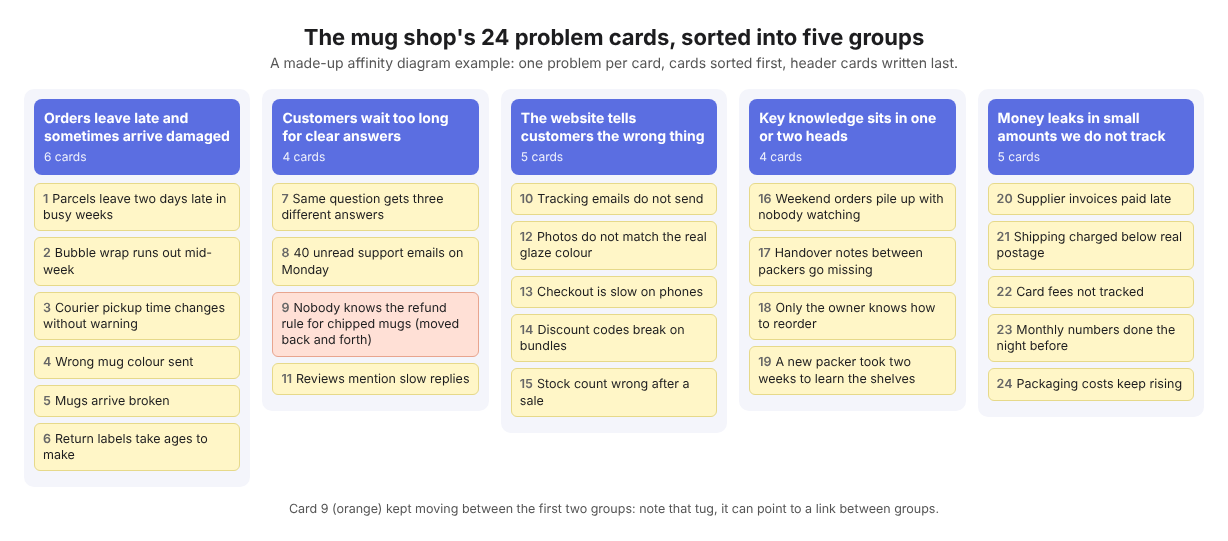
The mug shop's finished affinity diagram (a made-up example).
Step 4: Read the finished affinity diagram and choose what to tackle
Size. The parcels group is the biggest, but card count is not frequency: six cards may describe things that happen once a month. Before you commit, count how often each problem really happens with a check sheet that tallies a problem before you fix it.
Links between groups. Broken mugs (parcels) create refund questions (customers). Late parcels plus missing tracking emails (website) create "where is my order" messages. The parcels group feeds two others.
What you control. Packing is in the team's hands; checkout speed depends on the web helper's time.
The mug shop picked "Orders leave late and sometimes arrive damaged" first, because fixing it should also shrink the customer inbox.
Here is how that looks in Problem Graph. Put each problem in the work lane by typing one line and pressing Enter. Mark the header problem as a main node, then link the six card problems to it. Link "Mugs arrive broken" to "Nobody knows the refund rule for chipped mugs" too, even though it sits in another group. Patterns between groups show up on a map in a way they do not in a list. Then attach solutions as ideas, such as "Double-box mugs over 400 ml" or "Fixed packing cutoff at 2 pm", mark the one you are trying, and later record whether it worked, partly worked or failed.
Common mistakes when grouping problems (and how to avoid them)
- Grouping by department. "Packer problems" and "owner problems" hide links. Group by what the problem is about.
- Vague cards. "Communication" is not a problem. Ask "what happens?" until you get "Handover notes go missing".
- A "Misc" pile. Before you give up on a leftover card, try renaming a group so it fits.
- Solutions sneaking in. A card that says "Hire another packer" skips the thinking. Rewrite it as the problem it answers.
- Too many tiny groups. If you end up with ten groups of two cards, look for headers that say nearly the same thing and merge them.
- Throwing it away. The diagram is worth most when you come back to it and see what you tried. A weekly log of what you tried works the same way for one person.
Frequently asked questions
How many problems do you need for an affinity diagram?
There is no fixed number. If you can sort the problems in your head, you do not need the cards. The mug shop had 24; with a much longer pile, you can split the session by topic and sort each part on its own.
What is the difference between an affinity diagram and a mind map?
A mind map starts from one central idea and branches out. An affinity diagram starts from many loose items and groups them from the bottom up, so the headers come last.
Can you make an affinity diagram alone or remotely?
Yes. Alone, sort the cards, walk away for an hour, then sort again before naming groups. Remotely, a shared list helps, much like one shared list for running club organisers or food bank volunteers on every shift; in Problem Graph you can create a private network, give the team the invite code, and share a main node into it with its solutions and outcomes; problems you only link to it stay home, so make each problem the team must see its own main node.
What should you do after the affinity diagram is finished?
Pick one group, check how often its problems happen, and try one solution at a time. Wikipedia notes that a finished affinity diagram may be used to build a cause and effect diagram, so a fishbone diagram for an everyday problem is a good next step for the group you pick. Write down what happened each time, including failures.
Get started
An affinity diagram on a wall is gone the next time someone cleans. In Problem Graph, your problems stay private by default and follow you to any phone or computer you log in on. Each header can become a main node, with linked problems, solutions and outcomes around it. If you want to see how a map looks first, the app has a "Load example set" button for an empty graph, filters by lane, and a List view beside the map.
Try Problem Graph: it is free, and you can look around the public network without an account. Write one problem down in a line and attach the first thing you will try.
Every problem you carry, on one map. Solved together.
Visit problemgraph.vlvd.net↗


Comments
No comments yet.