Running club problems: one shared list for organisers
Running club problems pile up fast: a missing sweeper on Tuesday, a route that floods every November, a lost key to the kit box. The fix is simple. Write every problem as one line, attach what you tried and whether it worked, and keep it all in one place your run leaders can see. That replaces scattered chat messages with a record that outlasts any single organiser.
Problem Graph gives your committee that record. You write each club problem down in a line, attach the fixes you try with an outcome (worked, partly or failed), and share the list into a private network that only your organisers can join.
Why running club problems get lost between organisers
Say your club runs on a group chat and goodwill. Someone raises a problem after a run. Three people reply. Someone says "leave it with me." Two weeks later the thread has scrolled away, and nobody remembers whether the fix happened.
The problem is not effort. It is memory. Each organiser holds a piece of the picture. When a run leader steps back, their piece goes with them. The next person tries the same fix that already failed last winter.
A shared list solves one thing well. It turns "I think we tried that" into a line you can point at.
The most common running club problems organisers face
Here are the kinds of problem an organiser might write down:
- Leader cover. Not enough run leaders or sweepers for one pace group or one night.
- Routes. A muddy section, a dark stretch, a busy crossing, a path closed for works.
- Kit and access. Hi-vis vests going missing, one person holding the only key, a first aid kit nobody has checked.
- New runners. People turning up for the wrong group, or dropping off after week two.
- Admin. Venue bookings, social events, renewals falling through the cracks.
If one of these is the real bottleneck, the rest can follow from it. If you are short of leaders, routes get cut and new runners have nobody to run with. The idea is the same one behind finding the one bottleneck at home: fix the constraint first.
What belongs on one shared problem list
Keep each entry small. You need three things:
- The problem, in one line. "Thursday 6pm group has no sweeper twice a month." Not a paragraph.
- What you tried. Each attempt is its own solution, attached to the problem.
- What happened. Worked, partly, or failed. Be honest about failures.
That last point matters most. A fix that failed is useful information. If the committee tried a sign-up sheet for sweepers and nobody used it, record it as failed. The next organiser should know that before they print another one. As the Problem Graph page puts it, "A solution that failed three times stays on the map as a failed solution, and that is exactly what the next person needs to know."
Some solutions also need something before they can work. Problem Graph lets you add a requirement node for that. "Cut a second key to the kit store" might need "permission from the venue." Writing the requirement down stops a good fix from stalling quietly.
What does not belong: personal details about members, complaints about named people, or anything urgent. The list is a record, not an alarm.
Running club problems: one shared list for organisers, step by step
Here is a setup to try with a small committee.
1. Pick one owner
One organiser creates the account and keeps the list. You need an account with a username and a password to add problems. The other organisers report problems to the keeper and read what is shared once they join the network.
2. Write the problems down
Open the app, type a problem in one line and press Enter. It lands on the graph right away. Put club problems in the same lane every time, for example personal, so filtering stays clean. The app has four lanes: personal, work, expert and scientific.
3. Link problems that belong together
"No sweeper on Thursdays" and "new runners dropping off" might be the same story. Link them. Patterns show up on a map that you would miss in a list.
4. Mark problems as main nodes and share them
In Problem Graph, only a main node can be shared. When you share it, its solutions, their outcomes and the requirements they need go along with it. A problem you only link to a main node stays private. So for each problem you want the committee to see, mark it as a main node.
5. Create a private network for organisers
Create a network and give your run leaders the invite code. Share your main nodes into it. Members see them. Nobody else does. One warning: the app says anyone with the invite code can join, so treat the code like the kit store key. Send it directly to each organiser. Do not post it in the open club chat.
Run leaders can open it on their phone in the browser. In the app, the Network filter shows what has been shared there, and the List view gives you a plain list beside the map.
Running a quick weekly review without another meeting
The pages describe no notifications, comments or chat. That is fine. You still have your group chat for talking. The list is for remembering.
Once a week, the keeper spends ten minutes on it:
- Open the app, filter by Network, switch to List view.
- For each problem, ask one question: did anything change this week?
- Update outcomes. A fix that half worked gets marked partly. A fix that did nothing gets marked failed.
- Add any new problems raised in the chat as one-line entries.
- Post one short message to the organisers: "List updated. Two new problems, one fix marked worked."
If a problem has no next step, write one as a new solution and mark it as the one you are trying. A club committee problem list works the same way: one keeper, one small next action per problem, a clear sign of done.
Stuck on a problem? You can ask for suggestions. The AI proposes new solutions grounded in what worked for others on problems like yours. Treat these as proposals to discuss, not answers. Problem Graph can also show you similar problems other people have shared publicly and which of their fixes worked. You can borrow one into your own graph with one tap, and it keeps a link back to where it came from.
Example: turning a messy group chat thread into a clear problem list
Imagine this thread from a club's organiser chat on a Wednesday night:
"Nobody swept the 6pm group again." "I can do next week but not the one after." "Did we ever sort the hi-vis? Two new people had none." "Also the canal path was flooded." "Can someone chase the cafe about Sunday?" "Who has the kit key? I'm away."
Six messages, four problems, one admin task and no record. Here is how the keeper turns it into entries:
- Problem: Thursday 6pm group has no sweeper twice a month. Solution: sign-up sheet in the chat. Outcome: failed.
- Solution: pair each leader with a fixed sweeper for a month. Marked as trying.
Problem: New runners arrive without hi-vis in winter.
- Solution: keep six spare vests in the kit box. Requirement: access to the kit box.
Problem: Canal path floods after heavy rain.
- Solution: wet-weather alternative route. Outcome: worked.
Problem: Only one person holds the kit store key.
- Solution: cut a second key. Requirement: venue permission.
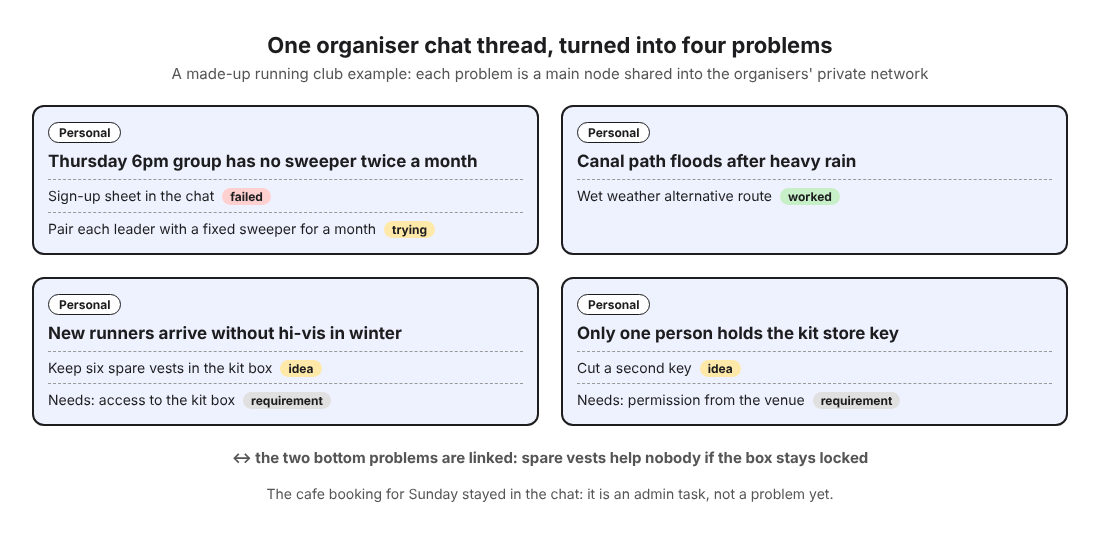
Now link "hi-vis" to "kit key," because the vests are useless if nobody can open the box. Mark all four as main nodes and share them into the organisers' network. The cafe booking is admin, not a problem yet, so it stays in the chat.
The thread took five minutes to turn into a list. Next month, when a new run leader asks "have we tried a sign-up sheet?", the answer is on the map, marked failed. If you have ever kept a log like the one in logging what you tried for noise problems at home, this is the same habit, shared with a team.
Frequently asked questions
Who should own the running club problem list?
One organiser, for example the club secretary or whoever already chases things up. The others report problems to them and read the shared list, and one person doing the weekly review keeps it current.
How do we handle safety issues on the list?
Deal with any safety issue straight away through the person responsible, in person or by phone. The pages describe no alerts or notifications, so use the list afterwards to record what happened and what you changed.
What if volunteers stop updating it?
Do not ask them to. Let run leaders raise problems where they already talk, in the chat, and have the keeper copy them in as one-line entries during the weekly review. Then the list depends on one person, not on everyone remembering.
Can the same approach work for other volunteer groups?
Yes. Any group with rotating volunteers has the same memory problem. See how it works for food bank volunteers sharing one list across every shift.
Get started
Start small. Take the last messy thread in your organiser chat and pull out the problems. Write each one in a line. Attach what you already tried and be honest about what failed. Then create a private network, send the invite code to your run leaders one by one, and share the problems they need to see.
Try Problem Graph: it is free, and you can look around the public network without an account. Write one problem down in a line and attach the first thing you will try.
Every problem you carry, on one map. Solved together.
Visit problemgraph.vlvd.net↗


Comments
No comments yet.