Texture Clamp vs Repeat: What the Wrap Modes Actually Do
Texture clamp vs repeat comes down to one question: what should the graphics card read when a texture coordinate lands outside the image? Repeat wraps the coordinate around, so the image tiles. Clamp to edge pins it to the border, so the outermost pixels stretch outward. Mirrored repeat is a third option that tiles with every other copy flipped. Pick the wrong one and you get seams, smears or thin lines along a sprite's edge.
To see both modes in one small, real game, open Tank City Reboot, two free tank games in your browser whose code builds every texture by hand and clamps each one unless it is set to repeat.
What wrap modes are and why coordinates leave the image
A texture coordinate tells the graphics card where to read in an image. Engines call the two axes U and V (WebGL calls them S and T), and the image itself spans 0 to 1 on each. The wrap mode is the rule for every coordinate outside that square. Unity's reference puts it the same way: wrap mode decides how a texture is sampled when coordinates fall outside the 0 to 1 range.
Coordinates leave that range more often than you might think:
- You multiply them by 4 to tile a floor four times.
- You add time to them to scroll water or clouds.
- Smooth filtering reads the neighbouring pixel too, and at the very edge that neighbour is past the border.
The last case is the sneaky one. Even when your coordinates stay inside 0 to 1, smooth filtering can reach past the edge, and the wrap mode decides what it finds there. If textures are new to you, start with our plain guide to textures.
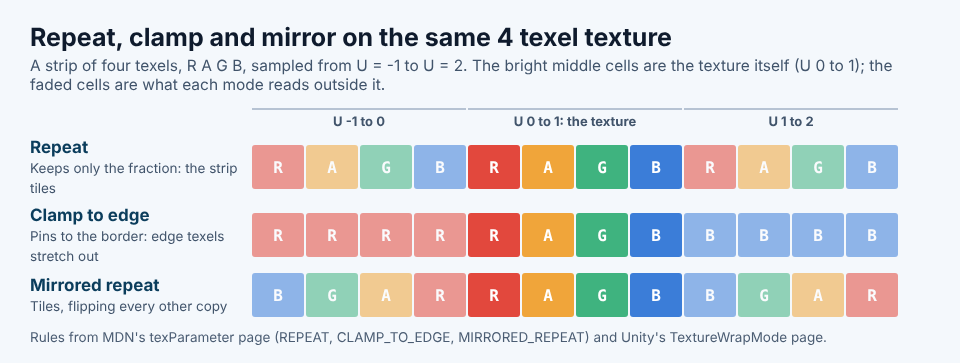
Repeat: tiling a texture across a surface
Repeat keeps only the fractional part of the coordinate. A U of 2.3 reads the same spot as 0.3, and a U of minus 0.2 reads the same spot as 0.8. The image tiles forever in both directions. In WebGL, repeat is the default: MDN's texParameter page lists REPEAT as the default value of both wrap settings.
Use repeat for anything meant to tile: floors, walls, grass, scrolling backgrounds and overlay patterns. The texture has to be seamless, so its right edge matches its left and its top matches its bottom, or every tile boundary shows a hard line.
Tank City Reboot's scan line overlay is a clean example. It is a 64 by 64 texture set to repeat, with one row in four painted black at a low alpha of 46 out of 255, drawn over everything else on screen. Because 64 divides evenly by 4, the pattern ends exactly where the next copy begins, so the spacing never breaks at a seam. That is the whole trick to a good repeating pattern: make its period divide the texture's size. Our posts on scan lines in retro games and powers of two cover the look and the numbers.
Clamp to edge: stretching the last pixel
Clamp to edge never lets the coordinate read past the outermost pixel. Unity's reference says it plainly: clamp "clamps the texture to the last pixel at the edge". A U of 2.3 reads the last column, and a U of minus 5 reads the first. Anything outside the image becomes a smear of whatever colour sits on its border.
That makes clamp the safe choice for single images: sprites, interface panels, text and pictures that cover a surface exactly once, because their edges can never pick up colour from the opposite side.
Tank City Reboot clamps by default. The board and the encrypted zones are each one 208 by 208 texture that covers the whole field once. There is nothing to tile, so clamp is correct.
Mirrored repeat: tiling without a hard seam
Mirrored repeat tiles the image but flips every other copy. Unity describes it as tiling the texture "by mirroring it at every integer boundary". So U 0.3 reads 0.3, but U 1.3 reads 0.7. Edges always meet their own mirror image, so even a texture that does not tile cleanly shows no hard seam.
The flip itself can be obvious on text or strong shapes, so mirroring suits organic textures like rock, sand and noise. Unity also has Mirror Once, which mirrors one copy and then clamps.
WebGL offers only these three: MDN lists REPEAT, CLAMP_TO_EDGE and MIRRORED_REPEAT, and no mode that returns a fixed border colour. If you need "nothing outside the image" in a browser, check in the shader whether the coordinate is inside 0 to 1 before you sample.
Texture clamp vs repeat, worked through: one coordinate, three answers
Take the four texel strip in the diagram above: red, amber, green and blue, left to right. Each texel covers a quarter of the image, so U 0 to 0.25 is red and U 0.75 to 1 is blue. Now sample U = 1.1 under each mode.
- Repeat: keep the fraction, 0.1. That is inside the first quarter, so you get red.
- Clamp to edge: 1.1 is past the right edge, so it reads the last texel, blue.
- Mirrored repeat: the whole part is 1, an odd copy, so read backwards: 1 minus 0.1 is 0.9, in the last quarter, so you get blue.
Now try U = minus 0.1. Repeat gives 0.9, blue. Clamp gives the first texel, red. Mirrored repeat reads the copy to the left, which is flipped, so it lands at 0.1, red. Working one coordinate through by hand like this is the fastest way to predict what a mode will draw.
Then match the mode to the job:
- Tiling surfaces: repeat, or mirrored repeat if the texture has visible seams.
- Sprites and interface pictures: clamp to edge.
- Sprite sheets: clamp on the sheet, plus a gap between frames, because clamp only protects the sheet's outer edge.
- Screen effects such as blur: clamp, so they do not pull in pixels from the opposite edge of the screen.
Fixing seams and lines at texture edges
Most edge bugs have one cause, so change one setting at a time and look again.
- Check the wrap mode. A thin line on one side of a sprite that matches the colour of its opposite side is repeat plus smooth filtering. Switch to clamp.
- Check the filter. Smooth (bilinear) filtering blends neighbours; point filtering, set as
NEARESTin WebGL, reads exactly one texel. Tank City Reboot uses point filtering for its textures and switches only the soft glow behind tanks and shots to bilinear, where smoothness is the point. Our point filtering post explains why pixel art stays crisp. - Check mipmaps. Smaller copies of a texture average neighbouring pixels, so frames on a sheet can bleed into each other at a distance. Tank City Reboot builds its textures with no mipmaps at all.
- Check the image size in WebGL 1. MDN's WebGL textures tutorial notes that WebGL 1 treats sizes that are not a power of 2 differently: for those images it turns off mipmaps and sets wrapping to clamp to edge.
Setting wrap modes in WebGL, Unity and Godot
- WebGL: wrap is set per axis on the texture, for example
gl.texParameteri(gl.TEXTURE_2D, gl.TEXTURE_WRAP_S, gl.CLAMP_TO_EDGE), and the same withTEXTURE_WRAP_Tfor the other axis. - Unity: set
texture.wrapModetoTextureWrapMode.Clamp,Repeat,MirrororMirrorOnce, or usewrapModeUandwrapModeVto set each axis on its own. - Godot: a 2D node's texture repeat setting on CanvasItem can be disabled, enabled (repeat) or mirror.
Whatever the engine, check wrap and filter together on every new texture.
Frequently asked questions
Why does my sprite show a thin line at one edge?
With repeat and smooth filtering, the edge texel is blended with the texel on the opposite side, because repeat wraps the neighbour around. Switch the sprite to clamp to edge, or use point filtering for pixel art.
Can I set different wrap modes for U and V?
Yes. WebGL sets TEXTURE_WRAP_S and TEXTURE_WRAP_T separately, and Unity has wrapModeU and wrapModeV. A strip that scrolls sideways can repeat across and clamp down.
What is the default wrap mode?
In WebGL it is repeat, on both axes. Tank City Reboot's code does the opposite: it clamps every texture unless that texture is set to repeat.
Is mirrored repeat better than repeat?
Only for textures that do not tile cleanly. It hides the hard seam, but the flip shows on text and strong shapes.
Get started: spot the wrap modes in Tank City Reboot
Open the game in a current browser with WebGL 2 and look closely at the faint scan lines over the field. That is the 64 by 64 repeating texture, tiled across the whole screen with no visible seam. The board under it is one clamped texture. Then try Tank City Zero Day, the second game, and watch the soft bilinear glow behind each tank against the sharp pixel art.
Play Tank City Reboot: it is free, plays in your browser on a computer or a phone, and needs no account.
The Family Computer tank classic, rebuilt inside a computer.
Visit tankcityreboot.vlvd.net↗
Comments
No comments yet.