What Is Point Filtering in Graphics? Why Pixel Art Stays Crisp
If you have ever scaled up a tiny sprite and watched it turn to mush, you have met the problem this post solves. So, what is point filtering in graphics? It is a texture sampling mode that picks the single nearest texel for each screen pixel and never blends neighbors. That is why pixel art stays crisp: no new colors appear between the pixels you drew.
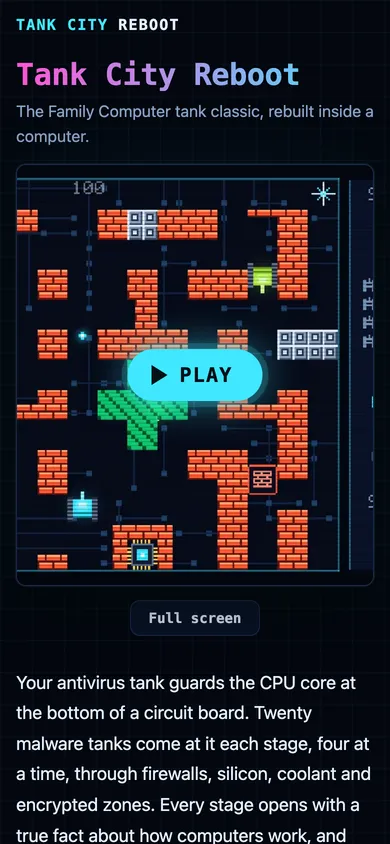
Tank City Reboot is a free game that plays in your browser, on a computer or a phone, with no account needed to play. Its tanks and walls are tiny pixel patterns, so it is a handy place to see point filtering at work.
What is point filtering in graphics?
A texture is a grid of colored cells called texels. When a GPU draws that texture on screen, the texel grid rarely lines up with the screen pixel grid. A 16 by 16 sprite shown at 64 by 64 pixels means each texel covers a 4 by 4 block of screen pixels. Every screen pixel has to ask the texture: what color goes here?
The filter mode is the rule for answering that question. Point filtering gives the simplest answer: take the color of the texel the position falls inside. Nothing is averaged. If your sprite uses five exact colors, the screen shows those same five colors and no others.
You will also see it called nearest neighbor filtering or nearest sampling. They mean the same thing. For the wider idea of how a texture is made in the first place, see what a texture is in computer graphics, and for the art style itself, what pixel art is in video games.
How point filtering picks a pixel (nearest neighbor sampling)
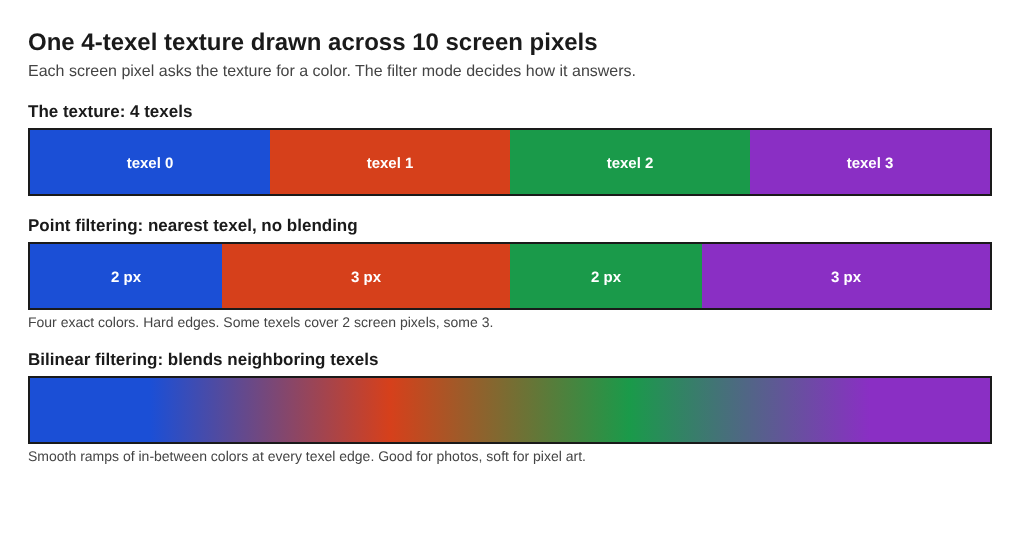
Here is a worked example. Say you have a texture that is 4 texels wide and you draw it across 10 screen pixels. Look at the screen pixel with index 6.
- The GPU takes the center of that pixel: 6 plus 0.5 gives 6.5.
- It divides by the screen width to get a texture coordinate: 6.5 / 10 = 0.65.
- It multiplies by the texture width: 0.65 x 4 = 2.6.
- It rounds down to a whole texel index: 2.
The pixel gets texel 2's color, exactly. Run the same steps for all 10 pixels and you get texel 0 for pixels 0 and 1, texel 1 for pixels 2 to 4, texel 2 for pixels 5 and 6, and texel 3 for pixels 7 to 9. That is clean, hard-edged blocks. Some texels end up covering 2 screen pixels and some 3, which matters later when we talk about uneven pixels. The diagram below shows the result next to a blended one.
Point vs bilinear vs trilinear filtering
The same 2.6 position gives a different result in the other common modes.
Bilinear filtering
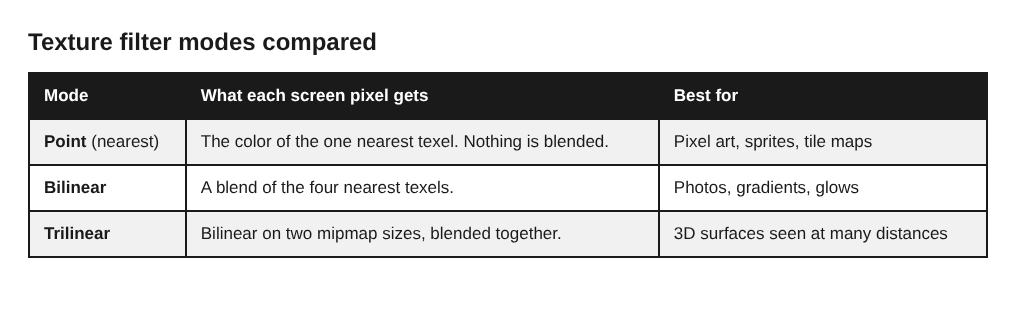
Bilinear filtering blends the four nearest texels. Texel centers sit at 0.5, 1.5, 2.5 and so on, so a position of 2.6 sits between the centers of texel 2 (at 2.5) and texel 3 (at 3.5). Along this one axis, the result is 90% texel 2 and 10% texel 3. The same happens on the vertical axis. At the edge between two texels you get a smooth ramp of in-between colors. That is great for photos and gradients. For a sprite with hard outlines, it reads as blur.
Trilinear filtering
Trilinear filtering does bilinear sampling on two mipmap levels and blends between them. A mipmap is a pre-shrunk copy of the texture at half size, then a quarter, and so on. Trilinear helps when a texture is shown much smaller than its real size, such as a distant floor in a 3D scene. It is built to smooth things out, which is the opposite of what pixel art wants.
The quick rule: point keeps hard edges, bilinear smooths between texels, trilinear also smooths between sizes. Wikipedia's texture filtering article describes nearest-neighbor interpolation as the simplest and crudest method, which uses the color of the texel closest to the pixel center.
Why pixel art stays crisp with point filtering
Pixel art is drawn at a tiny resolution on purpose. Each pixel is a deliberate choice. The art only looks right on a large screen if those choices are enlarged into clean squares.
Point filtering does exactly that. Edges stay hard. Colors stay in the palette you picked. A one-pixel line stays a one-pixel line, just bigger.
Tank City Reboot is built this way. According to the code, its tanks are made from 16 by 16 letter patterns and drawn with point filtering, facing up and then rotated. The board is a 208 by 208 texture. Each texture is created in code with no mipmaps. Brick walls get their mortar lines from a rule in code, and the tank treads flip between two frames every 2 pixels a tank moves.
Why pixel art looks blurry and how to fix it
Blurry pixel art almost always has one of four causes.
- The filter is bilinear or trilinear. Most engines default to a smooth mode because it suits photos and 3D art. Switch the texture to point filtering.
- Mipmaps are on. Mipmaps blend texels into smaller copies. For pixel art, turn them off.
- Compression is on. Lossy texture compression adds smudged colors around edges. Use uncompressed formats for small sprites.
- The image was resized in an editor. If you scaled the sprite with a smooth resampling option, the blur is already baked into the file. Re-export it at its true size and let the engine do the enlarging.
Check them in that order. The first fix solves most cases.
How to set point filtering in Unity, Godot and other engines
The setting has a different name in each tool, but it is always one switch.
Unity
Select the texture in the Project window. In the Inspector, set Filter Mode to Point (no filter). While you are there, set Compression to None and turn off Generate Mip Maps. If you create textures in code, set texture.filterMode = FilterMode.Point; Unity's reference page for FilterMode.Point covers it.
Godot
In Godot 4, open Project Settings and look under Rendering, then Textures, then Canvas Textures, for the default texture filter. Set it to Nearest. You can also override it per node with the Texture Filter property on a sprite or other canvas item; Godot's CanvasItem reference lists the options.
Other places
- OpenGL and WebGL: set both
TEXTURE_MIN_FILTERandTEXTURE_MAG_FILTERtoNEARESTwithtexParameteri. - HTML canvas: set
ctx.imageSmoothingEnabled = falsebefore drawing (see MDN). - CSS: use
image-rendering: pixelatedon an image (see MDN).
Common problems, and when not to use point filtering
Point filtering is simple, but it brings its own quirks.
Uneven pixels
If you scale a sprite by a non-whole number, such as 2.5, some texels cover 2 screen pixels and others cover 3. Lines look lumpy. The fix is to scale by whole numbers (2x, 3x, 4x) or to render the game at its low resolution and enlarge that final image by a whole number.
Shimmering
When a sprite moves by fractions of a pixel, the nearest texel can flip back and forth from frame to frame. Edges seem to crawl. Snap positions to whole pixels, or move things in whole-pixel steps. Tank City Reboot's first game moves tanks one pixel at a time, which suits the grid.
Texture bleeding
If many sprites share one big atlas texture, a sample near a sprite's edge can pick up a neighbor's color, which shows up as a thin stray line. Add a pixel or two of padding around each sprite, and use clamped edges so the texture does not wrap around by accident. Tank City Reboot's textures are clamped unless a texture is set to repeat. The scan line overlay is a 64 by 64 texture that repeats on purpose.
When not to use point filtering
Point filtering is the right default for pixel art and the wrong one for plenty of other things.
- Photos and painted art: hard blocks make them look broken.
- Textures shown much smaller than their real size: they can sparkle and flicker. Bilinear or trilinear with mipmaps is better here.
- Soft effects: glows, smoke and gradients need smooth sampling.
Tank City Reboot makes this exact choice. Every texture uses point filtering except the glow behind tanks and shots, which switches to bilinear so it fades smoothly instead of stepping. You can mix modes in one scene, one texture at a time.
Frequently asked questions
What is point filtering in simple terms?
It is a texture setting where each screen pixel copies the color of the single nearest texel. No colors are blended, so hard edges stay hard when you enlarge an image.
Is point filtering the same as nearest neighbor?
Yes. Point filtering, nearest filtering and nearest neighbor sampling all describe the same method. Engines just use different names for it.
Why is my pixel art blurry in my game engine?
Most engines default to bilinear or trilinear filtering. Set the texture to point (or nearest) filtering, turn off mipmaps and compression, and make sure you scale by whole numbers.
Does point filtering cost more performance?
It is not the costlier choice. It is the simplest sampling mode, since it reads one texel instead of blending several, so you can pick it for its look without worrying about extra work.
Get started with Tank City Reboot
The quickest way to see crisp pixel art is to play it. Press Play, click the game so it has focus, then move with the arrow keys or WASD and fire with Space. Shoot a brick wall and watch it break a block at a time, then look at how sharp the tank and wall edges are. The second game, Tank City Zero Day, lets you move and fire in eight directions and dash through shots.
Play Tank City Reboot: it is free, plays in your browser on a computer or a phone, and needs no account.
The Family Computer tank classic, rebuilt inside a computer.
Visit tankcityreboot.vlvd.net↗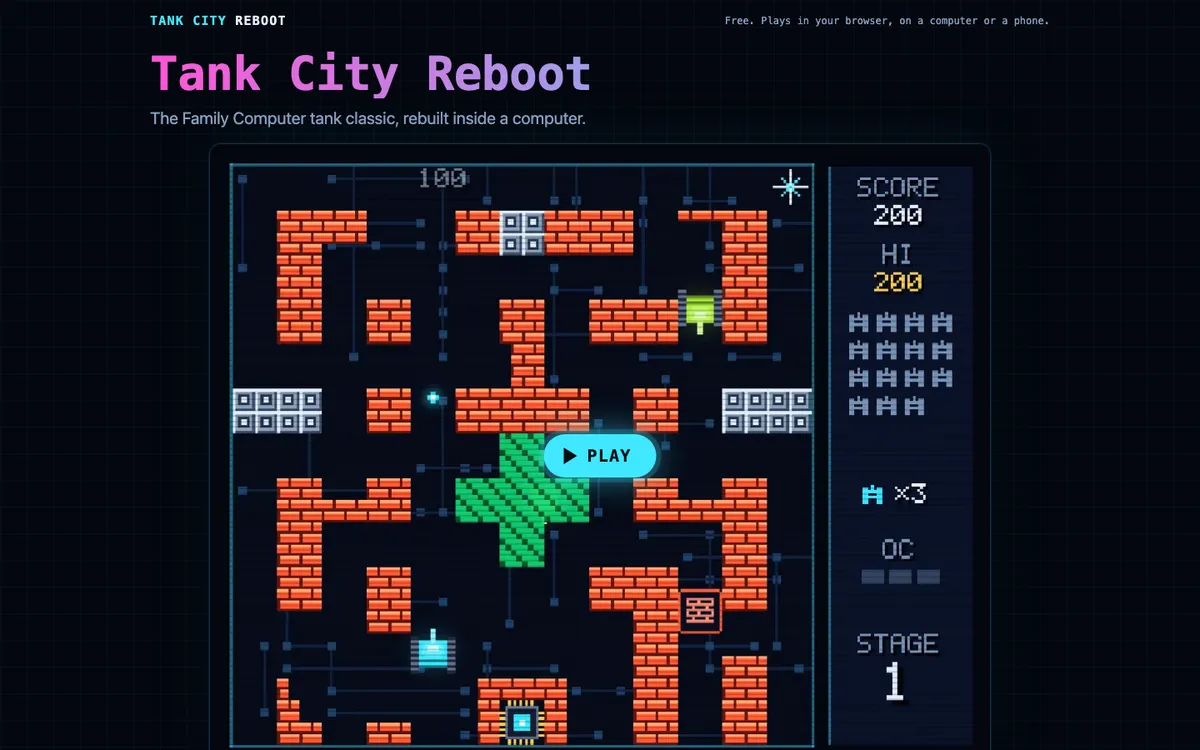
Comments
No comments yet.