What Is a Context Window? How Much an AI Can Read at Once
What is a context window? It is the amount of text an AI model can take into account at one time, measured in tokens. Everything the model sees for one answer has to fit inside it: your instructions, the conversation so far, any documents you paste in, and the answer it is writing. If you build a product on a model, the window decides how much you can show it per request, and what you pay for.
The How Modern AI Actually Works course on Age of AI Entrepreneur explains in its first lesson, Next-Token Prediction, how a model reads the text so far and picks what comes next; a reader signs in with an email and an emailed code to open it. This post takes that idea one step further, to the limit on how much "text so far" a model can hold.
What is a context window? The short answer
A language model writes one token at a time. A token is a small chunk of text: a word, part of a word or a punctuation mark. To pick each next token, the model looks back at the tokens it already has. The context window is the most it can look back at.
Anthropic's documentation puts it plainly: the context window is "all the text a language model can reference when generating a response, including the response itself." That last part matters. The answer is not written somewhere else. It takes up room in the same window as your prompt.
Window sizes differ by model. The same documentation lists models with a 200,000 token window and models with up to 1 million. Other providers publish their own limits, and they change as new models come out, so check the model page of whichever API you use rather than a number from a blog post.
What counts toward the context window
People often think of the window as "how long my message can be". It is more than that. Anthropic's page lists what counts in one request: the system prompt, every message in the conversation, including tool results, images and documents, and the definitions of any tools the model may call.
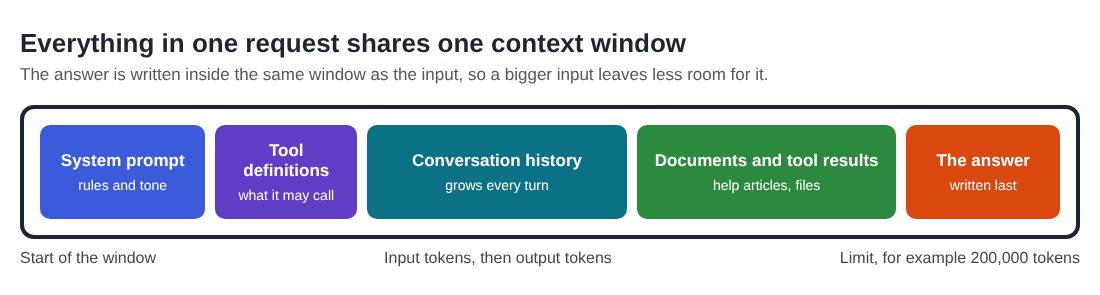
In a chat product, the history grows with every turn. Turn ten carries turns one to nine with it. So a conversation that felt small at the start can fill the window later, and every request costs more as it grows, since you pay for the input tokens you send each time. Our post on LLM token pricing shows how to work out what one request costs.
Why a bigger window is not always better
It is tempting to fill a large window with everything you have. The same Anthropic page warns that more context is not automatically better, and research backs that up.
In the paper Lost in the Middle, researchers tested language models on two tasks that required finding one relevant piece of information in a long input. They found that performance was often highest when the relevant information sat at the beginning or the end of the input, and dropped when it sat in the middle. This held even for models built for long contexts.
For a builder, that gives three practical rules:
- Put the instructions that matter most at the start or the end, not buried between two long documents.
- Send what is relevant, not everything you have. Ten pages where one is useful is harder for the model than one page.
- Test with long inputs, not only short ones. A feature that works on a two-line question may fail on a forty-page contract.
What happens when you run out of room
When a request is larger than the window, something has to give. Through Anthropic's API, for example, an input that is already larger than the window is refused with a "prompt is too long" error, and an answer that reaches the limit stops there, so your code has to decide what to cut. In a chat app, the app decides for you. Anthropic's page says Claude.ai can manage the window on a rolling "first in, first out" basis, which means the oldest parts of a long chat drop out first.
That is why a long chat can seem to "forget" what you said at the start. The model did not lose a memory. The early text is simply no longer in what it is shown. A model has no memory between requests beyond what you send it, so anything your product needs it to know has to be in the window every time.
A worked example: budget the window for a support-reply tool
Say you are building a tool that drafts replies to customer emails using your help articles. Before you write code, write a budget for each request. The numbers below are an example; count your own with your provider's token counter.
- System prompt: your tone, rules and what never to promise. Example: 1,500 tokens.
- Tool definitions: say the model can look up an order. Example: 800 tokens.
- The customer's email and the thread so far: cap it at the last five messages. Example: 3,000 tokens.
- Help articles: send only the 3 most relevant ones, not all 200. Example: 6,000 tokens.
- Room for the answer: a reply of a few paragraphs. Example: 700 tokens.
That comes to 12,000 tokens, far under a 200,000 token window. The point of the budget is not to fill the window. It is to decide, on purpose, what goes in, so that the cost per email is known and the most important text is not lost in the middle.
Then test it. Take 20 real past emails, including the longest thread you have, and check two things: does each reply use the right help article, and does it still follow the rules in your system prompt when the thread is long? If the rules slip on long threads, move them to the end of the prompt as well, or cut the thread shorter.
How to fit what matters into the window
Most products need less context than they think. Four common ways to keep the window lean:
- Retrieval: store your documents outside the model and send only the parts that match the question. The AI Product Stack course covers this in its lesson Giving Models Your Data: Retrieval, and our guide to the AI tech stack for startups shows where it fits.
- Summaries: replace old turns of a long conversation with a short summary of what was decided.
- Trimming: drop tool results and documents once the answer that needed them is written.
- Short instructions: a clear 300-token system prompt often works better than a rambling 3,000-token one, and it costs less on every request.
Whatever you choose, keep checking the output. A model with the wrong text in its window can give a confident wrong answer, which our post on AI hallucination examples shows in real cases.
Frequently asked questions
Is the context window the same as the model's memory?
No. The window is what the model sees for one answer. It keeps nothing between requests on its own, so a product that seems to remember is sending earlier text again each time.
Does the answer count toward the context window?
Yes. The window holds your input and the response together, so a long input leaves less room for a long answer.
Is a model with a bigger context window always better?
Not always. Research found models often use information at the start and end of a long input better than information in the middle, and more tokens also cost more.
How do I know how many tokens my prompt uses?
Use your provider's token counting tool or the token counts its API returns with each response. Count a few real requests before you set your budget.
Get started
Open Age of AI Entrepreneur, sign in with your email and an emailed code, and start with the How Modern AI Actually Works course, then the AI Product Stack course for tokens, costs and retrieval. Each lesson takes about nine minutes and lists its sources, and the terms page says every lesson is free to anyone with an account.
Building a business in the age of AI, from a first project to a company.
Visit aientrepreneur.vlvd.net↗
Comments
No comments yet.