AI Tech Stack for Startups: Models, Retrieval and Tools
An AI tech stack for startups is the short list of parts between your user and a language model: a model API, a way to give the model your own data, the prompts and glue code that connect them, and a way to check the output is any good. You need fewer parts than most architecture diagrams suggest. The Intermediate course The AI Product Stack covers the model API, retrieval and model choice in three short lessons: what a request costs, retrieval, and choosing between big, small, open and closed models. Prompts and glue code, and evals, sit in other courses, which this guide links where they come up. You sign in with your email and an emailed code to open the course.
Age of AI Entrepreneur teaches how to build, launch and grow a business with AI through short hands-on lessons with real sources, so you can learn each layer before you spend money on it.
What an AI tech stack for startups actually includes
Think in layers, and add one only when a real problem asks for it.
- Model API. The service that takes text in and returns text out.
- Retrieval. The step that finds your documents or records and hands the relevant pieces to the model.
- Prompts and glue code. The instructions, the code that calls the model, and the small amount of logic around it.
- Evals, logging and monitoring. The checks that tell you whether the product works and whether a change made it better or worse.
Notice what is missing: a training pipeline, a GPU cluster, a vector database you picked before you had users. Most early products need none of those. You are building a product, not a research lab.
Layer 1: Model APIs and how to start with one provider
A model API is a request and a response. You send text, you get text back, and you are billed by the token. A token is a chunk of text, roughly a short word or part of a word. Both what you send and what you receive count.
That makes cost easy to estimate before you write any product code. Here is a worked example with made-up numbers, so swap in your provider's real prices:
- Your prompt, including instructions and any pasted context, is about 1,500 tokens.
- The answer is about 300 tokens.
- Suppose input costs $2 per million tokens and output costs $10 per million tokens.
- One request costs (1,500 × 2 + 300 × 10) / 1,000,000 = $0.006.
- Multiply by the requests one user makes in a month: 200 requests is $1.20 for that user. Then multiply by your user count.
Do this on paper before launch. If a free user costs you more than a paying user brings in, you want to learn that now. The first lesson of the course, "Model APIs, Tokens and What a Request Costs", walks through this kind of calculation.
Start with one provider. Learning one API well beats wiring up three. Keep the provider call in one small function so you can swap it later. Providers retire models, so it helps to read what happens when a model is deprecated and how to prepare before you build on one.
Layer 2: Retrieval and your own data
A model knows what it learned in training. It does not know your price list, your support history or your customer's contract. Retrieval fixes that. Your code finds the few passages most relevant to the question, pastes them into the prompt, and tells the model to answer from them.
The flow looks like this:
- A user asks, "Can I get a refund after 30 days?"
- Your code searches your policy documents and pulls the two or three most relevant passages.
- Your prompt says: "Answer using only the passages below. If the answer is not there, say you do not know."
- The model answers from those passages, and you can show the user which passage it used.
Two things to remember. First, retrieval quality sets the ceiling. If the search returns the wrong passages, a better model will not save you. Second, retrieval also affects cost, because every passage you paste in is tokens you pay for on every request. The second lesson in the course is "Giving Models Your Data: Retrieval". The blog also has a longer read on retrieval augmented generation.
Start simple. If your whole knowledge base fits in a few pages, you may not need search at all. You can paste it into the prompt and move on.
Layer 3: Prompts, orchestration and glue code
This layer is mostly ordinary code. A prompt template, a function that fills it in, a call to the API, a check on the result, and a retry if something fails.
Keep these habits from day one:
- Keep prompts in files, not buried in code. You will edit them often, and you want to see what changed.
- Ask for a fixed output shape when your code needs to read the answer, and check it before you use it.
- Prefer a fixed workflow to an open loop. If you know the steps (extract, look up, draft, check), write them as steps. The Advanced course on agents and automation has lessons on workflows versus agents, and on why agents fail.
- Handle failure. APIs time out and models sometimes return something unexpected. Decide what the user sees in that case.
If you have not built anything yet, the Your First Builds course has a prompt-powered micro tool project. It is a good way to practise this layer on something small.
Layer 4: Evals, logging and monitoring
This is the layer solo founders skip, and it is the one that lets you change things safely. Without it, every prompt edit and every model swap is a guess.
An eval set can start small. Collect 20 real or realistic inputs, write down what a good answer looks like for each, and run them every time you change a prompt, a model or your retrieval. Look at the failures by hand. The Advanced course Evals: Shipping AI That Works covers building an eval set and judging outputs.
Logging comes next. Record the input, the retrieved passages, the prompt version, the output, the cost and the time taken for each request. When a user says "it gave me a wrong answer", you want to open that exact request and see why. For a deeper look at what to capture, read LLM observability: what small AI teams should log and track.
How to choose a model for each job without overbuilding
The third lesson in the course is "Choosing Models: Big, Small, Open, Closed". The practical idea is that one product often has several jobs, and they do not all need the same model.
Take a support tool. Sorting an incoming message into one of five categories is a narrow job. Writing a careful reply to an angry customer is a harder one. You might use a smaller, cheaper model for the first and a stronger one for the second.
A sensible way to decide:
- Start every job on a strong model so you know what good looks like.
- Run your eval set and save the scores.
- Try a smaller or cheaper model on the same set.
- If the scores hold up for that job, switch it. If not, keep the stronger one.
That order matters. You measure first, then save money. For a wider view of the trade-offs, see this practical guide to choosing an LLM. If you wonder about running your own model, self-hosted LLM vs API explains when that pays off. For most early teams, an API is where you begin.
A simple starter stack for a solo founder or tiny team
Here is a stack you could build in a weekend and still grow from:
- One model provider, called from one function in your code.
- Your documents pasted into the prompt if they are short, or a basic search step if they are not.
- Prompt templates stored in files, with a version name on each.
- A spreadsheet or file of 20 test cases, run before every change.
- A log of every request with its cost.
- A monthly check of your cost per user against what that user pays you.
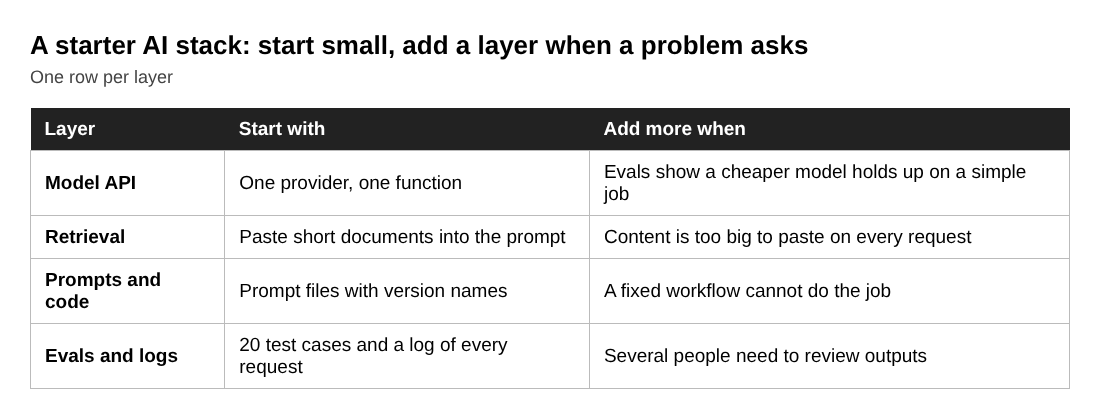
Add a second model, a proper search index or an agent loop only when your logs or evals show a specific problem. Before you open the doors, run through the AI product launch checklist.
Frequently asked questions
What is the minimum AI tech stack for a startup?
One model API, a prompt, and a way to test your outputs. Add retrieval when the model needs your own data, and add logging as soon as real users arrive.
Do I need a vector database to start?
Not always. If your knowledge base is short, you can put it straight into the prompt. Add a search step when the content is too large to paste in on every request.
Should I use one model or several?
Start with one strong model. Once you have an eval set, test cheaper or smaller models on the simpler jobs and switch only where the scores hold up.
How do I estimate what my AI features will cost?
Count the tokens in a typical prompt and answer, apply your provider's prices for input and output, then multiply by requests per user and number of users. Retrieved passages add to the input, so include them.
Get started
You can learn these layers in order. Age of AI Entrepreneur has 12 courses of short, hands-on lessons, and The AI Product Stack is the one for this topic. You sign in with your email and an emailed code. If you want a wider route, the 12 course path from zero to launch shows how the courses fit together.
Building a business in the age of AI, from a first project to a company.
Visit aientrepreneur.vlvd.net↗
Comments
No comments yet.
Sign in or make an account to comment.