What Is a Vector Database? When an AI Product Needs One
What is a vector database? It is a database built to store embeddings, the lists of numbers an AI model uses to represent the meaning of text, images or other data, and to find the stored items whose numbers sit closest to a new one. In plain words, you ask it "what do I have that means something like this?" and it returns your most similar items, even when they share no exact words with the question.
This is the job at the heart of Giving Models Your Data: Retrieval, a lesson in The AI Product Stack course on Age of AI Entrepreneur, which shows founders how an AI product's parts fit together; sign in with your email and an emailed code to open it.
What is a vector database, in one example
Say your help center has 400 articles. A customer types "Can I get my money back after a month?" Your refund article never uses the words "money back" or "month". It says "refunds within 30 days of purchase". A keyword search might miss it. A vector database will usually find it, because the two sentences mean nearly the same thing, so their embeddings sit close together.
Under the hood, three things happen. Each article, or each chunk of an article, was turned into an embedding when you loaded it. The question is turned into an embedding the same way. Then the database returns the stored chunks whose embeddings are nearest to the question's. If embeddings are new to you, start with our plain guide to embeddings.
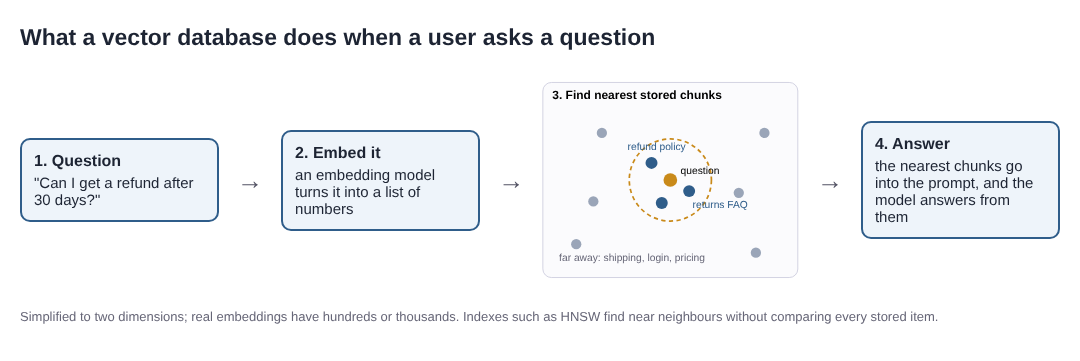
A vector database's one job: find the stored chunks nearest in meaning to a question.
Why it is not just a normal database
A normal database is great at exact questions: find the order with this ID, list the customers in this city. A vector database answers a fuzzy question: which items are most like this one? That needs a different kind of index.
The simple way to find the nearest items is to compare the question with every stored item. That is called brute-force search, and for a few thousand chunks it is often fast enough. At millions of items it gets slow, so vector databases use approximate nearest neighbour indexes. They give up a little accuracy, sometimes missing a true nearest item, in exchange for a large gain in speed.
One widely used method is HNSW, from a paper by Malkov and Yashunin. It builds layers of graphs that link each item to its near neighbours, so a search can hop from a rough area to the right spot quickly; the authors report search time that grows with the logarithm of the data size. Another landmark is the Faiss paper by Johnson, Douze and Jégou, which covers brute-force, approximate and compressed search on GPUs and reports building a graph connecting 1 billion vectors in under 12 hours on 4 GPUs.
Where a vector database sits in an AI product
Most founders meet vector databases through retrieval-augmented generation, or RAG. The flow is short:
- Split your documents into chunks and store each chunk with its embedding.
- When a user asks something, embed the question and fetch the nearest chunks.
- Put those chunks into the prompt and ask the model to answer only from them.
The vector database is step 2. It does not write anything and it does not understand anything. It only ranks your own content by closeness. The answer is only as good as the chunks it returns, which is why how you chunk documents matters as much as which database you choose. For when retrieval is the right tool at all, see RAG vs fine-tuning.
Do you need a vector database yet?
Often not on day one. Ask three questions:
- How much content do you have? If all of it fits in the model's context window, you can send it with every request and skip retrieval, though you pay for those tokens each time.
- Do users search by meaning? If people look up exact names, codes or IDs, a keyword search may serve them better. Many teams combine both.
- What do you already run? Some general-purpose databases can also store vectors and search them. A separate service is one more thing to pay for, secure and keep in sync.
A useful rule: start with the simplest thing that returns the right chunks, measure it, and move to a dedicated vector database when size or speed forces you to. Our post on the AI tech stack for startups shows where this choice sits next to the others.
A worked test you can run on your own data
Before you pick a database, check whether search by meaning helps your users at all. This takes an afternoon:
- Collect 20 real questions from support emails or chats, and for each one note the article that answers it.
- Chunk and embed your articles with any embedding model, and store them. A small script and brute-force search are enough at this size.
- Run each question and record whether the right article appears in the top 3 results.
- Run the same 20 through keyword search and record the same thing.
- Compare. If meaning-based search finds the right article for clearly more questions, retrieval is worth building. Read every miss: most come from chunks that split an answer in half or questions that use a product name the text never mentions.
Those 20 questions are also the start of an eval set, so you can check later that a new embedding model or index really helps.
Frequently asked questions
What is the difference between a vector database and a regular database?
A regular database finds rows that match exact values. A vector database finds items whose embeddings are closest to a query's embedding, so it can match by meaning rather than by exact words.
Is a vector database the same as RAG?
No. RAG is the whole pattern of fetching your own content and giving it to a model to answer from. A vector database is one common way to do the fetching step.
Why are vector search results approximate?
Comparing a query with every stored item is slow at large sizes, so most indexes, such as HNSW, check only a promising part of the data. They are much faster but can sometimes miss a true nearest item.
Do I need a vector database for a small AI product?
Not always. With a few hundred chunks, brute-force search in a short script, or a database you already run, is often enough. Move to a dedicated one when size or speed forces it.
Get started
Giving Models Your Data: Retrieval is the second of three lessons in The AI Product Stack course on Age of AI Entrepreneur, next to Model APIs, Tokens and What a Request Costs, and Choosing Models: Big, Small, Open, Closed. Each lesson takes about 9 minutes and lists its sources, every attempt is graded, and questions from lessons you finish come back later, spaced out, up to 5 a day. Sign in with your email and an emailed code to open the course.
Start Age of AI Entrepreneur: short hands-on lessons on how to build a business in the age of AI, with every side of the debate and the sources to read next.
Building a business in the age of AI, from a first project to a company.
Visit aientrepreneur.vlvd.net↗
Comments
No comments yet.