What Is Device Pixel Ratio? Sharp Graphics on High DPI Screens
What is device pixel ratio? It is the number of a screen's physical pixels the browser uses to draw one CSS pixel. A classic desktop monitor has a ratio of 1. Retina laptops have 2, and many phones have more. If your code ignores that number, a canvas game gets stretched to fit the screen and looks soft. This guide explains the ratio, why the blur happens, and the few lines that fix it, using a real browser game's code as the example.
To see it on your own screens, Tank City Reboot is a free pixel art tank game that plays in your browser on a computer or a phone, and it draws at your screen's pixel ratio, capped at 2.
What is device pixel ratio?
Browsers lay out pages in CSS pixels. A CSS pixel is a unit of length, not a dot of light. MDN defines window.devicePixelRatio as the ratio of the resolution in physical pixels to the resolution in CSS pixels for the current display. In simpler terms, it tells the browser how many of the screen's real pixels to use for a single CSS pixel.
The ratio applies to width and height alike. On a screen that reports 2, a box 100 CSS pixels wide covers 200 physical pixels across, and each CSS pixel is drawn with 2 x 2 = 4 real pixels. At a ratio of 3 it is 3 x 3 = 9. The box looks about the same size as on an older screen. It just has more dots to draw it with.
According to MDN's devicePixelRatio page, a value of 1 means a classic 96 DPI display, 2 is expected for HiDPI or Retina displays, and modern phone screens often report more than 2.
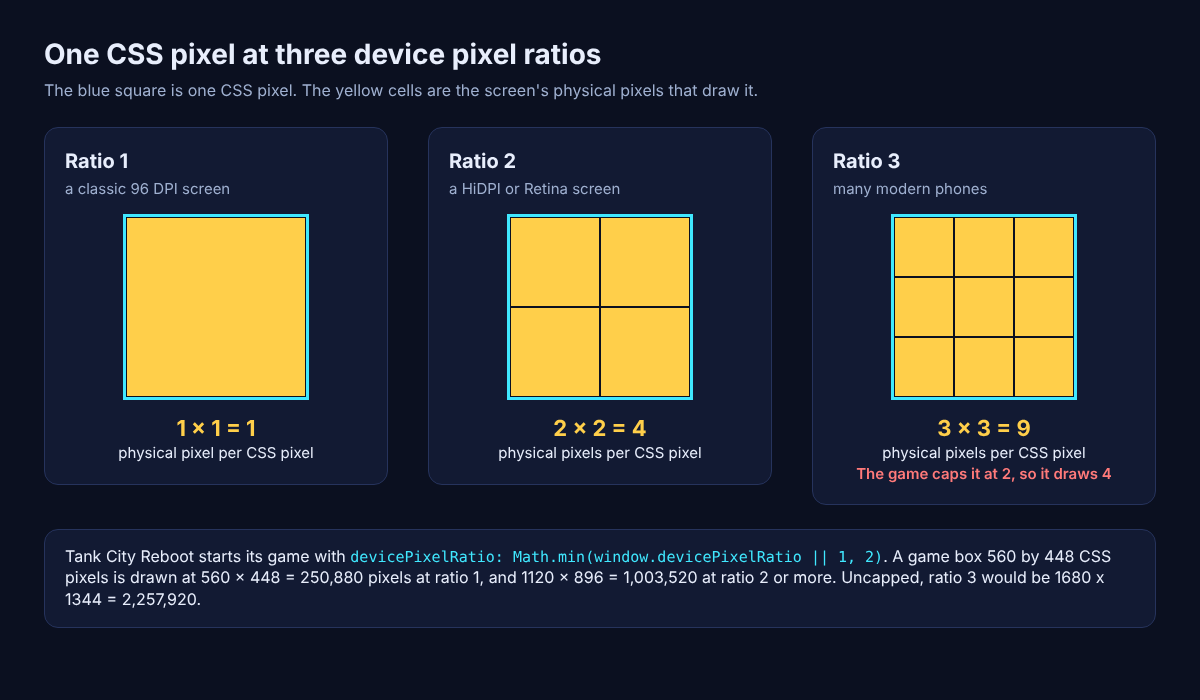
One CSS pixel at ratios 1, 2 and 3, and what the game's cap at 2 does to the number of pixels it draws.
Why the ratio changes while a page is open
The ratio is not fixed for the life of a page. MDN lists three cases worth knowing:
- Page zoom changes it. Zooming in makes a CSS pixel bigger, so the ratio goes up.
- Pinch zoom does not. It magnifies the page without changing the size of a CSS pixel.
- Moving the window can. Drag a window from a laptop screen to a monitor with a different pixel density and the value changes.
MDN suggests window.matchMedia() with a resolution query to notice when that happens, so your code can resize its drawing surface again. A game that sizes itself once, at load, can go soft the moment you zoom or move the window.
Why graphics look blurry on high DPI screens
Text and vector shapes stay sharp for free, because the browser draws them at whatever resolution the screen has. A canvas is different. It holds a bitmap with a fixed number of pixels.
Say you make a canvas with width="400" and height="300" and show it at 400 by 300 CSS pixels. On a screen with a ratio of 2, those 400 by 300 pixels have to cover 800 by 600 physical ones. The browser stretches the bitmap to fill the gap, and edges blur. MDN's own page says it plainly: a canvas can appear too blurry on retina screens.
The detail was never in the bitmap, so no setting on the screen can bring it back. The fix has to happen where the bitmap is made.
How to make a canvas sharp with devicePixelRatio
The fix is to give the canvas a bitmap as large as the physical pixels it covers, while its displayed size stays in CSS pixels. MDN's example does it in three steps:
- Read the ratio:
const scale = window.devicePixelRatio; - Size the bitmap:
canvas.width = Math.floor(size * scale);and the same forcanvas.height, while the CSS width and height stay atsizepixels. - Scale the drawing:
ctx.scale(scale, scale);so your drawing code keeps using CSS pixel numbers.
Now ctx.fillRect(10, 10, 300, 300) lands where you expect, and every CSS pixel is drawn with the screen's full detail. WebGL works on the same idea: the drawing buffer has to be the CSS size times the ratio, or the browser stretches it.
Game engines usually do this for you. Unity's page on configuring a Web canvas size says its Web builds match the WebGL render target to the canvas's CSS size automatically, and that by default this match is done to implement high DPI rendering. Its devicePixelRatio setting overrides the scale: setting it to 1 forces low DPI rendering.
Worked example: a browser game caps the ratio at 2
Tank City Reboot is a Unity Web build, and both of its pages start the game with these two lines in the settings they pass to createUnityInstance:
devicePixelRatio: Math.min(window.devicePixelRatio || 1, 2), matchWebGLToCanvasSize: true,
Read them one piece at a time:
window.devicePixelRatio || 1takes the screen's ratio, or 1 if the browser gives nothing.Math.min(..., 2)keeps whichever is smaller, so a phone that reports 3 is treated as 2.matchWebGLToCanvasSize: truekeeps Unity's automatic match on, so the drawing size follows the game box on the page times that capped ratio.
Now follow the numbers for a game box 560 by 448 CSS pixels. At a ratio of 1, the game draws 560 x 448 = 250,880 pixels each frame. At a ratio of 2, it draws 1120 x 896 = 1,003,520, four times as many. Uncapped, a ratio of 3 would mean 1680 x 1344 = 2,257,920 pixels, nine times the first number. The cap stops it at four.
Why stop at 2? Every pixel drawn costs GPU time. Unity's page notes that rendering at a lower resolution on a high DPI display conserves GPU fill rate. The cap is a trade: sharp on a Retina laptop, and on a phone that reports 3, less than half the pixels an uncapped ratio would ask for. You can try this pattern in your own canvas code by wrapping the ratio in Math.min before you size the bitmap.
Keeping pixel art crisp
Pixel art wants something different from photos. You do not want more detail. You want each art pixel to become a clean square block with hard edges.
- On a 2D canvas: set
ctx.imageSmoothingEnabled = false. MDN says it decides whether scaled images are smoothed, and it is true by default. - In CSS:
image-rendering: pixelatedscales by nearest neighbor to a whole number multiple, then smooths only the last step, as MDN's image-rendering page describes. - In a game engine: point filtering does the same job for textures.
Tank City Reboot uses the third. Its first game's board is 208 by 208 pixels, and its tanks are built in code from 16 by 16 letter patterns with point filtering, so treads and turrets keep their square edges however large the game box is drawn. The one exception is the soft glow behind tanks and shots, which uses smooth filtering on purpose, as the post on the glow effect in 2D games explains. The rule worth copying: nearest filtering for the art you want crisp, smooth filtering only where blur is the effect.
The game box itself changes shape when a phone turns, which is its own problem, covered in how mobile games handle portrait and landscape screens.
Frequently asked questions
What is a normal device pixel ratio?
There is no single normal value. MDN gives 1 for a classic 96 DPI display and 2 for HiDPI or Retina displays, and says modern phones often report more than 2, so read the value instead of assuming one.
How do I check my screen's device pixel ratio?
Open your browser's developer console, type window.devicePixelRatio and press Enter. The number is the ratio for that window on that screen, at the current zoom.
Does device pixel ratio change when I zoom?
Page zoom changes it: zooming in raises the ratio. Pinch zoom does not, because it magnifies the page without changing the size of a CSS pixel.
Why do games cap the device pixel ratio at 2?
Each step up multiplies the pixels drawn per frame: 4 times the work at a ratio of 2 and 9 times at 3. A cap like Math.min(window.devicePixelRatio || 1, 2) keeps the game sharp while sparing the GPU on the densest screens.
Get started
Open the game on a laptop and on a phone and look at the tank edges up close. The page has a Play button and a Full screen button, and on a phone the touch pad floats over the game in portrait or landscape. It needs a browser with WebGL 2. When you have tried the classic stages, Tank City Zero Day adds 8-way moves and dashes, a busier screen to inspect.
Play Tank City Reboot: it is free, plays in your browser on a computer or a phone, and needs no account.
The Family Computer tank classic, rebuilt inside a computer.
Visit tankcityreboot.vlvd.net↗


Comments
No comments yet.