What is on a circuit board? Layers and parts explained
What is on a circuit board? If you have ever opened a computer or an old phone, you have seen one: a flat board covered in thin lines, tiny parts and a few big chips. This guide explains what each of those things is, how a computer circuit board is built in layers, what the main board in a PC holds, and how data travels across it.
The explanations follow Wikipedia's articles on the printed circuit board and the motherboard. At the end you will see a free browser game whose whole battlefield is a circuit board.
What is on a circuit board?
The proper name is a printed circuit board, or PCB. Wikipedia describes it as a sandwich of layers that conduct electricity and layers that do not. Copper is etched into patterns, and those patterns do the job wires used to do: they connect one part to another.
On almost any board you will find four kinds of thing:
- Traces. The thin lines. Each one is a flat strip of copper left behind after etching. Wikipedia calls them wires fixed in place, kept apart by air and the board itself.
- Pads. Small copper spots where a part is soldered on. The solder holds the part in place and connects it at the same time.
- Vias. Tiny drilled holes lined with metal. They carry a connection from one copper layer to another.
- Components. Everything soldered to the pads: chips, connectors and many smaller parts.
Wikipedia notes that PCBs are used in nearly all electronic products today. The older ways of wiring a circuit by hand, such as wire wrap and point-to-point construction, are now rarely used, because printed boards are cheaper and faster to make in large numbers.
The layers of a printed circuit board
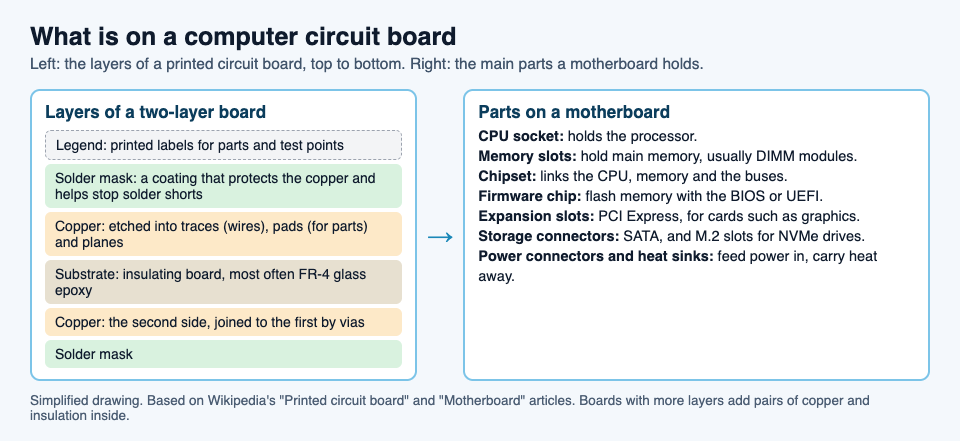
A board is built up like a sandwich. From the outside in, a common two-layer board has:
- The legend. Printed labels that name the parts and test points. It was first done by silkscreen printing.
- Solder mask. A coating over the copper. It protects the copper from corrosion and helps stop solder from bridging two traces by mistake.
- Copper. The etched traces, pads and wide solid areas called planes.
- The substrate. The stiff board in the middle that does not conduct. Wikipedia names FR-4 glass epoxy as the most common.
- Copper and solder mask again on the other side.
Bigger designs stack more layers. Wikipedia explains that copper layers almost always come in pairs, and that more layers let designers fit more connections into the same space.
One detail matters for anyone who designs boards: a trace has resistance, and Wikipedia notes it depends on the trace's width, thickness and length. Its resistance must be low enough for the current it carries, so power and ground traces may need to be wider than signal traces.
How parts attach: through-hole and surface mount
There are two ways to fix a part to a board.
- Through-hole. The part has wire legs that go through drilled holes and are soldered on the other side. The first PCBs all worked this way.
- Surface mount. The part sits on pads on the same side and is soldered there. Wikipedia says the method emerged in the 1960s, gained momentum in the early 1980s, and was widely used by the mid-1990s.
Surface mount made boards smaller and cheaper to build. The cost, in Wikipedia's words, is that repairs became more difficult.
The motherboard: the main board in a computer
A desktop or laptop has one board that everything else plugs into. Wikipedia defines the motherboard as the main printed circuit board in a general-purpose computer. It holds the processor and memory, lets them talk to each other, and gives other devices a place to connect. Apple calls it the logic board. The Oxford English Dictionary traces the word to 1965, a nod to it being the "mother of all boards".
The main parts it holds:
- The CPU socket, where the processor sits. Some processors are soldered straight onto the board instead. Our post on what a CPU core is explains what happens inside it.
- Memory slots, usually for DIMM modules, which hold the computer's main memory.
- The chipset, which links the processor, main memory and the buses that reach other devices.
- A firmware chip, flash memory holding the BIOS or UEFI that starts the computer.
- Expansion slots. Wikipedia says a standard ATX board typically has two or three PCI Express x16 slots for a graphics card, plus smaller slots for other cards.
- Drive connectors: SATA ports, and M.2 slots that take NVMe solid-state drives.
- Power connectors and heat sinks. Power comes in from the power supply and is shared out; heat sinks and fan mounts carry heat away. When a chip still gets too hot, it slows itself down, which our post on thermal throttling covers.
A worked example: follow a file across the board
Say you open a photo stored on an NVMe drive. Here is a simplified path it takes, part by part. Real boards differ in which slots are wired to the chipset and which go straight to the processor, but the parts are the same.
- The drive. The photo sits on a solid-state drive plugged into an M.2 slot on the board.
- Traces and the bus. The data leaves the slot along copper traces. A set of shared lines that carries data between parts is called a bus; our post on what a data bus is goes deeper.
- The chipset. Wikipedia describes the chipset as the interface between the processor, main memory and the buses, so this is where the data is passed on toward memory.
- Memory. The photo is copied into the DIMM modules in the memory slots, where the processor can reach it quickly.
- The processor. The CPU in its socket reads the photo from memory and works on it, so it can be shown on screen.
Every step crosses copper you could see with a magnifying glass, and some of it may pass through vias from one copper layer to another.
A short history of the printed circuit
Wikipedia credits the Austrian engineer Paul Eisler with inventing the printed circuit around 1936, while working in the UK, as part of a radio set. Around 1943, the United States began to use the technology on a large scale for proximity fuzes in World War II, because those circuits had to survive being fired from a gun and be made in quantity. Wikipedia notes why the idea won: making circuits with PCBs is cheaper and faster than other wiring methods, because the parts are mounted and wired in one operation.
See the idea in Tank City Reboot
Tank City Reboot is a free tank game set inside a computer. In the page's words, "Your antivirus tank guards the CPU core at the bottom of a circuit board." Look behind the walls and you will see faint lines and dots like the traces on a real board.
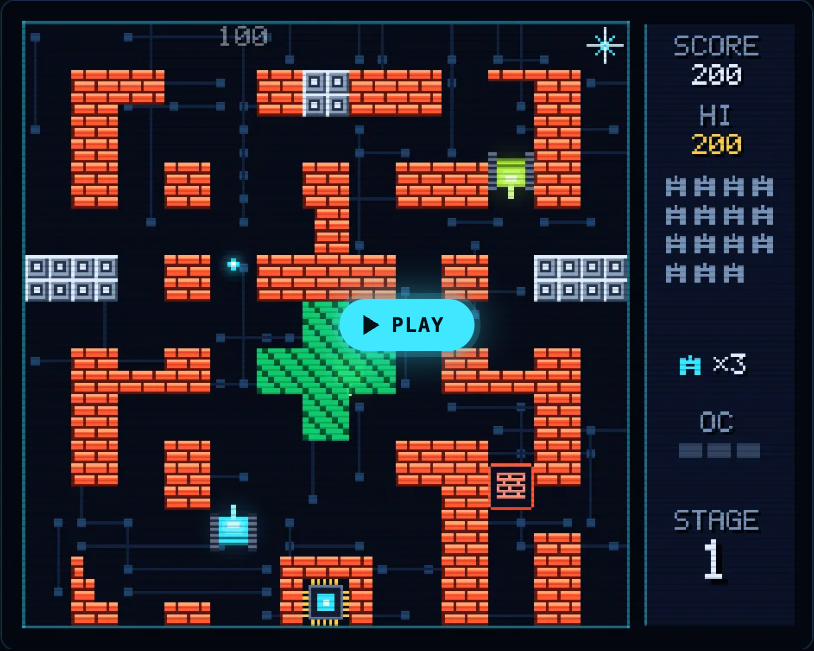
The board's parts turn up as terrain. Silicon blocks stop every shot until your cannon is fully overclocked, and their card notes that silicon is the material most computer chips are made from. Data bus lanes are slippery, so tanks slide before they stop. The fifth of the six stages is called DATA BUS, and it opens with a true fact: "A bus is the set of shared lines that carries data between the processor, memory and devices."
The game teaches each idea in one sentence. It is not a computer course, just a way to make the words stick.
Frequently asked questions
What are the lines on a circuit board?
They are traces: flat strips of copper that work as wires fixed in place. They carry power and signals between the parts on the board.
What is the difference between a circuit board and a motherboard?
A circuit board is any board of etched copper that connects parts. A motherboard is the main circuit board of a computer, holding the processor, memory and the connectors for everything else.
What is a via on a circuit board?
A via is a small drilled hole lined with metal. It carries a connection from one copper layer of the board to another.
Get started
Play Tank City Reboot: it is free, plays in your browser on a computer or a phone, and needs no account. Clear the first four stages to reach DATA BUS, and try Tank City Zero Day next.
Comments
No comments yet.
Sign in or make an account to comment.