2048 Practice Plan: A Week of Short Games on a Cube
A 2048 practice plan: a week of short games on a cube gives your games a job to do. On a cube you turn like a Rubik's cube, that matters more than usual, because you have three kinds of move to learn instead of one. Each pair of days trains one skill, and a small score log shows what changed.
You can follow it in Evolved 2048, which is free to play in your browser on a computer or a phone. It is the 2048 puzzle on a cube with six faces of nine squares, 54 in all, and you aim for a 2048 tile.
Why a 2048 practice plan: a week of short games on a cube works better than random replays
When you replay at random, a loss teaches you little. You do not know whether the problem was your corner, your merges or one bad twist. A plan fixes one habit per session, so a bad game still tells you something.
Short sessions help for the same reason. Each one gives you a fresh result to compare, and seven light sessions beat one long, tired one.
How a cube changes the way you play 2048
You only slide on the front face. The other five faces are storage. Three moves matter:
- Slide the front face with a swipe, the arrow keys or W A S D. Equal tiles merge into their sum.
- Twist a row on the right face or a column on the top face. That layer turns a quarter and carries its tiles to the next face.
- Turn the whole cube by dragging around it, or with Shift and an arrow key. Turning is free: it adds no points, counts no move and adds no tile.
Slides and twists each count as one move and add a new tile, a 2 most of the time and a 4 otherwise. One more thing to know before you start: there is no undo. Plan each move as if it is final.
Set up your week: time, goals, and a simple score log
Pick one mode and stay in it all week. The game asks you to choose from Evolved, Edge and Fun, and it keeps a separate best score for each. Evolved slides on the front face as in 2048 and leaves the twisting to you, so start there.
Set aside one short session a day. Keep a notebook or a note on your phone with four columns: day, score, biggest tile and moves. The top bar shows Score, Best and Moves, so you can copy the numbers when a game ends. Your own log is worth keeping: a signed-out game and best score are saved on your own device, so clearing your browser data would take them with it.
Give each day one goal and ignore everything else. The goal is not a score. It is a habit you can check, like "my biggest tile never leaves the top left corner."
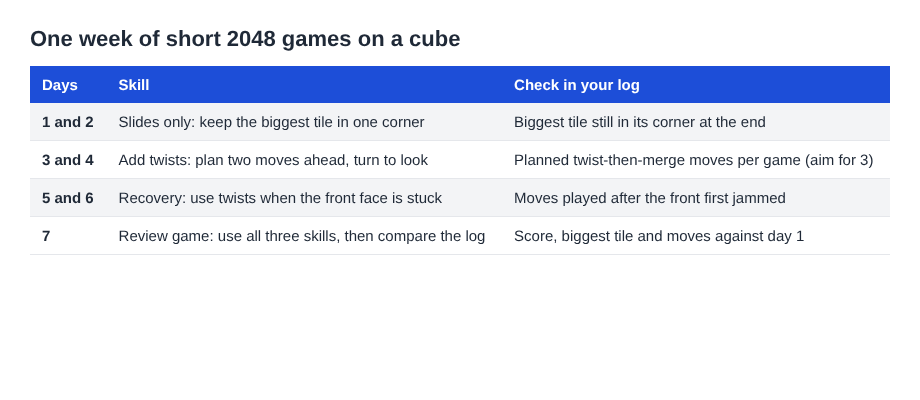
The week at a glance: one skill for each pair of days.
Day 1 and 2: Corner anchoring and clean merges
Start with slides only. Pick a corner of the front face and keep your biggest tile there; where to keep your biggest tile in 2048 on a cube explains which two twist keys to avoid for each corner. Use two directions most of the time, for example Left and Up for the top left corner, and use a third only when you must.
Learn the merge rules now, because they decide a lot later. A tile made in a merge does not merge again in the same slide. The pair nearest the wall you slide towards merges first. In a test on a set-up front face, Left turned the row 2 2 2 into 4 2, and Right turned the same row into _ 2 4. Know where the leftover tile ends up before you press the key.
Expect these early games to end fast. In one test game, played with slides only and no twists, the front face was full at move 46 with a score of 332, the other five faces were empty, and turning the cube to an empty face and sliding moved nothing. A turn alone does not rescue a stuck front.
Log each game. Your target for these two days is simple: finish with your biggest tile still in its corner.
Day 3 and 4: Planning three moves ahead on the cube
Now add twists. On a keyboard, the keys 1, 2 and 3 twist the top, middle and bottom row to the right. The keys 4, 5 and 6 twist the left, middle and right column up. Hold Shift to twist the other way.
Here is a worked example from a test board. A 16 sits on the front's middle-left square. Another 16 sits on the right face's top-left square, just over the front's top right edge. Press Shift and 1. The top row twists left, and the right face's 16 lands on the front's top-left square, above the other 16. A new 2 appears on the front. Then press Up, and the two 16s merge into a 32 in the top-left corner. Two moves, one merge you could not have made by sliding.
The habit to build is looking for the twist before the front face jams. For a method that works on any board, read how to plan a 2048 slide three moves ahead on a cube. Practice it like this:
- Before each move, name the next two moves you expect to make.
- Turn the cube (it is free) to look at the faces you cannot see, and check for a tile that could join a match on the front.
- Remember that every twist adds a tile. A twist needs one empty square for it.
Your goal for these two days: make at least three planned twist-then-merge combinations per game. Tally them in your log.
Day 5 and 6: Recovering from a messy board
Everyone ends up with a messy board. Today you practice getting out of it instead of avoiding it.
When the front face cannot slide, the game says "Nothing moves that way. Try another way, or twist a row." Believe it. In a second test game, a twist was made whenever the front was stuck. That game reached a 128 at move 118. All 54 squares were full at move 165 with a score of 1160, after 39 twists. The game was still not over, because other faces had equal tiles side by side. One game proves nothing general, but it shows what a twist can do for a jammed front.
Practice these recovery moves:
- Find the stuck line. Turn the cube and look for a tile on another face that matches one on the front.
- Twist toward the match. The game's own tip is to bring a tile from the side next to its match on the front.
- Keep room on one face. The game over box says as much: keep one face with space so a twist can still bring tiles round.
A twist can be reversed with Shift and its key, but that counts as a second move and adds a second new tile. A mistaken twist is not free to fix, so spend a few seconds before you commit.
The game ends when all 54 squares are full and no face has two equal tiles side by side (how to spot a lost board early helps here). Your goal for these two days is to start at least one game by deliberately letting the board get crowded, then see how many moves you can add before it ends.
Day 7: A timed review game and how to track progress
Set a timer for fifteen minutes and play one game from the start. Use everything: corner anchoring, planned twists and recovery. Stop when the timer ends or the game does.
Then compare your log. Look at three things:
- Did your biggest tile stay in its corner for most of the game?
- How many planned twist merges did you make?
- Did the board end earlier or later than on Day 1?
Do not judge the week by one score. New tiles are random: a 2 appears when a random number is under 0.9, and a 4 otherwise. In one luck test, the same starting tiles were played with different slide orders. Those games got stuck at move 32 and move 28, and two new games with the first order got stuck at move 37 and move 42. Scores ran from 160 to 260 even when the play was similar. Look at your habits, not one number.
If you want a harder week next time, try Edge mode, where a slide towards an edge also merges the tile at that edge with an equal tile just over it. Start a new game and the mode box lets you pick it.
Frequently asked questions
How long should each practice session be?
Keep each session to one focused game of about fifteen minutes. The plan works because the sessions are short and you do them every day.
Does the cube make 2048 harder?
It adds twists and turns, so there is more to learn, and tiles on other faces can come back to the front. The site gives no difficulty numbers, so judge it by your own log.
Can I undo a bad move?
No. A twist can be twisted back with Shift and its key, but that counts as a second move and adds a second new tile.
Do I need an account to follow this plan?
No. You can play without one, and a signed-out game and best score are saved on your own device. Keep your own score log in case you clear your browser data.
Get started
Open a game, pick Evolved mode and spend today's session on one corner. Write down the score and the biggest tile when it ends. That is the whole first day.
Play Evolved 2048: it is free and plays in your browser on a computer or a phone.
The 2048 puzzle on a Rubik's cube, and past 2048.
Visit evolved2048.vlvd.net↗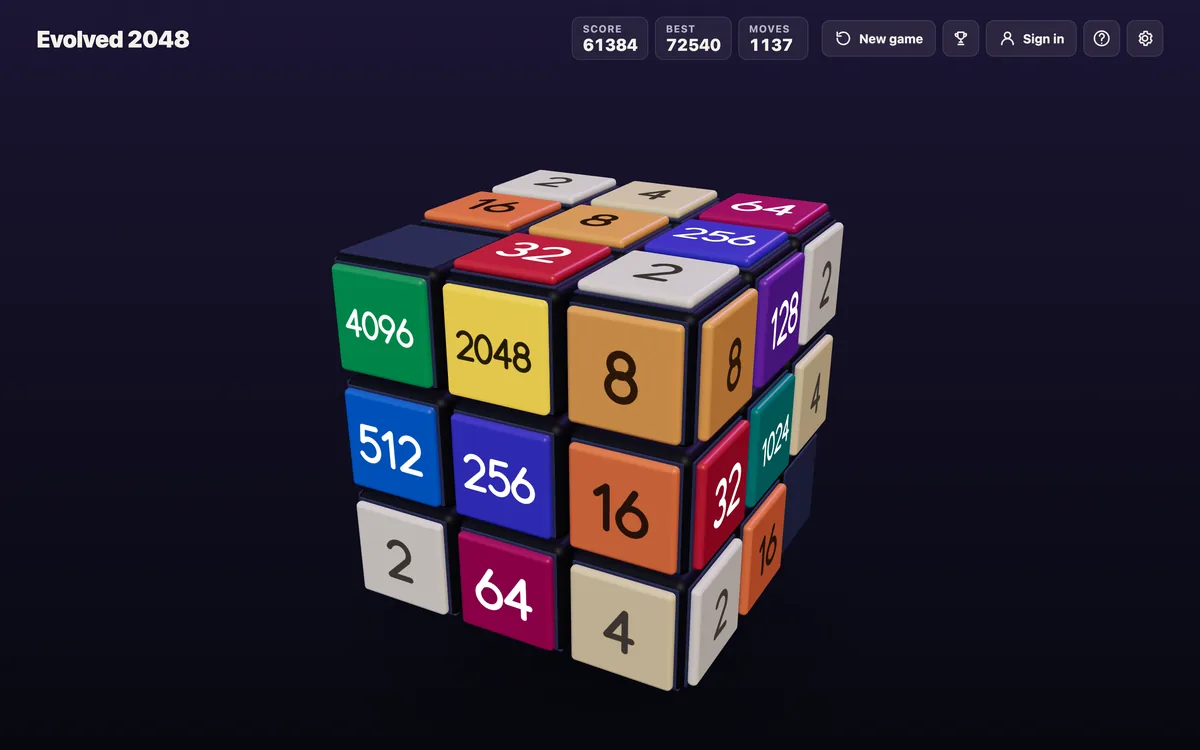
Comments
No comments yet.
Sign in or make an account to comment.