2048 Small Tile Stuck Between Big Tiles: How to Free It
A 2048 small tile stuck between big tiles can be freed. Say a 4 sits between your 64 and your 32, so nothing in that row can merge. You can grow a matching tile on its one open side, or bring a match in from somewhere else and slide the two together. On a cube there is a third way: move the trapped tile off the face.
Evolved 2048 puts the 2048 puzzle on a cube you turn like a Rubik's cube. When a tile gets trapped on the front face, you can twist a row or column to carry its match round from another side, or carry the trapped tile away.
Why a small tile gets stuck between big tiles in 2048
Tiles slide as in 2048, and two equal tiles merge into their sum. Every slide or twist then adds a new 2 or 4, on the front face when it has room. Each face is 3 by 3, so a tile in the middle of the top row has only three neighbours: left, right and below. If the left and right ones are big, the square below is its only way out.
Here is the board this post uses as an example. It shows the front face, top row first:
- Top row:
64 4 32 - Middle row:
16 2 8 - Bottom row:
_ 2 _
The 4 is trapped. Left and right slides do nothing to the top row, because it is full and has no equal pair.
Leftovers are how small tiles get stranded. The pair nearest the wall you slide towards merges first, and a merged tile does not merge again in the same slide, so 2 2 2 slid left becomes 4 2. That leftover 2 is what gets boxed in later.
Read the board first: is the trapped tile really stuck?
Before you spend a move, check every place a match could come from. Use the same order every time.
- The square below. In the example that square holds a 2. A 2 does not match the 4 yet, but it can grow into one.
- The other faces. Press Shift and an arrow key to turn the whole cube and read another side. Turning adds no points, counts no move and adds no tile. Turn back with Shift and the opposite arrow. The post on whether turning the cube costs a move covers this in more detail.
- Rows and columns a twist can carry. A row on the right face or a column on the top face can be turned a quarter onto the front. On a keyboard, 1, 2 and 3 twist the top, middle and bottom row right. 4, 5 and 6 twist the left, middle and right column up. Shift twists the other way.
- Just over the edge, in Edge mode. A slide towards an edge also merges the tile at that edge with an equal tile just over it, on the next face. In a test, a slide up merged a tile on the front's top middle square with an equal tile on the top face's bottom middle square; the squares beside it did not count.
If you want a routine for this, the 2048 board check post lists what to look at before every slide.
2048 small tile stuck between big tiles: how to free it with a matching tile
The plain fix works on any 2048 board. Grow a tile under the trapped one until it matches, then slide them together. In the example, the trapped 4 has a 2 below it and another 2 below that.
- Slide up. The middle column reads 4, 2, 2 from the top. The 2s are the only equal pair, so they merge. The column becomes 4, 4, empty. The left column (64, 16) and the right column (32, 8) stay where they are.
- Slide up again. The two 4s merge into an 8 at the top middle. The top row now reads
64 8 32.
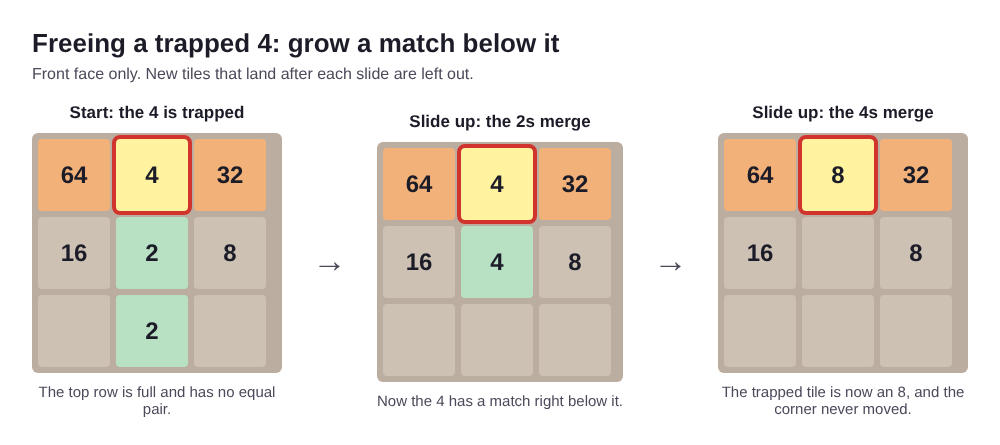
The tile is still between big tiles, but it is bigger. Keep feeding that column until the trapped tile reaches 32. Then a left slide turns 64 32 32 into 64 64, and one more left slide makes a 128 in the corner. That is exactly what happened in a chain test on the game: a top row of 64, 32, 32 became 64, 64 and then 128 in two left slides.
On a cube you can save moves by carrying a match in. Say the right face has a 4 in its centre. Press Shift and 2 to twist the middle row the other way: the right face's middle row comes onto the front, its centre landing in the front's centre, right under the trapped 4. Slide up and they merge into an 8.
That twist has a cost. The front's own middle row (16 2 8) goes round to the left face, and the twist counts as one move, scores nothing and adds a new tile. The tiles are not lost; they stay on the cube.
Shift the row without breaking your corner
The rule that matters most: a twist moves the whole layer. If you twist the row the trapped tile sits in, your 64 leaves with it. So twist the row or column next to the trapped tile, not the one it is in. In the example, the middle row is safe to twist, and the top row is not.
There is one exception that helps. You can twist the trapped tile's own column to carry it away. Press 5, and the front's middle column turns up onto the top face. The trapped 4 goes with it, and the bottom face's middle column comes up onto the front. Your 64 and 32 never move. Use this when the bottom face's middle column holds something you want next to them.
Two limits apply. A twist needs one empty square for its new tile; if there is none, the game says "The cube is full. Merge two tiles on a face to make room before you twist." And a row with nothing in it gets "That row has no tiles to carry."
Slides can break a corner too. In the example, a down slide pulls the 32 out of the top row. Before any slide, check which big tile it moves.
When to sacrifice position to rescue the tile
Sometimes the only way out is to let a big tile leave its spot. Do that only after the checks above come up empty, because there is no undo: Control and Z, Backspace and the other usual keys change nothing. You can twist a layer back with Shift and the same key, but that counts as a second move and adds a second new tile.
Give up position when all three of these are true:
- The front face is nearly full and your next new tile has few places to land.
- No match for the trapped tile sits below it, on another face, or just over an edge.
- The trapped tile blocks the only line your big tiles can merge along.
If only one of those is true, wait: growing the tile below is slower, but it keeps your corner. If all three are true, move now, while you still have empty squares to work with.
How to stop small tiles from getting trapped again
- Keep a falling line. Sizes that step down next to each other (64, 32, 16) merge like a chain. A 4 dropped in the middle of that line is the trap.
- Clean up leftovers. After a slide like
2 2 2, the stray 2 is your future trapped tile. Pair it soon. The post on whether you should merge small tiles first covers when to wait. - Expect 2s. Of 10,000 new tiles from the game's own random code, 1,001 were 4s, so a trapped 4 usually has to be built from two 2s.
- Keep room on one face. When you run out of moves, the game's own tip is: "Next time, keep room on one face so a twist can still bring tiles round to their match."
Frequently asked questions
Should I move my biggest tile out of the corner to free a small one?
Usually not. First check the square below, the other faces, and twists of the layer next to the trapped tile. Move the big tile only when the front is nearly full and no match exists, because there is no undo.
What if the stuck tile is a 2 or 4 in the middle of my main row?
Build a match in the square below it, or twist the middle row to bring a match under it, then slide up. You can also twist its own column to carry it off the front. In Edge mode, when it sits at an edge, an equal tile just over that edge merges with it on a slide towards the edge.
Is it better to merge small tiles first so they never get stuck?
Pairing stray small tiles early prevents many traps, but sometimes waiting sets up a bigger chain, so check the board before you choose.
Can a trapped tile end the game on its own?
No. The game ends only when all 54 squares are full and no two equal tiles sit side by side (in Edge mode, across an edge too). A trapped tile can stop your slides, though, and then the game says "Nothing moves that way. Try another way, or twist a row."
Get started: free a trapped tile in Evolved 2048
Set up the example on your own cube. When a small tile gets stuck, run the checks in order: the square below, the other faces, and the layer next to it. Pick Evolved mode to practise twists, or Edge mode to try merges over the edge. Each mode keeps its own best score.
Play Evolved 2048: it is free and plays in your browser on a computer or a phone.
The 2048 puzzle on a Rubik's cube, and past 2048.
Visit evolved2048.vlvd.net↗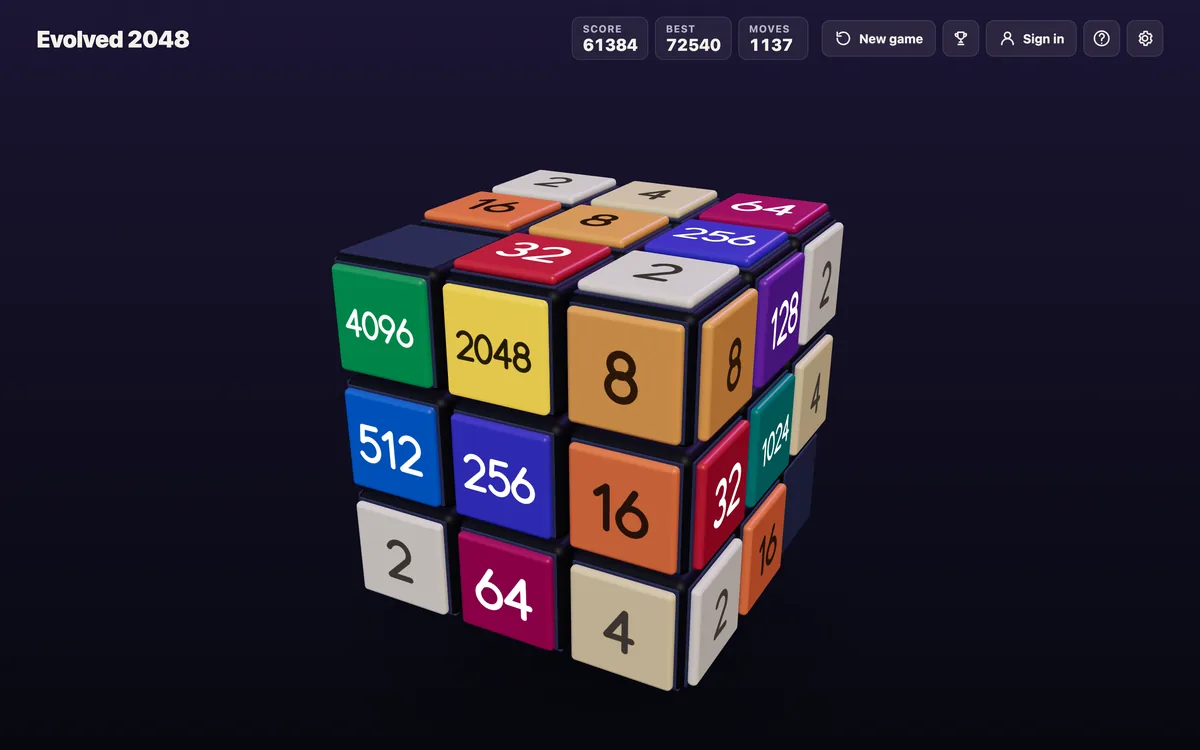
Comments
No comments yet.