2048 Board Check: What to Look at Before Every Slide
A 2048 board check is a short habit you run before every slide: find your biggest tile, count the empty squares, read your chain, sort the slides into safe and risky, then picture the board after the move. It takes a few seconds, and it catches most of the moves that feel like bad luck afterwards.
If you want a board where this habit pays off twice, Evolved 2048 puts the puzzle on a cube with six faces of nine squares, and turning the whole cube to look at its other sides is free: no move, no new tile.
The 2048 board check in five words
Every slide is followed by a new tile, and you cannot take a slide back. Evolved 2048 has no undo: Control+Z, Backspace and the other usual keys change nothing, and a reload keeps the board as it is. The only time to fix a mistake is before you press the key.
So the check is not deep calculation. It is the same short list in the same order, so nothing gets skipped when you play fast. Learn it as five words: corner, count, chain, choose, peek.
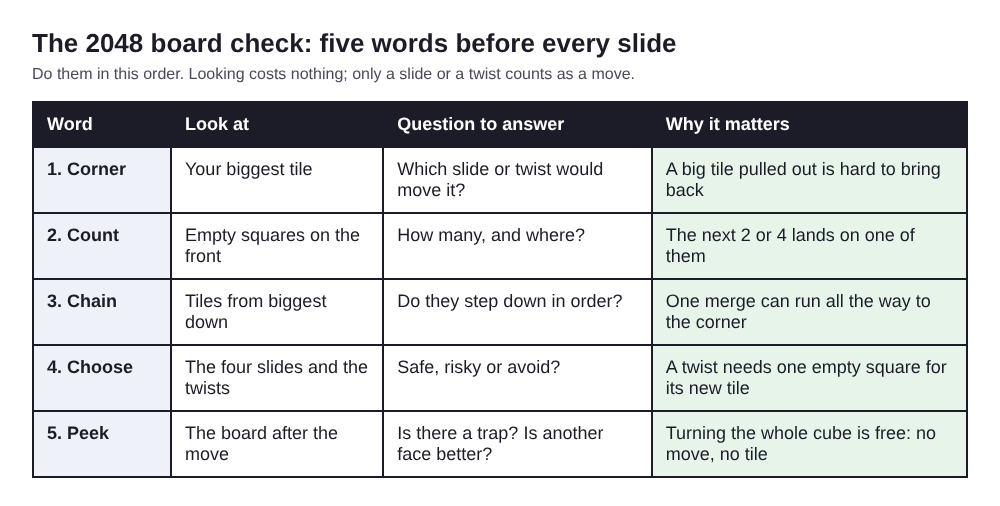
The sections below take each word in turn, with what to look for on a flat board and on the cube.
Check 1, corner: is your biggest tile still in place?
Pick one corner and keep your biggest tile there. Before each slide, look at that corner first. Is the biggest tile still in it? Is the row or column along it full, so that a slide along that line cannot pull it out?
On the cube there is a second way to lose the corner: a twist moves a whole layer. On a keyboard, 1, 2 and 3 twist the top, middle and bottom rows, and 4, 5 and 6 twist the columns. If your big tile sits in the top row and you twist the top row, it leaves the front and goes round to the next face. So the corner check has two questions: which slide would move the tile, and which twist would carry it away?
Which corner is best matters less than keeping to one. In scripted test games with slides only, one game per corner, the best corner changed with the random start: bottom left scored highest on one start and top left on another.
Check 2, count: how many squares are empty?
Count the empty squares on the face you are sliding. Every slide or twist adds one tile, a 2 or a 4. In Evolved 2048 it lands on a random empty square of the front face, and only goes to another face when the front is full. About one new tile in ten is a 4: when the game's own random code was run for 10,000 new tiles, 1,001 were 4s.
Then ask where that tile can land. If the only empty square after your slide sits right next to your corner tile, a 2 dropped there can block your chain. With three or four empty squares the risk is spread out. On a face of nine squares, two or fewer empty squares is a good point to slow down.
Empty squares matter for twists too. A twist needs one empty square for its new tile, and when there is none the game says: "The cube is full. Merge two tiles on a face to make room before you twist."
Check 3, chain: do your tiles step down in order?
Read your tiles from the biggest down: 128, 64, 32, 16. Do they sit next to each other in a line that runs away from the corner? If they do, one merge at the small end can carry all the way back to the corner.
Here is a worked example, from a test on a set-up front face. The top row reads 64 32 16 from left to right. The middle row reads 4 8 16. The bottom row is empty.
- Slide up. The two 16s in the right column merge into a 32 at the top right. Score 32.
- Slide left. The two 32s merge into a 64 next to the corner 64. Score 96.
- Slide left again. The two 64s merge into a 128 in the top left corner. In the test, two new 2s on the bottom row also merged into a 4, for a Score of 228.
Three moves, three merges along the chain, and the biggest tile never left its corner. It worked because the chain was in order before the first slide. When you read your chain, look for the broken link: a small tile stuck between two big ones, or a 4 sitting where you need an 8.
Check 4, choose: which slides are safe?
Say your corner is the top left. Before you press anything, sort the four slides into three groups.
- Safe: left and up. Both push tiles towards your corner.
- Risky: right when the top row is full, or down when the left column is full. The corner tile stays put, but the rest of the face shifts away from it.
- Avoid: right when the top row has a gap, or down when the left column has a gap. Either one can slide the big tile out of its corner.
Check the merge order as well. When three equal tiles share a line, the pair nearest the wall you slide towards merges first: left on 2 2 2 gives 4 2. A tile made in a merge does not merge again in the same slide, so 2 2 4 slid left gives 4 4, not 8. Knowing the order tells you where the new tile ends up. Our post on 2048 merge rules has the tests behind this.
On the cube, put twists through the same sort. A twist on a layer that holds none of your chain is the safer kind; a twist on the layer that holds your corner tile goes in the avoid group, unless you mean to move that tile.
Check 5, peek: what does the board look like after this move?
Once you have picked a slide, picture the board after it. Two traps come up again and again.
The first is a stuck face. When the face is full and no two equal tiles sit side by side, no slide moves anything, and Evolved 2048 shows "Nothing moves that way. Try another way, or twist a row." A slide that moves nothing does not count as a move, but the message means you are one bad tile away from trouble. In one scripted game with slides only, the front face locked at move 46 while the other five faces were still empty. In another that twisted whenever the front was stuck, the cube reached a 128 tile at move 118.
The second trap is a lone small tile behind your chain. If the next new tile could drop into the one empty square beside your corner row, ask whether you could merge it away next turn. If not, pick a different slide now.
On the cube you can peek beyond one face. Press Shift and an arrow key to turn the whole cube and see another side; Moves and Score stay the same and no tile appears, and Shift with the opposite arrow turns it back. That free look tells you whether a twist could bring a matching tile round when the front gets tight. The game's own advice when you run out of moves points the same way: "Next time, keep room on one face so a twist can still bring tiles round to their match." In Edge mode, also look just over each edge of the front: a slide towards an edge there also merges the tile at that edge with an equal tile just over it, on the next face.
For planning further than one move, see how to plan a slide three moves ahead.
Frequently asked questions
How long should a 2048 board check take?
A few seconds once the five words are a habit. Slow down when two or fewer squares are empty, or when a chain merge is about to reach your corner tile.
What should I do when every move looks bad?
Pick the move that keeps your biggest tile in its corner, even if it costs you a merge. In Evolved 2048 you can also turn the cube for free and look for a twist that brings a matching tile round, as long as one square is empty for the new tile.
Does checking the board help you get past 1024?
It can. A stall near 1024 is often a broken chain or a full face, and both show up in the check before they lock the board. Our post on being stuck at 1024 covers the fixes.
How do I choose between two moves that both pass the check?
Prefer the one that leaves more empty squares away from your corner and keeps your chain in one line. Two equal moves in 2048 walks through this case.
Get started: practise your board check in Evolved 2048
Open the game and pick a mode. Evolved mode keeps slides on the front face, as in 2048, and you twist and turn the cube to bring tiles together. Play one game in which you say the five words before every slide. Slide with the arrow keys or W A S D, turn the cube with Shift and an arrow, and twist with 1 to 6 (Shift twists the other way). Press H to open How to play if you forget a control. Your game, best score and settings are saved on your device, so you can stop and pick up later.
Play Evolved 2048: it is free and plays in your browser on a computer or a phone.
The 2048 puzzle on a Rubik's cube, and past 2048.
Visit evolved2048.vlvd.net↗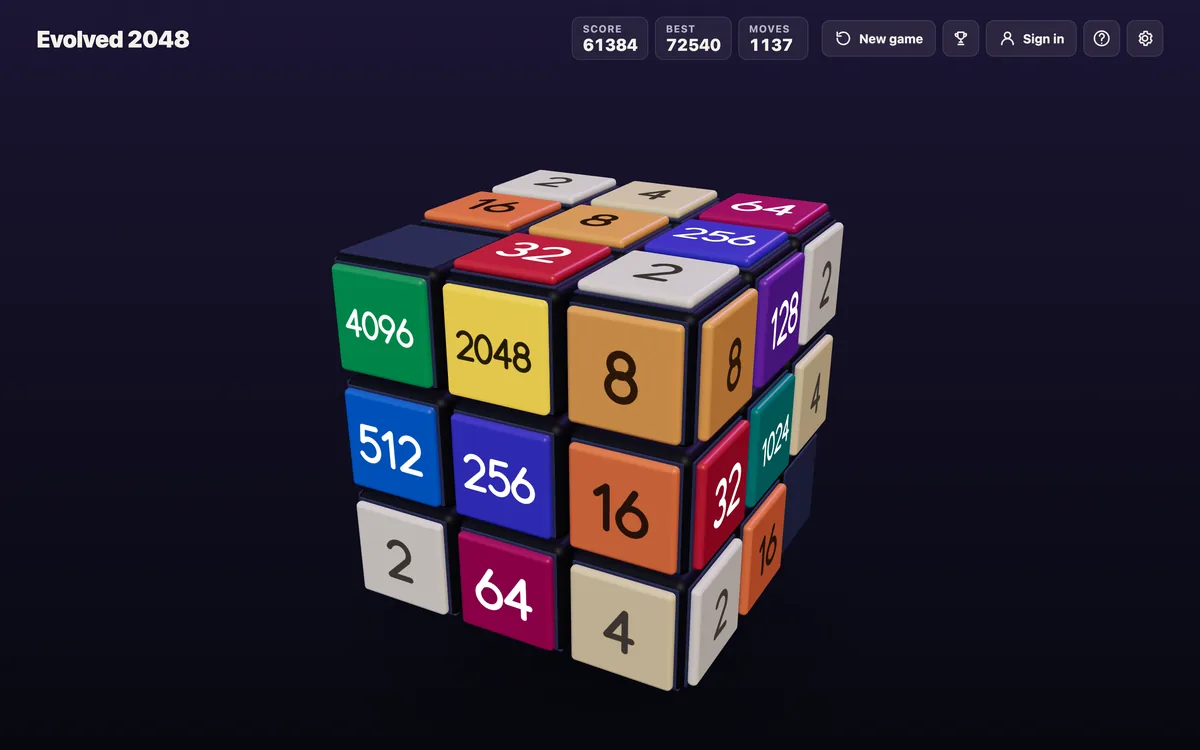
Comments
No comments yet.