Certificate pinning: when it helps and when it breaks apps
Certificate pinning means an app trusts one specific certificate or public key for a host, not every certificate its device trusts. The OWASP Pinning Cheat Sheet is unusual among cheat sheets because it spends as much space on when not to do the thing as on how to do it. Its own answer to "Should I pin?" is "probably never". This post follows the sheet so you can decide for your app, and set it up safely if the answer is yes.
Building or testing something that has to be safe? Book a meeting with whitehatstoic: it builds web and mobile apps, tests web apps and AI systems for weak spots, and gives independent advice.
Certificate pinning: what it is and the threat it targets
The OWASP sheet defines pinning as associating a host with its expected X509 certificate or public key. If more than one is acceptable, the program holds a pinset, and the credential the server presents must match one element of it.
The threat is a man-in-the-middle attack on a channel that uses TLS. The sheet names two forms: an attacker gets a rogue certificate in the victim site's name from a certificate authority your device trusts, or an attacker injects a dangerous authority into the client's trust store. In the second case the sheet notes that someone who can edit a trust store can also change how a mobile app works, which could defeat pinning too. It also quotes OWASP's community page that this problem is very small today, thanks to years of work by the certificate authority and browser communities. Baseline TLS settings come first; see our TLS settings checklist.
Should you pin at all? The sheet says probably never
The sheet separates two questions. "When do I add a pin" has an answer: at development time is preferred, because preloading the pin out of band usually means an attacker cannot taint it. The alternatives are Trust On First Use, where you pin whatever you see the first time, or updating pins in real time over an unpinned channel. But the first question is whether to pin, and the sheet's answer is blunt: there is almost no situation where you should consider it, because the risk of outages almost always outweighs the security risk. If you still think you need it, it points you to the OWASP community page on certificate and public key pinning to understand the threat model first.
When not to pin
The sheet gives five stop signs:
- You do not control both the client and the server side of the connection.
- You cannot update the pinset securely.
- Updating the pinset is disruptive, such as needing an app redeployment. The exception it allows is when you control the redeployment, such as forced updates inside a corporation.
- You cannot predict the certificate key pair in advance, before it goes into service.
- It is not a native mobile application.
One exception to plan for: organizations that filter outbound traffic as part of data loss prevention use interception proxies. The sheet says not to allow-list the proxy, since that defeats your security goals. Instead, add the proxy's public key to your pinset once Risk Acceptance tells you to.
What to pin: root, intermediate or leaf
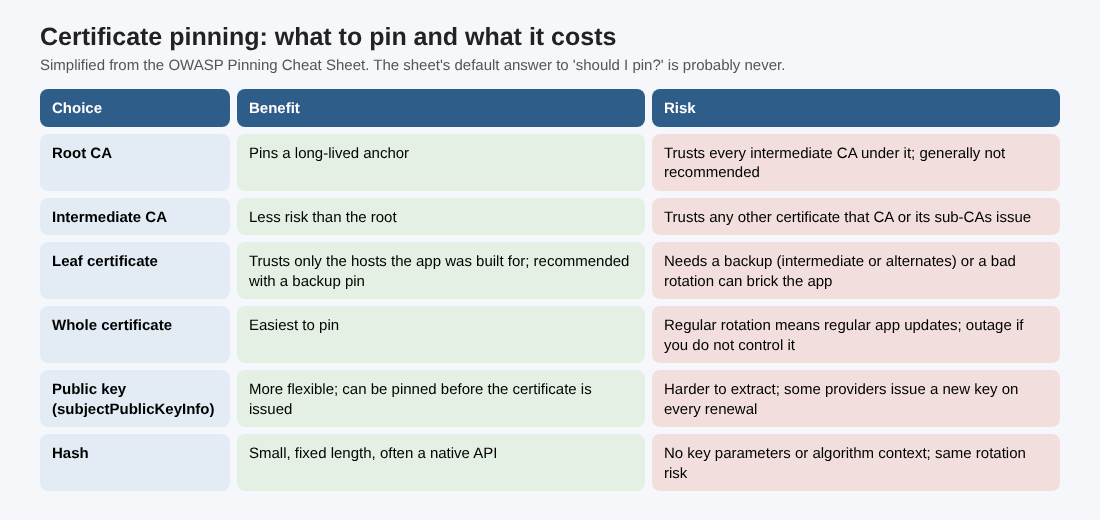
If you have passed the checks above, decide what to pin. The sheet ranks the choices by how much trust they add:
- Root CA: generally not recommended, since you then trust every intermediate under it.
- Issuing or intermediate CA: less risk, but the app trusts any other certificate that CA or its sub-CAs issue, not only yours.
- Leaf certificate: recommended, but it must come with a backup, such as the intermediate CA or a pinset with alternates.
The sheet's example: pin the server's leaf certificate and add a backup pin for the intermediate CA. That trusts more authorities, which raises the risk a little, but it lowers the chance of bricking your app: if anything goes wrong with the leaf certificate, the app can fall back to the intermediate until you ship an update.
Certificate, public key or hash
Next, choose the form of the pin. All three are in the table above; here are the trade-offs in the sheet's words.
- Whole certificate: the easiest. Fetch it out of band (the sheet mentions
openssl s_client) and compare it with the embedded copy in a callback. The cost: if the site rotates its certificate on a regular basis, the app needs regular updates, and if you do not control when the new certificate goes live, pinning causes an outage. - Public key: more flexible, a little trickier, because you extract the key from the certificate. Most certificates last about 90 days, and you can pin a key before its certificate even exists. The sheet encourages pinning the subjectPublicKeyInfo, which carries the key parameters plus the algorithm. Renewing a certificate with the same key to keep a pin working is, in the sheet's words, a bad key management practice for emergencies only. Some providers generate a new key on each renewal, which makes pinning ahead impossible. See key management for rotation habits.
- Hash: a digest of either one. It is convenient, small and fixed length, often a native fingerprint API. It gives up the key parameters and algorithm context, and carries the same rotation risk as pinning a certificate.
Whatever you pick, the sheet's rule for failure is firm. If the comparison fails, fail the call, log it on the client side and alert the user. Users click past warnings, so do not offer a way to bypass the pin.
How to pin on each platform
The idea is to reuse the connection setup you already have and harden it, using the library's connect callback to check the remote host's certificate or key. The sheet's platform notes:
- Android: since Android N, use Network Security Configuration and its
pin-setsetting, or OkHttp'sCertificatePinner. - iOS: Apple suggests pinning a CA public key in
Info.plistunder App Transport Security Settings; TrustKit is an open source library for it. - .NET: use
ServicePointManager. - OpenSSL: check in the
verify_callbackor after connecting throughSSL_get_peer_certificate. You must callSSL_get_verify_resultand requireX509_V_OK, and check the certificate is not NULL, because a server that supplies no certificate givesX509_V_OKwith a NULL certificate. - Electron: the
electron-ssl-pinninglibrary, orses.setCertificateVerifyProc.
Across Android and iOS the sheet adds the same warning: avoid writing the validation from scratch, because implementation mistakes are extremely likely and usually lead to severe vulnerabilities. To confirm pinning works, it points to the network testing chapters of the OWASP Mobile Security Testing Guide. Our mobile app security post puts it into a release checklist.
A worked example: deciding for one mobile app
Take a made-up native mobile app that talks only to its own API, which the same team runs. This is an example to practice on, not a real client, and the order is ours; the sheet supplies the questions.
- Step 1, the five stop signs. Do we control both ends? Yes. Can we update a pinset securely? Only through an app release. Is that disruptive? Check how fast users update. Can we predict the next key? Only if we generate it before the certificate is issued. Is it native mobile? Yes.
- Step 2, the verdict. If any answer is "no", the sheet's default stands: do not pin, and put the effort into the baseline TLS settings instead.
- Step 3, if yes. Pin the leaf's subjectPublicKeyInfo with a backup for the intermediate CA, set through Network Security Configuration on Android and the platform's own setting on iOS.
- Step 4, test the break. Rehearse a certificate rotation in a test build before it happens in production, and confirm a failed pin stops the connection with no bypass.
Write each decision as one line: the question, the answer, the owner. If the answer is "do not pin", that line is the result.
Frequently asked questions
Should my web app pin certificates?
The sheet says not to pin if it is not a native mobile application, and that for most cases the risk of outages outweighs the security gain.
Is it better to pin the leaf or the CA?
The sheet recommends the leaf, with a backup such as the intermediate CA or alternate pins. Pinning the root is generally not recommended.
What happens when the certificate rotates?
If you pinned the certificate, or a key you did not plan for, the app can stop connecting until it is updated. That is the outage risk the sheet warns about.
Get started
Run the four steps on one app this week, and write down the verdict. whitehatstoic tests web apps and APIs for weak spots, with a written report and a retest after fixes, and gives independent codebase and vendor reviews. Book a meeting with whitehatstoic and tell us about your product, your deadline and your biggest worry; work is scoped after a short call.
Build it right. Test it thoroughly. Keep it safe.
Visit whitehatstoic.com↗


Comments
No comments yet.
Sign in or make an account to comment.