Mobile app security: what to check before you release
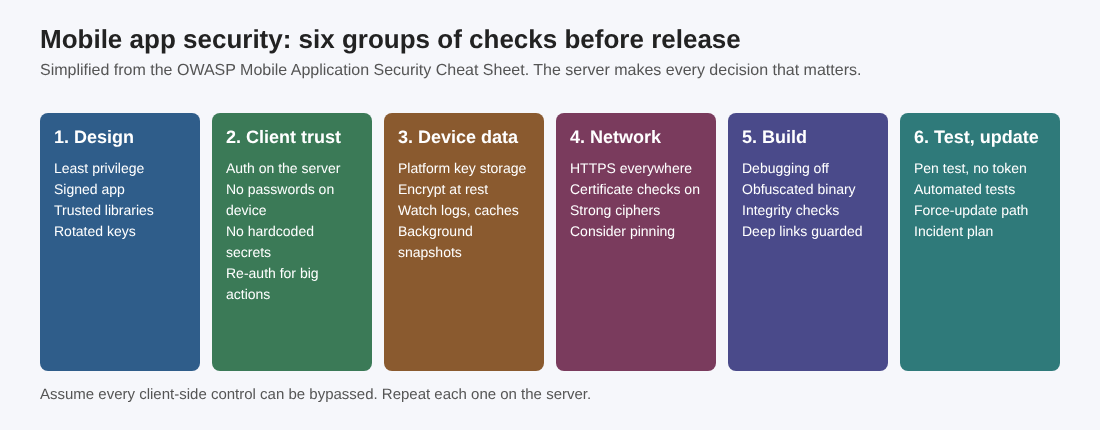
Mobile app security: what to check before you release comes down to one habit: treat the phone, the network and the app itself as things you do not control, and let your server make every decision that matters. This post turns the OWASP Mobile Application Security Cheat Sheet into a pass you can run on your own app before it goes to the stores. OWASP calls the sheet a starting point, and so is this.
If you are still building the app or its backend, whitehatstoic builds web and mobile apps from database to deploy, and runs security tests on web apps and AI systems, so you can book a meeting for either.
Start with design, then do not trust the client
The sheet opens with design: pick a secure design at the start, not as an afterthought, and keep least privilege, defense in depth and separation of concerns in mind. Our secure product design post covers it.
Three checks to run now:
- Secure APIs. The app talks to backend services, so use OAuth2, JWT or something similar for authentication, and update and rotate the API keys and tokens you use.
- Least privilege. Request only the device permissions the app needs. The same goes for what backend services let the app do. Do not save app files with overly permissive permissions, and ship the most secure settings as the default.
- Supply chain. Sign the app, use only trusted and validated third-party libraries, set controls for updates, patches and releases, and watch for security incidents in the products you depend on.
Now the part to read twice. OWASP says to do authentication and authorization on the server, and to load data onto the device only after a successful sign-in. It also says to assume every client-side control can be bypassed, so each one needs a server-side twin.
That has concrete consequences:
- Do not store user passwords on the device. Use device-specific tokens that you can revoke.
- Do not hardcode credentials in the app, and encrypt credentials in transmission.
- Do not use values an attacker can fake, such as device identifiers, to authenticate.
- If a design needs a key made from a password, use a dedicated password-based key derivation function with a unique random salt and a suitable work factor. A password, or a fast hash of one, is not a suitable encryption key.
Our secrets management post says where keys should live instead.
Check sign-in, PINs, biometrics and sessions
OWASP warns that authentication has many pitfalls and its tips barely scratch the surface. For the mobile side, the sheet asks for these:
- Passwords: allow long passphrases without character-composition rules, and block common or compromised passwords, following NIST's guidance.
- PINs: do not allow short PINs such as 4 digits.
- Biometrics: use the methods the platform supports, and always offer a fallback such as a PIN.
- Sessions: time them out after inactivity, offer a remote logout, use randomly generated session tokens and secure the session data on both the client and the server. See session management.
- Tokens: store them securely and handle expiry gracefully.
- Sensitive actions: ask people to sign in again before they change a password or update payment details, and consider it before showing highly sensitive information. Every backend function needs its own authorization check.
Protect data on the device
The storage rules are short. Encrypt sensitive data at rest and in transit, keep private data in the device's internal storage, and use the platform's encryption APIs. Do not write your own algorithms. Where the hardware offers it, such as the Secure Enclave on iOS or StrongBox on Android, use it for key storage and cryptographic operations.
Then hunt for leaks. OWASP names three: caching, logging and background snapshots. Make sure sensitive data does not end up in any of them.
On personal data, the sheet asks you to:
- Keep it to what you need.
- Swap it for less critical data where you can, for example by updating location less often.
- Expire and delete it automatically.
- Ask for consent before you collect or use it.
On Android, the sheet adds: avoid sensitive data in SharedPreferences and turn off backup mode so that nothing sensitive lands in backups. On iOS, it says not to keep sensitive data in plist files.
Lock down network traffic
Assume that anyone can read and change the traffic between the app and your server. In practice:
- Use HTTPS for all network communication.
- Never override SSL certificate validation to accept self-signed or invalid certificates.
- Use strong, industry standard cipher suites and certificates signed by a trusted CA.
- Avoid mixed version SSL sessions.
- Encrypt data even when it travels over SSL, in case of future SSL flaws.
- Do not send sensitive data by SMS.
The sheet says to consider certificate pinning and sends you to the OWASP Pinning sheet for its pros and cons.
Harden the build, test it and plan the release
For the build, OWASP lists: disable debugging, include code that validates the integrity of the app's code, and obfuscate the binary. It also describes runtime anti-tampering controls: checks for debugging, hooking or code injection, detection of emulators and rooted or jailbroken devices, and signature checks at runtime, with a suitable response such as limiting functionality when tampering shows up. These checks run on a device the attacker holds, so your server still has to decide.
Platform notes from the sheet:
- Android: use ProGuard for obfuscation, keep keys in the Android Keystore with hardware backing, and use the Play Integrity API, validating the verdict on the server. SafetyNet Attestation was fully turned down in January 2025.
- iOS: use ATS (App Transport Security) to enforce strong network settings, the Secure Enclave for keys, and App Attest to validate the app, verifying assertions on the server.
Before release, use static analysis tools, make security a focus of code reviews and keep libraries up to date. Our dependency updates post covers that last part.
OWASP lists three kinds of testing: penetration testing (ethical hacking, such as a cryptographic assessment), automated tests that prove security features work and access controls hold, and usability testing, because awkward security gets bypassed.
After release, have an incident response plan. Plan regular updates and patches. The sheet stresses this for mobile apps because of the delay between a patch and the moment users actually get it, with app store review and slow updaters in between, so build a way to force an update when needed. Use real-time monitoring to detect threats, and tell users about security events such as a sign-in from a new device.
Mobile app security: what to check before you release, in one afternoon
Say you have a notes app with sign-in, a token and a share link, and its API follows our REST API checklist. Work through it in this order:
- Write down what the device holds. You find the app keeps the user's password to sign in again silently. Replace it with a revocable token, and keep that token in Keychain or Keystore.
- Test without a token. The sheet's own example test: try to run backend functions anonymously by removing the session token from your POST and GET requests. Anything that still works is a server bug.
- Change the object. Send a request for another user's note. If you get it, you have broken access control. Our access control post walks through that test.
- Open the share link signed out. The sheet warns that deep links can skip authentication and gives a real case: an authenticator app for iOS let people bypass its App Lock by opening one crafted address, fixed in July 2024. Put an authentication check on every screen a deep link reaches, validate its parameters, and send signed-out users to the login screen.
- Check logs and snapshots. Remove tokens from log output and look at the background snapshot.
Frequently asked questions
What is the biggest mobile app security risk?
Trusting the client. OWASP says to assume every client-side control can be bypassed and to repeat each one on the server.
Should I use certificate pinning?
The sheet says to consider it and points to the OWASP Pinning sheet for the pros and cons. Never turn off certificate validation to get around a problem.
Can biometrics be the only login check?
The sheet asks for platform-supported biometrics and a fallback such as a PIN. It also asks for authentication on the server, so a check on the phone alone is not enough.
Get started
No checklist finds every weakness, but the pass above removes the common ones before your users meet them. The backend behind a mobile app is a web app and API, which is what whitehatstoic's security testing covers, with a written report and fixes and a retest after fixes. whitehatstoic also builds web and mobile apps from database to deploy.
Building something that has to be safe? Book a meeting with whitehatstoic: tell us the product, the deadline and your biggest worry, and we reply with a plan.
Comments
No comments yet.
Sign in or make an account to comment.