Clutter problems log: what you tried to keep a room tidy
A clutter problems log is a short written record of what you tried to keep a room tidy and what happened each time. Without one, it is easy to repeat a fix that already failed and to blame yourself when the room slides back. With a clutter problems log, the outcome sits beside each attempt, so you read the history instead of guessing at it.
Problem Graph is a journal that draws itself as a map. You write the messy spot down in one line, attach each fix you try, and mark it worked, partly or failed, so the record is there when you come back.
What a clutter problems log is
A tidy room is not one problem. It is a pile of small ones: the chair that collects clothes, the table that collects mail, the floor by the door that collects shoes. Each spot may have its own cause, so each may need its own fix.
A big clean can make the room look good for a week, and then it slides back. The tempting conclusion is that you need more discipline. A better question is what you already tried. A log gives you three things: a name for each problem, a list of attempts, and an honest outcome for each one.
What to record in each clutter log entry
Keep each entry small. If it takes more than a minute, you will probably stop writing it. Record these:
- The problem in one line. Name the spot, not the room. "Clothes pile up on the bedroom chair" is more useful than "bedroom is messy".
- What you tried. One fix per entry: a hook, a basket, a rule, a weekly reset.
- What it needed. A drill and a free Saturday, a partner who agrees, ten minutes after dinner.
- The outcome. Worked, partly or failed, with a few words on why.
The "why" does the most work. "Failed: I skipped it when I was tired" says the trigger was the weak point. "Failed: the basket was too small" says the fix itself was wrong. They lead to different next steps.
Common fixes worth logging one at a time
You will recognise most of these. Log them separately, because each can fail for a different reason.
- A home for every item. Test whether the home is closer than the floor.
- A "put it away now" rule. Note the time of day when it breaks down.
- A short daily reset. Ten minutes at a fixed point, such as after dinner. Note whether it survives weekends.
- A drop zone. One tray or basket for things with no home yet. Note whether you empty it.
- Fewer things. Removing items so the room has less to hold.
- A weekly sweep. One longer session. Note whether you did it three weeks running or only once.
None of these will suit every room. The log shows which ones suit yours.
A sample clutter log entry for one chair
Here is a made-up example in Problem Graph. Open the app, choose the Personal lane, type the problem and press Enter. It lands on the graph straight away.
The problem: Clothes pile up on the bedroom chair. Then add the solutions one at a time and mark the one you are trying:
- Put clothes away before bed. Failed. Tried for three weeks, skipped when tired.
- Bigger laundry basket next to the chair. Partly. Worn-once clothes go in, then the basket fills and I stop using it.
- Two wall hooks by the door for worn-once clothes. Worked. Requirement: a drill and a free Saturday. The chair stayed clear for a month.
- Ten-minute reset after dinner. Partly. It holds on weekdays, not on weekends.
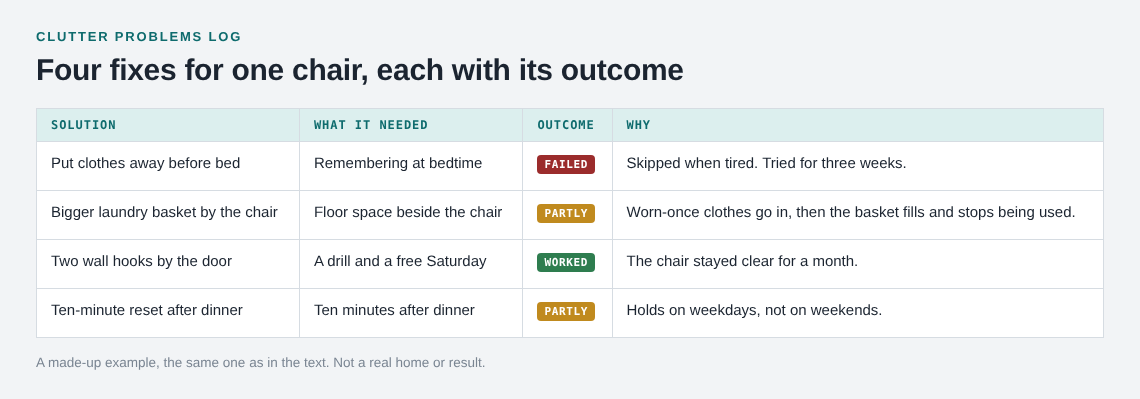
In this example the rule that relied on remembering at bedtime failed, and the physical change that put a place for the clothes next to the door worked. The weekend gap is its own small problem, so you write it as a new line and link it to the first one.
The map keeps the failed rule as a failed solution. Next time you are tempted to try "just be stricter", you can see that you already did.
How to spot patterns in what worked
After a few entries, look at what the winners share. In the example above, the hooks worked after the rule failed, and they cut the distance between the action and the place. That is a pattern you can test elsewhere, not a law.
Linking helps. Link the chair pile to "Mail stacks on the hall table", even if they sit in different parts of the home. Problem Graph lets you link problems that belong together, including across lanes, so you could also link a work problem such as "Papers spread across my desk" if you suspect the same habit of putting things down for later.
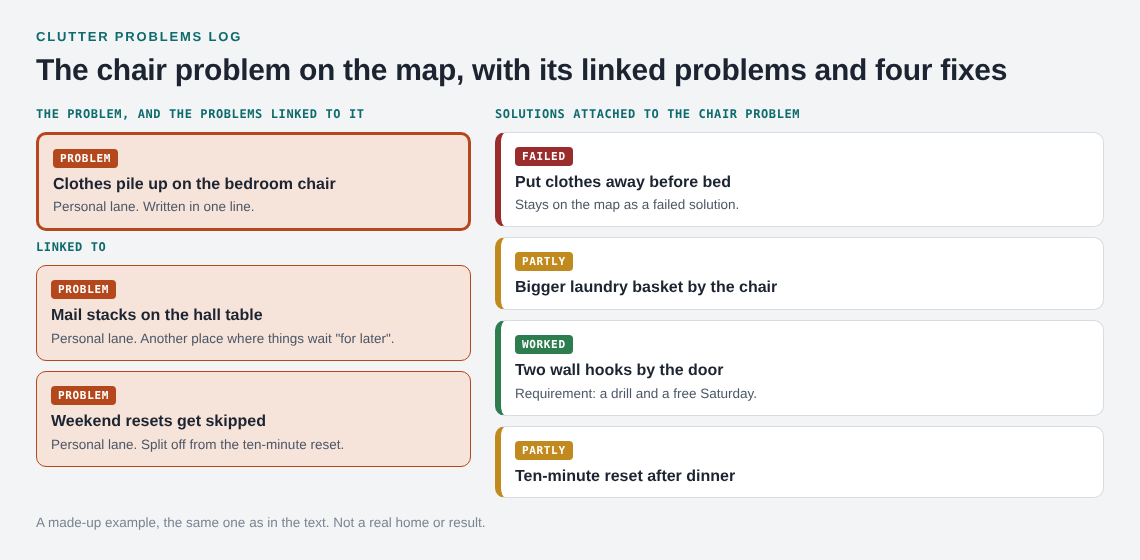
Patterns show up on the map that a plain list hides. If three clutter spots all link to one failed "put it away later" idea, the lesson may be about the word "later" and not about three rooms. The map key marks problems, solutions and requirements, and the List view beside the map is there for a plain scan.
Fixes that depend on other people
Some clutter is not yours alone: the shared kitchen counter, the hallway, the toy box. A fix such as "everyone uses the basket" depends on other people, so log that dependency. Put "partner agrees to leave post in the tray" as a requirement on the solution, and do not mark the fix as tried until they have agreed. If a fix stalls on someone else, this waiting on someone log shows how to track it.
You can also share the problem. Mark it as a main node, create a private network and give the invite code to the people in your home. The main node carries its solutions, their outcomes and their requirements into the network, and members see it. Anyone with the invite code can join, so give it only to people you mean to include. A problem you merely linked to the main node stays on your own graph. The pages describe no alerts or chat, so you will still talk to each other. The shared map gives you something specific to discuss: "this one failed twice, what should we try instead?"
How to review your log and pick the next fix
Set a regular time to look. Once a week is enough. Use this routine:
- Open the problem that bothers you most.
- Read the failed solutions first. Do not repeat them unless something has changed.
- Read the partly worked ones. Ask what small change would finish the job.
- Borrow the idea from your best winner. If hooks worked for the chair, ask where else a hook would cut the distance.
- Pick one new fix, mark it as the one you are trying, and write down when you will judge it.
Changing one thing at a time keeps the outcome clear. If you change four things at once, you cannot tell which one helped.
You can also ask the app for suggestions. The AI proposes new solutions grounded in what worked for others on problems like yours. Treat them as ideas to test, log them like any other fix and let the outcome decide. Problem Graph also shows similar problems other people have shared, with the solutions that worked; you can borrow one with one tap and it keeps a link back to where it came from. That is how the feature works, so do not count on finding a match on any given day.
If you hit a long run of failed attempts, the habit is the same one described in this writing block log. The subject differs, but the method carries over.
Frequently asked questions
What should I write in a clutter log?
Write the specific spot that gets messy, one fix you tried, what it needed, and whether it worked, partly worked or failed. Add a few words on why, because the reason tells you what to try next.
How long should I try a fix before marking it as failed?
Pick a window before you start, such as two or three weeks, and write it down. Judge the fix at the end of that window, not on one bad day in the middle.
Is it worth logging fixes that failed?
Yes. A failed fix shows what not to repeat and often points at the real cause. Problem Graph keeps a failed solution on the map as a failed solution.
Can I share a clutter log with my household?
Yes. Mark the problem as a main node, create a private network and give the invite code to the people you live with. Anyone with the invite code can join, so share it carefully.
Is a clutter log private by default?
Yes. Private is the default in Problem Graph, so only you see your problems until you choose to share a main node.
Get started
Pick the one spot in your home that keeps getting messy. Write it as a single line, attach the first fix you will try and come back in two weeks to mark the outcome.
Try Problem Graph: it is free, and you can look around without an account. Write one problem down in a line and attach the first thing you will try.
Every problem you carry, on one map. Solved together.
Visit problemgraph.vlvd.net↗


Comments
No comments yet.
Sign in or make an account to comment.