Writing Block Log: What You Tried When You Got Stuck
A writing block log is a running record of each time you got stuck and what you tried to get moving again. Most writers try a fix, forget how it went, and try the same fix again a month later. A writing block log keeps what you tried when you got stuck, with the outcome of each try, so you stop that loop and see which fixes work for you.
If you want a place to keep this, Problem Graph lets you write each block as a one-line problem, attach the fixes you try, and mark every one as worked, partly or failed, so the history stays on the map.
What a writing block log is
It is a short journal with one job. For every block, it records three things: what stopped you, what you tried, and what happened. That is all.
It is not a diary about how you feel while writing, and it is not a productivity system. It is closer to a lab notebook. You are running small experiments on yourself and keeping the results.
The same idea works well outside writing. A gym plateau log records what you changed and what happened. A pet behaviour log does the same for a dog or cat. A writing block log is the same habit pointed at your page. If your real block is starting at all, a procrastination log records the same things for what you tried to start a task.
Why logging beats just pushing through a block
Pushing through sometimes works. But when it does not, you have nothing to show for the hour except a bad mood.
Three things go wrong without a record:
- You repeat failed fixes. You try the same trick, such as writing at dawn, because you forgot it already failed twice.
- You forget partial wins. A fix that helped a little gets dropped because it did not feel like a cure.
- You misjudge the cause. You blame "lack of discipline" when the log would show you get stuck whenever you start a section without an outline.
A log turns a vague sense of "I always get stuck" into a list of specific blocks with specific outcomes. That is much easier to act on.
What to record each time you get stuck
Keep it light. If logging takes longer than the block, you will stop. Record these four things:
- The block, in one line. "Cannot start the methods section." "Every paragraph in chapter 3 sounds wrong." One line is enough.
- The conditions. Time of day, how long you had, whether you had an outline, whether you were in a noisy place.
- What you tried. One fix per attempt, so you can tell which one did something.
- The outcome. Worked, partly, or failed. Be honest. "Partly" is a real answer.
The conditions matter more than most people expect. A fix rarely works or fails in the abstract. It works at 9pm with a clear outline and fails at 6am with no plan.
A simple writing block log template
You do not need software for the template. Copy this shape anywhere you like:
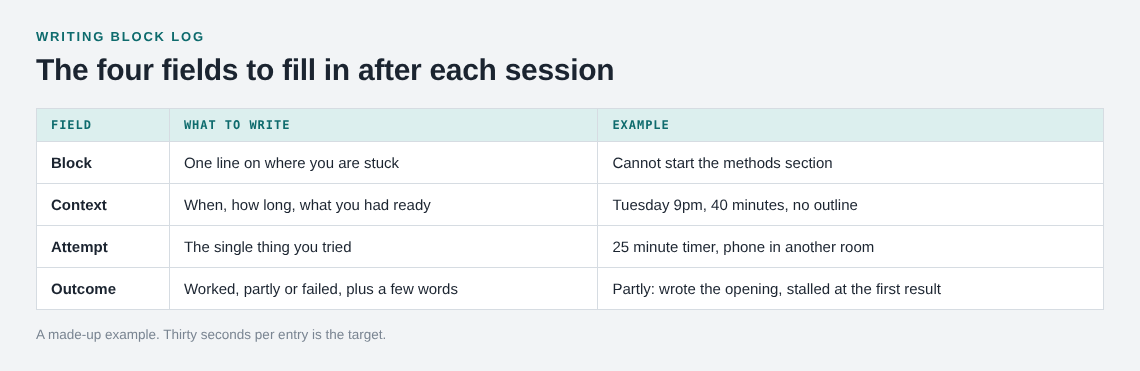
- Block: one line describing where you are stuck.
- Context: when, how long, what you had ready.
- Attempt: the single thing you tried.
- Outcome: worked, partly, or failed, plus a few words on what you saw.
Fill it in after the session, not during. Thirty seconds is the target. If you tried three things in one sitting, write three attempts under the same block.
In Problem Graph the template maps onto the app directly. The block is a problem, written in one line. You place it in a lane (personal, work, expert or scientific), and it lands on the graph the moment you press Enter. Each attempt is a solution you add as an idea. You mark the ones you are trying, then record the outcome as worked, partly or failed. Put the conditions in the wording of the idea itself, such as "25 minute timer, phone in another room."
Example entries: what you tried and what happened
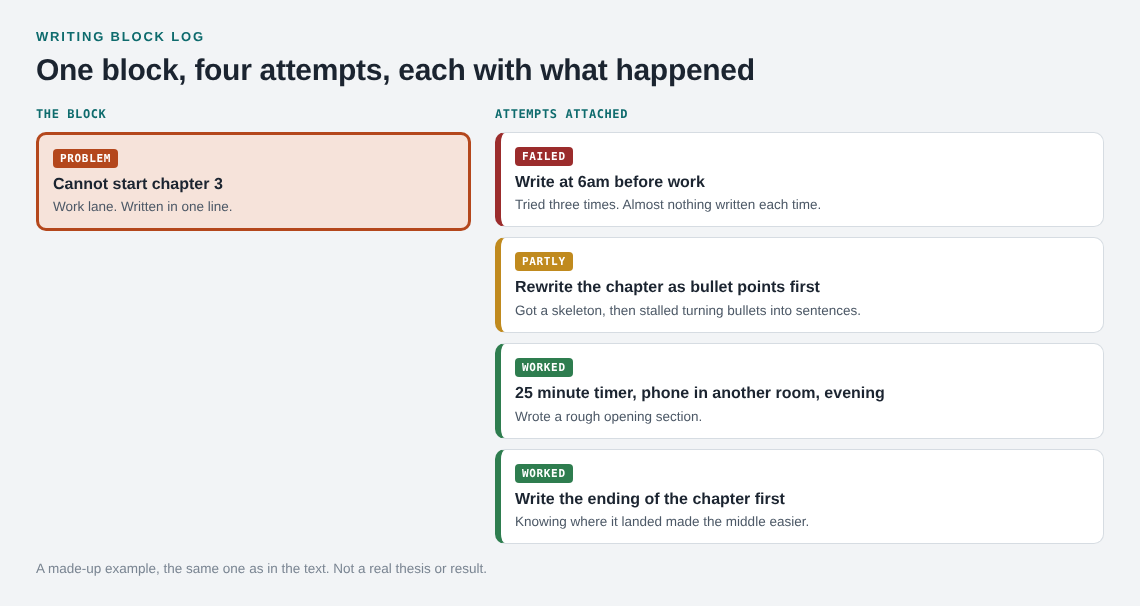
Here is an illustrative example, not real results. Say you are writing a thesis and the problem you enter is: Cannot start chapter 3.
Over two weeks you attach these ideas:
- Write at 6am before work. Failed. You tried it three times and produced almost nothing each time.
- Rewrite the chapter as bullet points first. Partly. You got a skeleton, but you stalled again when turning bullets into sentences.
- 25 minute timer, phone in another room, evening. Worked. You wrote a rough opening section.
- Write the ending of the chapter first. Worked. Knowing where it landed made the middle easier.
Now a second block appears: Every paragraph sounds wrong. You can link it to the first one, since both may come from the same cause. Linking problems that belong together is a core part of the app, and you can link across lanes, so a work problem can connect to a personal one such as sleep.
That second block might get a different fix: "Write badly on purpose, edit tomorrow." You try it and mark it worked. Now your map shows one cluster of blocks and a short list of what has actually helped.
How to read your log and spot patterns
After a few weeks, read the log as a whole. Do not read it entry by entry. You are looking for things that repeat.
Ask these questions:
- Which fixes are marked worked more than once?
- Which fixes failed repeatedly, and under what conditions?
- Do the blocks cluster around one kind of task, such as openings, transitions or editing?
- Do the failures share a condition, like early mornings or no outline?
This is where a graph helps over a flat list. The app describes it this way: patterns show up on the map that never show up in a list. If three different blocks all link to "no outline," you have found a cause, not just a symptom. There is also a List view beside the map when you want the plain version.
One more detail matters here. In Problem Graph, a solution that failed stays on the map as a failed solution. That is the point. A failed attempt is useful information, and the next time you meet the same block you can see at a glance what not to repeat.
When the log says to stop or change approach
A log also tells you when more effort is not the answer. If you have marked the same kind of fix as failed four or five times, the log is telling you that the problem is somewhere else.
Signs it is time to change approach:
- Every attempt differs only in small ways, and all of them failed.
- The block is not about writing at all. It might be a topic you do not yet understand, a decision you have not made, or a piece you do not want to write.
- The fixes that worked all involved a change of structure, not more effort.
That last point is worth testing. If you stall on the whole piece, try changing its structure before you try again with more effort. And if you keep trying fixes that never worked, a stop doing list is a way to drop them on purpose.
At the end of a month, the log is also raw material for a solo retrospective. You will not be reconstructing events from memory. You will have the record.
If you want fresh ideas, Problem Graph can ask the AI for suggestions. It proposes new solutions grounded in what worked for others on problems like yours. Treat these as proposals to test, not answers. Add one as an idea, try it, and log the result like any other attempt.
Frequently asked questions
How often should I update a writing block log?
Update it right after each session where you got stuck, while you still remember the details. A thirty second entry is better than a thorough one you never write.
Should I log every small stall?
No. Log blocks that cost you real time or that you have hit before. If you log everything, the log becomes a chore and you will drop it.
What counts as "partly" worked?
A fix that moved you forward but did not finish the job. For example, an outline that gave you a skeleton but did not get you writing sentences. Mark it partly and note what was missing.
Can I keep my writing block log private?
Yes. Private is the default in Problem Graph, so only you see your problems. You can later share a main node with a private network of people you choose, or put it out for everyone.
Does a writing block log help with every kind of block?
It helps you see what has and has not worked for you. It is a journal and a map, not a treatment for any condition, so it will not fix problems that have causes outside your writing.
Get started with your writing block log in Problem Graph
Start with your current block. Write it as one line, such as "Cannot start the next section." Then add the first thing you will try and mark it as the one you are trying. When the session ends, record whether it worked, partly worked or failed.
You can look around the public network without an account. To add a problem, you create an account with a username and a password. It runs in your web browser, including on your phone, and you can open the app directly at problemgraph.vlvd.net/app. If you want to see how a filled graph looks first, the app offers a "Load example set" button on an empty graph.
Try Problem Graph: it is free, and you can look around the public network without an account. Write one problem down in a line and attach the first thing you will try.
Every problem you carry, on one map. Solved together.
Visit problemgraph.vlvd.net↗


Comments
No comments yet.
Sign in or make an account to comment.