DevSecOps maturity model: score your pipeline with DSOMM
A DevSecOps maturity model is a list of security activities for your build and delivery pipeline, sorted into levels, so you can see what you already do and what to do next. OWASP publishes a free one, the OWASP DevSecOps Maturity Model (DSOMM): its current model data sorts 252 activities into six dimensions and five levels, and you mark each activity as not implemented, started, partly implemented or fully implemented.
This post reads the model from its own data file and scores one corner of a small team's pipeline with it.
A self-assessment tells you what you believe you do. If you want that belief tested from outside, whitehatstoic runs security tests on web apps and AI systems and gives you a written report with fixes: book a meeting.
What the DevSecOps maturity model measures
The OWASP project page lists DSOMM as an OWASP Lab project led by Timo Pagel and Aryan Prasad. Its own site describes it as a framework that helps organizations assess, improve and prioritize security activities in their software development cycle.
The unit of the model is the activity: one concrete thing a team does, such as "Defined build process" or "MFA for admins". Activities are grouped into dimensions, and each dimension into sub-dimensions. The model data file, version 5.1.0, released on 21 September 2026, holds 252 of them.
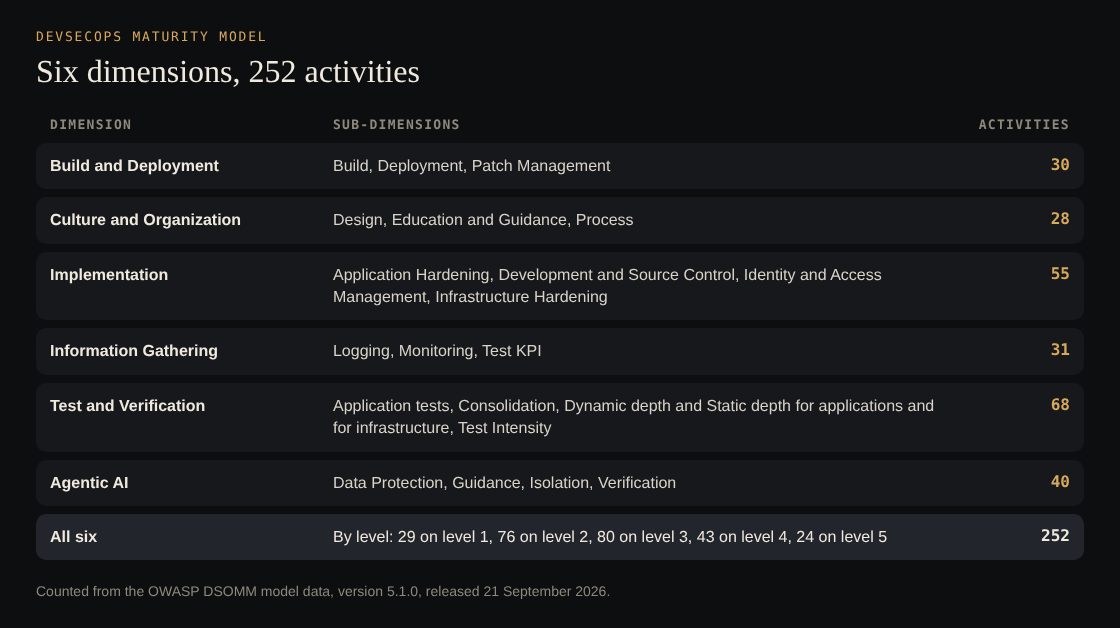
Counted from the DSOMM model data, version 5.1.0.
The model scores how your team works, not an application's code: whether the build is defined, whether patches arrive as pull requests.
How the five levels work
Every activity sits on exactly one level, from 1 to 5. The model names them:
- Basic understanding of security practices
- Adoption of basic security practices
- High adoption of security practices
- Very high adoption of security practices
- Advanced deployment of security practices at scale
The levels are not evenly filled: 29 activities on level 1, then 76, 80, 43 and 24. The first level is a short list, and most of the work sits in the middle.
A level is a ladder inside one sub-dimension. Take Logging. Level 1 is "Centralized system logging", level 2 adds "Logging of security events", level 3 adds "Analyze logs", and level 5 is "Correlation of security events". You cannot correlate events you never collected, and the model writes that down: 144 of the 252 activities name at least one other activity they depend on. "Automated merge of automated PRs" at level 2 depends on "Automated PRs for patches" at level 1. "Signing of artifacts" at level 5 depends on "Defined build process" and "Pinning of artifacts".
This is the part that is easy to miss. The level is not a grade the model hands you. It is an order of work, with the reasons attached.
What each activity tells you
Open any activity and you get the same fields:
- Risk: what goes wrong without it. For "A patch policy is defined": vulnerabilities in running artifacts may persist for a long time and might be exploited.
- Measure: what to do. For the same activity: define a patch policy for all artifacts, including how often an image is rebuilt.
- Difficulty of implementation: three scores from 1 to 5, for knowledge, time and resources.
- Usefulness: one score from 1 to 5.
- Implementation and references: tools that can do it, and the matching entries in OWASP SAMM and other standards.
Difficulty and usefulness are what make the model a planning tool. "Inventory of production components" scores 1 for knowledge, 1 for time and 1 for resources, with a usefulness of 4. "Defined deployment process" is just as cheap but has a usefulness of 1. Both are level 1. The model is telling you which of the two to do on Monday.
How you score an activity
The model's settings file defines four states, each with a score:
- Not implemented, 0%: activity not started and not planned.
- Started, 20%: activity has been started, or completed for a few applications.
- Partly implemented, 50%: implemented for at least half of the applications.
- Fully implemented, 100%: fully implemented for (almost) all applications.
Read the definitions closely: they count applications, not effort. A team that signs artifacts well for one service out of ten is "Started", however good that one pipeline is. The project's README says an assessment can be per team or per application, so decide which before you score.
The site at dsomm.owasp.org is a frontend-only application. It stores your marks in your browser's local storage, so clearing the browser loses them and you cannot share them. To keep and share scores, the project tells you to run your own copy and export the progress as a YAML file, which you can track in a repository. Evidence for an activity is added in that file, not in the browser.
Before level 1: the pre-requirements
The model has a page of things to do before the first activity, which it says is based on AppSecure NRW's security belts. The main one is to find the person who decides on risk against cost for the product. The page calls this person the "Risk Manager" and says it can be the project manager or the product owner. The steps:
- Identify the persons in charge of risk decisions.
- Ask them about their risk appetite.
- Make them aware of information security risks, with the impact and probability of threats.
- Convince them that security needs continuous effort.
The page also asks you to find and follow your organization's existing security policies, and to improve in small slices that the Risk Manager keeps in the backlog. If you have security champions, the page asks you to let them review how you implemented each activity.
Worked example: level 1 of Build and Deployment
Say your team runs two applications, a web app and an API. Level 1 of the Build and Deployment dimension has six activities. You score them:
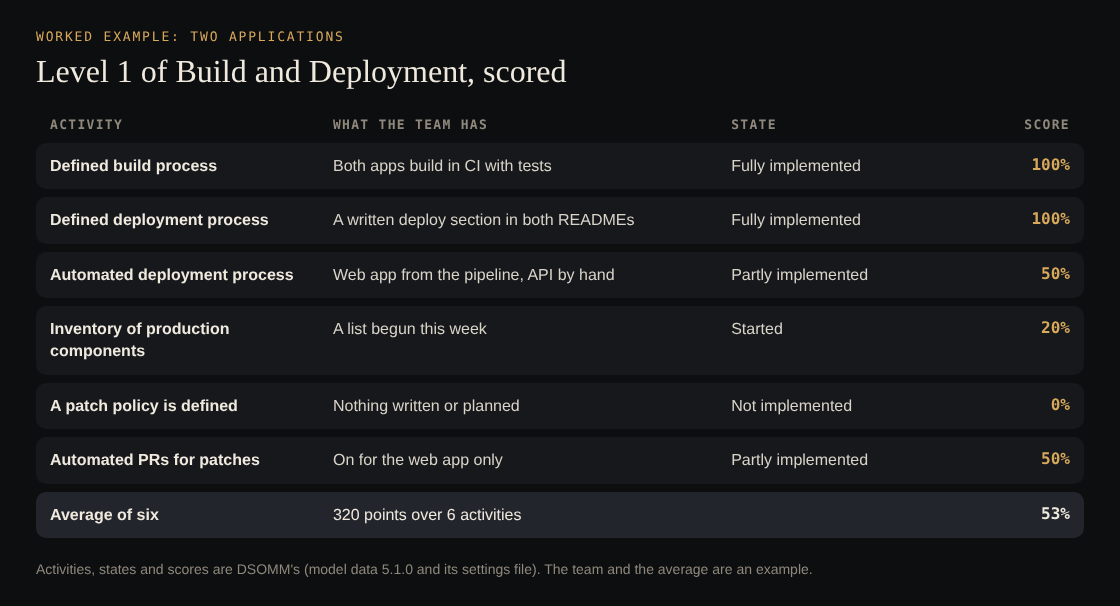
States and scores from DSOMM; the team is an example.
- Defined build process: both apps build in CI with tests. Fully implemented, 100%.
- Defined deployment process: both have a written deploy section in the README. Fully implemented, 100%.
- Automated deployment process: the web app deploys from the pipeline, the API by hand. One of two is at least half. Partly implemented, 50%.
- Inventory of production components: someone began a list this week. Started, 20%.
- A patch policy is defined: nothing written, nothing planned. Not implemented, 0%.
- Automated PRs for patches: on for the web app only. Partly implemented, 50%.
The six scores add up to 320, an average of about 53%. The averaging is this post's arithmetic.
Now use difficulty and usefulness to pick. The inventory is the cheapest useful step (1, 1, 1, usefulness 4): finish the list of what runs in production. The patch policy needs more knowledge (3) but little time (1): write down how often images are rebuilt and who is responsible. Turning on automated patch PRs for the API copies what the web app already has; the dependency updates post shows how. With those three at 100%, the total is 550 and the average about 92%. The last gap is automated deployment for the API; the CI/CD security post covers how to lock that pipeline down once it exists.
Three small tasks moved the number from 53% to 92%. Level 1 is short and cheap on purpose.
DSOMM or OWASP SAMM, and the limits of a score
It is easy to treat the two models as rivals. The DSOMM usage page says they share a goal. OWASP SAMM covers the whole organization: governance, compliance, risk management and secure development, written by security specialists for security specialists. DSOMM goes lower in the technology stack and is written for the technical teams doing the work. Almost every DSOMM activity (247 of 252) lists its matching SAMM entry, so a team can use DSOMM for the pipeline and report upward in SAMM terms.
The strongest objection to any maturity score is that it measures claims, not outcomes. DSOMM scores are self-assessed, and "Started" covers anything from a first attempt to a few finished applications. A team can reach a high percentage and still ship an exploitable bug. The model's own pages do not say a level makes an application safe, and you should not either.
Three things are still unsettled:
- Status. DSOMM is an OWASP Lab project, while SAMM is a Flagship project, so it may change more between versions.
- Scope. The usage page lists five dimensions. The 5.1.0 data adds a sixth, Agentic AI, with 40 activities such as "Usage of sandboxing for AI agents" at level 1. The model is moving faster than its own guide.
- Judgment. Which level an activity belongs on, and how useful it is, is the contributors' judgment. Treat the order as a strong default, and change it where your risks differ.
Frequently asked questions
What is a DevSecOps maturity model?
It is a list of security activities for building and delivering software, sorted into levels from basic to advanced. You mark what your team does today and use the next level as your plan. OWASP DSOMM is a free one with 252 activities on five levels.
How many levels does OWASP DSOMM have?
Five. Level 1 is "Basic understanding of security practices" and level 5 is "Advanced deployment of security practices at scale".
Is DSOMM the same as OWASP SAMM?
No. SAMM looks at the whole organization's software security, including governance and risk. DSOMM looks at technical activities in the DevOps workflow. DSOMM maps its activities to SAMM, so you can use both.
Does a high maturity level mean the app is secure?
No. The score records what a team says it does, across how many applications. It does not test the application.
Get started
Open the model, pick one dimension, and score its level 1 activities for your own applications this week. Then choose the two cheapest useful gaps and put them in the backlog.
When you want the result checked from outside, whitehatstoic tests web apps and AI systems for weak spots, with a written report, fixes and a retest after fixes. Book a meeting with whitehatstoic and tell us the product, the deadline and your biggest worry.
Build it right. Test it thoroughly. Keep it safe.
Visit whitehatstoic.com↗
Comments
No comments yet.