Drag to Twist a Row in 2048: Mouse and Touch Controls
To drag to twist a row in 2048 on the cube, you press on a row of the right face and pull it sideways, or press on a column of the top face and pull it along. The layer turns a quarter and carries its tiles round to the next face. This post covers how that works with a mouse and with touch, which layer to pick, and what to do when a drag does nothing.
Evolved 2048 is the 2048 puzzle on a cube you turn like a Rubik's cube, and it is free in your browser on a computer or a phone. Twisting is how you bring tiles from the other five faces next to their match on the front.
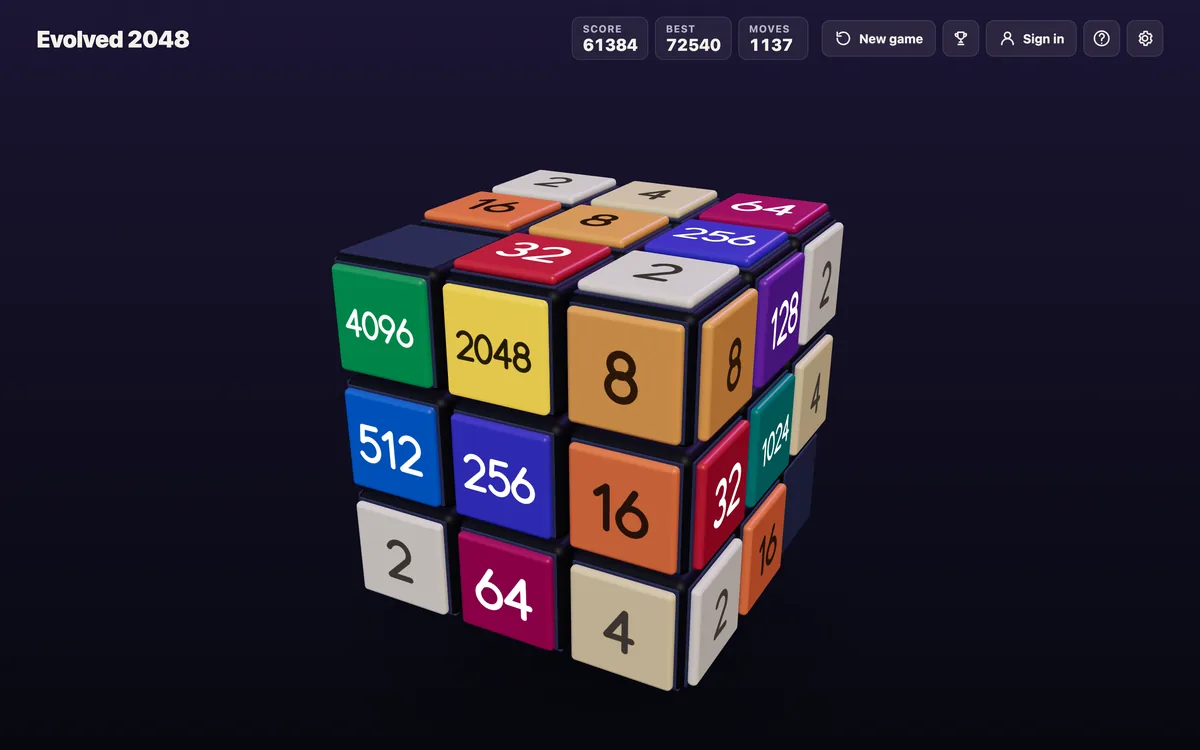
How to drag to twist a row in 2048 on the cube
The cube has six faces of nine squares, 54 in all. In Evolved mode, a slide works on the front face, so tiles on the other faces cannot merge until something carries them round. Edge mode adds merges across an edge of the front face, and Fun mode slides a row or column all the way round the cube. In Evolved mode, a twist is what does the carrying.
The game's own wording is short: drag a row on the right face sideways, or a column on the top face. That layer turns a quarter and carries its tiles to the next face. Bring a tile from the side next to its match on the front.
Three details matter before you try it:
- A twist moves a whole layer, not one tile. The front's own squares in that row leave for the next face as the other tiles arrive.
- A twist counts as one move and adds no points. It adds a new tile, a 2 or a 4, on the front when there is room. It needs one empty square for that tile.
- Turning the whole cube is a different action. It is free, adds no tile and does not count as a move.
Here is a worked case from a test board. A 16 sat on the right face, just over the front's top right edge. Dragging the right face's top row to the left carried that 16 onto the front's top left square, and a new 2 appeared. One slide down then merged it with a 16 below it into a 32. Two moves, 32 points.
Mouse controls: click, drag and release to twist
With a mouse, press on a square of the layer you want, move the pointer sideways or along the column, and release. The cube shows the right face on its side and the top face above, so those are the two faces you drag.
Direction matters. Dragging the right face's row to the left brings the right face's tiles onto the front. In the same test, the front's tiles in that row went to the left face.
The middle row and middle column twist like any other layer. In one desktop test at 1280 by 800, dragging the right face's middle row left from its centre square by 120 pixels worked. For the top face's middle column, a straight up or down drag did nothing. A drag of about 60 pixels left and 110 down worked. So if a column drag does not respond, try an angled pull that follows the cube's drawn perspective.
If the drag feels fiddly, the keyboard does the same job. The keys 1, 2 and 3 twist the top, middle and bottom row to the right. The keys 4, 5 and 6 twist the left, middle and right column up. Hold Shift to twist the other way. In a keyboard test on 11 October 2026, 1, 2, 3, 4 and 6 each twisted a layer and added 1 to Moves.
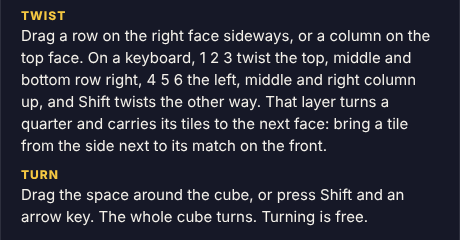
The How to play box says how to twist and turn.
Touch controls: swipe and drag on a phone
The game says the same thing for every device. Its cube label reads: "Swipe the front face to slide, drag the top or right face to twist, drag around the cube to turn it." On a phone you use your finger instead of a pointer. The three first-game tips say it in similar words, and you can skip them. For more on touch, see 3D 2048 on a phone.
I did not test twists on a phone for this post, so I will not promise how a finger drag compares with a mouse drag. What the game names is three gestures:
- Swipe on the front face: slides the tiles.
- Drag along a row on the right face or a column on the top face: twists that layer.
- Drag across empty space around the cube: turns the whole cube.
If a swipe on the front face slides when you meant to twist, you started on the wrong face. Lift, and start again on the right or top face.
Choosing the right row, column or layer to twist
Start from the match you want. Find a tile on a side face that equals a tile on the front. Then ask which layer carries it to a square next to that front tile.
Take a 16 on the right face in the top row, and another 16 on the front's middle left. Twisting the top row left puts the right face's 16 on the front's top left, above the other 16. Then slide up and they merge into a 32 in the corner. That is the pattern: twist to place, slide to merge.
In another test, a 16 sat on the front's middle left, with 2, 4, 8 down the bottom face's left column. The 4 key twisted the left column up. The 2, 4, 8 came up onto the front's left column and the 16 went to the top face. Check where the front's tiles will go before you twist, because they leave the front.
The game also lets you chain twists. In one test, dragging the right face's top row left and then its middle row left brought two tiles onto the front's left column. That took two moves and added two new tiles. Plan for that cost.
Common mistakes and how to fix them
The drag does nothing
The layer may hold no tiles. The game says "That row has no tiles to carry." In key tests, a twist of an empty layer changed nothing and Moves stayed the same. Pick a layer that has a tile in it, or turn the cube to find where your tiles are.
The game says the cube is full
A twist needs one empty square for the new tile. The message reads "The cube is full. Merge two tiles on a face to make room before you twist." Slide to merge a pair first, then twist.
You twisted the wrong way
There is no undo. You can twist back with Shift and the same key, but that is a second move and adds a second new tile. In a test, key 4 then Shift and 4 took Moves to 2 and grew the board from 4 tiles to 6. Think before you drag.
You wanted to look, not twist
Use a whole-cube turn instead: drag around the cube, or press Shift and an arrow key. Moves and Score stay the same, so you can look at every face for free.
Tips for cleaner twists and bigger merges
- Keep room on one face. The game's end box says as much: next time, keep room on one face so a twist can still bring tiles round to their match.
- Turn first, then decide. Turning costs nothing, so rotate until the match you want sits on the right or top face.
- Place, then merge. A twist adds no points. The points come from the slide after it.
- Expect a random new tile. Each twist adds a 2 or a 4 to a random empty square of the front. The game makes it a 2 when a random number is under 0.9.
Not sure which key is which? The keyboard controls post lists them, and turning the whole cube covers the free turn.
Mouse vs touch: which control feels better
On a computer you have both: a mouse drag, and the number keys. The keyboard is the most exact way to twist, because key 1 always means the top row and needs no aim. A drag lets you pick a layer by touching it.
On a phone there are no number keys, so the drag is the way to twist. I can only describe the gestures the game names, not how they feel for you. If a drag feels clumsy, start it from the middle of a square on the right or top face.
Frequently asked questions
Which faces can I drag to twist?
Drag a row on the right face sideways, or a column on the top face. You can also use the number keys, 1 to 6, with Shift for the other direction.
Does a twist cost points?
No. A twist adds no points, counts as one move and adds a new tile. The score comes from the merges in your slides.
Can I undo a twist?
No undo was seen. You can twist the layer back with Shift and its key, but that counts as a second move and adds a second new tile.
Why did my drag do nothing?
The layer may be empty, so it has nothing to carry. In a desktop test, a straight up or down drag on the top face's middle column also did nothing, and an angled drag worked.
Does turning the whole cube count as a move?
No. Turning is free: it adds no points, no tile and no move.
Get started with Evolved 2048
Open the game, pick a mode, and slide until a match sits on a side face. Then drag that layer and watch where its tiles land. Play Evolved 2048: it is free and plays in your browser on a computer or a phone.
Comments
No comments yet.
Sign in or make an account to comment.