Food bank volunteer problems: one shared list for every shift
Food bank volunteer problems repeat because the people who notice them change every shift. A shift lead spots a jammed sign-in line, tries something, and goes home. A week later another lead hits the same jam with no idea it was already tested. The answer is one shared list: each problem written down once, with every fix someone tried and how it turned out, so Tuesday's crew starts where Saturday's crew left off.
Problem Graph gives your food bank that list as a map: one keeper writes each problem in a line, attaches the fixes tried with an outcome of worked, partly or failed, and shares it with your shift leads in a private network.
Why food bank volunteer problems keep coming back
If your food bank runs on rotating crews, the Saturday morning crew may never meet the Wednesday evening crew. Each crew sees its own slice of the week, and each one solves its problems on the spot.
That makes it a record problem more than a people problem. What the food bank knows sits with a few long-time volunteers, and when one of them takes a month off, what they knew goes with them. The costly case is the fix that failed: nobody wrote down that it failed, so someone tries it again.
Where the problems show up: intake, sorting, distribution, scheduling
Your list will look different from anyone else's. These are possible starting points, grouped by where they show up.
Intake
- The sign-in line backs up out the door in the first half hour.
- Returning guests fill out the same form every visit.
- Volunteers at the desk are not sure which questions they are allowed to ask.
Sorting
- Out-of-date items get mixed in with good stock.
- Bins are unlabeled, so each crew sorts differently.
- Large donations arrive when nobody is there to unload them.
Distribution
- One category, often produce, runs out before the last guests arrive.
- Guests who need help carrying boxes wait too long.
- The table layout changes every shift, and the line gets confused.
Scheduling
- No-shows leave one station empty.
- Some shifts are overfull while weekday shifts are short.
- Only one person knows how to close up.
Why group chats and clipboards lose the fix
A group chat scrolls. The message about the broken cooler door is buried under shift swaps by Friday. A note on the intake clipboard gets recycled with the sign-in sheets.
Both record that something went wrong. Neither keeps what was tried and how it turned out, and that second part is what saves the next shift an hour. The same idea runs through keeping one shared list for a volunteer group; a food bank adds a crew that changes every shift.
How to set up the shared list
Here is a setup one coordinator can finish in an afternoon. It follows the same logic as keeping meeting room problems on one list for an office.
- Look around first. Open the app. On an empty graph, press "Load example set" to see how problems, solutions and outcomes look before you add your own. You can browse without an account.
- Create the keeper's account. To add problems, the coordinator signs up with a username and a password.
- Write each problem in one line. Put it in the work lane. It lands on the graph as soon as you press Enter.
- Mark the ones the crews should see as main nodes. Only a main node can be shared. When you share it, its solutions, their outcomes and the requirements they need go with it. A problem you only link to a main node stays private, like the rest of your graph.
- Create a private network. Give the invite code to your shift leads and regular volunteers. Anyone with the code can join, so hand it out in person rather than on a public flyer.
- Share each main node into the network. Members see it. Nobody else does.
Volunteers who join can filter the app by Network to see what has been shared with them. If they would rather read rows than a map, the List view sits beside it.
One rule before you start: keep guest names and household details off the list. Write "a returning guest could not find the gluten-free shelf," not who it was. The list is about how the shift runs, not about the people you serve.
What to record: the problem, what was tried, what it needs
Each entry has three parts.
The problem, in one specific line. "Intake is slow" gives the next person nothing to work with. "Thursday intake line reaches the door between 3:45 and 4:30" tells them when and where to look.
Every solution, including the ones you only thought about. Add fixes as ideas. Mark the one you are trying now. When it has had a fair run, record the outcome: worked, partly or failed.
What each solution needs. Problem Graph has a third kind of node, the requirement. If a fix needs a printer, a second table or a trained person, attach that to the fix, so whoever picks it up knows what it takes.
Here is how one made-up entry might look after a month:
- Problem: Thursday intake line reaches the door between 3:45 and 4:30.
- Solution: A second clipboard at the end of the line. Partly. The line moved, but sheets got mixed up.
- Solution: A greeter outside to pre-check guests. Failed. Nobody was free at 3:45 three Thursdays in a row.
- Solution: Pre-filled sign-in cards for returning guests. Worked. Requirement: a printer, and someone to print the cards on Wednesday.
Keep the failed greeter idea on the list. Problem Graph's home page puts it this way: "The graph is honest. A solution that failed three times stays on the map as a failed solution, and that is exactly what the next person needs to know." A new shift lead who sees it will not spend their first Thursday trying it again.
Stuck with no good ideas yet? You can ask Problem Graph for suggestions: the AI proposes new solutions grounded in what worked for others on problems like yours. Treat each one as an idea to test, and record its outcome like any other fix.
Finding the one problem that slows the whole shift
A list shows problems one at a time. A map shows how they connect. Problem Graph lets you link problems that belong together, even across lanes, and in its own words, "patterns show up on the map that never show up in a list."
Say the keeper has these three entries from different crews:
- Doors open late on Thursdays.
- Produce runs out before the last guests arrive.
- Cleanup runs past closing time.
They look like three separate problems. Then a sorting volunteer reports a fourth: "Sorting is not finished when doors open." In this example, the keeper links it to the other three, and the picture changes. Doors open late because sorting runs over. Produce runs out because it was never fully counted before the doors opened. Cleanup runs long because sorting is still on the tables.
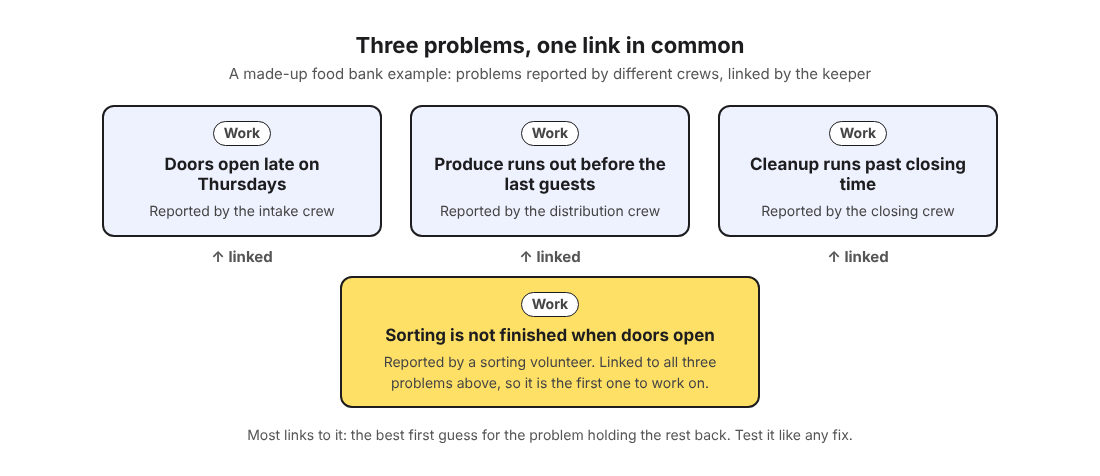
That one sorting problem is where to start. It is the idea behind the theory of constraints at home: find the one step that holds the rest back and work on it first. On the map, a good first guess is the problem with the most links to it. Test that guess like any fix.
Keeping the list alive: who updates it and when
Give the list a routine so it does not depend on whoever happens to remember.
- One keeper. The volunteer coordinator, or one steady shift lead, owns the list. They add problems, mark main nodes and share them.
- A two-minute handoff after every shift. The shift lead tells the keeper three things: what broke, what they tried and how it went. A text message is enough. The keeper enters it that day.
- A short weekly review. Look at every solution still marked as trying. Did it work, partly work or fail? Set the outcome.
- A monthly look at the map. Check which problems have gathered the most links. That is your next candidate for the problem holding the rest back.
Put the weekly review on a calendar with a fixed day and time, so it is a plan rather than a hope.
Frequently asked questions
Who should own the food bank's problem list?
One person, usually the volunteer coordinator or a steady shift lead. Everyone reports problems, but one keeper writes them down, records outcomes and shares main nodes into the network, so the list stays consistent.
How do new volunteers learn what has already been tried?
Give them the invite code on their first day and show them the Network filter. Each shared problem carries its solutions and outcomes with it, so they can see what worked and what failed before their first shift.
Should guest complaints go on the same list?
Yes, when they point to a process problem, such as "guests cannot tell where the line starts." Write them without names or household details, since the list is about how the shift runs, not about who said what.
How is a problem list different from a volunteer schedule?
A schedule says who is where, and a task list says what to do today. A problem list keeps what goes wrong, every fix tried and whether it worked, so the same mistake is not repeated next month.
Get started
Start small. Write down the one problem your last shift complained about most. Add the fixes already tried, even the failed ones, and mark it as a main node. Then create a network and give the code to two shift leads. Add the next problem after their next shift.
Try Problem Graph: it is free, and you can look around the public network without an account. Write one problem down in a line and attach the first thing you will try.
Every problem you carry, on one map. Solved together.
Visit problemgraph.vlvd.net↗


Comments
No comments yet.