How does liquid cooling work in a computer?
Open the side of a gaming PC and you may see tubes, a block on the processor and a radiator with fans. So how does liquid cooling work in a computer? A liquid flows over the hot chip, soaks up its heat, carries it to a radiator, and lets the air take it away. Then the cooled liquid goes round again.
This guide follows Wikipedia's article on computer cooling. It covers each part of the loop, why liquid beats air at moving heat, the different kinds of liquid cooler, and what can go wrong. At the end you will find a free browser game where coolant is part of the battlefield.
Why a computer needs cooling at all
Every chip turns some of its power into heat. Computer cooling exists to remove that waste heat and keep each part inside the temperatures it can safely run at. Processors, chipsets, graphics cards, hard drives and SSDs can all misbehave or fail when they overheat.
Modern processors also protect themselves. When one gets too hot, it lowers its voltage or its clock speed until the temperature falls. Lowering the clock speed is called thermal throttling, and our post on what thermal throttling is explains why your computer feels slower when it happens. Good cooling keeps the chip out of that zone, so it can hold its full clock speed for longer.
Most computers use air: a metal heat sink sits on the chip, and a fan blows air across it. Liquid cooling is another way to do the same job.
How does liquid cooling work? The loop, part by part
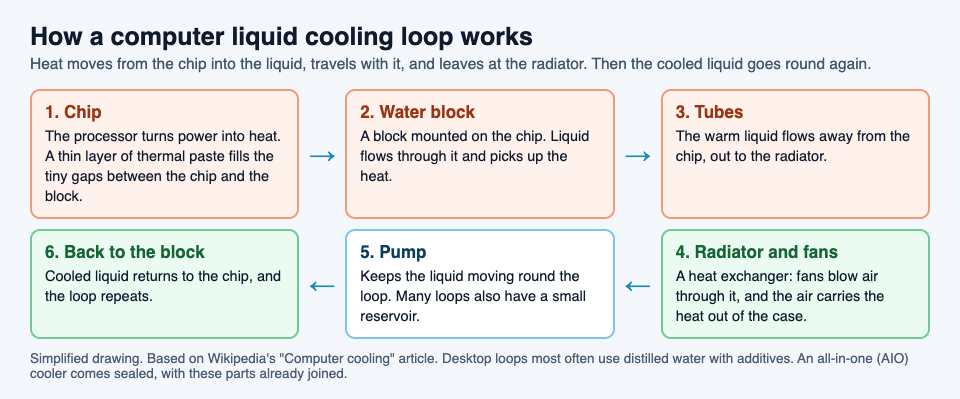
Wikipedia compares a computer's liquid cooling to the cooling system in a car engine. The idea is a closed loop. Here are its parts, in the order the heat travels.
- Thermal paste. The chip's surface and the cooler are never perfectly flat. A thin layer of thermal compound fills the tiny gaps, so heat can cross.
- The water block. A block mounted on the processor, with liquid flowing through it. Some loops add blocks for the graphics chip, memory or chipset too.
- Tubes. They carry the warm liquid away from the chip.
- The radiator and fans. The radiator is a heat exchanger. Fans push air through it, and the air carries the heat out of the case.
- The pump. It keeps the liquid moving round the loop. Many loops also have a small reservoir for extra liquid.
The liquid itself is usually distilled water with additives, the most common choice in desktop PCs.
Why liquid carries heat better than air
Two properties of water do the work. First, it has a high specific heat capacity, which means it can soak up a lot of heat before its own temperature climbs. Wikipedia's article on water cooling notes that water's heat capacity is unusually high among common liquids. Second, water conducts heat better than air, so heat moves from the block into the liquid more easily.
There is a quieter benefit too. With air cooling, the heat has to leave right beside the chip. With liquid, the heat travels down a tube first, so the radiator can sit wherever there is room for it and its fans.
Many laptops and phones use a small cousin of this idea. A heat pipe is a sealed copper tube with a little water inside. At the hot end the water turns to vapour, carries the heat along the pipe, and turns back to liquid at the cool end. It has no moving parts, and it moves heat far better than solid metal.
All-in-one coolers, custom loops and immersion
- All-in-one (AIO) coolers. A sealed loop that comes ready made: block, pump, tubes and radiator, already filled. You mount it like any other cooler. The closed-loop design was invented by the company Asetek, and in the 2010s liquid cooling became common in ready-built desktops.
- Custom loops. Builders pick every part themselves, fill the loop and route the tubes. They can cool several parts at once, but they take more work.
- Immersion cooling. The whole computer, or some of its parts, sits in a liquid that carries heat but not electricity. The Cray-2 supercomputer was cooled this way.
Liquid cooling started in big mainframe computers. Today it is most linked with overclocking, where people run a chip faster than its rated speed and need to move the extra heat.
The downsides: leaks, effort and upkeep
Liquid cooling is not always the better choice. Wikipedia lists its main costs plainly.
- Leaks. Water and its additives can damage electronics they touch. Testing for and fixing leaks makes a loop more complex and less reliable.
- Effort. An air cooler is much simpler to build, install and keep running. AIO kits close some of that gap.
- Upkeep. Any cooler slows down when dust builds up, because dust acts like a blanket. Thermal paste also wears, and replacing it from time to time is one way to stop damage before it starts.
For an everyday computer, a decent air cooler is often enough. Liquid makes most sense when a chip makes a lot of heat, or when you want the radiator away from the chip.
A worked example: check a liquid cooled PC
Here is a short check you can follow on a desktop with an AIO cooler. Turn the computer off and unplug it first.
- Find the block. Look at the processor in the middle of the motherboard. On a liquid cooled PC it has a block on top, with two tubes leaving it instead of a big finned heat sink.
- Follow the tubes. They lead to the radiator, usually at the front or the top of the case, with one or more fans on it.
- Look for wet spots. Check the tube ends, the block and the radiator for any sign of liquid. A leak is a reason to stop using the loop until it is fixed.
- Clear the dust. Dust on the radiator blocks the air, just as it does on an air cooler.
- Watch the temperature. Start the computer and give it a heavy job. If it slows down sharply as it warms, it may be throttling, which means heat is not leaving fast enough.
If you want to see where the board, the processor and its socket sit, our post on what is on a circuit board walks through them.
See the idea in Tank City Reboot
Tank City Reboot is a free tank game set inside a computer. Your antivirus tank guards the CPU core, and every wall on the field is named for a real computing idea. Coolant is one of them. Its card says tanks cannot cross it, but shots fly over it, and gives the real idea in one line: liquid cooling carries heat away from a chip faster than air.

Stage 3 of the first game is called COOLANT. It opens with a true fact about thermal throttling, and two coolant rivers run across its map, each with one gap on the left and one on the right. Twenty malware tanks have to squeeze through those gaps, while your shots fly straight over the water. Our guide to all six stages has a plan for it.
The second game, Tank City Zero Day, builds a fresh arena for every wave, and coolant can appear there too. The game only keeps an arena if every enemy gate and your start can still reach the core by going round the coolant and silicon. The game teaches one idea per name. It is not a hardware course.
Frequently asked questions
Is liquid cooling better than air cooling?
Water carries heat better than air, so liquid can move more heat away from a hot chip. But an air cooler is simpler, cheaper to keep running, and cannot leak, so for many computers it is the sensible choice.
What liquid is inside a computer cooler?
In desktop PCs it is most often distilled water with additives. Immersion systems use a liquid that carries heat but not electricity.
Does liquid cooling need maintenance?
Yes. Check for leaks, keep dust off the radiator, and replace the thermal paste from time to time. All-in-one coolers come sealed, which makes them easier to live with than custom loops.
Can liquid cooling stop thermal throttling?
It can delay it. A chip throttles when it reaches its temperature limit, so moving heat away faster keeps it below that limit for longer.
Get started
Play Tank City Reboot: it is free, plays in your browser on a computer or a phone, and needs no account. Reach stage 3, COOLANT, and see how the rivers split the board.
Comments
No comments yet.
Sign in or make an account to comment.