What is clock speed in a processor?
What is clock speed? It is how many steps a processor takes each second, set by a clock inside the chip that ticks billions of times a second. It is the GHz number on every spec sheet, and it comes up in the free browser game Tank City Reboot, where every stage opens with a true fact about how computers work. This post explains what the number measures, why a higher number is not always faster, and why your computer's clock speed changes while you use it.
What is clock speed, in plain words?
Inside every processor is a clock. It does not tell the time. It sends out a steady stream of pulses, like a drummer keeping the beat for a band.
Every part of the chip moves in step with that beat. On each pulse, the parts take their next step together, so they stay in sync. The clock speed is how many of those pulses arrive each second. One pulse and the gap before the next one is called a cycle.
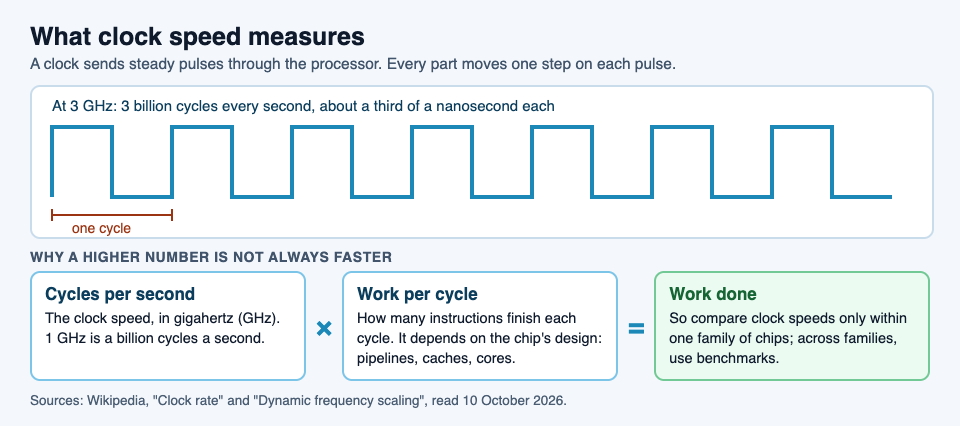
So a processor running at 3 GHz takes 3 billion steps every second. Each cycle lasts about a third of a nanosecond, a third of a billionth of a second.
Hertz, megahertz and gigahertz
Clock speed is measured in hertz (Hz), the unit for "times per second". A history of computers is also a history of this number (the figures are from Wikipedia's clock rate entry):
- The Z1, the first fully mechanical digital computer, ran at 1 Hz: one cycle per second.
- ENIAC, the first electronic general purpose computer, used a 100 kHz clock, or 100,000 cycles a second.
- The original IBM PC, from about 1981, ran at 4.77 MHz, almost 5 million cycles a second.
- In 2002, a Pentium 4 model became the first processor at 3 GHz, or 3 billion cycles a second.
Since then, clock speeds have risen much more slowly. Most of the gains in processor speed have come from other design changes, which is why the next section matters.
Where the beat comes from
The beat usually starts with a small crystal that vibrates at a fixed rate when powered. A circuit turns that steady wave into clean on and off pulses. Often a multiplier then raises the speed to some fixed multiple of the crystal's rate. A network of wires inside the chip carries the pulses to every part that needs them.
There is a limit to how fast the beat can go. After each pulse, every signal line inside the chip has to finish switching from 0 to 1, or from 1 to 0. If the next pulse comes before the lines settle, the results are wrong. Each switch also turns a little energy into heat, so a faster clock means a hotter chip.
Makers test every chip against this limit before it is sold. Chips that pass a higher speed test are labeled and sold as faster models. That label is the rated clock speed.
Why a higher clock speed is not always faster
Clock speed counts steps, not work. How much a processor gets done is the number of cycles per second times the work it finishes in each cycle.
ENIAC shows the gap well. Its clock ran at 100,000 cycles a second, but each instruction took 20 cycles, so it finished only about 5,000 instructions a second.
Modern chips work hard to do more per cycle. Instruction pipelining starts the next instruction before the last one finishes, and a CPU cache keeps data close so the core is not left waiting. Two chips at the same clock speed can do very different amounts of work.
That is why clock speed is most useful for comparing processors in the same family. Across different families, test programs called benchmarks are a better guide. One more trap: you cannot add up cores. A processor with two cores at 2.8 GHz is not a 5.6 GHz processor; each core still runs at 2.8 GHz.
Why your clock speed changes while you work
A modern processor does not run at one fixed speed. It raises and lowers its clock on the fly, depending on what it needs to do. This is called dynamic frequency scaling, and it saves power and cuts heat when the chip is not busy. On a laptop or phone, it helps the battery last longer.
Speed and voltage go together: a higher clock needs a higher voltage to give correct results, and more voltage means more heat. So when a chip gets too hot, it slows its clock down to protect itself. That is thermal throttling.
People can also change the clock by hand. Running a chip above its rated speed is overclocking, and running it below is underclocking. Both trade speed against heat and power.
A worked example: comparing two chips
Here is a made-up example, with round numbers, to show the math. These are not real products.
- Chip A runs at 4 GHz and finishes, on average, 1 instruction per cycle. That is 4 billion cycles times 1, or 4 billion instructions a second.
- Chip B runs at 3 GHz and finishes, on average, 2 instructions per cycle. That is 3 billion cycles times 2, or 6 billion instructions a second.
- The result: chip B has the lower clock speed but does half as much work again as chip A.
- Now add heat. If chip A runs hot and throttles down to 3 GHz under a long load, it falls to 3 billion instructions a second.
Real chips do not publish one neat "instructions per cycle" number, because it depends on the program being run. That is the reason benchmarks exist. The lesson holds, though: read the GHz number as one part of the picture, not the whole of it.
Where clock speed shows up in Tank City Reboot
In Tank City Reboot, your antivirus tank guards the CPU core, and every stage opens with a true fact about how computers work. Stage 3, COOLANT, opens with this one: "When a chip gets too hot, it lowers its own clock speed to cool down. This is called thermal throttling."

The Coolant on that stage's map is named for the fix: liquid cooling carries heat away from a chip faster than air. And the Overclock power-up borrows the idea from the other side: "Overclocking runs a chip faster than its rated clock speed." Each name is one small lesson. The game is not a computer science course, but it is a fun way to meet the words.
Frequently asked questions
Is a higher clock speed always better?
No. It is a fair way to compare chips in the same family, but across families the work done per cycle differs, so benchmarks are a better guide.
What does GHz mean?
Gigahertz: billions of cycles per second. A 3 GHz processor's clock ticks 3 billion times each second.
Why does my processor's clock speed keep changing?
Modern chips raise and lower their clock speed as needed, to save power and limit heat. When a chip gets too hot, it lowers its clock speed to cool down, which is called thermal throttling.
Do more cores add up to a higher clock speed?
No. Adding up cores does not give a clock speed: two cores at 2.8 GHz can work on two things at once, but neither runs at 5.6 GHz.
Get started
Play Tank City Reboot: it is free, plays in your browser on a computer or a phone, and needs no account. Reach stage 3, read the COOLANT fact, and hold the coolant river's gaps.
Comments
No comments yet.
Sign in or make an account to comment.