How to Build Your First AI Product in a Weekend
If you want to know how to build your first AI product in a weekend, start by shrinking the goal. You will not build a company in 48 hours. You can build one small tool that does one job for one kind of person, put it in front of a few of them, and learn whether they care.
Age of AI Entrepreneur teaches the pieces behind this plan in short hands-on lessons: finding a real problem, building your first AI projects, and launching. This post gives you a weekend schedule you can follow on your own.
How to build your first AI product in a weekend: what it really means
A weekend AI product is a narrow tool that takes one input, calls an AI model, and returns one useful output. It has a page where people can try it. It does not have accounts, dashboards, or ten features.
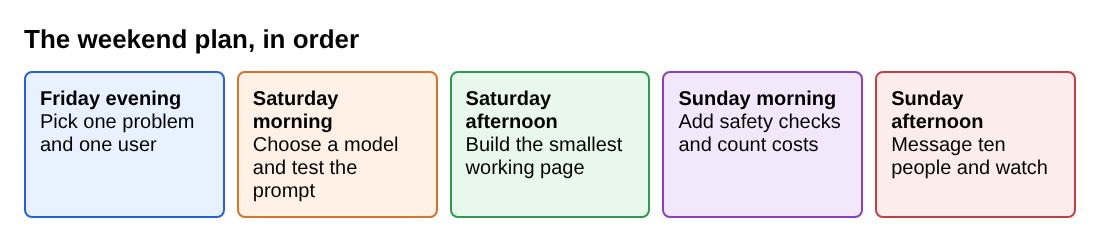
The plan below runs from Friday evening to Sunday afternoon. Adjust the hours to your life. The order matters more than the clock. If you have not picked a problem yet, our post on how to find a real problem for an AI startup goes deeper than Friday evening allows.
Friday evening: pick one problem and one user
Spend this session on paper, not code. Write one sentence in this form:
[Specific person] struggles with [specific task] and currently solves it by [slow or annoying workaround].
A strong version: "Freelance designers spend 20 minutes after each client call turning messy notes into a follow-up email, and they do it by hand." It names a person, a task, and a workaround, so you can find ten of them and ask if the problem is real.
Use the rest of the evening for three checks:
- Can you describe the input in one line (call notes) and the output in one line (a follow-up email)?
- Would the output be useful even if it is only 80 percent right?
If the answer to any is no, pick a different problem tonight. It is cheaper to change your mind on Friday than on Sunday.
Saturday morning: choose your tools and model
Keep the stack boring. You need three things: a hosted AI model you call through an API, a simple way to show a web page, and a place to store almost nothing.
This means you are building on someone else's model. That is fine for a first product, and one lesson in the app, Building on Someone Else's Model, looks at what that choice means for your business later. For this weekend, just know the tradeoff: you ship fast, but you do not own the core ability. Your edge has to come from the problem you picked, the way you shape the input, and how well you serve your user.
Make two decisions before you write code:
- Which model. Pick one mainstream hosted model and stick with it for the weekend. Do not compare five.
- What you store. Ideally nothing. If you do not save user text, you have less to protect and less to explain.
Then write your first prompt on its own, before any app exists. Open a chat with your chosen model and test it with five real examples of the input. Here is a starting prompt for the follow-up email idea:
You write short follow-up emails for freelance designers. Read the call notes below. Write an email of under 150 words that thanks the client, lists the agreed next steps with owners, and ends with one clear question. Do not invent details that are not in the notes. If something is unclear, say what is missing instead of guessing.
Run it on five different sets of notes. Read every output. Fix the prompt until at least four of five are something you would send. If you cannot get there by lunch, your problem may be too vague. Go back to Friday's sentence and narrow it. Our post on how to evaluate whether your AI feature actually works shows how to score outputs more carefully.
Saturday afternoon: build the smallest working version
Now wrap the prompt in a page. One text box, one button, one result area. That is the whole product.
A sensible build order:
- A page with a text box and a button that does nothing yet.
- A server function that receives the text, adds your prompt, calls the model, and returns the answer.
- Show the answer on the page, with a copy button.
- Handle failure: a clear message if the model call fails or takes too long.
Resist everything else. No login. No history. No settings. If a feature does not help a stranger get one good result in under a minute, it waits until next weekend.
Test with your five real examples again, now through the page. Then test with bad input: an empty box, a huge paste, text in another language. Note what breaks. Fix only what would embarrass you in front of a real user.
Sunday morning: add basic security and check your costs
Two checks before you show anyone: protect what you built, and make sure it does not cost more than it earns.
Basic security
For a weekend product, security comes down to a few habits:
- Keep your API key on the server. Never put it in the page code a visitor can read.
- Set a spending cap with your model provider, if they offer one.
- Limit how many requests one visitor can make in an hour, so one person cannot run up your bill.
- Do not save user text unless you need it. Say so on the page.
Anything a user pastes goes into your prompt, so keep the prompt narrow and give the model no power beyond returning text.
Check your costs
Each use of your tool costs you something. Work out how much. The basic formula is simple:
cost per use = what the model charges for the input and output of one request
Look up your provider's current prices, run ten real examples, and check the usage numbers they report. Suppose, as a made-up example, that one request costs you one cent. If a user runs it twenty times a month, you spend twenty cents on that user. You can only judge whether that works once you know what you might charge. When you are ready to go further, the app has a lesson called Revenue, Costs and Unit Economics, in the Business Basics for Builders course, that takes about nine minutes. Our post on how to calculate unit economics for an AI product walks through the arithmetic.
Sunday afternoon: launch and get your first users
Launching means sending the link to specific people and asking for specific feedback. It does not mean a big announcement.
Use your Friday list. Message ten people who match your sentence. Keep it short:
I built a small tool that turns call notes into a follow-up email. Would you try it on one real set of notes and tell me what was wrong with the result? It takes two minutes.
Then watch what happens. These signals beat visitor counts:
- Did they finish one full use?
- Did they copy the result?
- Did they come back, or ask for something it does not do yet?
- What did they edit in the output before using it?
If you want to go a step further, add a short email signup so you can tell interested people when you improve it. The site's own blog has longer reads on testing demand with a landing page and a waitlist, and on pricing an AI product, for when you are ready for the next step.
Common mistakes to avoid
- Ignoring cost until the bill arrives. Set a cap and a rate limit on Sunday morning, not after a surprise.
- Treating a thin wrapper as a finished business. A weekend tool that only passes text to a model is easy to copy. Our post on what a moat is for an AI startup covers what to build next.
Nothing here promises income or a business outcome. A weekend project teaches you how to build, ship, and listen. What you earn from it depends on the problem you chose and what you do next.
Frequently asked questions
Do I need to know how to code to build an AI product in a weekend?
It helps, because you will connect a page to a model through an API. If you cannot code yet, you can still do Friday's work, write and test the prompt on Saturday morning, and run a manual version of the service for a few users.
How much will it cost me to run?
It depends on your model provider's current prices and how many people use your tool. Measure the cost of ten real requests, then set a spending cap and a per-visitor rate limit so a surprise cannot get large.
How do I know if the product worked?
Look for behavior, not compliments. People who finish a full use, copy the result, and come back or ask for more are a good sign. Silence after you message ten matching people is also useful information.
Is it a problem that I am building on someone else's model?
Not for a first product. It lets you test demand quickly. Just remember that the model is not your edge, so over time your advantage has to come from the problem, the users, and how well you serve them.
Get started
If you want the thinking behind each step, the app covers it in short lessons. The Intermediate level has courses on finding a real problem, building your first AI projects, and launching and getting paid. You sign in with your email and an emailed code, and every lesson is free to anyone with an account, as set out on the terms page.
Start Age of AI Entrepreneur: short hands-on lessons on how to build a business in the age of AI, with every side of the debate and the sources to read next.
Comments
No comments yet.
Sign in or make an account to comment.